Fitbit Problems and Fixes: Pairing, Sync, Battery

By Suraj Giri, Founder & Publisher. Reviewed by Suraj Giri on .
Published · 9 min read
How this page was made
- Sources. Checked against 19 official pages from Google, most recently on . See the sources.
- No device testing. We don't test fixes on physical devices, so nothing on this page is a hands-on result. A fact counts as verified only when it matches an official source page.
- AI use. As with every page on Gadget247News, AI tools helped research, outline, draft and edit this page, and re-read the official pages to flag facts that didn't match. The illustration at the top was generated with Runway and is labelled under the image.
- Human sign-off. Suraj Giri, Founder & Publisher, read this page and signed it off on . The site won't publish a page without that sign-off.
- Changes. The published and updated dates move only when the content changes, and every change gets a dated note. Spot an error or a fix that didn't work? Email info@gadget247news.com.
Read our AI use policy, editorial policy and corrections policy.
Fitbit problems usually come down to the phone connection, sync or battery; start with the row that matches your symptom below. Fitbit works with Android 11 or later and iPhones with iOS 16.4 or later through the Google Health app (formerly the Fitbit app). Steps on each page are checked against Google Health Help. When your stats stop reaching the app, Fitbit not syncing has the full fix order; Google's Android list alone runs to 10 steps, from other phones nearby to removing extra Fitbit devices from your account.
Google Fitbit Air behaves a little differently from the rest of the range: it reports charging and battery level with a status light on the side of the tracker, and its restart button sits on the back of the charger. Pixel Watch problems have a hub of their own, because a Pixel Watch connects to your Google Account through the Google Pixel Watch app. For Apple Watch, Galaxy Watch and other brands, the guide to smartwatch sync, battery and pairing fixes routes you by symptom.
Find Your Fitbit Problem
Find your symptom, try the first fix, then open the full guide. The 11 rows run from first setup to software updates, and each bold fix is the first step of the guide it links to.
| Symptom | Most likely cause | First fix | Full steps |
|---|---|---|---|
| Setting up, or pairing with a new phone | First setup, or a new phone | Put your Fitbit on its charger, open the Google Health app (formerly the Fitbit app), sign in with Google and follow the prompts to connect it. | How to Pair a Fitbit With Your iPhone or Android Phone |
| Won't connect or pair | Another phone or tablet with the app nearby | Uninstall the Google Health app from any other phones or tablets nearby, then restart your Fitbit. | Fitbit Not Connecting to Your Phone |
| Not syncing, stats not updating | The Fitbit needs a restart and a manual sync | Restart your Fitbit, then open the Google Health app, tap Connections and pull down on the screen until a progress bar appears. | Fitbit Not Syncing |
| Wrong time | Not synced since travel or a clock change | Sync your Fitbit in the Google Health app; if the time is still wrong, set your time zone under Date, time & units, then sync again. | How to Change the Time on a Fitbit |
| Not charging | Dirty contacts or a weak power source | Clean the gold contacts and charger pins with a cotton swab and rubbing alcohol, then charge your Fitbit from a wall outlet for a full hour. | Fitbit Not Charging |
| Battery draining fast | The always-on display | Turn off the always-on display in your Fitbit's settings, then turn off notifications, alarms and reminders you don't need. | Fitbit Battery Draining Fast |
| Frozen, or needs a restart or reset | Frozen software | Restart your Fitbit from Settings › Restart Device, or hold the button for 10 seconds on a Sense or Versa watch. | How to Restart or Factory Reset a Fitbit |
| Won't turn on | A battery at 0% | Charge your Fitbit from a wall outlet for a full hour, then restart it while it's still on the charger. | Fitbit Won't Turn On |
| No notifications | A quiet mode, or the phone out of range | Turn off Do Not Disturb and Sleep mode on your Fitbit, turn off Do Not Disturb or Focus on your phone, and keep the phone within 30 feet. | Fitbit Not Getting Notifications |
| Update the software | An update waiting in the app | Open the Google Health app with your Fitbit charged and nearby, tap Connections, then your device, then Update. | How to Update Fitbit |
| Update won't install | Charge under 50%, or too far from the phone | Charge your Fitbit to at least 50%, keep it within 2 to 3 feet of your phone, and keep the Google Health app running. | Fitbit Won't Update |
Restart and factory reset share one row, but they are different steps. Google recommends a factory reset only as a last resort, for a Fitbit that stays unresponsive, loops on boot or stops working after repeated failed updates.
Does Fitbit Work With iPhone and Android?
Yes: Fitbit works with an Android phone on Android 11 or higher and an iPhone on iOS 16.4 or higher, through the Google Health app and a Google Account. Since May 19, 2026, Fitbit account users have had to move to a Google Account to use the Google Health app.
| Phone | Requirement | Source |
|---|---|---|
| Android phone | Android 11 or higher | Google Health app setup requirements |
| iPhone | iOS 16.4 or higher | Google Health app setup requirements |
| Any phone | A Google Account | Google Health app setup requirements |
Meeting those versions doesn't rule out problems. Google names the Huawei P8 Lite, Huawei P9 Lite, Huawei P20 Lite and Xiaomi Mi 6 as phones that "may experience compatibility issues even if they meet the requirements." Fitbit Ace LTE sits outside this setup: Google sends its owners to a separate help center, and its serial number shows in the Fitbit Ace app.
Fitbit Won't Connect or Sync
Connecting and syncing are two different jobs. Connecting is the Bluetooth link, and Fitbit trackers and watches talk to phones and tablets over Bluetooth Low Energy (BLE). Syncing is what travels over that link, the transfer of the data your Fitbit collects to your Google Health account. Data syncs on its own through the day, and the Fitbit also syncs each time you open the Google Health app with it nearby. Google lists the signs of a broken link: stats that don't update even after a manual sync, a sync error in the app, missing notifications and a wrong time, and the Fitbit may show a Phone disconnected icon. Google's first move targets a second device: if another phone or tablet near you is signed in to the same account, uninstall the Google Health app on it, then restart your Fitbit.
Fitbit Not Charging or Draining Fast
Every Fitbit comes with a charging cable unique to its model. Charge 5, Charge 6, Luxe, Sense, Sense 2, Versa 3 and Versa 4 attach magnetically; Inspire 2 and Inspire 3 press into the charger until they snap into place; Versa, Versa Lite Edition and Versa 2 sit in a charging cradle. When a Fitbit won't charge, Google's step-by-step fixes start with the contacts: clean the gold dots on the back and the pins on the charger with a cotton swab and rubbing alcohol, then leave the Fitbit on a standard wall outlet for a full hour. For a totally black screen, Google's table says 60 minutes on a wall outlet, and not a computer.
For drain, Google's battery table shows what the always-on display costs. Charge 5 and Charge 6 are rated at up to 7 days and Inspire 3 at up to 10 days. Turning the always-on display on cuts Sense 2, Versa 4, Versa 2, Inspire 3, Charge 6 and Charge 5 to up to 3 days, and Sense, Versa 3 and Luxe to up to 2 days. A battery that dies in less than a day gets one fix from Google: turn off Always On in the watch settings.
How to Restart or Reset a Fitbit
A restart turns your Fitbit off and on without losing any activity data; a factory reset erases it, removing apps, stored data, personal information, saved settings and, on models with contactless payments, credit and debit cards. Restart first. The restart control depends on the model: Charge 5, Charge 6, Luxe and Inspire 3 restart from the Settings app, Sense and Versa watches from their buttons, and Google Fitbit Air from the button on the back of its charger. In the Settings app, the erase option goes by one of two names. It's Clear User Data under Settings › Device Info on Charge 5, Charge 6, Inspire 3 and Luxe, and Factory Reset under Settings › About on the Sense and Versa series. Other makers' watches are covered in the cross-brand smartwatch reset guide.
Notifications, Time and Power
Notifications reach a Fitbit once you set them up under Notifications in the Google Health app. They stop when Do Not Disturb or Sleep mode is on the Fitbit, when Focus or Do Not Disturb is on the phone, or when the phone is more than 30 feet away. The clock depends on the app as well: syncing shows the correct time, and the time zone is set in the Google Health app, so how to change the time on a Fitbit starts with a sync. Power has a catch: only some Fitbit devices turn off, among them Versa, Versa Lite Edition, Versa 2, the Sense series, Versa 3 and Versa 4, and a device missing from Google's list doesn't turn off at all. A dark screen calls for a charge or a restart, and Fitbit won't turn on covers both.
Which Fitbit Do I Have?
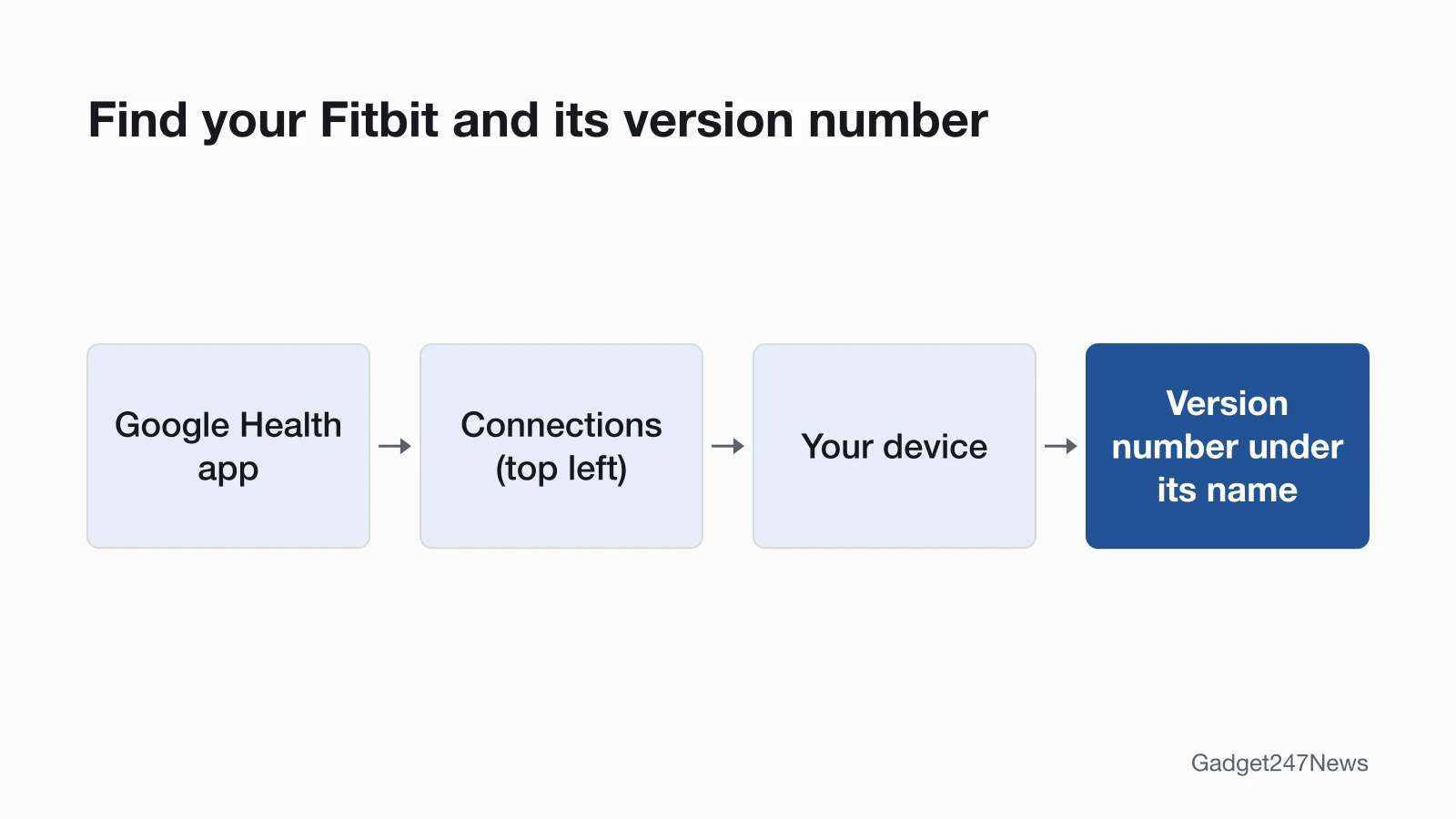
Your Fitbit's name shows in the Google Health app. Check it in this order:
- Open the Google Health app and tap Connections at the top left. Your Fitbit is listed there with its battery level to the right; tap it, and the version number sits under your Fitbit's name.
- Or find the serial number on the device: take off the bottom band on Charge 5, Charge 6 and Luxe, or the top band on Sense 2, Versa 4 and Inspire 3, and look inside the device where the band connects. On Google Fitbit Air, it's printed on the side once the tracker is out of its band.
Keep that serial number handy, because Google Health Support asks for your model and serial number.
Fitbit Model Identifier Table
The table lists 16 Fitbit models in 12 rows, with the charger each one uses and where its restart control sits. Hold times are on the reset guide.
| Model | Type | Charger | Restart control |
|---|---|---|---|
| Google Fitbit Air | Tracker with a status light | Magnetic | Button on the back of the charger |
| Charge 6 | Tracker | Magnetic (same cable as Charge 5 and Luxe) | Settings app |
| Charge 5 | Tracker | Magnetic | Settings app |
| Luxe | Tracker | Magnetic | Settings app |
| Inspire 3 | Tracker | Press-in | Settings app |
| Inspire 2 | Tracker | Press-in | Settings app |
| Sense 2, Versa 4 | Smartwatch | Magnetic | Button |
| Sense, Versa 3 | Smartwatch | Magnetic | Button |
| Versa 2, Versa Lite Edition | Smartwatch | Pinch-clip cradle | Button |
| Versa | Smartwatch | Pinch-clip cradle | Left and bottom-right buttons |
| Charge 3, Charge 4 | Tracker | Clip (cables not interchangeable) | Settings app |
| Ace 3 | Kids' tracker | Press-in | Button or buttons, while on the charger |
Two cables don't swap between models: the Charge 3 cable doesn't work with Charge 4, and the Versa 2 cable doesn't work with Versa or Versa Lite Edition. Google Fitbit Air charges from 0 to 100% in about 90 minutes, and its status light turns solid white when it's full.
Fitbit Updates and Known Issues
Fitbit updates start in the Google Health app: tap Connections, then your device, then Update, a button that appears only when an update is available. Google sends Fitbit updates to everyone gradually, and if there's no update yet, it says to check again later. Google's conditions for installing: the Fitbit is "charged to at least 50%. A charge of 75% or higher is recommended to prevent power loss," and the phone has "a stable Wi-Fi or cellular connection." An update may take more than an hour, so keep the Google Health app running. Current Fitbit versions and the update problems Google has acknowledged are tracked on the Fitbit and Pixel Watch update rollout page, and versions for every brand we cover start from Fitbit updates on the Update Tracker. Get an email when a Fitbit update breaks something, and when it's fixed.
Health Tracking and Fitbit News
Three Fitbit topics sit outside the fix table, each with a page of its own:
- Fitbit not tracking sleep: Open the Sleep tab in the Google Health app and pull down to refresh; if last night still isn't there, force quit the app, turn Bluetooth off and on, and sync again.
- Fitbit not counting steps: Sync your Fitbit in the Google Health app, and restart it if the step count still doesn't move.
- Is Fitbit going away? From May 19, 2026, the Fitbit app turned into the Google Health app, Fitbit Premium turned into Google Health Premium, and Fitbit account users needed to move to a Google Account.
This covers device settings only and isn't medical advice.
When to Contact Google Health Support
Google Health Support comes third, after the bold fix and the rest of your symptom's guide:
- Work through the linked guide for your symptom, one fix at a time.
- Restart your Fitbit, and keep the factory reset as the last step.
- Contact Google Health Support through Google Health Help, with your Fitbit's model and serial number ready.
- Check your warranty: File a warranty claim for your Fitbit device is Google's route for a defect that happened "through no fault of your own"; accidental damage isn't covered.
Where you bought the Fitbit matters, since Google says its warranty terms vary by country or region. Google also splits the terms by purchase date: the Google Hardware Warranty Center for a Fitbit bought on or after July 11, 2023, and the Fitbit Limited Warranty for one bought before that date.
Sources
We checked this page against the pages below, most recently on . How we verify fixes
- What is new with the redesigned Google Health app (Google, support.google.com)Official
- Google Health app setup requirements (Google, support.google.com)Official
- How do I set up my Fitbit device? (Google, support.google.com)Official
- Why won't my Fitbit device sync? (Google, support.google.com)Official
- How do Fitbit devices sync their data? (Google, support.google.com)Official
- Charge your Fitbit device (Google, support.google.com)Official
- Why isn't my Fitbit device's battery charging? (Google, support.google.com)Official
- Extend your Fitbit device's battery life (Google, support.google.com)Official
- Restart your Fitbit device (Google, support.google.com)Official
- How do I erase my Fitbit device? (Google, support.google.com)Official
- Change phone notifications on my Fitbit device (Google, support.google.com)Official
- How do I change the time on my Fitbit device? (Google, support.google.com)Official
- How do I turn off my Fitbit device? (Google, support.google.com)Official
- Update your Fitbit device (Google, support.google.com)Official
- Troubleshoot updating your Fitbit device (Google, support.google.com)Official
- Find your device serial number & model (Google, support.google.com)Official
- Track sleep with Google Health (Google, support.google.com)Official
- How to fix a blank, unresponsive, rebooting, or flickering Fitbit device screen (Google, support.google.com)Official
- File a warranty claim for your Fitbit device (Google, support.google.com)Official