How to Change the Time on a Fitbit

By Suraj Giri, Founder & Publisher. Reviewed by Suraj Giri on .
Published · 4 min read
How this page was made
- Sources. Checked against 6 official pages from Google, most recently on . See the sources.
- No device testing. We don't test fixes on physical devices, so nothing on this page is a hands-on result. A fact counts as verified only when it matches an official source page.
- AI use. As with every page on Gadget247News, AI tools helped research, outline, draft and edit this page, and re-read the official pages to flag facts that didn't match. The illustration at the top was generated with Runway and is labelled under the image.
- Human sign-off. Suraj Giri, Founder & Publisher, read this page and signed it off on . The site won't publish a page without that sign-off.
- Changes. The published and updated dates move only when the content changes, and every change gets a dated note. Spot an error or a fix that didn't work? Email info@gadget247news.com.
Read our AI use policy, editorial policy and corrections policy.
Sync your Fitbit in the Google Health app; if the time is still wrong, set your time zone under Date, time & units, then sync again. Google says the time on a Fitbit may be wrong after you travel to a different time zone or when clocks change for daylight saving time. A Fitbit shows the correct time once it syncs with the Google Health app (formerly the Fitbit app), and Google's time page describes no clock setting on the Fitbit itself. So resetting the time means a sync and the right time zone, not a factory reset. Other faults are covered in Fitbit Problems and Fixes.
How to update Fitbit covers software updates instead, and watches from other brands have their own smartwatch sync fixes.
How to Change the Time on Your Fitbit
To change the time on your Fitbit, sync it first, then correct the time zone in the Google Health app if the clock is still off:
- Keep your Fitbit near your phone and open the Google Health app.
- Sync: on the Today tab, tap and hold on the screen and pull down. Or use Sync Now: tap Connections at the top left, then Sync.
- Check the clock on your Fitbit. If it matches your phone, you're done.
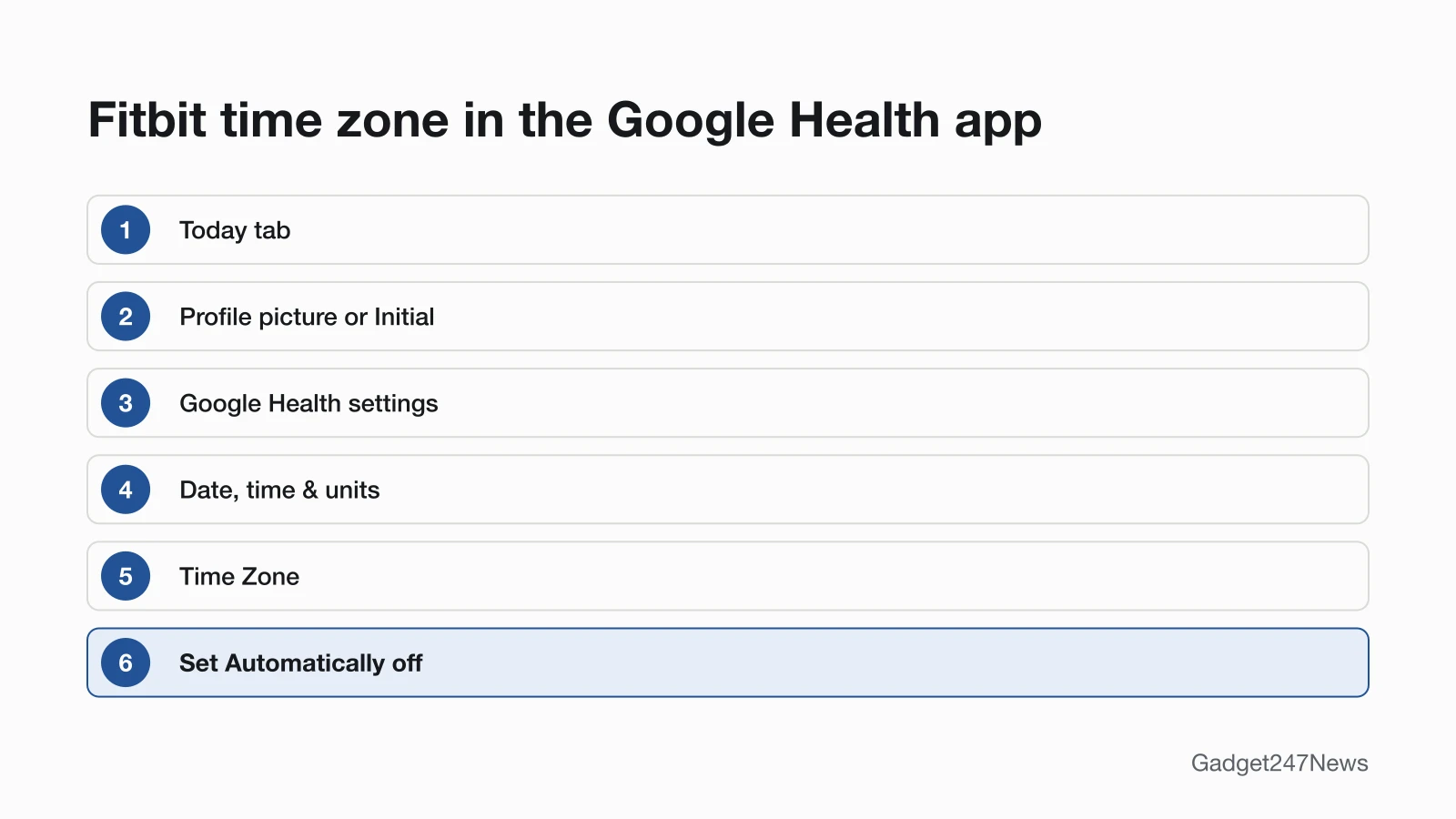
- If it's still wrong, go to the Today tab and tap your Profile picture or Initial, then Google Health settings. Under "App Settings," tap Date, time & units, then Time Zone.
- Turn off Set Automatically and choose the correct time zone.
- Sync your Fitbit again. If the time is still incorrect, log out of the Google Health app, log back in, then sync once more.
Steps 4 to 6 are Google's fix for a Fitbit that still shows the wrong time after a sync, when you've changed time zones.
Switch Between 12-Hour and 24-Hour Time
The clock format sits in the same menu as the time zone:
- Open Google Health settings from your profile picture on the Today tab, and in the App Settings section tap Date, time & units.
- Tap the arrows next to Clock Display Time and choose 24 hour or 12 hour.
- Sync your Fitbit.
Time Problems by Situation
Google's help pages name three reasons a Fitbit clock goes wrong: a trip across time zones, a daylight saving change and a Fitbit that has stopped syncing.
After Travel or a Daylight Saving Change
Travel to a different time zone and the daylight saving clock change are the two causes on Google's time page, and both start with the same fix: sync the Fitbit. If you changed time zones and the clock is still incorrect after the sync, check the time zone in the Google Health app, using steps 4 to 6 above.
Off by an Hour or More
A wrong time is one of the signs Google lists for a Fitbit that may be disconnected from your phone, and the size of the error decides where you start. Off by an hour or more, Google sends you to its time-change steps, the ones on this page. Off by a few minutes, Google starts at Step 4 of its sync troubleshooting, a check of your phone's Bluetooth and internet access; both paths are in Fitbit sync fixes.
Changing the Time Without the App
Google's time page doesn't give a way to change the time without the app. We read it in full on September 27, 2026: it lists only settings inside the Google Health app, and it says to sync the Fitbit in the app to show the correct time. To correct the clock, you need the app signed in on a phone near the Fitbit.
How to Check the Time Is Right
Two checks confirm the new time took:
- The clock matches your phone. After the sync, compare the time on your Fitbit with the time on your phone.
- The app shows a fresh sync. Tap Connections at the top left, then your device, and read the "last synced when" note below your device's image.
If the Time Still Won't Change
Google corrects the time through a sync, so a Fitbit that won't sync needs its connection fixed first. Google's sync troubleshooting begins with other phones or tablets nearby that are signed in to your account: uninstall the Google Health app there. Later steps include a restart of the Fitbit, a Bluetooth check and, on Android, the Location and Nearby devices permissions for the app. The guide Fitbit Not Connecting to Your Phone walks through those checks. Once the Fitbit connects, sync it and check the clock again; the full sync order is in the Fitbit not syncing guide.
Time Questions
How do I reset the time on my Fitbit?
To reset the time on your Fitbit, sync it in the Google Health app. If the clock is still wrong, open Google Health settings, tap Date, time & units › Time Zone, turn off Set Automatically, pick your time zone and sync again. A factory reset isn't part of Google's time steps, and it erases the Fitbit.
Can I change the time on my Fitbit without the app?
No, not according to Google's time page. It covers only the Google Health app, and the Fitbit shows the correct time after it syncs with the app. If the app won't run on your phone, check Google's requirements: Android 11 or higher, or iOS 16.4 or higher.
Why is my Fitbit showing the wrong time?
A Fitbit shows the wrong time after travel to another time zone, a daylight saving clock change, a wrong time zone in the Google Health app or a missed sync. Google adds one model-specific warning: a Fitbit Blaze that has been shut down needs a sync as soon as it's back on, or its time may be incorrect.
Sources
We checked this page against the pages below, most recently on . How we verify fixes
- How do I change the time on my Fitbit device? (Google, support.google.com)Official
- How do Fitbit devices sync their data? (Google, support.google.com)Official
- Why won't my Fitbit device sync? (Google, support.google.com)Official
- What is new with the redesigned Google Health app (Google, support.google.com)Official
- Google Health app setup requirements (Google, support.google.com)Official
- How do I turn off my Fitbit device? (Google, support.google.com)Official