Fitbit Not Connecting to Your Phone? How to Fix It

By Suraj Giri, Founder & Publisher. Reviewed by Suraj Giri on .
Published · 6 min read
How this page was made
- Sources. Checked against 10 official pages from Google, most recently on . See the sources.
- No device testing. We don't test fixes on physical devices, so nothing on this page is a hands-on result. A fact counts as verified only when it matches an official source page.
- AI use. As with every page on Gadget247News, AI tools helped research, outline, draft and edit this page, and re-read the official pages to flag facts that didn't match. The illustration at the top was generated with Runway and is labelled under the image.
- Human sign-off. Suraj Giri, Founder & Publisher, read this page and signed it off on . The site won't publish a page without that sign-off.
- Changes. The published and updated dates move only when the content changes, and every change gets a dated note. Spot an error or a fix that didn't work? Email info@gadget247news.com.
Read our AI use policy, editorial policy and corrections policy.
This page covers the Bluetooth link between a Fitbit and the phone running the Google Health app (formerly the Fitbit app): a Fitbit that won't connect, won't pair or won't stay connected. Google says a Fitbit "must remain near your phone to sync," and it can only sync with one phone or tablet at a time. A connected Fitbit with missing data has a sync problem instead; other faults start from Fitbit fixes.
For a watch from another brand, see what to do when a smartwatch won't connect to your phone.
Why Your Fitbit Won't Connect to Your Phone
Six causes on Google's sync and setup pages break the link, listed in the order the fixes below deal with them:
- Another phone or tablet nearby has the Google Health app, or the Fitbit is still paired to it.
- The phone's Bluetooth is off or stuck. Google's first setup fix is to turn it off and on.
- The Google Health app is missing a permission, or Power Saving Mode is on (Android), which Google says "frequently causes the device to disable Bluetooth."
- The Fitbit or the phone needs a restart.
- Something is out of date: the phone's software, the Google Health app or the Fitbit.
- Old pairings are in the way: other Fitbit devices on your account, or an old Bluetooth entry for the Fitbit on the phone.
Causes 1 to 5 have quick fixes. Cause 6 needs the full removal in Fix 6.
How to Fix a Fitbit That Won't Connect
These fixes combine Google's sync and setup troubleshooting; removing the Fitbit and setting it up again comes last, as it does in Google's setup steps.
Fix 1: Remove the App From Other Nearby Phones and Tablets
Uninstall the Google Health app on every other phone or tablet nearby that's signed in to the same account, because your Fitbit "can only sync with one device at a time." Then check each of those devices for the Fitbit in Settings › Connected devices or Bluetooth. If it's listed, remove it: Settings › Forget on Android, or the Information icon › Forget This Device on an iPhone or iPad. Go back to the phone you use and open the Google Health app.
Fix 2: Turn Bluetooth Off and On
Google's setup troubleshooting starts with a Bluetooth reset on the phone:
- Open the Bluetooth setting: Settings › Bluetooth on an iPhone; Settings › Connected devices › Connection preferences › Bluetooth on Android (Settings › Connections › Bluetooth on some Android phones).
- Turn Bluetooth off and wait 10 seconds. Google's sync page asks for at least 3 seconds; the setup page uses 10.
- Turn it back on, and check that the phone is on Wi-Fi or cellular data.
Google's connection steps don't mention Airplane Mode.
Fix 3: Check the Google Health App's Permissions
Check these settings for the Google Health app; Google's list differs between Android and iPhone:
| Phone | Where | Turn on | Turn off |
|---|---|---|---|
| Android | Settings app › Apps › Google Health › Permissions | Location and Nearby devices (Android 12.0+); location services for the phone | Power Saving Mode |
| iPhone | Settings app › Apps › Google Health | Bluetooth, Background App Refresh and Cellular Data, "at a minimum" | Google lists none |
With every permission on, open the Google Health app again near the Fitbit.
Fix 4: Restart Your Fitbit and Your Phone
Restart the Fitbit first, then the phone. A Fitbit restart "turns your device off and on without the loss of any activity data," and the method varies by model; Google lists a Fitbit that "won't sync with the Google Health app" as the first reason to restart. When the Fitbit shows its clock face again, restart the phone and open the app. The model-by-model methods are in the guide to restart or factory reset a Fitbit; use only the restart part.
Fix 5: Update the App, Phone and Fitbit
Bring all three up to date:
- Install any pending update for the phone, and check that it runs Android 11 or higher, or iOS 16.4 or higher. Then update the Google Health app from the Google Play Store or the App Store.
- Once the Fitbit connects, tap Connections › your device › Update in the Google Health app. The button only appears when an update is available; the full steps are in the Fitbit firmware update guide.
Fix 6 (Last): Remove the Fitbit and Set It Up Again
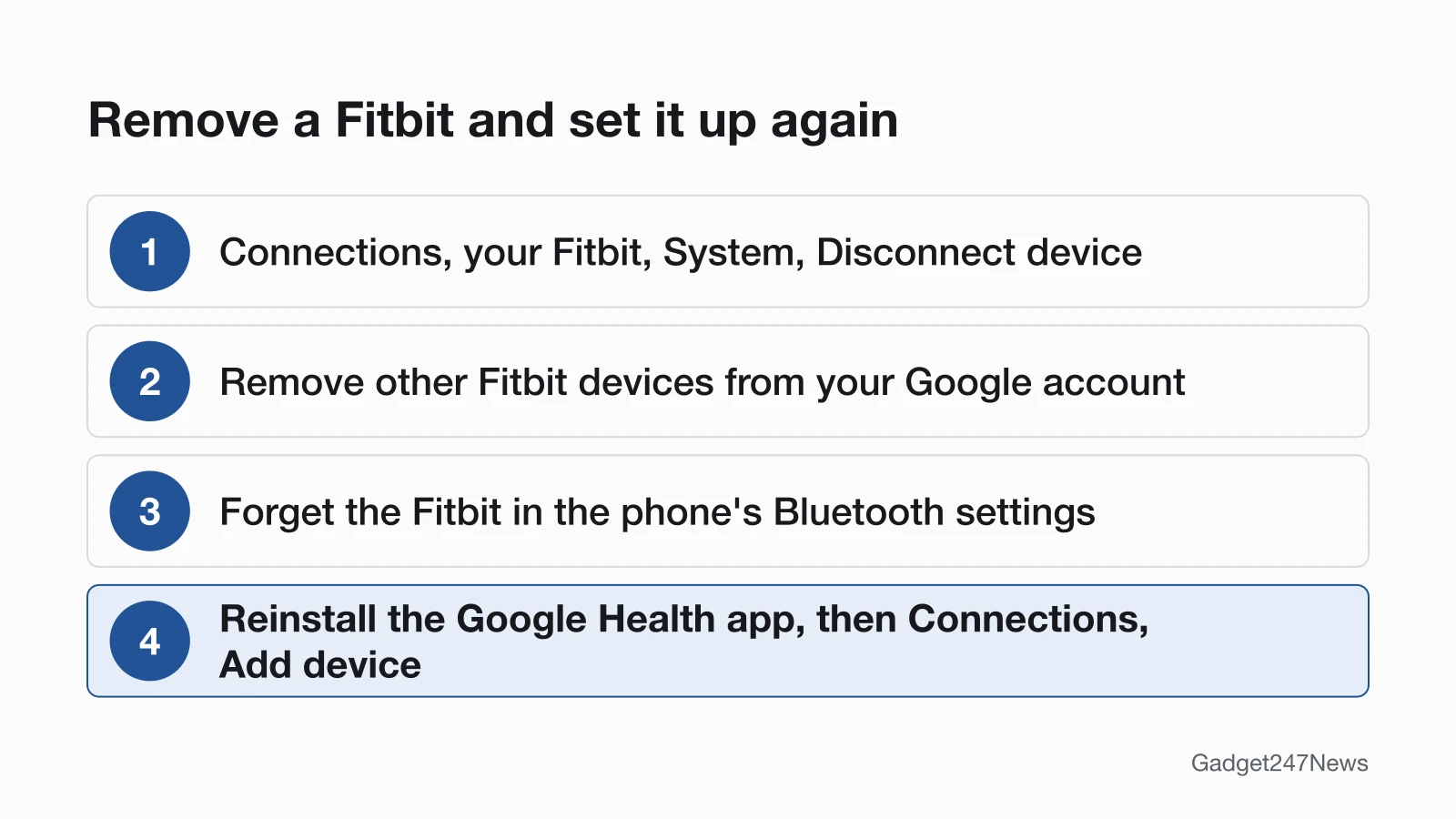
Google's setup troubleshooting ends with a clean start. Removing a Fitbit deletes any data it hasn't synced.
- In the Google Health app, tap Connections at the top left, tap your Fitbit, then System › Disconnect device.
- Remove any other Fitbit devices from your Google account the same way.
- On the phone, open Settings › Bluetooth, tap the information icon or gear icon next to your Fitbit, and choose the option to forget it.
- Uninstall and reinstall the Google Health app, then tap Connections › Add device and set the Fitbit up again. On Android, check first that the phone runs a supported version; on an older one, Google says, "you won't be able to reinstall the app."
A factory reset isn't one of Google's connection steps; the reset guide has it if Customer Support asks for one.
Connection Problems With New Phones, iPhone and Android
Three situations have their own checks: a new phone, a link that keeps dropping, and a phone the app doesn't support.
Fitbit Won't Pair With a New Phone
A new phone pairs only when Google's setup requirements are met: the Fitbit on its charger, the phone's software up to date, Bluetooth on and, on Android, location services on with Power Saving Mode off. Start setup in the Google Health app; Google says you "can't set up your Fitbit device from your phone or tablet's Bluetooth screen." The full steps to pair a Fitbit with your phone cover the rest.
Fitbit Won't Stay Connected
A Fitbit that keeps dropping the link may show a Phone disconnected icon, stop getting notifications or show the wrong time. Keep the phone near the Fitbit, and turn off Bluetooth on other nearby devices for now: Google explains: "Multiple paired devices can cause connectivity issues with the Fitbit device." On Android, turn off Power Saving Mode.
Does Fitbit Work With iPhone and Android?
Yes, the Google Health app runs on Android 11 or higher and on iPhones with iOS 16.4 or higher. Google lists four phones that may have compatibility issues even when they meet those requirements: Huawei P8 Lite, Huawei P9 Lite, Xiaomi Mi 6 and Huawei P20 Lite.
Still not working?
- Try the next fix: if the Fitbit connects but its data doesn't arrive, see Fitbit won't sync.
- Reset your Fitbit: How to Restart or Factory Reset a Fitbit (you'll need to set it up again afterwards).
- Contact Google Health Support: Google Health Help. Google's setup page ends: "If you still can't set up your device, contact Customer Support."
- Check repair or warranty options: File a warranty claim for your Fitbit device.
Started after an update? Check the Update Tracker for known issues.
Started After an Update?
If the link dropped right after a firmware update, check the known issues for your model under Fitbit and Pixel Watch update rollout. On Charge 6 and Inspire 3, version 214.24 added Bluetooth security features that turn on when you reconnect the device at the Google Health app's prompt. Any update over Bluetooth also needs the Fitbit within 2 to 3 feet of the phone.
Fitbit Connection: Quick Answers
Why won't my Fitbit pair?
A Fitbit won't pair when a setup requirement is missing or setup started in the wrong place: it must start in the Google Health app, with the Fitbit on its charger and Bluetooth on. If that's all in place, Google's order is to reset Bluetooth for 10 seconds, restart the Fitbit and phone, remove other Fitbits from your account, forget the Fitbit in Bluetooth, then reinstall the app.
Can a Pixel Watch connect to the Google Health app?
Yes, a Pixel Watch connects to the Google Health app: after you set the watch up in the Google Pixel Watch app, tap Connections › Add device › Google Pixel Watch in the Google Health app. On the watch, Battery saver mode and Bedtime mode limit background data, so sync waits until they're off. Pixel Watch not connecting has its own steps on Google's Pixel Watch help pages.
Sources
We checked this page against the pages below, most recently on . How we verify fixes
- Google Health Help: Why won't my Fitbit device sync? (Google, support.google.com)Official
- Google Health Help: Why can't I set up my Fitbit device? (Google, support.google.com)Official
- Google Health Help: How do I set up my Fitbit device? (Google, support.google.com)Official
- Google Health Help: Restart your Fitbit device (Google, support.google.com)Official
- Google Health Help: Update your Fitbit device (Google, support.google.com)Official
- Google Health Help: Troubleshoot updating your Fitbit device (Google, support.google.com)Official
- Google Health Help: What's changed in the latest Fitbit device update? (Google, support.google.com)Official
- Google Health app setup requirements (Google, support.google.com)Official
- Google Health Help: What is new with the redesigned Google Health app (Google, support.google.com)Official
- Google Health Help: File a warranty claim for your Fitbit device (Google, support.google.com)Official