Smartwatch Battery Draining Fast? Causes and Fixes

By Suraj Giri, Founder & Publisher. Reviewed by Suraj Giri on .
Published · 9 min read
How this page was made
- Sources. Checked against 18 official pages from Apple, Google, Samsung, Garmin and Oura, most recently on . See the sources.
- No device testing. We don't test fixes on physical devices, so nothing on this page is a hands-on result. A fact counts as verified only when it matches an official source page.
- AI use. As with every page on Gadget247News, AI tools helped research, outline, draft and edit this page, and re-read the official pages to flag facts that didn't match. The illustration at the top was generated with Runway and is labelled under the image.
- Human sign-off. Suraj Giri, Founder & Publisher, read this page and signed it off on . The site won't publish a page without that sign-off.
- Changes. The published and updated dates move only when the content changes, and every change gets a dated note. Spot an error or a fix that didn't work? Email info@gadget247news.com.
Read our AI use policy, editorial policy and corrections policy.
The makers' battery pages point to three common drains: the display, the watch being far from your phone, and background tasks after an update. Turn on your watch's low-power mode and keep it near your phone. If the drain started after an update, Apple's advice for Apple Watch is to wait a few days and check again; the full Apple steps are on Apple Watch Battery Draining Fast. Find your brand below.
This hub covers smartwatches, fitness trackers and smart rings. A watch that won't charge at all has a different fault, and the smartwatch charging fixes hub handles it. If your smartwatch stopped working in some other way, the family hub routes every symptom.
Find Your Problem: Brand, Cause and First Fix
The table pairs each watch with a drain its maker's battery page names and a first fix from that page, with a link to the full steps.
| Watch | Most likely drain | First fix | Full steps |
|---|---|---|---|
| Apple Watch | The display, distance from the iPhone, or a recent update | Turn off Always On, turn on Low Power Mode from Control Center, and keep your Apple Watch near your iPhone. | Apple Watch Battery Draining Fast |
| Pixel Watch | Always-on Display and background activity | Turn on Battery Saver in Settings › Battery to turn off Always-on Display and limit background activity. | Pixel Watch Battery Draining Fast |
| Samsung Galaxy Watch | Apps or Always On Display | Turn off Always On Display and turn on Power saving in your watch's Settings. | Samsung Galaxy Watch battery drain |
| Fitbit | The always-on display | Turn off the always-on display in your Fitbit's settings, then turn off notifications, alarms and reminders you don't need. | Fitbit Battery Draining Fast |
| Garmin | Display brightness, Always On Display or the GPS mode | Lower the display brightness and turn off Always On Display, then turn on Battery Saver if you need more time. | Garmin Watch Battery Draining Fast |
| Oura Ring | Out-of-date firmware or Blood Oxygen Sensing | Update the Oura app and your ring's firmware, then run two charge cycles (charge to 100%, use it down to about 25%). | Oura Ring Battery Draining Fast |
| Any watch, drain started after an update | The update itself | Check the known issues listed for your watch's latest update. | earbud and smartwatch Update Tracker |
| Apple Watch, older battery | A worn battery | Check Battery Health in Settings › Battery, and contact Apple Support if it shows Battery Needs Service. | Apple Watch Battery Replacement |
The saver mode has a different name on each brand: Low Power Mode on Apple Watch, Battery Saver on Pixel Watch and Garmin, and Power saving on Galaxy Watch. Google's Fitbit pages and Oura's battery tips name no saver mode for daily wear.

Why Your Smartwatch Battery Drains Fast
Six drains appear on the makers' battery pages, and the display is the one every watch brand here names:
- The always-on display. Apple's Low Power Mode switches Always On off, and Pixel Watch Battery Saver disables the Always-on Display. Google's fix for a Fitbit that dies in under a day is turning off Always On.
- Distance from the phone. An Apple Watch is most efficient on a Bluetooth link to its paired iPhone. Away from the phone, Wi-Fi uses less battery power than cellular, and a weak signal costs more.
- GPS and heart rate during workouts. In Low Power Mode, Apple offers Fewer GPS and Heart Rate Readings for long outdoor walking, running and hiking workouts. Garmin's vívoactive 5 manual rates the watch at up to 11 days in smartwatch mode but up to 21 hours in GPS Only mode.
- Audio through the watch speaker. Apple says playback through the built-in speaker can drain the battery more quickly, and recommends AirPods or another Bluetooth audio device.
- Background tasks after an update. Apple says tasks related to a watchOS update continue in the background and might affect battery life.
- An aging battery. Apple Watch batteries have a limited lifespan and might need replacing eventually, and Google notes that after several hundred charge cycles a Fitbit may need charging more often.
On Apple Watch and Pixel Watch, the low-power mode switches off several of these drains at once.
What Saves Battery on Any Smartwatch
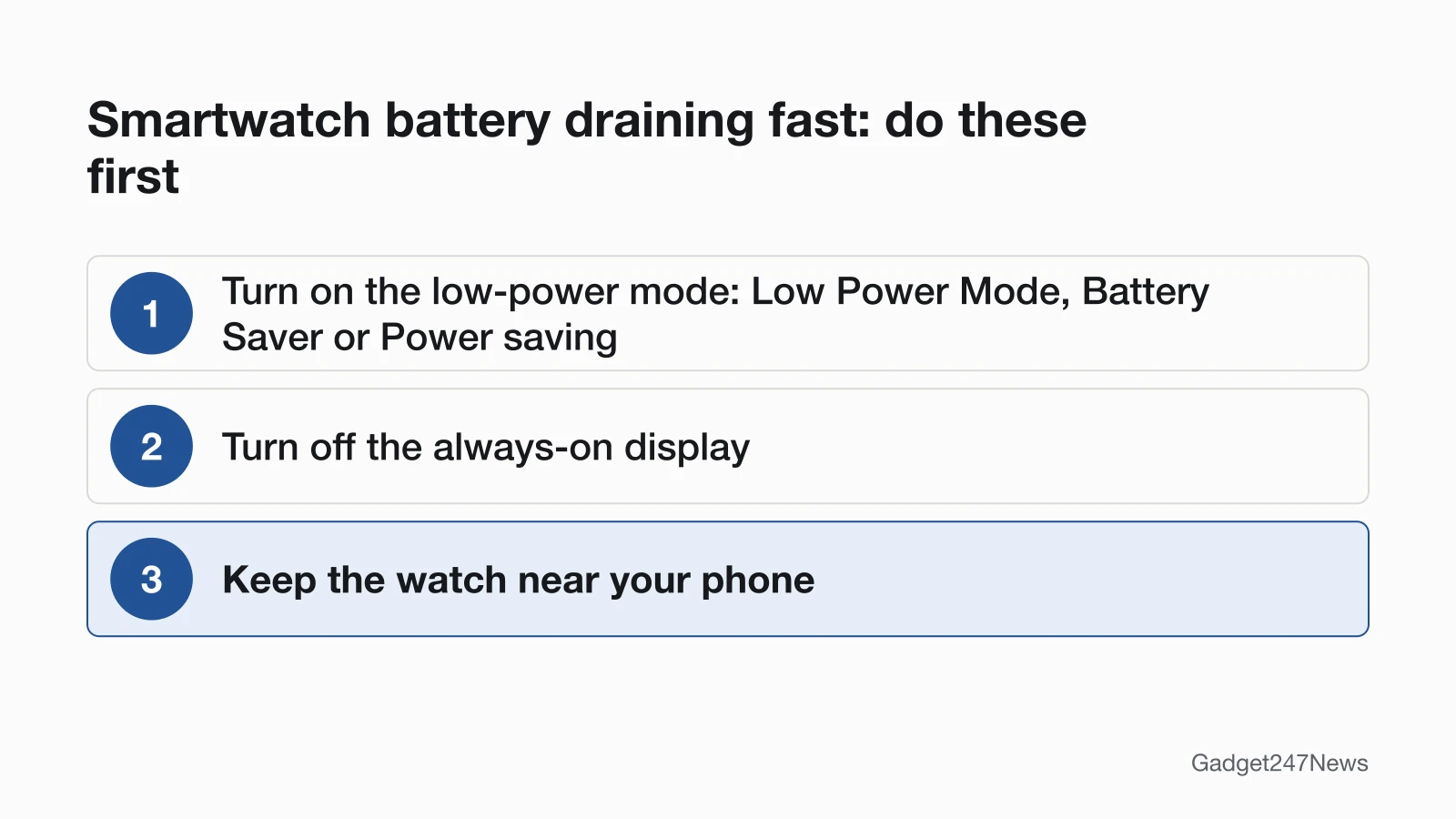
Three settings cut drain on the watches in this hub. Google's Fitbit pages name no saver mode, so a Fitbit starts at step 2:
- Turn on the watch's low-power mode: Low Power Mode on Apple Watch, Battery Saver on Pixel Watch and Garmin, Power saving on Galaxy Watch.
- Turn off the always-on display.
- Keep the watch near your phone; Apple says an Apple Watch is most efficient on Bluetooth to its iPhone.
Saver modes work by switching features off. On Apple Watch, Low Power Mode turns off the Always On display, background heart rate and blood oxygen measurements, and double tap and wrist flick gestures. It turns itself off when the battery charges to 80%, unless you chose to keep it on for a number of days.
Battery Draining After an Update?
An Apple Watch can drain faster right after an update. Apple says tasks related to the update keep running in the background and might affect battery life, so wait a few days and check the battery again. With watchOS 27, the watch can also pause features you rarely use and shows an Extending Battery notification naming the paused feature. If the drain lasts, check the earbud and smartwatch Update Tracker for known issues. Apple Watch versions are listed on watchOS Versions and Known Issues on Apple Watch.
Apple Watch Battery Draining Fast
To save battery on an Apple Watch, press the side button to open Control Center, tap the battery percentage, and turn on Low Power Mode. The watch offers the same switch when the battery drops to 10%, and Low Power Mode turns off by itself above 80 percent. To lose only the Always On display instead, open Settings, tap Display & Brightness, then Always On. Keep the watch within range of your iPhone. When the phone is away, use Wi-Fi rather than cellular, and turn on Airplane Mode where the signal is weak. Play audio through AirPods rather than the watch speaker.
Pixel Watch, Galaxy Watch, Fitbit, Garmin and Oura Battery Drain
Each maker names its saver differently, and the Fitbit and Oura pages name none for everyday wear.
Pixel Watch. Battery Saver turns off the Always-on Display but keeps Tilt-to-wake on, limits background activity and may delay notifications. It turns on by itself at 15%, or you can turn it on under Settings › Battery › Battery saver. See Pixel Watch Battery Draining Fast.
Samsung Galaxy Watch. Samsung's saver is Power saving, under Settings › Battery and device care (Battery or Battery management on some watches). It shows the Home screen in grayscale and keeps only calls, messages and notifications over Bluetooth. Always On Display is a switch under Settings › Display. See Samsung Galaxy Watch battery drain.
Fitbit. Google's Fitbit battery pages name no saver mode. Google's fix for a battery that dies in less than a day is turning off Always On in the watch settings. Its battery-life page adds turning off notifications, alarms and move reminders you don't need. See Fitbit Battery Draining Fast.
Garmin. Garmin's saver is Battery Saver, in Watch Settings › Power Manager › Battery Saver, or in Watch Settings › System › Battery Manager › Battery Saver on some models. The watch prompts you to turn it on when the battery drops to 10%. See Garmin Watch Battery Draining Fast.
Oura Ring. Oura's battery tips list no saver mode for daily wear; its Power Saving Mode is for storing the ring during a break of more than two weeks. To stretch a charge, turn off Blood Oxygen Sensing from the menu in the Oura app, or turn on Ring airplane mode from the battery icon for up to seven days at a time. See Oura Ring Battery Draining Fast.
Is Your Battery Worn Out?
An Apple Watch shows battery wear under Settings › Battery › Battery Health, where Maximum Capacity is measured against the battery when new. The watch also alerts you when capacity is significantly reduced, and a Battery Needs Service message is Apple's cue to contact Apple Support. Galaxy Watch owners with a Samsung phone can run a battery test in Samsung Members; a pass means the battery is in good condition.
Battery Life and Replacement
Rated battery life shows what each maker says a new watch lasts, and battery health shows how far yours has dropped from that.
How Long Should a Smartwatch Battery Last?
The figures below are battery life as rated by each manufacturer, copied from their own pages. They are not a buying ranking, and every maker says real battery life depends on settings and use.
| Watch | Rated battery life | Rated by |
|---|---|---|
| Apple Watch Series 12 | Up to 24 hours; up to 38 hours in Low Power Mode | Apple |
| Apple Watch SE 3 | Up to 18 hours; up to 32 hours in Low Power Mode | Apple |
| Apple Watch Ultra 4 | Up to 50 hours; up to 84 hours in Low Power Mode | Apple |
| Pixel Watch 5 (45 mm) | Up to 40 hours with Always-on Display on; up to 72 hours with Battery Saver | |
| Pixel Watch 5 (41 mm) | Up to 30 hours with Always-on Display on; up to 48 hours with Battery Saver | |
| Pixel Watch 4 (45 mm) | Up to 40 hours with Always-on Display on; up to 72 hours with Battery Saver | |
| Pixel Watch 4 (41 mm) | Up to 30 hours with Always-on Display on; up to 48 hours with Battery Saver | |
| Pixel Watch 3 (41 mm and 45 mm) | Up to 24 hours with Always-on Display on; up to 36 hours with Battery Saver | |
| Pixel Watch 2 | Up to 24 hours with Always-on Display on | |
| Pixel Watch | Up to 24 hours with Always-on Display off | |
| Fitbit Sense 2 and Versa 4 | 6+ days; up to 3 days with the always-on display | |
| Fitbit Charge 6 | Up to 7 days; up to 3 days with the always-on display | |
| Fitbit Inspire 3 | Up to 10 days; up to 3 days with the always-on display | |
| Garmin Forerunner 265 | Up to 13 days in smartwatch mode | Garmin |
| Garmin Forerunner 265S | Up to 15 days in smartwatch mode | Garmin |
| Garmin Forerunner 970 | Up to 15 days in smartwatch mode | Garmin |
| Garmin vívoactive 5 | Up to 11 days in smartwatch mode; up to 21 days with battery saver | Garmin |
| Oura Ring 5 | Typically 6 to 9 days | Oura |
| Oura Ring 4 | Typically 5 to 8 days | Oura |
| Oura Ring Gen3 | Up to seven days | Oura |
Apple's Series 12 figure includes 18 hours of normal daily use and 6 hours of sleep tracking. Samsung's support pages read for this guide give no rated battery life, so Galaxy Watch has no row. For other Apple Watch models, see How Long Does an Apple Watch Battery Last.
Should You Replace the Battery?
Start with battery health, not the age of the watch. Apple's trigger for service is a Battery Needs Service message, or a battery you think needs replacing, and in either case Apple says to contact Apple Support. Apple also says only Apple or an authorized service provider should service the lithium-ion battery in an Apple Watch. The service options are on Apple Watch Battery Replacement.
When to Contact the Manufacturer
If the saver mode and the brand page haven't slowed the drain, escalate in this order:
- Work through the next fix for your brand in the table above.
- Run a smartwatch reset if the drain continues after the settings changes.
- Contact the maker's support team: Apple, Samsung, Google (Pixel Watch and Fitbit), Garmin or Oura.
- Ask about battery service; an Apple Watch alerts you when battery capacity is significantly reduced so you can check your service options.
Smartwatch Battery: Quick Answers
Five Apple Watch battery questions, answered from Apple's own support pages.
How do I keep my Apple Watch battery from draining so fast?
Turn on Low Power Mode from Control Center, turn off Always On in Settings › Display & Brightness, and keep your Apple Watch near your iPhone so it stays on Bluetooth. Away from the iPhone, use Wi-Fi rather than cellular, and play music through AirPods instead of the watch speaker.
How do I find what's draining my Apple Watch battery?
Open Settings and tap Battery: the screen shows the battery percentage, a graph of recent charge history, and when the watch was last charged. Apple's battery pages don't describe a per-app battery list on the watch, so the drains Apple names (display, distance from the iPhone, cellular, workouts and speaker audio) are the ones to check.
How do you know if your Apple Watch battery is bad?
A worn Apple Watch battery shows up in Battery Health, where Maximum Capacity gives a percentage relative to the battery when new. If Battery Health shows Battery Needs Service, Apple says to contact Apple Support. The service routes are on Apple Watch Battery Replacement.
What's the average lifespan of an Apple Watch battery?
Apple gives no lifespan in years. Its batteries page says an Apple Watch battery is designed to retain up to 80% of its original capacity at 1000 complete charge cycles, and replacement is covered on Apple Watch Battery Replacement.
Is it worth replacing the battery on an Apple Watch?
Check Battery Health first: a Battery Needs Service message, or a battery you think needs replacing, is Apple's cue to contact Apple Support. The options, including where to get the work done, are on Apple Watch Battery Replacement.
Sources
We checked this page against the pages below, most recently on . How we verify fixes
- If the battery in your Apple Watch drains too quickly (Apple, support.apple.com)Official
- Use Low Power Mode on your Apple Watch (Apple, support.apple.com)Official
- Check battery health and usage on Apple Watch (Apple, support.apple.com)Official
- Important safety information for Apple Watch (Apple, support.apple.com)Official
- Apple Watch - Battery (Apple, apple.com)Official
- Batteries: Service and Recycling (Apple, apple.com)Official
- Charge Google Pixel Watch and tips to improve battery life (Google, support.google.com)Official
- Reduced battery life on your Samsung smart watch (Samsung, samsung.com)Official
- Extend your Fitbit device's battery life (Google, support.google.com)Official
- Why isn't my Fitbit device's battery charging? (Google, support.google.com)Official
- How to Use Power Manager on Garmin Watches (Garmin, support.garmin.com)Official
- Forerunner 265 Series Owner's Manual: Battery Life Information (Garmin, www8.garmin.com)Official
- vívoactive 5 Owner's Manual: Battery Life Information (Garmin, www8.garmin.com)Official
- Forerunner 970 Owner's Manual: Battery Life Information (Garmin, www8.garmin.com)Official
- Oura Ring Battery Tips (Oura, support.ouraring.com)Official
- Blood Oxygen Sensing (SpO2) (Oura, support.ouraring.com)Official
- Airplane Mode (Oura, support.ouraring.com)Official
- Power Saving Mode (Oura, support.ouraring.com)Official