Smartwatch Not Syncing? Apple Watch, Garmin, Fitbit Fixes

By Suraj Giri, Founder & Publisher. Reviewed by Suraj Giri on .
Published · 9 min read
How this page was made
- Sources. Checked against 21 official pages from Apple, Google, Garmin, Samsung and Oura, most recently on . See the sources.
- No device testing. We don't test fixes on physical devices, so nothing on this page is a hands-on result. A fact counts as verified only when it matches an official source page.
- AI use. As with every page on Gadget247News, AI tools helped research, outline, draft and edit this page, and re-read the official pages to flag facts that didn't match. The illustration at the top was generated with Runway and is labelled under the image.
- Human sign-off. Suraj Giri, Founder & Publisher, read this page and signed it off on . The site won't publish a page without that sign-off.
- Changes. The published and updated dates move only when the content changes, and every change gets a dated note. Spot an error or a fix that didn't work? Email info@gadget247news.com.
Read our AI use policy, editorial policy and corrections policy.
Most smartwatch sync failures come down to three things: the watch lost its Bluetooth link to your phone, a power-saving mode is limiting background data, or the watch needs a restart. Keep the watch near your phone, open its app, and restart both. Then find your brand below for the full force-sync steps. Charging, pairing and reset problems live on the parent guide, smartwatch sync, battery and pairing fixes.
This page covers smartwatches, fitness trackers and smart rings. "Sync" here means health and app data moving between the watch and its phone app: steps, sleep, workouts and contacts. Apple's full order for its watch is on Apple Watch Not Syncing. If the watch shows disconnected and won't pair at all, first connect a smartwatch to your phone, then come back here.
Find Your Problem: Brand, Cause and First Fix
The table gives each brand's most likely sync cause and the first fix from its maker's support page, plus rows for notifications and updates.
| Watch or symptom | Most likely cause | First fix | Full steps |
|---|---|---|---|
| Apple Watch not syncing | Watch disconnected from the iPhone | Check for a green iPhone icon in Control Center, keep your watch near your iPhone, and turn on Fitness Tracking in the Health app. | Apple Watch Not Syncing |
| Fitbit not syncing or showing the wrong time | Fitbit disconnected from the phone | If the time is off by an hour or more, change the time on your Fitbit; otherwise restart it and sync manually. | How to Change the Time on a Fitbit and Fitbit Not Syncing |
| Garmin not syncing with Garmin Connect | Bluetooth off, phone offline or a Garmin Connect outage | Turn on Bluetooth on your phone and watch, make sure the phone is online, then restart both devices. | Garmin Watch Not Syncing With Garmin Connect |
| Pixel Watch not syncing | Watch not connected, or Bedtime mode or Battery Saver limiting data | Check the Google Pixel Watch app shows Connected, then turn off Bedtime mode and Battery Saver. | Pixel Watch Not Syncing |
| Oura Ring not syncing | Ring airplane mode on, or the Oura app not open | Put your Oura Ring on its charger for a few minutes, then open the Oura app and wait for it to finish syncing. | Oura Ring Not Syncing |
| Samsung Galaxy Watch not syncing | Watch and phone not connected through the Galaxy Wearable app | Restart your phone, then your watch, and check they're connected in the Galaxy Wearable app. | Galaxy Watch section below; alerts: Samsung Galaxy Watch notifications not working |
| Notifications stopped too | The same phone link | Fix the sync first, then the notification settings | Notifications Stopped Too? below |
| Stopped after an update | A watch, phone or app update, or a service outage | Check the known issues for your watch's latest update. | latest smartwatch and earbud updates |
Each first fix is the opening step of the linked brand page; for Galaxy Watch it's the first step on Samsung's own sync page.
Check These First on Any Smartwatch
These three checks come from the steps that Apple, Google, Samsung and Garmin publish:
- Keep the watch next to your phone with Bluetooth on. For an Oura Ring, put the ring on its charger instead, with the Oura app open.
- Open the companion app and let it run. On Android, the Google Health app (formerly the Fitbit app) needs its Location permission turned on, plus Nearby devices on Android 12 and later.
- Restart the watch and the phone.
Syncing and connecting are different faults. Connecting is the Bluetooth link between watch and phone; syncing is the data that travels over it. Samsung says the phone and watch must be connected through Bluetooth to sync content, and Google says a Fitbit must stay near the phone to sync, so a watch that shows disconnected needs the connection fixed first.
Apple Watch Not Syncing
An Apple Watch syncs its data to the iPhone over their connection, so a disconnected watch stops syncing. A red iPhone icon or a red X in Control Center means the watch and iPhone aren't connected; the green iPhone icon means they are. Apple also asks you to make sure Fitness Tracking is on for your Apple Watch: open the Health app, tap your profile, then Devices, your Apple Watch and Privacy Settings, and turn on Fitness Tracking. After some iOS updates, Apple asks you to update watchOS too, so that your data, including Activity data, keeps syncing to your iPhone. Missing alerts share the same link and have their own page, Apple Watch Not Getting Notifications.
Fitbit Not Syncing: Start With the Time
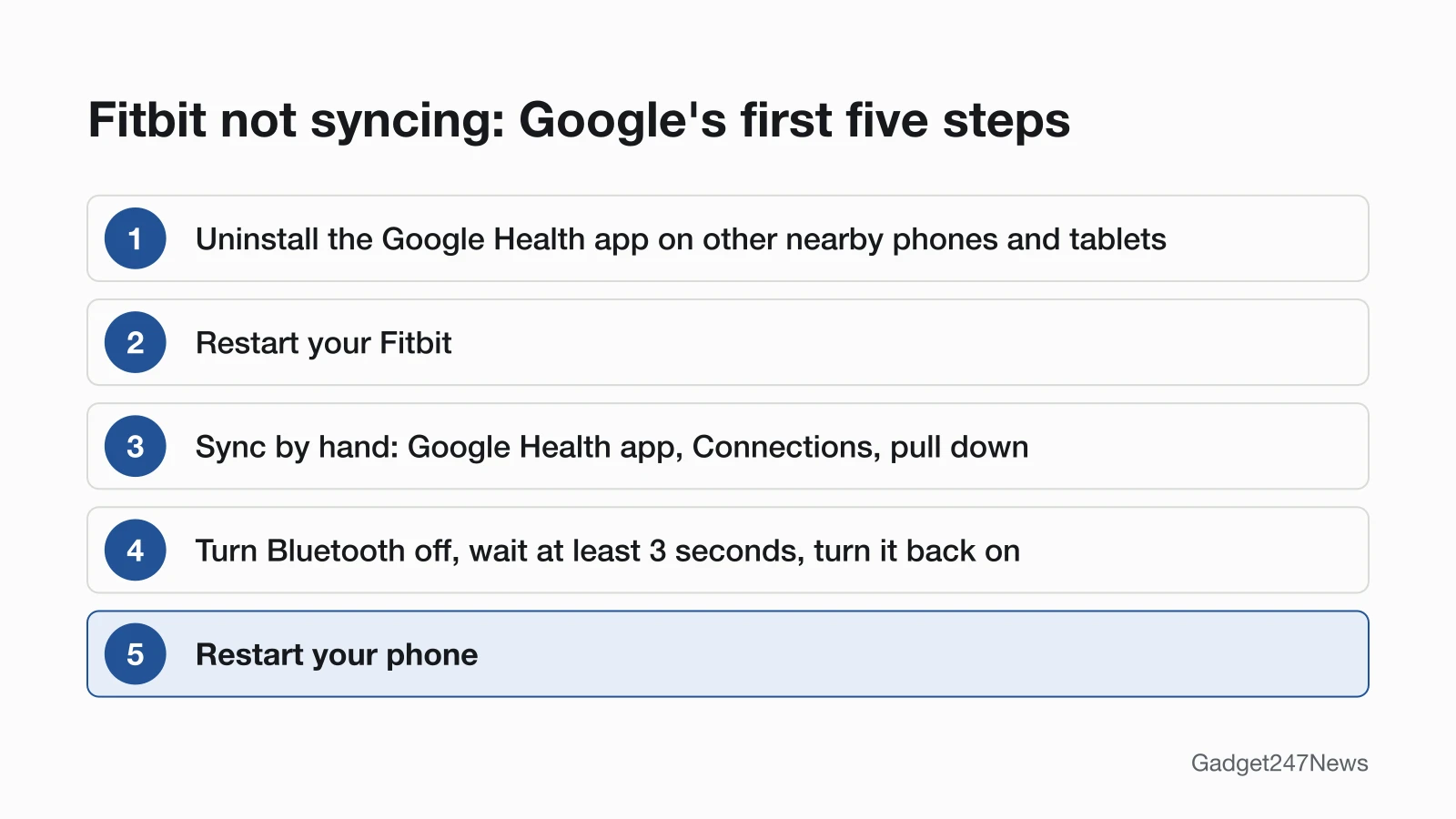
A Fitbit that shows the wrong time might be disconnected from your phone: Google lists the wrong time as one of the signs. If the time is off by an hour or more, change the time on the Fitbit first, with the steps in How to Change the Time on a Fitbit. If it's off by a few minutes, Google sends you to its Bluetooth and internet check. Otherwise, follow Google's order: uninstall the Google Health app on other nearby phones or tablets signed in to the same account, restart the Fitbit, then sync by hand from Connections in the app. A restart turns the Fitbit off and on without losing any activity data. The Fitbit app became the Google Health app starting May 19, 2026, so older guides that say "Fitbit app" mean the same app. Fitbit Not Syncing has Google's full 10-step order, and Fitbit Not Getting Notifications covers missing alerts.
Garmin Watch Not Syncing With Garmin Connect
A Garmin watch syncs through the Garmin Connect app, and Garmin asks for three checks before any advanced step: Bluetooth turned on for both the phone and the watch, the phone online over cellular or Wi-Fi, and no outage on the Garmin Connect Status page. Then restart both devices, turn off Battery Saver or Stealth Modes, and only after that remove the watch and add it again. To force a sync or resync with an iPhone, use the two answers at the end of this page. Garmin Watch Not Syncing With Garmin Connect has every step, and Garmin Watch Not Getting Notifications covers alerts.
Pixel Watch, Galaxy Watch and Oura Ring Not Syncing
Pixel Watch: A Google Pixel Watch is set up in the Google Pixel Watch app, and its fitness data goes to the Google Health app. Google's first check is that the watch shows as Connected in the Google Pixel Watch app, and it warns that Battery Saver and Bedtime mode limit background data. To restart, press and hold the crown for 3 seconds, scroll down and tap Restart. The full order is on Pixel Watch Not Syncing, and Pixel Watch Not Getting Notifications covers alerts.
Samsung Galaxy Watch: Samsung says the watch and phone must be paired through the Galaxy Wearable app and connected over Bluetooth to sync content. Its checks: restart the phone, then the watch; keep both above 25% battery; turn off Power saving mode, Watch only mode and Airplane mode; then turn on the app permissions on the phone and watch. Alerts are covered in Samsung Galaxy Watch notifications not working.
Oura Ring: Put the ring on its charger for a few minutes, then open the Oura app and wait for the latest sync. Ring airplane mode turns off the Bluetooth link between the ring and the app; placing the ring on its charger turns airplane mode off again. Oura Ring Not Syncing has the rest.
How to Sync Contacts to a Smartwatch From Android or iPhone
Contacts on a smartwatch come from your phone or its account, so you fix missing contacts on the phone side first. An Apple Watch keeps contacts up to date across devices with iCloud; if you use more than one contacts group or account, Apple says to open the iPhone's Contacts app, tap Lists and make sure All iCloud is selected. A Google Pixel Watch gets your phone's contact list during setup, when you approve access through the linked Google Account. For a Samsung Galaxy Watch on an Android phone, Samsung's sync page names no contacts setting. It says syncing content needs the phone and watch paired through the Galaxy Wearable app and connected over Bluetooth, with app permissions turned on. For Fitbit, Google says the device shows calls and texts from your nearby phone but names no contacts setting. Unbranded watches with a "BT sync" style app follow the app named in their manual; we don't cover unbranded apps.
Which Watch and App Do You Have?
Each brand syncs through its own app, so the first step is knowing which app your watch uses. The table pairs each brand with its companion app and the page that holds its sync steps.
| Brand | Companion app | Sync page |
|---|---|---|
| Apple Watch | Apple Watch app on the iPhone | Apple Watch Not Syncing |
| Fitbit | Google Health app | Fitbit Not Syncing |
| Google Pixel Watch | Google Pixel Watch app for setup, Google Health app for fitness data | Pixel Watch Not Syncing |
| Samsung Galaxy Watch | Galaxy Wearable app | Galaxy Watch paragraph above |
| Garmin | Garmin Connect app | Garmin Watch Not Syncing With Garmin Connect |
| Oura Ring | Oura app | Oura Ring Not Syncing |
For the Apple Watch model itself, Which Apple Watch Do I Have lists the model numbers.
Updates, Outages and Notifications
Sync can also stop for reasons outside the watch, such as a software update or a service outage, and notifications tend to stop with it.
Did an Update or Outage Stop Syncing?
A smartwatch that suddenly stopped syncing often follows a watch, phone or app update, or a service outage. Google lists updating the phone, the Google Health app and the Fitbit itself as one of its sync steps, and Apple's watchOS note is in the Apple Watch section above. For Garmin, check the Garmin Connect Status page before you reset anything. We track versions and known issues under latest smartwatch and earbud updates. Get an email when a smartwatch update breaks syncing, and when it's fixed.
Notifications Stopped Too?
Notifications travel over the same phone link as synced data, so a broken link stops both. Apple says missing notifications, messages or calls on an Apple Watch can mean the watch and iPhone aren't connected, and Google lists missing notifications as a sign a Fitbit is disconnected. Fix the connection first, then use the notification page for your brand, linked in the brand sections above.
When to Contact the Manufacturer
Contact the maker when the brand page's steps have failed, in this order:
- Try the next fix on the brand page for your watch.
- Restart the watch, or reset it as a last step: see how to restart or reset a frozen smartwatch, then pair and sync it again.
- Contact official support: Apple Support, Google Health Help for Fitbit, Google Pixel Watch Help, Samsung Support, Garmin Support or Oura Support.
- Ask about repair or warranty service.
Smartwatch Sync: Quick Answers
These four answers cover common Apple Watch and Garmin sync questions.
Why won't my Apple Watch sync with my phone anymore?
An Apple Watch that stopped syncing is most likely disconnected from the iPhone, and a red iPhone icon in Control Center confirms it. Bring the two close together, turn off Airplane Mode, turn on Wi-Fi and Bluetooth, restart both, and update watchOS if your iPhone asks; Apple Watch Not Syncing has the rest.
How do I force my Apple Watch to sync?
To force an Apple Watch to sync its calendars, open the Apple Watch app on your iPhone and tap My Watch → General → Reset → Reset Sync Data. Apple's force-sync steps cover calendar data only, so for other data, reconnect the watch to your iPhone, restart both and follow Apple Watch Not Syncing.
How do I force my Garmin watch to sync?
To force a Garmin watch to sync, open the Garmin Connect app with the watch connected; Garmin says the app should start syncing on its own. You can also sync from the watch: on a Forerunner 265, hold LIGHT to open the controls menu, then select Sync. For other models, check the owner's manual, which Garmin names as the place for device-specific settings. Garmin Watch Not Syncing With Garmin Connect has the steps.
How do I resync my Garmin watch to my iPhone?
To resync a Garmin watch to an iPhone, restart the watch and the iPhone first. If it still won't sync, select Remove Device for the watch in Garmin Connect, choose Forget This Device for it in the iPhone's Bluetooth settings, then restart both. In Garmin Connect, select More → Garmin Devices → Add Device → Find Nearby Accessories, put the watch in pairing mode, select Set Up and confirm that the six-digit code matches.
Sources
We checked this page against the pages below, most recently on . How we verify fixes
- Apple: If your Apple Watch isn't connected or paired with your iPhone (Apple, support.apple.com)Official
- Apple: Update your Apple Watch (Apple, support.apple.com)Official
- Apple: Manage Health data on your iPhone, iPad, or Apple Watch (Apple, support.apple.com)Official
- Apple: If your iCloud Contacts, Calendars, or Reminders won't sync (Apple, support.apple.com)Official
- Apple Watch User Guide: Use the Contacts app on Apple Watch (Apple, support.apple.com)Official
- Google Health Help: What is new with the redesigned Google Health app (Google, support.google.com)Official
- Google Health Help: Why won't my Fitbit device sync? (Google, support.google.com)Official
- Google Health Help: Restart your Fitbit device (Google, support.google.com)Official
- Google Health Help: Change phone notifications on my Fitbit device (Google, support.google.com)Official
- Google Pixel Watch Help: Set up Google Pixel Watch (Google, support.google.com)Official
- Google Pixel Watch Help: Fix Bluetooth, connection, and LTE issues on Google Pixel Watch (Google, support.google.com)Official
- Google Pixel Watch Help: Make and receive phone calls and SMS texts on Pixel Watch (Google, support.google.com)Official
- Samsung: Cannot sync content between phone and Samsung smart watch (Samsung, samsung.com)Official
- Samsung: Samsung smart watch will not hold charge or power on (Samsung, samsung.com)Official
- Garmin: My Device Is Not Syncing Data to the Garmin Connect App (Garmin, support.garmin.com)Official
- Garmin: Garmin Connect App Bluetooth Troubleshooting (Garmin, support.garmin.com)Official
- Garmin: How Do I Pair My Watch to a New Phone? (Garmin, support.garmin.com)Official
- Garmin: Remove and Add a Device From the Garmin Connect App (Garmin, support.garmin.com)Official
- Garmin Forerunner 265 Series Owner's Manual: Manually Syncing Data with Garmin Connect (Garmin, www8.garmin.com)Official
- Oura: Factory Reset an Oura Product (Oura, support.ouraring.com)Official
- Oura: Airplane Mode (Oura, support.ouraring.com)Official