Sony Headphones Problems and Fixes: Pairing, Battery, Sound

By Suraj Giri, Founder & Publisher. Reviewed by Suraj Giri on .
Published · 8 min read
How this page was made
- Sources. Checked against 49 official pages from Sony, Google and Apple, most recently on . See the sources.
- No device testing. We don't test fixes on physical devices, so nothing on this page is a hands-on result. A fact counts as verified only when it matches an official source page.
- AI use. As with every page on Gadget247News, AI tools helped research, outline, draft and edit this page, and re-read the official pages to flag facts that didn't match. The illustration at the top was generated with Runway and is labelled under the image.
- Human sign-off. Suraj Giri, Founder & Publisher, read this page and signed it off on . The site won't publish a page without that sign-off.
- Changes. The published and updated dates move only when the content changes, and every change gets a dated note. Spot an error or a fix that didn't work? Email info@gadget247news.com.
Read our AI use policy, editorial policy and corrections policy.
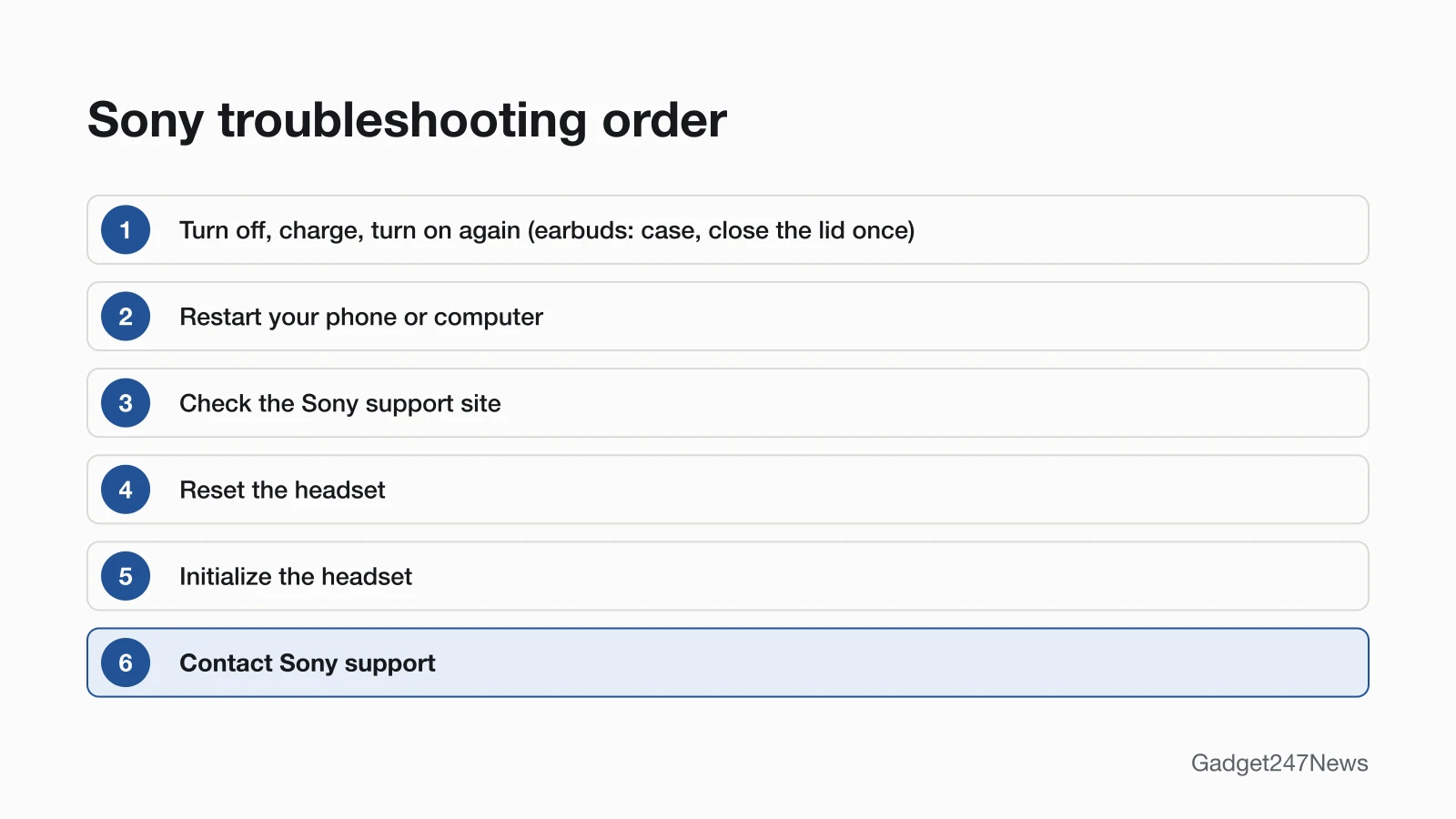
Sony headphones problems usually come down to pairing, charging or a setting in the Sony | Sound Connect app, so start with the row in the table that matches your symptom. Sony's own order is: turn them off, charge them and turn them on again (earbuds: put them in the case, close the lid once, then take them out), restart your phone or computer, check Sony's support site, reset, then initialize before you contact Sony. Buttons differ by model, so check yours first; the steps on each linked page are checked against Sony's Help Guides. If they won't pair with your phone at all, go straight to Sony headphones not connecting.
For AirPods, Galaxy Buds and other brands, start from earbud and headphone fixes by symptom instead. If your Sony headphones stopped working suddenly after a software update, the updates section near the end of this page links the known-issues list.
Find Your Sony Problem: Symptom, Cause and First Fix
The table lists nine Sony symptoms, each with its most likely cause, the first fix from the matching Sony page and the page with the full steps.
| Symptom | Most likely cause | First fix | Full steps |
|---|---|---|---|
| Connect or pair Sony headphones | Not in pairing mode | Put your Sony headphones in pairing mode (the indicator repeatedly flashes blue twice in a row), then select the model name in your device's Bluetooth list. | How to Connect and Pair Sony Headphones With Any Device |
| Connect to Android | Not in pairing mode | Put your Sony headphones in pairing mode, then on your Android phone touch and hold Bluetooth, tap Pair new device and tap the model name. | How to Connect Sony Headphones to Android |
| Connect to a Windows PC or laptop | Not in pairing mode, or still connected to your phone | Put your Sony headphones in pairing mode, then on your PC go to Start > Settings > Bluetooth & devices > Add device > Bluetooth and select the model name. | How to Connect Sony Headphones to a Windows PC |
| Won't connect | Connected to the last device it used | Turn off Bluetooth on the last phone or laptop your Sony headphones used, then select them in your device's Bluetooth list. | Sony Headphones Not Connecting |
| Keep disconnecting, cutting out or skipping | Sound-quality-first mode, or obstacles | Switch your Sony headphones to the stable-connection sound quality mode in the Sony | Sound Connect app, and keep your phone close with nothing between it and the headphones. | Why Sony Headphones Keep Disconnecting |
| Not charging | USB hub, sleeping computer, or earbuds not seated | Plug the USB-C cable into a wall USB adapter, not a USB hub or a sleeping computer, and for earbuds seat both firmly in the case and close the lid. | Sony Headphones Not Charging |
| Battery drains fast | Battery-hungry settings on together | Turn off DSEE Extreme, Speak-to-Chat, Service Link and the sound-quality priority mode in the Sony | Sound Connect app, and put Sony earbuds back in the closed case after use. | Sony Headphones Battery Draining Fast |
| Need a reset | A fault that charging and restarting didn't clear | Reset your Sony headphones first, which keeps your pairings, and initialize them to factory settings only if that fails; the buttons depend on your model. | How to Reset Sony Headphones |
| Won't turn on or off, or Speak-to-Chat | Wrong control, charging, or auto power-off | Press and hold the power button for about 2 seconds to turn Sony headphones on or off, or take Sony earbuds out of the case to turn them on and put them back and close the lid to turn them off. | How to Turn Sony Headphones On and Off |
Two symptoms have no Sony page yet. For sound from only one earbud, start with the cross-brand steps and Sony's one-side notes below; for earbuds sound muffled, use the cross-brand page. Software updates have their own section after the model table.
Sony Headphones Won't Connect or Keep Disconnecting
Sony headphones enter pairing mode on their own the first time you pair them: headphones when you turn them on, earbuds when you take both out of the case. To connect and pair Sony headphones with a second phone or laptop, you hold a button for about 5 seconds: the Bluetooth button on the WH-1000XM6 and WH-CH520, the power button on the WH-1000XM5, or the pairing button on the back of the charging case, lid open, on the WF-1000XM6, WF-1000XM5 and WF-C510. Pairing mode is canceled if nothing pairs within 5 minutes, and the WH-1000XM6 and WF-1000XM5 each store up to 8 devices; a ninth overwrites the one with the oldest connection date. Sony's WF-1000XM5 guide names one cause: if the headset "automatically connects to the last connected Bluetooth device", other devices may fail to connect. For drop-outs, the WH-1000XM5 guide starts with "Priority on stable connection", and the WF-1000XM5 guide warns that with multipoint "it may be easier for the sound to skip"; the full order is in why Sony headphones keep disconnecting. The default differs by model: the WH-1000XM6 starts on Prioritize Sound Quality, while the WF-1000XM5 starts on Prioritize Stable Connection.
Sony Headphones Not Charging or Draining Fast
Sony headphones charge through a USB-C cable, and Sony earbuds charge inside their case; the WF-1000XM5 case also works on a Qi wireless charger. For Sony headphones not charging, the WH-1000XM6 guide says charging "will not be properly completed" through a USB hub, a sleeping computer can't charge it, and other cables may fail. On the WH-1000XM6, a steady orange charging light means it is charging; a flashing orange light means abnormal temperature or abnormal charging. Sony headphones battery draining fast has seven named settings behind it on the WF-1000XM5: Prioritize Sound Quality, noise canceling or Ambient Sound Mode, the equalizer, DSEE Extreme, Speak-to-Chat, launching voice assist by voice, and Service Link. One earbud works as the "main headset unit" and drains faster, which Sony calls "not a malfunction".
How to Reset Sony Headphones
Sony has two levels. Resetting keeps your pairings and other settings; initializing restores factory settings and deletes all pairing information, so you pair again afterwards. Sony resets a headset that "cannot be turned on or cannot be operated", and initializes only if it still misbehaves after the reset. The controls sit in different places: the power and NC/AMB buttons on the WH-1000XM6 and WH-1000XM5; volume up and volume down together to reset, or power and volume down to initialize, on the WH-CH520; the reset or initialize button on the back of the charging case on the WF-1000XM6, WF-1000XM5 and WF-C510; and the buttons on both earbuds on the WF-C500. Other brands' steps are in the guide to hard reset wireless earbuds.
One Side Silent, Power and Speak-to-Chat
For no sound from one Sony earbud, the WF-1000XM5 guide says to pair again, set both earbuds in the case and close the lid, and clean earwax off the mesh of the earbud tip. Sony also notes that some apps needing HFP or HSP play a voice from only one earbud. A WH-1000XM5 that won't turn on may be charging: Sony says it "cannot be turned on while charging the battery", so remove the USB-C cable first. WF-1000XM5 earbuds also go silent during an automatic software update; Sony's fix is to set them in the case, close the lid and wait about 5 minutes. Music that pauses when you talk is Speak-to-Chat, which is disabled in the WH-1000XM6's factory settings and, once on, ends after about 15 seconds by default; the off switch is covered in How to Turn Sony Headphones On and Off.
Which Sony Model Do I Have?
Your Sony model name appears in two places:
- Check your phone's Bluetooth list. Sony headphones show up under the model name, such as WH-1000XM6.
- Check the product itself. On Sony earbuds with a case, "the model and serial numbers are located on the bottom of the charging case" and on the packaging; on Sony headphones, "the model number is located on the side of the unit".
The model name tells you which buttons to use in the table below.
Sony Model Identifier Table
The table covers the seven Sony models whose Help Guides we read for this hub, with the control each one uses to pair and reset and how it charges.
| Model | Type | Pair and reset controls | Charging |
|---|---|---|---|
| WH-1000XM6 | Headphones | Bluetooth button (about 5 seconds) to pair; power + NC/AMB to reset or initialize | Supplied USB-C cable; full charge in about 3.5 hours |
| WH-1000XM5 | Headphones | Power button (about 5 seconds) to pair; power + NC/AMB to reset or initialize | Supplied USB-C cable |
| WH-CH520 | Headphones | Bluetooth button (about 5 seconds) to pair; volume up + volume down to reset; power + volume down to initialize | Supplied USB-C cable; full charge in about 3 hours |
| WF-1000XM6 | Earbuds with charging case | Buttons on the back of the case, lid open, to pair, reset and initialize | Case, supplied USB-C cable; earbuds and case full in about 2 hours |
| WF-1000XM5 | Earbuds with charging case | Buttons on the back of the case, lid open, to pair, reset and initialize | Case, supplied USB-C cable or a Qi wireless charger; earbuds and case full in about 2 hours |
| WF-C510 | Earbuds with charging case | Buttons on the back of the case, lid open, to pair, reset and initialize | Case, commercially available USB-C cable; earbuds and case full in about 3 hours |
| WF-C500 | Earbuds with charging case | Buttons on both earbuds to pair, reset and initialize | Case, supplied USB-C cable |
Sony's pairing article also lists the WF-1000XM4, WF-C700N, WF-C710N and the LinkBuds models, among others. We haven't read their Help Guides for this table, so check the Help Guide for your exact model before you hold any button.
Sony Software Updates and Known Issues
Sony updates headphone software through the Sony | Sound Connect app, which the App Store lists as the "former Headphones Connect". With automatic updates turned on in the app, the WH-1000XM6 updates at around night time when "The software has already transferred", the battery is "more than 20%" and the headset is turned off. The WF-1000XM5 needs both earbuds in the case with the lid closed, the earbuds at "more than 20%" and the case at "more than 10%". If your Sony headphones stopped working suddenly after an update, check Sony headphone updates on the Update Tracker and the version history in Sony, Bose and JBL Headphone Firmware Updates. Get an email when a Sony update breaks something, and when it's fixed.
When to Contact Sony Support
Sony's Help Guides put reset and initialize before a call to Sony, so work down this list:
- Try the next fix on the linked page for your symptom.
- Reset the headset, then initialize it (you'll pair it again afterwards).
- Contact Sony Support; the Sony | Sound Connect app's menu also opens Sony's support site.
- Check repair options through Sony Product Repair.
A battery that no longer lasts is a repair question too: if its usage hours "decrease significantly, the battery should be replaced", and Sony sends you to its support contact or a Sony dealer.
Sources
We checked this page against the pages below, most recently on . How we verify fixes
- WH-1000XM6 Help Guide: Troubleshooting (Sony, helpguide.sony.net)Official
- WF-1000XM6 Help Guide: Troubleshooting (Sony, helpguide.sony.net)Official
- WH-1000XM6 Help Guide: Pairing and connecting with an Android smartphone (Sony, helpguide.sony.net)Official
- WH-1000XM5 Help Guide: Pairing and connecting with an Android smartphone (Sony, helpguide.sony.net)Official
- WH-CH520 Help Guide: Pairing and connecting with an Android smartphone (Sony, helpguide.sony.net)Official
- WF-1000XM6 Help Guide: Pairing and connecting with an Android smartphone (Sony, helpguide.sony.net)Official
- WF-1000XM5 Help Guide: Pairing and connecting with an Android smartphone (Sony, helpguide.sony.net)Official
- WF-C510 Help Guide: Pairing and connecting with an Android smartphone (Sony, helpguide.sony.net)Official
- WF-C500 Help Guide: Pairing and connecting with an Android smartphone (Sony, helpguide.sony.net)Official
- WH-1000XM6 Help Guide: Pairing and connecting with a computer (Windows 11) (Sony, helpguide.sony.net)Official
- Connect to Bluetooth devices (Android Help) (Google, support.google.com)Official
- WF-1000XM5 Help Guide: Unable to make a Bluetooth connection. (Sony, helpguide.sony.net)Official
- WF-1000XM5 Help Guide: Sound skips frequently. (Sony, helpguide.sony.net)Official
- WH-1000XM5 Help Guide: Sound skips frequently. (Sony, helpguide.sony.net)Official
- WH-1000XM6 Help Guide: About the sound quality mode (Sony, helpguide.sony.net)Official
- WH-1000XM6 Help Guide: Charging the headset (Sony, helpguide.sony.net)Official
- WH-1000XM6 Help Guide: About the indicator (Sony, helpguide.sony.net)Official
- WF-1000XM5 Help Guide: Charging (Sony, helpguide.sony.net)Official
- WF-1000XM5 Help Guide: Headset cannot be charged or charging time is too long. (Sony, helpguide.sony.net)Official
- WF-1000XM5 Help Guide: The available operating time is short (Sony, helpguide.sony.net)Official
- WH-1000XM6 Help Guide: Resetting the headset (Sony, helpguide.sony.net)Official
- WH-1000XM6 Help Guide: Initializing the headset to restore factory settings (Sony, helpguide.sony.net)Official
- WH-1000XM5 Help Guide: Resetting the headset (Sony, helpguide.sony.net)Official
- WH-1000XM5 Help Guide: Initializing the headset to restore factory settings (Sony, helpguide.sony.net)Official
- WH-CH520 Help Guide: Resetting the headset (Sony, helpguide.sony.net)Official
- WH-CH520 Help Guide: Initializing the headset to restore factory settings (Sony, helpguide.sony.net)Official
- WF-1000XM6 Help Guide: Resetting the headset (Sony, helpguide.sony.net)Official
- WF-1000XM6 Help Guide: Initializing the headset to restore factory settings (Sony, helpguide.sony.net)Official
- WF-1000XM5 Help Guide: Resetting the headset (Sony, helpguide.sony.net)Official
- WF-C510 Help Guide: Resetting the headset (Sony, helpguide.sony.net)Official
- WF-C500 Help Guide: Resetting the headset (Sony, helpguide.sony.net)Official
- WF-C500 Help Guide: Initializing the headset to restore factory settings (Sony, helpguide.sony.net)Official
- WF-1000XM5 Help Guide: No sound, no sound from one side (Sony, helpguide.sony.net)Official
- WH-1000XM5 Help Guide: Unable to turn on the headset. (Sony, helpguide.sony.net)Official
- WH-1000XM6 Help Guide: Speaking with someone while wearing the headset (Speak-to-Chat) (Sony, helpguide.sony.net)Official
- WH-1000XM6 Help Guide: Turning on the headset (Sony, helpguide.sony.net)Official
- WF-1000XM5 Help Guide: Turning on the headset (Sony, helpguide.sony.net)Official
- WF-1000XM5 Help Guide: Turning off the headset (Sony, helpguide.sony.net)Official
- WF-1000XM6 Help Guide: Charging (Sony, helpguide.sony.net)Official
- WF-C510 Help Guide: Charging (Sony, helpguide.sony.net)Official
- WF-C500 Help Guide: Charging cannot be done. (Sony, helpguide.sony.net)Official
- WH-CH520 Help Guide: Charging the headset (Sony, helpguide.sony.net)Official
- WH-1000XM5 Help Guide: Charging cannot be done. (Sony, helpguide.sony.net)Official
- WH-1000XM6 Help Guide: How to keep the software up-to-date (Sony, helpguide.sony.net)Official
- WF-1000XM5 Help Guide: How to keep the software up-to-date (Sony, helpguide.sony.net)Official
- How to find your model and serial number (Sony) (Sony, sony.com)Official
- How to pair Bluetooth headphones with a Bluetooth source device (Sony) (Sony, sony.com)Official
- Sony | Sound Connect (App Store) (Apple, apps.apple.com)Official
- Support for Sony products (Sony USA) (Sony, sony.com)Official