Sony Headphones Battery Draining Fast? Causes and Fixes

By Suraj Giri, Founder & Publisher. Reviewed by Suraj Giri on .
Published · 6 min read
How this page was made
- Sources. Checked against 14 official pages from Sony, most recently on . See the sources.
- No device testing. We don't test fixes on physical devices, so nothing on this page is a hands-on result. A fact counts as verified only when it matches an official source page.
- AI use. As with every page on Gadget247News, AI tools helped research, outline, draft and edit this page, and re-read the official pages to flag facts that didn't match. The illustration at the top was generated with Runway and is labelled under the image.
- Human sign-off. Suraj Giri, Founder & Publisher, read this page and signed it off on . The site won't publish a page without that sign-off.
- Changes. The published and updated dates move only when the content changes, and every change gets a dated note. Spot an error or a fix that didn't work? Email info@gadget247news.com.
Read our AI use policy, editorial policy and corrections policy.
Sony rates the WF-1000XM5 at up to 8 hours of music with noise canceling on and up to 12 hours with it off (AAC or SBC) on a full charge. Those figures are for the earbuds alone; Sony's operating-time page doesn't add the charges the case holds. If yours die well short of that, the fixes below follow Sony's own list of causes; other Sony faults start from the Sony headphones not working hub.
Draining fast is a different fault from not charging. If the battery never fills, use the charging fixes in the Still not working list further down; for AirPods, Galaxy Buds and other brands, start with a dead earbud that won't charge.
Why Is My Sony Headphones Battery Draining So Fast?
Your Sony headphones battery drains fast for six reasons, and Sony's Help Guides for the WF-1000XM5 and WH-1000XM5 name every one:
- Battery-hungry settings on together. Noise canceling, DSEE Extreme, Speak-to-Chat and four other features each shorten battery time, and more so in combination.
- Earbuds carried in a pocket. Out of the case, WF-1000XM5 earbuds can think they're being worn and stay on.
- A case lid left open. An open lid uses up the charging case battery.
- Magnets near the case. Phones, magnetic wireless chargers and magnetic accessories can upset the case's lid detection.
- Long phone calls. WF-1000XM5 call time tops out at 6 hours with noise canceling on, against 8 hours for music.
- Long storage or a worn battery. A WH-1000XM5 left unused can lose usage hours; a significant drop means the battery should be replaced.
How to Fix Sony Headphones That Drain Fast
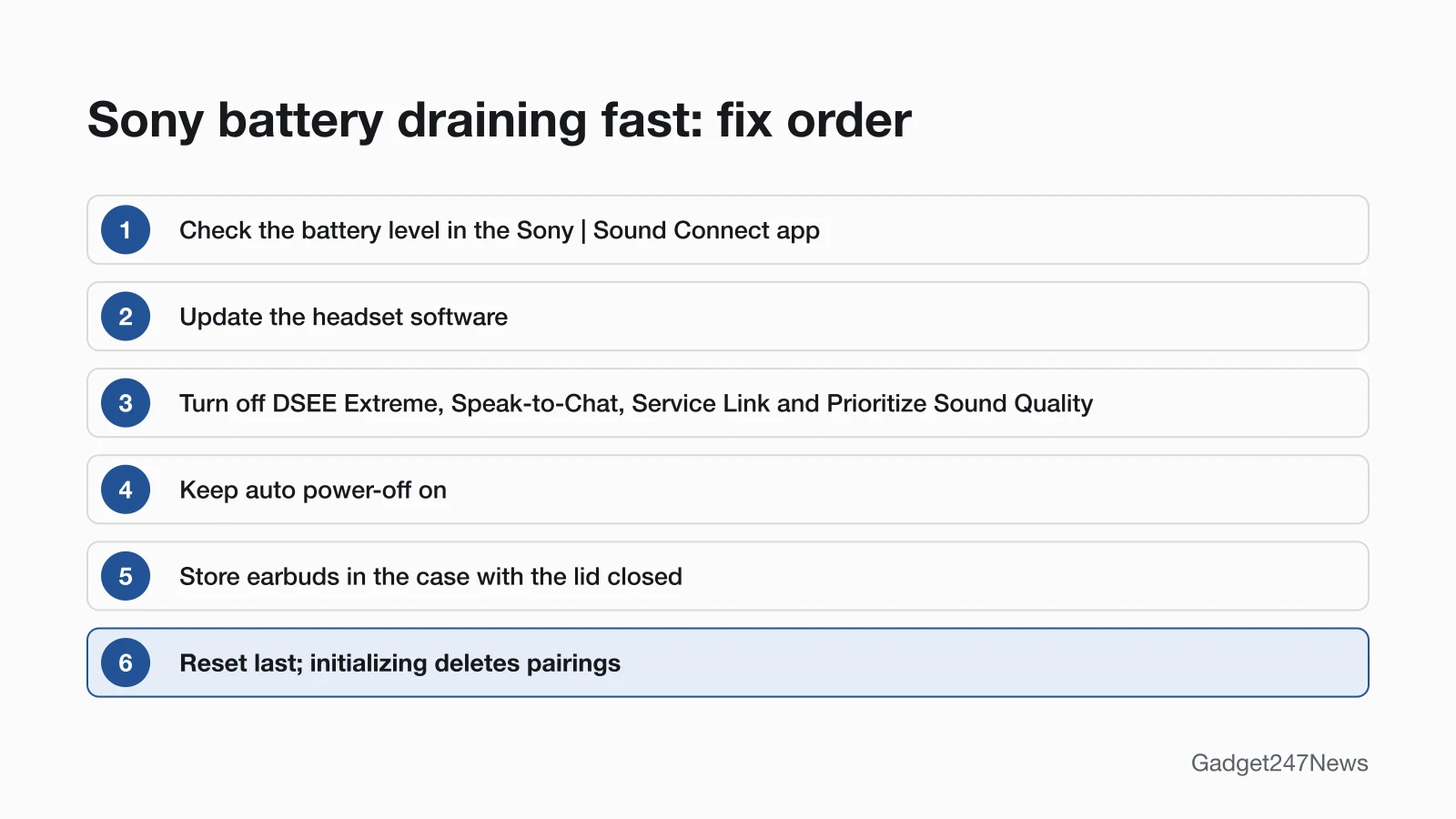
These six fixes follow Sony's own "operating time is short" pages, from checking the charge level to a reset, which comes last.
Fix 1: Check the Battery Level in the App
Check the real charge level before you change anything. On the WH-1000XM6, the Sony | Sound Connect app can "Display the remaining battery charge of the headset". On WF-1000XM5 earbuds, the case light shows the earbud with less charge left when both are inside: when you open or close the lid, it lights green for about 6 seconds at 95% or higher, or orange between 94% and 1%.
Fix 2: Update the Headphone Software
Sony says the latest headset software can "resolve a certain number of issues with the headset", so update before you change settings:
- Turn WH-1000XM6 headphones on, or take WF-1000XM5 earbuds out of the case.
- Open the Sony | Sound Connect app on your phone and update the headset software following the on-screen instructions.
The WF-1000XM5 guide still calls the app "Sony | Headphones Connect". With automatic updates turned on, the update starts "at around night time when the headset is not in use", but only when Sony's conditions are met. For the WF-1000XM5, "Both headset units are stored in the charging case and the charging case lid is closed", with the earbuds at "more than 20%" and the case at "more than 10%". The WH-1000XM6 needs "more than 20%" and "The headset is turned off." Version history is on the latest Sony headphones firmware page.
Fix 3: Turn Off the Features That Use the Most Battery
Turn off the features you don't need in the Sony | Sound Connect app. Sony's WF-1000XM5 guide names seven that shorten battery life:
- Sound quality mode set to Prioritize Sound Quality
- Noise canceling function or Ambient Sound Mode
- Equalizer
- DSEE Extreme
- Speak-to-Chat
- Voice-assist launch by your voice
- Service Link
In Sony's words: "If you run the above settings at the same time, the available operating time of the battery becomes even shorter." The WH-1000XM5 guide lists the same features and calls the first one "Priority on sound quality"; the WF-C510 list is shorter, with Equalizer, DSEE and Service Link. For when noise canceling is worth the battery, see how to use noise cancelling on earbuds and headphones.
Fix 4: Keep Auto Power-Off On
Auto power-off stops an unworn headset from running on, so make sure it hasn't been switched off:
- In the Sony | Sound Connect app, check the wearing detection automatic power off setting. A WH-1000XM6 turns off "after 15 minutes of not being worn"; WF-1000XM5 earbuds turn off after about 15 minutes out of your ears.
- Turn WH-1000XM6 headphones off before they go in a bag, because Sony warns that "Wearing detection may react incorrectly."
Both guides say the app can change this setting. The button steps are in how to turn Sony headphones on and off.
Fix 5: Store Earbuds in the Closed Case
Put Sony earbuds back in the case and close the lid after use. The WF-1000XM5 guide says "Be sure to close the charging case lid" so the case battery isn't used up, and warns that earbuds in a pocket may not turn off. Keep smartphones, magnetic wireless chargers and magnetic accessories away from the case, since they can affect how it detects the lid opening and closing. Before long storage, the WH-1000XM5 guide says to "charge the battery once every 6 months to avoid over-discharge."
Fix 6 (Last): Reset Your Sony Headphones
Reset only after the five fixes above. On the WF-1000XM5, a reset keeps your pairings: "The pairing information and other settings are retained." Initializing goes further and "deletes all pairing information", so you pair the earbuds again afterwards. Use the model-by-model steps to factory reset Sony headphones.
Sony Battery Life by Model
The table shows Sony's maximum music time per full charge for four models; your time is lower with the features above turned on.
| Model | Noise canceling or Ambient Sound Mode on | Both off | Quick charge |
|---|---|---|---|
| WF-1000XM5 (earbuds) | 8 hours (AAC, SBC); 7 hours (LC3); 5 hours (LDAC) | 12 hours (AAC, SBC); 11 hours (LC3); 8 hours (LDAC) | About 1 hour of music after 3 minutes |
| WF-C510 (earbuds) | 8 hours (AAC); 7 hours (SBC) | 11 hours (AAC); 9 hours (SBC) | About 1 hour after 5 minutes |
| WH-1000XM6 (headphones) | 30 hours (AAC, SBC, LC3); 26 hours (LDAC) | 40 hours (AAC, SBC, LC3); 36 hours (LDAC) | About 1 hour after 3 minutes (5 V/1.5 A adaptor); about 3 hours with a USB PD 9 V/2.3 A adaptor |
| WH-1000XM5 (headphones) | 30 hours (AAC); 28 hours (SBC); 26 hours (LDAC) | 40 hours (AAC); 38 hours (SBC); 36 hours (LDAC) | About 1 hour after 3 minutes; about 5 hours after 10 minutes |
Every playback figure is a "Max." time from that model's "Available operating time" page. LDAC gives the shortest time on each model that lists it, and the app shows which codec is in use. For the WF-1000XM4 and older models, check your model's Help Guide.
One Sony Earbud Dies Faster
One Sony earbud dies faster because it works as the main unit. Sony's WF-1000XM5 guide says the main unit "consumes the rechargeable battery faster than the other unit", and either side can take that role depending on the usage environment. Wearing one earbud alone before using both also leaves a gap. Sony says of the uneven charge: "this is not a malfunction."
Still not working?
- Try the next fix: Sony headphones charging fixes (if the battery won't fill).
- Reset your Sony headphones: factory reset Sony headphones (after an initialize you'll need to pair them again).
- Contact Sony Support: Sony Support.
- Check repair or warranty options: Sony Product Repair.
Started after an update? Check the Update Tracker for known issues.
Draining Faster After an Update?
If your Sony battery suddenly drains faster after a software update, check the Update Tracker linked above for known issues. To match your headset to a listed version, the Sony | Sound Connect app can "Check the headset software version" on the WH-1000XM6.
When Is a Sony Battery Worn Out?
A Sony battery needs replacing when its usage hours drop significantly. The WH-1000XM5 guide says: "If the usage hours of the built-in rechargeable battery decrease significantly, the battery should be replaced. Consult your nearest Sony dealer." A drop after months unused is different: Sony says battery life "will improve after charging and discharging several times". The Sony pages we read give no battery lifespan in years or charge cycles.
Sony Battery: Quick Answers
How long do Sony WF-1000XM5 earbuds last on a charge?
Sony WF-1000XM5 earbuds last up to 8 hours of music with noise canceling on and up to 12 hours with it off, using AAC or SBC. LDAC lowers those to 5 and 8 hours. Calls run up to 6 hours with noise canceling on.
Why does my left Sony earbud drain faster?
Your left Sony earbud drains faster when it's acting as the main unit, which uses more battery than the other side. Sony says either earbud can become the main unit depending on the usage environment, and that the uneven charge is not a malfunction.
How do I fix Sony earbuds battery draining fast?
To fix Sony earbuds battery draining fast, turn off DSEE Extreme, Speak-to-Chat, Service Link and Prioritize Sound Quality in the Sony | Sound Connect app when you don't need them. Then update the headset software, keep auto power-off on, and store the earbuds in the case with the lid closed.
Sources
We checked this page against the pages below, most recently on . How we verify fixes
- WF-1000XM5 Help Guide: The available operating time is short, the battery power does not last long, the battery life of the left and right headset units is different. (Sony, helpguide.sony.net)Official
- WH-1000XM5 Help Guide: The available operating time is short (the duration of the battery is short). (Sony, helpguide.sony.net)Official
- WF-1000XM5 Help Guide: Available operating time (Sony, helpguide.sony.net)Official
- WF-C510 Help Guide: Available operating time (Sony, helpguide.sony.net)Official
- WH-1000XM6 Help Guide: Available operating time (Sony, helpguide.sony.net)Official
- WH-1000XM5 Help Guide: Available operating time (Sony, helpguide.sony.net)Official
- WF-1000XM5 Help Guide: How to keep the software up-to-date (for comfortable use of the headset) (Sony, helpguide.sony.net)Official
- WH-1000XM6 Help Guide: How to keep the software up-to-date (for comfortable use of the headset) (Sony, helpguide.sony.net)Official
- WH-1000XM6 Help Guide: What you can do with the "Sony | Sound Connect" app (Sony, helpguide.sony.net)Official
- WH-1000XM6 Help Guide: Turning off the headset (Sony, helpguide.sony.net)Official
- WF-1000XM5 Help Guide: Turning on the headset (Sony, helpguide.sony.net)Official
- WF-1000XM5 Help Guide: About the indicator (Sony, helpguide.sony.net)Official
- WF-1000XM5 Help Guide: Resetting the headset (Sony, helpguide.sony.net)Official
- WF-1000XM5 Help Guide: Initializing the headset to restore factory settings (Sony, helpguide.sony.net)Official