How to Reset Sony Headphones

By Suraj Giri, Founder & Publisher. Reviewed by Suraj Giri on .
Published · 4 min read
How this page was made
- Sources. Checked against 17 official pages from Sony, most recently on . See the sources.
- No device testing. We don't test fixes on physical devices, so nothing on this page is a hands-on result. A fact counts as verified only when it matches an official source page.
- AI use. As with every page on Gadget247News, AI tools helped research, outline, draft and edit this page, and re-read the official pages to flag facts that didn't match. The illustration at the top was generated with Runway and is labelled under the image.
- Human sign-off. Suraj Giri, Founder & Publisher, read this page and signed it off on . The site won't publish a page without that sign-off.
- Changes. The published and updated dates move only when the content changes, and every change gets a dated note. Spot an error or a fix that didn't work? Email info@gadget247news.com.
Read our AI use policy, editorial policy and corrections policy.
Sony headsets have two levels of reset: a reset that keeps your pairings, and an initialize that restores factory settings. Both come last in Sony's troubleshooting order, after charging the headset and restarting your phone or computer. This guide covers the models on the Sony headphones fixes hub.
For other brands, see how to factory reset earbuds.
Reset vs Initialize: What's the Difference?
A reset restarts Sony headphones and keeps your pairings; initializing restores factory settings and deletes all pairing information.
| Sony term | What it does | When Sony says to use it |
|---|---|---|
| Reset (soft reset) | Restarts the headset. "The pairing information and other settings are retained." | "If the headset cannot be turned on or cannot be operated even when it is turned on" |
| Initialize (factory reset) | "resets volume settings, etc. to the factory settings, and deletes all pairing information" | "If the headset does not operate correctly even after resetting" |
Reset first; initialize only if that fails.
How to Reset (Soft Reset) Sony Headphones and Earbuds
To reset Sony headphones, connect them to a wall outlet and press two buttons; earbuds with a case use the button on its back.
| Model | How to reset | Hold for | What you see |
|---|---|---|---|
| WH-1000XM6 | Connected to an AC outlet: (power) and NC/AMB buttons | About 5 seconds | Charging indicator turns off, then lights up again |
| WH-1000XM5 | Connected to an AC outlet: press (power) and NC/AMB simultaneously | No time given | Sony describes no light |
| WH-CH520 | Connected to an AC outlet: press the + (volume +) and - (volume -) buttons simultaneously | No time given | Sony describes no light |
| WF-1000XM6, WF-1000XM5, WF-C510 | Earbuds in the case, lid open: reset button on the back of the case | About 20 seconds or more | After about 15 seconds the case light flashes orange for about 5 seconds, then turns off |
| WF-C500 | One earbud at a time: the button on that earbud | About 20 seconds | Orange flashes slowly for about 5 seconds, turns off, then blue flashes twice |
How to Initialize (Factory Reset) Sony Headphones
To factory reset Sony headphones, turn them off, unplug the cable and hold two buttons until the blue light flashes 4 times:
- Turn the headphones off.
- Remove the USB Type-C cable.
- Press and hold the buttons for your model (table below).
- When initializing is complete, the indicator (blue) flashes 4 times.
| Model | Buttons | Hold for |
|---|---|---|
| WH-1000XM6 | (power) and NC/AMB | About 10 seconds |
| WH-1000XM5 | (power) and NC/AMB | About 7 seconds |
| WH-CH520 | (power) and - (volume -) | About 10 seconds or more |
Then delete the headphones from your phone's Bluetooth list and pair them again.
How to Initialize (Factory Reset) Sony Earbuds
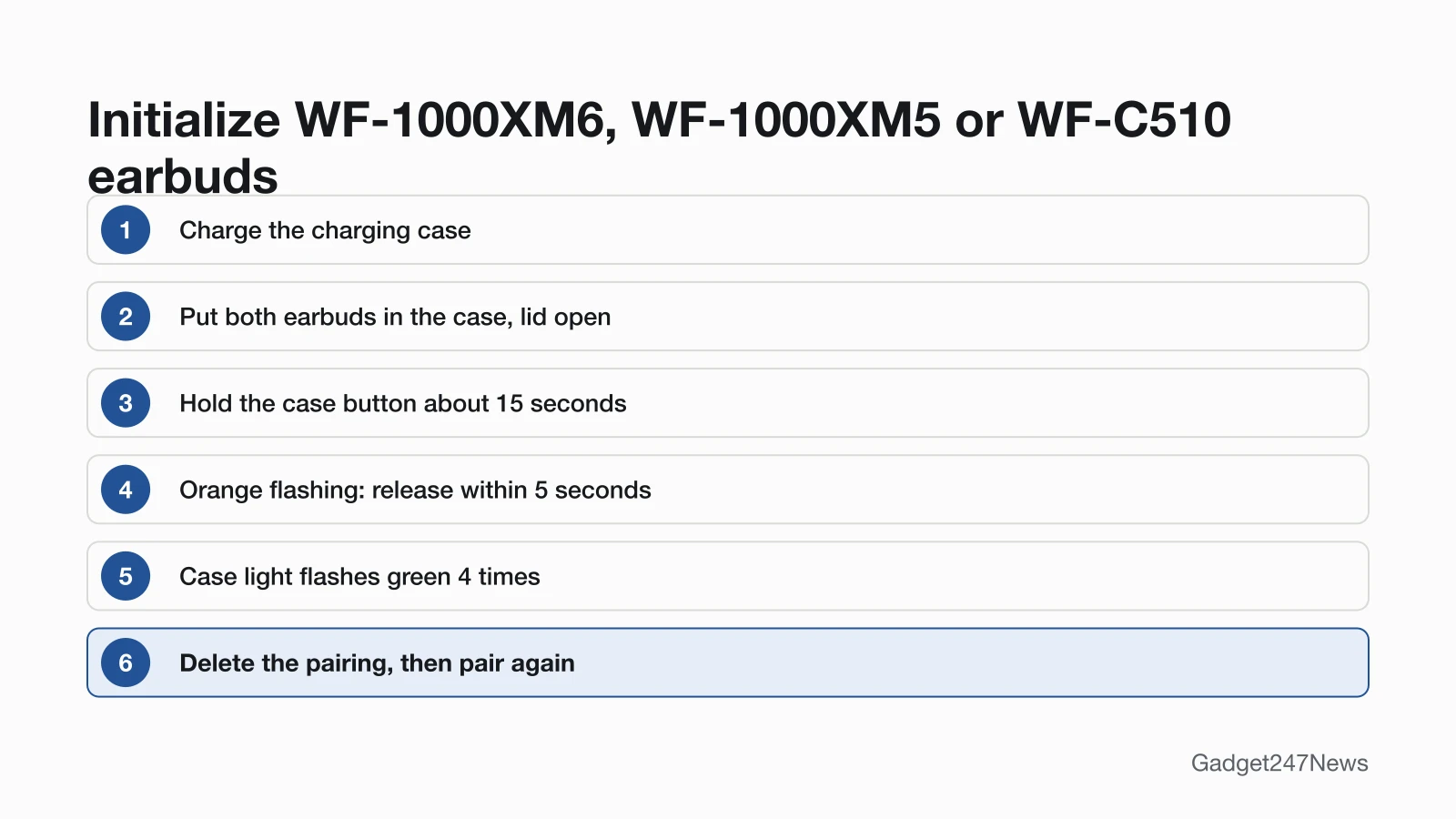
To factory reset the WF-1000XM6, WF-1000XM5 or WF-C510, hold the case button and let go within 5 seconds of the orange flashing:
- Charge the charging case.
- Put both earbuds in the case and leave the lid open.
- Press and hold the initialize button on the back of the case for about 15 seconds or more.
- When the case light starts flashing orange, release your finger within 5 seconds.
- The case light flashes green 4 times when it's done.
On the WF-1000XM5, the case light flashes blue twice in a row before the orange starts.
The WF-C500 uses the buttons on both earbuds. Hold both for about 15 seconds and release within 5 seconds of the orange flashing. When the orange lights stay on, hold both again within 10 seconds; the blue lights flash 4 times and the earbuds turn off.
Initialize From the Sony Sound Connect App
Sony lists "Initialize the headset" among the Sony | Sound Connect app's functions for the WH-1000XM6, and the WF-1000XM5 guide says "You can also initialize the headset" with the app. Neither guide gives the menu path.
How to Check the Reset Worked
A factory reset worked when the light flashes 4 times: blue on the headphones and the WF-C500, green on the other earbuds' case.
- Watch the light: if the case light doesn't flash green 4 times, Sony says "the headset has not been initialized. Try again".
- Delete the old pairing on each device the headset used.
- Pair again. With no pairing information left, the headset enters pairing mode by itself when you turn the headphones on or take the earbuds out; see How to Connect and Pair Sony Headphones With Any Device.
A soft reset skips steps 2 and 3, because your pairings stay.
If Resetting Sony Headphones Doesn't Work
A reset that won't confirm needs a charged case and a second try. If the headset resets but won't pair, see Sony headphones not connecting to your phone.
The Light Doesn't Confirm, or They Still Won't Work
Charge the case and try once more. If the headset still misbehaves, Sony says: "If the headset does not operate correctly even after initializing, consult the Sony support contact or your nearest Sony dealer." In the US, start at Sony Support.
Resetting Sony Headphones: Quick Answers
Where is the reset button on Sony earbuds?
On the WF-1000XM6, WF-1000XM5 and WF-C510, it's on the back of the charging case; use it with both earbuds inside and the lid open. The WF-C500 resets from the button on each earbud.
How do I reset Sony WF-C500 earbuds?
Reset one earbud at a time: hold its button about 20 seconds and let go when the light turns off. To initialize, hold both buttons about 15 seconds, release within 5 seconds of the orange flashing, then hold both again within 10 seconds.
Does a factory reset remove Sony software updates?
No. The WF-1000XM6, WF-1000XM5, WF-C510 and WF-C500 guides say updated software "is retained updated even if you initialize the headset." The WH-1000XM6, WH-1000XM5 and WH-CH520 pages don't mention it.
Sources
We checked this page against the pages below, most recently on . How we verify fixes
- WH-1000XM6 Help Guide: Resetting the headset (Sony, helpguide.sony.net)Official
- WH-1000XM6 Help Guide: Initializing the headset to restore factory settings (Sony, helpguide.sony.net)Official
- WH-1000XM6 Help Guide: What can I do to solve a problem? (Sony, helpguide.sony.net)Official
- WH-1000XM6 Help Guide: What you can do with the Sony | Sound Connect app (Sony, helpguide.sony.net)Official
- WH-1000XM5 Help Guide: Resetting the headset (Sony, helpguide.sony.net)Official
- WH-1000XM5 Help Guide: Initializing the headset to restore factory settings (Sony, helpguide.sony.net)Official
- WH-CH520 Help Guide: Resetting the headset (Sony, helpguide.sony.net)Official
- WH-CH520 Help Guide: Initializing the headset to restore factory settings (Sony, helpguide.sony.net)Official
- WF-1000XM6 Help Guide: Resetting the headset (Sony, helpguide.sony.net)Official
- WF-1000XM6 Help Guide: Initializing the headset to restore factory settings (Sony, helpguide.sony.net)Official
- WF-1000XM5 Help Guide: Resetting the headset (Sony, helpguide.sony.net)Official
- WF-1000XM5 Help Guide: Initializing the headset to restore factory settings (Sony, helpguide.sony.net)Official
- WF-C510 Help Guide: Resetting the headset (Sony, helpguide.sony.net)Official
- WF-C510 Help Guide: Initializing the headset to restore factory settings (Sony, helpguide.sony.net)Official
- WF-C500 Help Guide: Resetting the headset (Sony, helpguide.sony.net)Official
- WF-C500 Help Guide: Initializing the headset to restore factory settings (Sony, helpguide.sony.net)Official
- Sony Support (Sony USA) (Sony, sony.com)Official