Beats Problems and Fixes: Pairing, Battery, Sound

By Suraj Giri, Founder & Publisher. Reviewed by Suraj Giri on .
Published · 9 min read
How this page was made
- Sources. Checked against 20 official pages from Apple, Microsoft, Google and Beats, most recently on . See the sources.
- No device testing. We don't test fixes on physical devices, so nothing on this page is a hands-on result. A fact counts as verified only when it matches an official source page.
- AI use. As with every page on Gadget247News, AI tools helped research, outline, draft and edit this page, and re-read the official pages to flag facts that didn't match. The illustration at the top was generated with Runway and is labelled under the image.
- Human sign-off. Suraj Giri, Founder & Publisher, read this page and signed it off on . The site won't publish a page without that sign-off.
- Changes. The published and updated dates move only when the content changes, and every change gets a dated note. Spot an error or a fix that didn't work? Email info@gadget247news.com.
Read our AI use policy, editorial policy and corrections policy.
Most Beats headphones and earbuds problems come down to pairing, charging or a setting; start with the row that matches your symptom below. Fixes differ by model (Beats earbuds with a charging case, Beats Solo Buds, Beats headphones, Beats Flex and Beats Pill), so check your model first. Steps on each page are checked against Apple's Beats support pages, where Beats Support sends its guides and repairs. For any other brand, the guide to headphones not working routes by symptom instead.
If your Beats headphones or earbuds stopped working suddenly after an update, read the firmware section below before you reset anything. Beats that won't pair or won't play have their own page: Beats headphones not connecting.
Find Your Beats Problem: Symptom, Cause and First Fix
The table lists 12 Beats problems (9 symptoms plus 3 host and speaker rows), each with its most likely cause, the first fix from the official support pages and the page with the full steps.
| Symptom | Most likely cause | First fix | Full steps |
|---|---|---|---|
| Connect or pair Beats | Not in pairing mode, or not near the device | Near an iPhone or iPad, open the case or turn the Beats on and follow the setup animation. | how to connect and pair Beats headphones with any device |
| Connect to Android | No Fast Pair pop-up (Apple lists it for supported Beats only) | Open the case with your Beats earbuds inside (or turn on your Beats headphones) next to your Android phone and follow the setup animation, or pick them under Pair new device. | how to connect Beats headphones to Android |
| Connect to a Windows PC or laptop | Not in pairing mode, or Windows Bluetooth devices discovery not set to Advanced | Put your Beats headphones or earbuds in pairing mode, then select them under New devices in Windows 11's Manage Bluetooth devices panel (Windows 10: Add Bluetooth or other device). | how to connect Beats headphones to a Windows PC |
| Pair a Beats Pill speaker | Not in pairing mode | Press and hold the Beats Pill power button until a tone repeats, then select Beats Pill in your phone's Bluetooth settings (near an iPhone, follow the setup animation instead). | How to Pair a Beats Pill Speaker |
| Won't connect | Too far away, interference, or a stale pairing | Move your Beats within 30 feet of your phone, away from microwaves and Wi-Fi routers, then forget them in Bluetooth settings and pair them again. | Beats headphones not connecting |
| Keep disconnecting or cutting out | Distance, walls or interference | Keep your phone within 30 feet with no walls between you, away from microwaves, Wi-Fi routers and wireless speakers. | why Beats headphones keep disconnecting |
| Not charging | No power reaching them: the cable, adapter or outlet | Plug your Beats headphones, or the case with both Beats earbuds inside, into a power outlet with a USB-C cable and a compatible power adapter, then check the charging light. | Beats headphones not charging |
| Battery drains fast | Noise cancelling or Transparency left on | Turn off Active Noise Cancellation and Transparency when you don't need them, and check each battery level on your phone. | Beats headphones battery draining fast |
| Need a reset | Sound, pairing or charging faults that remain | Update the phone or computer your Beats headphones or earbuds are paired with, then hold your model's reset button or buttons for 10 to 15 seconds and pair them again. | how to reset Beats headphones |
| Won't turn on or off | Flat battery, or the wrong control | Press and hold the power button on Beats headphones (the system button on Beats Studio Pro) for one second, or take Beats earbuds out of the case. | how to turn Beats headphones on and off |
| One side silent | One earbud flat, or the balance off-center | Charge both Beats earbuds in the case (or charge your Beats headphones), then center the Balance slider in Settings > Accessibility > Audio & Visual on your iPhone. | one Beats earbud not working |
| Update firmware or won't update | Update conditions not met | Charge your Beats headphones or earbuds and keep them in Bluetooth range of an up-to-date iPhone, iPad or Mac on Wi-Fi for at least 30 minutes; on Android, tap Update in the Beats app. | how to update Beats headphones firmware |
Each first fix is the opening move on its linked page, which carries the remaining steps for each model. Pausing, muffled sound and microphone faults have no Beats page, so the one side, power and sound section below routes them.
Beats Won't Connect or Keep Disconnecting
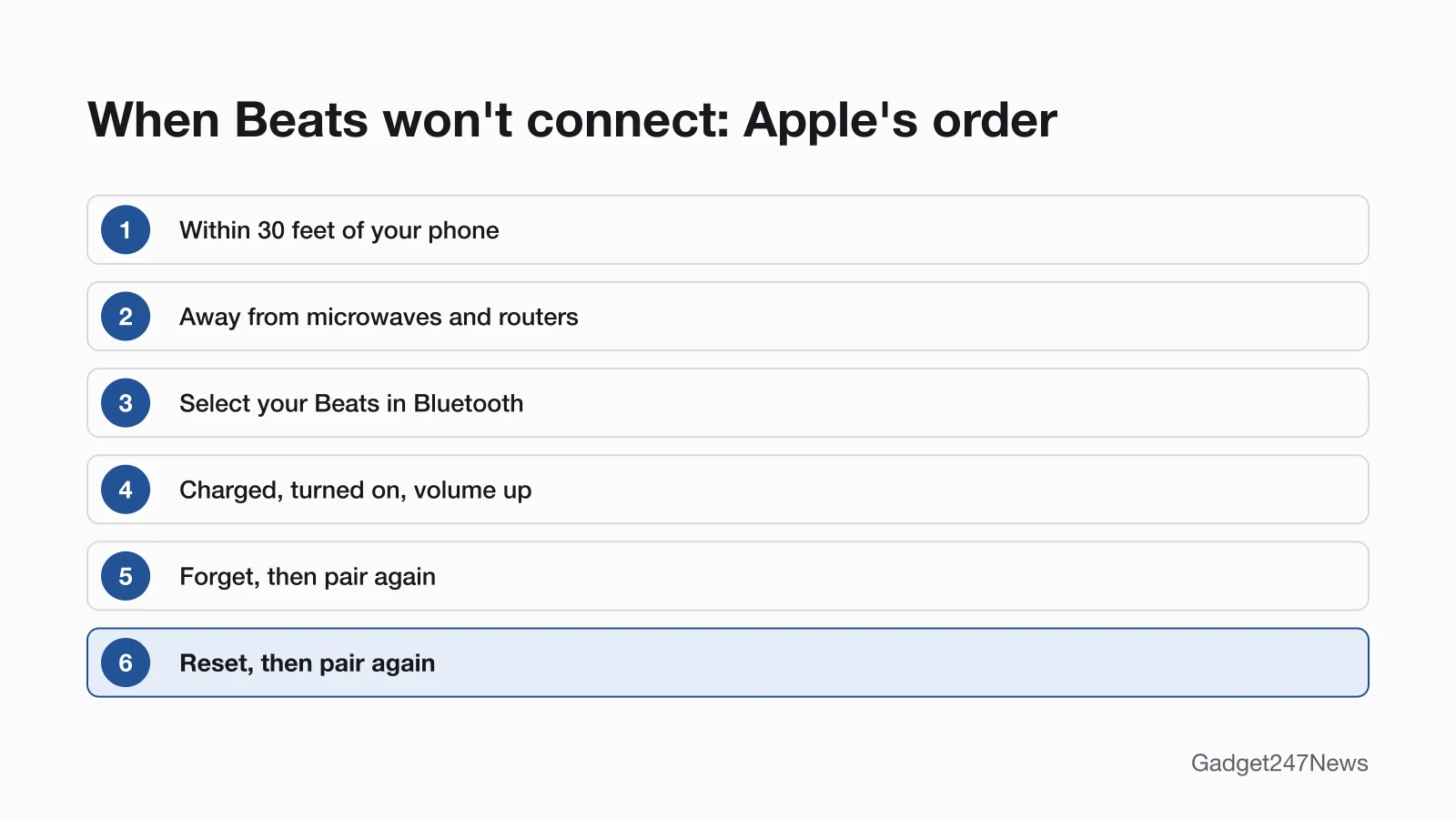
Beats that won't connect follow Apple's order: closer, away from interference, selected in Bluetooth, then forget and pair again, with a reset last. Place your Beats and your phone within 30 feet of each other, away from other Bluetooth devices, microwaves and wireless routers. Select them in Settings > Bluetooth on an iPhone, and check that both devices are charged, turned on and turned up. Still silent means forgetting them and pairing again, which how to connect and pair Beats headphones with any device covers for each phone and computer. Beats that connect and then drop out get the distance checks first, then an unpair and pair again; that order is why Beats headphones keep disconnecting.
Pairing mode depends on the model group. Earbuds with a charging case (Beats Fit Pro, Powerbeats Fit, Powerbeats Pro 2 and Beats Studio Buds +) enter it when you hold the system button with the earbuds in the open case. Beats Solo Buds need the button above the logo held until a tone repeats. Beats headphones use the power button on the right earcup (Beats Solo 4), the system button on the right earcup (Beats Studio Pro) or the Power button on the back of the left earcup (Beats 360). Beats Flex use the power button on the right control module, and Beats Pill holds its power button until a tone repeats. Syncing Beats is the same thing as pairing them. On Android, the Beats app manages settings and firmware; an iPhone needs no app, because your Beats settings sit in the Settings app under their name.
Beats Not Charging or Draining Fast
Every current Beats model charges from a power outlet with a USB-C cable and a compatible power adapter: the headphones, Beats Flex and Beats Pill directly, the earbuds through their charging case. The Powerbeats Pro 2 case can also sit on a Qi-certified charger, and Beats Solo 4 and Beats Studio Pro charge while you listen over USB-C to a supported iPhone, iPad, Mac or Android device. After you plug in, check the light, because its colors differ by model; Beats headphones not charging lists them. Each battery level shows in Settings under your Beats' name on an iPhone, or below the image of your Beats in the Beats app for Android.
Fast drain starts with the listening mode. Apple rates Beats Studio Pro at up to 24 hours of playback, and up to 40 hours with Active Noise Cancellation and Transparency turned off. Apple gives rated hours, not a battery lifespan, and says battery life "depends on device settings, environment, usage, and many other factors." Beats headphones battery draining fast covers the settings to change.
How to Reset Beats
A restart turns your Beats off and on again; after a reset, Apple says to "pair them again to your Apple or Android device." Before either, Apple's first step is to make sure the phone or computer your Beats are paired with is up to date. The reset control depends on the model:
- Beats Fit Pro, Powerbeats Fit, Beats Studio Buds + and Powerbeats Pro 2: the system button, with both earbuds in the open case.
- Beats Solo Buds: the button above the logo on both earbuds, in the open case.
- Beats Studio Pro: the system button on the right earcup.
- Beats Solo 4, Beats 360 and Beats Flex: two buttons held together.
- Beats Pill: the center button, alone to keep your paired devices or with volume down to reset its settings.
Hold times sit on the Beats reset page in the table. For other makers, see how to reset your earbuds.
One Side Silent, Power or Sound Problems
For one silent side, charge both Beats earbuds in the case, then center the Balance slider in Settings > Accessibility > Audio & Visual on your iPhone. Beats that won't turn on need a charge first; Beats 360 flash red three times and switch off when the battery is too low to turn on. Headphones and Beats Flex then start with a one-second hold of the power control, and Beats earbuds turn on when you take them out of the case. For noise cancelling, set Listening Mode to Active Noise Cancellation, Transparency or Off in iPhone Settings under your Beats' name, or on the My Beats screen of the Beats app. Playback that pauses when you remove one earbud is Automatic Ear Detection, which you can switch off in the same settings. Muffled sound on both sides and microphone faults go to the cross-brand sound and microphone guides. Beats Pill is a speaker with its own pairing and power page, linked in the table.
Which Beats Do I Have?
Your Beats model shows on your phone, and the controls confirm it:
- On an iPhone or iPad, open Settings and tap the name of your Beats at the top of the screen; on Android, open the Beats app. Apple says these screens show the model name, serial number and firmware version.
- Match the buttons to the table below. Apple's "Which Beats do I have?" page identifies each model by its design and controls and lists no model numbers.
Beats Model Identifier Table
The table lists the 10 models in Apple's current Beats guide, in Apple's order, with the control that pairs and resets each one and how it charges.
| Model | Type | Released | Pairing and reset control | Charging |
|---|---|---|---|---|
| Beats 360 | Headphones | 2026 | Power button on the left earcup; with the Listening mode button to reset | USB-C cable |
| Beats Solo 4 | Headphones | 2024 | Power button on the right earcup; with volume down to reset | USB-C cable; the 3.5 mm cable plays without battery power |
| Beats Studio Pro | Headphones | 2023 | System button on the right earcup | USB-C cable; the 3.5 mm cable plays without battery power |
| Beats Fit Pro | Earbuds with wingtips | 2021 | System button, earbuds in the open case | Charging case, USB-C |
| Beats Flex | Earphones with control modules | 2020 | Power button on the right control module; with the volume button to reset | USB-C cable |
| Powerbeats Fit | Earbuds with wingtips | 2025 | System button, earbuds in the open case | Charging case, USB-C |
| Powerbeats Pro 2 | Earbuds with earhooks | 2025 | System button on the case | Charging case, USB-C or a Qi-certified charger |
| Beats Solo Buds | Earbuds | 2024 | Button above the logo on the earbuds; a tone repeats in pairing mode | Charging case, USB-C |
| Beats Studio Buds + | Earbuds | 2023 | System button on the case | Charging case, USB-C |
| Beats Pill | Speaker | 2024 | Power button to pair; center button to reset | USB-C cable |
Solo3 Wireless, Studio3 Wireless, the original Beats Studio Buds and Powerbeats Pro aren't in Apple's current guide, so their steps may differ; Apple points owners of earlier Beats to beatsbydre.com/support.
Beats Firmware Updates and Known Issues
Beats firmware installs itself on Apple devices: Apple says "firmware updates are delivered automatically (over the air)." Its conditions are an iPhone, iPad or Mac on the latest software and on Wi-Fi, Bluetooth on, your Beats connected and fully charged or on power, earbuds in the closed case or other models turned off, then "wait at least 30 minutes" with them in Bluetooth range. On Android, "updates are made available in the Beats app", where an Update button appears when one is ready. If your Beats stopped working suddenly after an update, compare your version with Beats headphone updates on the Update Tracker, where we list current versions and known issues. Get an email when a Beats update breaks something, and when it's fixed.
When to Contact Beats Support
Contact Beats Support once the first fix and its linked page haven't worked, in this order:
- Try the next fix in the table for your symptom.
- Reset your Beats with your model's control from How to Reset Beats; you'll pair them again afterwards.
- Contact Beats Support at beatsbydre.com/support, which sends its user guide, service options and AppleCare+ links to Apple.
- Check repair or warranty options: Apple repairs Beats in person at a Genius Bar or Apple Authorized Service Provider, by mail in a prepaid box, or through Express Replacement with AppleCare. Beats headphones repair explains each route.
Try the fix for your symptom first; for damage or a worn battery, start a request at Apple's Beats service page.
Started after an update? Check the Update Tracker for known issues.
Sources
We checked this page against the pages below, most recently on . How we verify fixes
- Which Beats do I have? (Beats User Guide) (Apple, support.apple.com)Official
- Pair Beats (Beats User Guide) (Apple, support.apple.com)Official
- If you can't connect to your wireless Beats product (Apple, support.apple.com)Official
- If the sound from your wireless headphones cuts out or is distorted (Apple, support.apple.com)Official
- Reset Beats (Beats User Guide) (Apple, support.apple.com)Official
- Charge Beats headphones, earphones, and speakers (Beats User Guide) (Apple, support.apple.com)Official
- About charging and playback time (Beats User Guide) (Apple, support.apple.com)Official
- Check the charge status (Beats User Guide) (Apple, support.apple.com)Official
- Switch between listening modes using your Apple or Android device (Beats User Guide) (Apple, support.apple.com)Official
- Update Beats (Beats User Guide) (Apple, support.apple.com)Official
- Get information about your Beats (Beats User Guide) (Apple, support.apple.com)Official
- Install and set up the Beats app for Android (Beats User Guide) (Apple, support.apple.com)Official
- Use your Beats Fit Pro or Powerbeats Fit (Beats User Guide) (Apple, support.apple.com)Official
- Use your Beats 360 (Beats User Guide) (Apple, support.apple.com)Official
- Use your Beats Solo 4 (Beats User Guide) (Apple, support.apple.com)Official
- If your left or right AirPod isn't working (iPhone Balance setting) (Apple, support.apple.com)Official
- Pair a Bluetooth device in Windows (Microsoft Support) (Microsoft, support.microsoft.com)Official
- Find & set up Bluetooth devices near your Android device (Android Help) (Google, support.google.com)Official
- Official Beats Support (Beats, beatsbydre.com)Official
- Apple Service and Repair for Beats (Apple, support.apple.com)Official