How to Pair (Sync) a Beats Pill Speaker

By Suraj Giri, Founder & Publisher. Reviewed by Suraj Giri on .
Published · 4 min read
How this page was made
- Sources. Checked against 9 official pages from Apple and Microsoft, most recently on . See the sources.
- No device testing. We don't test fixes on physical devices, so nothing on this page is a hands-on result. A fact counts as verified only when it matches an official source page.
- AI use. As with every page on Gadget247News, AI tools helped research, outline, draft and edit this page, and re-read the official pages to flag facts that didn't match. The illustration at the top was generated with Runway and is labelled under the image.
- Human sign-off. Suraj Giri, Founder & Publisher, read this page and signed it off on . The site won't publish a page without that sign-off.
- Changes. The published and updated dates move only when the content changes, and every change gets a dated note. Spot an error or a fix that didn't work? Email info@gadget247news.com.
Read our AI use policy, editorial policy and corrections policy.
To pair a Beats Pill, press and hold the power button until a tone repeats, then select Beats Pill in your device's Bluetooth settings; next to an iPhone, a setup animation does the work for you. To turn it off, press the power button on the top of the speaker for 3 seconds, then release. If your headphones or earbuds are the problem, start from Beats headphones not working.
To pair earbuds or headphones from any brand instead, follow the steps to pair Bluetooth headphones.
How to Pair a Beats Pill With an iPhone or iPad
To pair a Beats Pill with an iPhone or iPad, turn it on next to the device and follow the setup animation:
- Go to Settings > Bluetooth and make sure Bluetooth is on.
- Turn on your Beats Pill and hold it next to your iPhone or iPad.
- When the setup animation appears, follow the onscreen instructions.
Once it's set up on one Apple device, it pairs automatically with your other devices signed in to the same Apple Account. No animation means pairing manually, with the steps below.
How to Pair a Beats Pill With an Android Phone
To pair a Beats Pill with an Android phone, hold the power button until the light flashes white and let Fast Pair finish the job:
- Make sure Bluetooth is turned on in Settings > Connections.
- Press and hold the Beats Pill power button until a tone sounds and the light flashes white.
- When the setup animation appears, follow the onscreen instructions.
- If no animation appears, put the speaker in pairing mode, go to Settings > Connections > Bluetooth, tap Beats Pill, then tap Pair. The Beats app also offers Connect Your Beats.
How to Put a Beats Pill in Pairing Mode (Mac, PC and Other Devices)
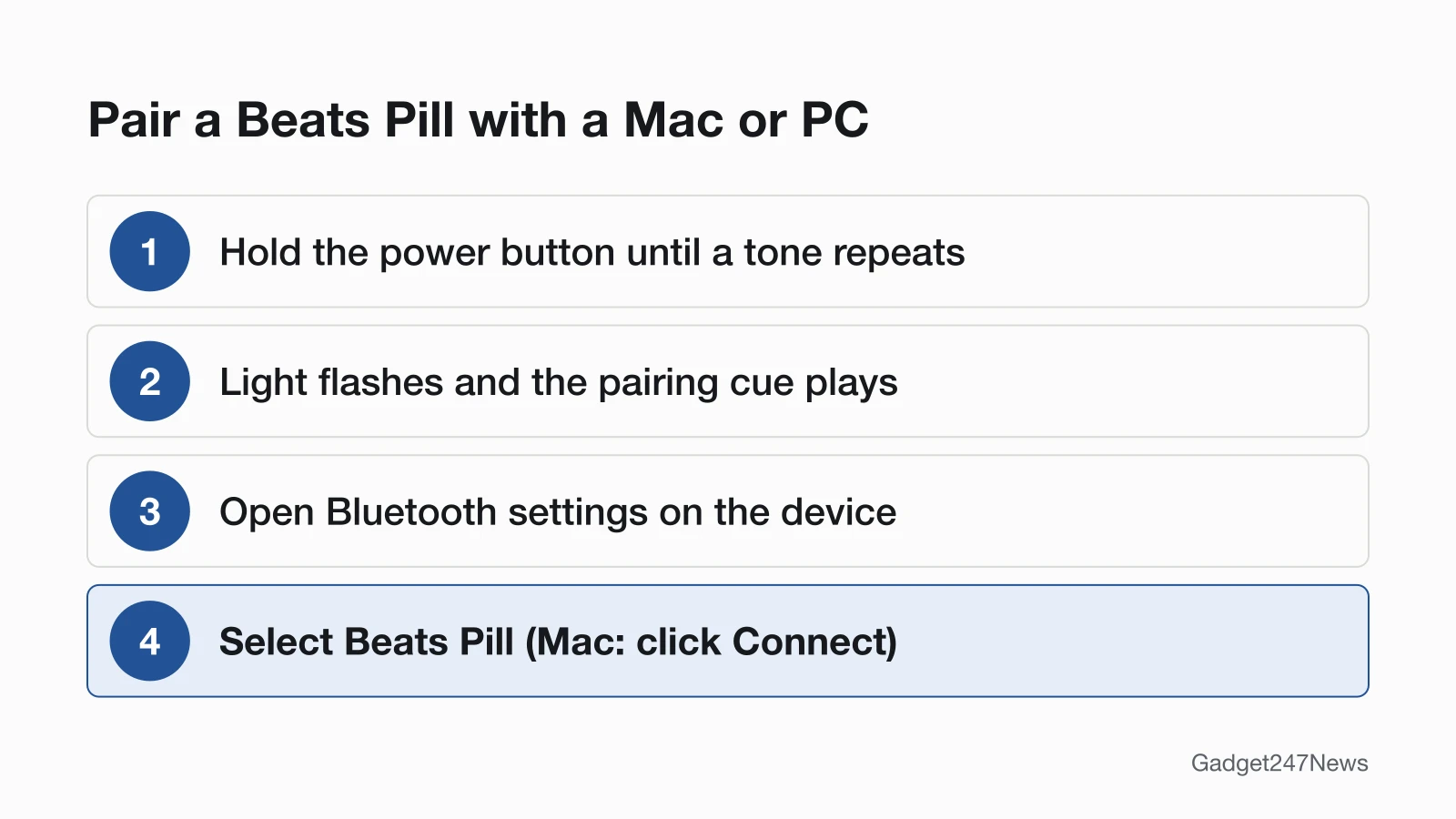
To put a Beats Pill in pairing mode, press and hold the power button until a tone repeats; the light flashes and the speaker plays a pairing cue. Then add it from the other device:
- Press and hold the power button until a tone repeats.
- Open the device's Bluetooth settings. Mac: Apple menu > System Settings > Bluetooth. Windows 11: turn on Bluetooth in Bluetooth & devices, then open Manage Bluetooth devices from the Bluetooth quick setting.
- Select Beats Pill. On a Mac, click Connect; on Windows 11, select it under New devices, then Done.
Any other Bluetooth device follows its own pairing instructions. Syncing a Beats Pill with a phone or computer is this same pairing. For Beats headphones or earbuds, see how to connect and pair Beats headphones on each device.
How to Turn a Beats Pill On and Off
To turn a Beats Pill on or off, use one press of the power button:
- Press the power button on the top of the speaker for 3 seconds, then release.
- Watch the light: it flashes white if the battery is more than 10 percent charged, and red if it's less than 10 percent.
To check the battery without switching it off, briefly press the power button: green means Beats Pill has power, red means the battery is low. Apple lists no idle power-off timer for Beats Pill. For headphones, see how to switch off Beats headphones.
How to Check Your Beats Pill Is Connected
Your Beats Pill is connected when your device's Bluetooth list shows it and the sound comes out of it:
- Open Bluetooth settings and check that Beats Pill is listed as connected.
- Play something from an audio app, such as a song in the Music app or a podcast episode.
If Your Beats Pill Won't Connect
Apple's order for a Beats Pill that won't connect starts with distance: keep it and your phone within 30 feet of each other, away from other Bluetooth devices, microwaves and wireless routers. Check that both are charged and turned on, with the volume up. Then forget the speaker in Bluetooth settings, pair it again, and reset it last. The same order applies when Beats headphones won't connect.
How to Reset a Beats Pill
Beats Pill has two resets, both on the center button:
- Keep your settings (paired devices and any custom name): hold the center button for at least 10 seconds.
- Reset the settings too: hold the center button and the volume down button for at least 15 seconds.
When it's ready, the pairing cue plays briefly and the light flashes white; pair it again. The steps to reset Beats headphones cover the other models.
Charging and Battery Life
Charge Beats Pill from a power outlet with a USB-C cable and a compatible power adapter. The light turns green while it charges, then shines white for 10 seconds and turns off when charging is complete. Apple rates it at up to 24 hours of playback, and a 10-minute charge gives up to 2 hours.
Pair Two Beats Pills (Amplify or Stereo)
Two Beats Pills play the same audio in Amplify mode, or split left and right channels in Stereo mode. With one speaker connected, turn on the second, then hold the center button on each for five seconds, until the light next to the power button on both turns blue. For Stereo, hold the center and volume up buttons on the speaker you want as the left channel until its light turns blue.
Beats Pill: Quick Answers
How do I turn off my Beats Pill?
Press the power button on top of your Beats Pill for 3 seconds and let go; the same press switches it back on. A white flash means more than 10 percent battery, a red flash less.
How long does the Beats Pill battery last?
A full charge gives a Beats Pill up to 24 hours of playback, according to Apple, and 10 minutes on the charger adds up to 2 hours. Real hours depend on settings, environment and use.
Why won't my Beats Pill connect?
Check pairing mode first by holding the power button until a tone repeats. Then bring the speaker within 30 feet, forget it in Bluetooth settings and pair again; reset it last.
Sources
We checked this page against the pages below, most recently on . How we verify fixes
- Pair Beats (Beats User Guide) (Apple, support.apple.com)Official
- Use your Beats Pill (Beats User Guide) (Apple, support.apple.com)Official
- Reset Beats (Beats User Guide) (Apple, support.apple.com)Official
- Charge Beats headphones, earphones, and speakers (Beats User Guide) (Apple, support.apple.com)Official
- About charging and playback time (Beats User Guide) (Apple, support.apple.com)Official
- Check the charge status (Beats User Guide) (Apple, support.apple.com)Official
- Which Beats do I have? (Beats User Guide) (Apple, support.apple.com)Official
- If you can't connect to your wireless Beats product (Apple, support.apple.com)Official
- Pair a Bluetooth device in Windows (Microsoft Support) (Microsoft, support.microsoft.com)Official