How to Reset Beats

By Suraj Giri, Founder & Publisher. Reviewed by Suraj Giri on .
Published · 4 min read
How this page was made
- Sources. Checked against 8 official pages from Apple, most recently on . See the sources.
- No device testing. We don't test fixes on physical devices, so nothing on this page is a hands-on result. A fact counts as verified only when it matches an official source page.
- AI use. As with every page on Gadget247News, AI tools helped research, outline, draft and edit this page, and re-read the official pages to flag facts that didn't match. The illustration at the top was generated with Runway and is labelled under the image.
- Human sign-off. Suraj Giri, Founder & Publisher, read this page and signed it off on . The site won't publish a page without that sign-off.
- Changes. The published and updated dates move only when the content changes, and every change gets a dated note. Spot an error or a fix that didn't work? Email info@gadget247news.com.
Read our AI use policy, editorial policy and corrections policy.
For sound, pairing or charging problems, Apple says to update the device your Beats are paired with first, then reset them. Hold your model's reset button or buttons for 10 or 15 seconds, then pair again. For other faults, see Beats headphones fixes.
Another brand? See how to reset earbuds for AirPods, Galaxy Buds and others.
Restart vs Reset: What's the Difference?
A restart turns your Beats off and on; a factory reset means pairing them again afterwards.
| Action | What it does | When to use it |
|---|---|---|
| Restart | Turns your Beats off and on with the power control | First, for any glitch |
| Factory reset | Button hold of 10 or 15 seconds; you pair again afterwards. The full Beats Pill reset also clears its settings | When sound, pairing or charging problems remain |
Apple's Reset Beats page has no separate "soft reset", so a restart is the soft option; only Beats Pill has a reset that keeps your settings.
How to Restart (Soft Reset) Beats
To restart Beats, turn them off and on again:
- Turn them off. Beats Studio Pro: press and hold the system button on the right earcup for one second. Beats Solo 4, Beats 360, Beats Flex: press and hold the power button for one second (Beats Flex: right control module; Beats 360: left earcup).
- Turn them on the same way. Beats earbuds turn on when you take them out of the charging case (Apple gives no off step for earbuds).
Every button, including Beats Pill's, is on the Beats headphones power controls page.
How to Factory Reset Beats Earbuds
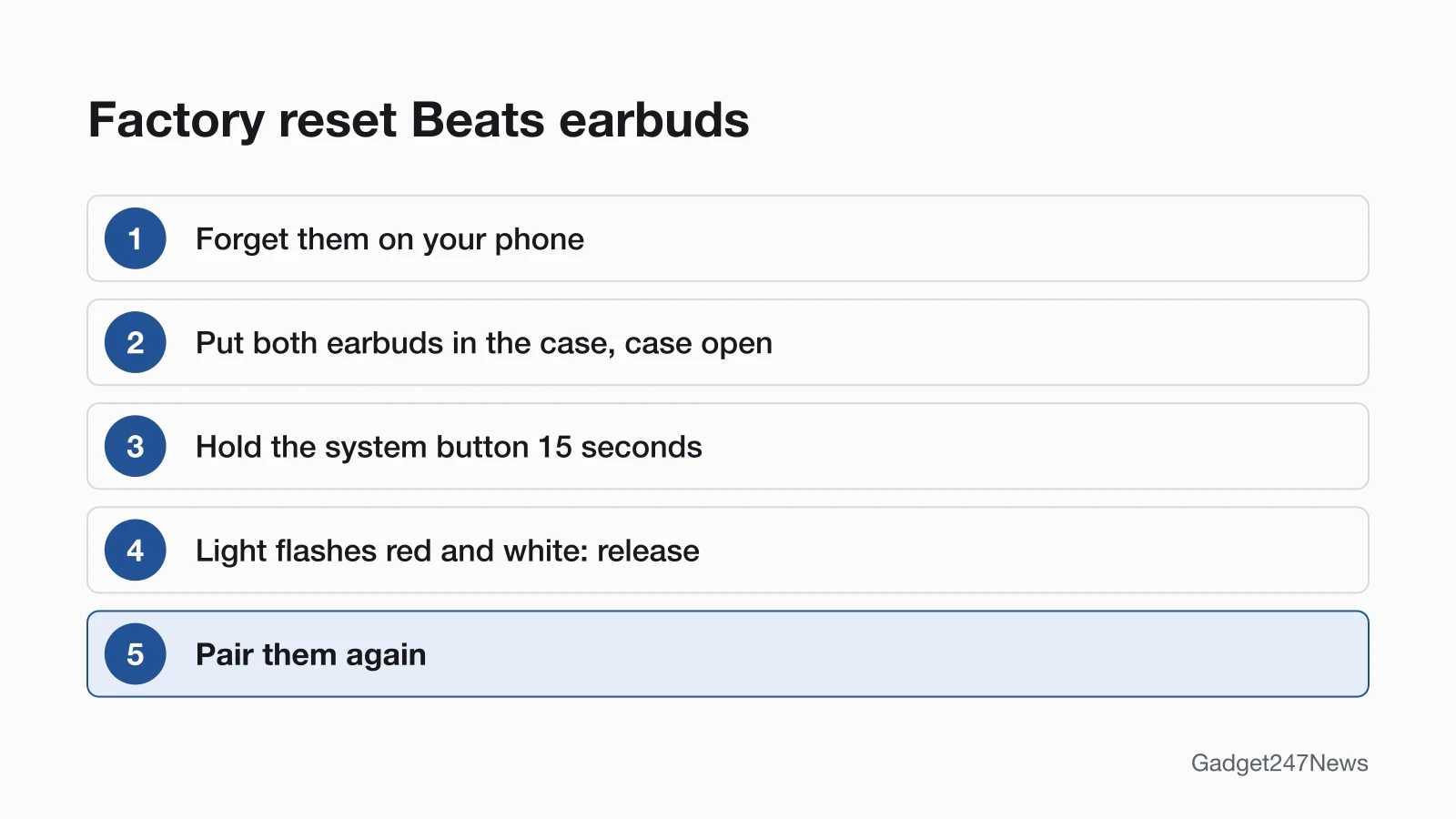
To factory reset Beats earbuds, hold the case's system button for 15 seconds (Beats Solo Buds: both earbud buttons for 10):
- Forget them on your phone. iPhone: Settings, tap your Beats, then Forget This Device. Android: Settings > Connections > Bluetooth, tap the Settings button next to your Beats, then Unpair.
- Put both earbuds in the charging case and leave the case open.
- Beats Fit Pro, Powerbeats Fit, Beats Studio Buds +, Powerbeats Pro 2: press and hold the system button for 15 seconds, until the light flashes red and white. Beats Solo Buds: press and hold the button above the "b" logo on both earbuds for at least 10 seconds.
- Release the button or buttons.
- Pair them again.
On iPhone, Forget This Device also removes the Beats from your other devices on the same Apple Account.
How to Factory Reset Beats Headphones and Beats Flex
To factory reset Beats headphones or Beats Flex, forget them on your phone, then hold your model's buttons:
| Model | Buttons | Hold | What happens |
|---|---|---|---|
| Beats Solo 4 | Volume down (left earcup) and power button (right earcup) | 10 seconds | Light flashes red and white; release |
| Beats Studio Pro | System button (right earcup) | 10 seconds, then release | All five lights flash white, then one flashes red, three times; they turn on by themselves |
| Beats 360 | Power button and Listening mode button (left earcup) | 10 seconds | Status light flashes five times; release |
| Beats Flex | Volume button (left control module) and power button (right control module) | 15 seconds | Light flashes; release |
Then pair them again. Solo3 Wireless, Studio3 Wireless, the original Beats Studio Buds and Powerbeats Pro aren't on Apple's current Reset Beats page.
How to Reset a Beats Pill
To reset a Beats Pill, choose one of two button holds:
- Keep your settings (paired devices and any custom name): press and hold the center button for at least 10 seconds.
- Reset everything: press and hold the center button and the volume down button for at least 15 seconds.
When the speaker is reset and ready, the pairing cue plays briefly and the light flashes white. Apple's pages we read list no Beats app reset. To connect it again, follow How to Pair (Sync) a Beats Pill Speaker.
How to Check the Reset Worked
To check a Beats reset worked, look for your model's signal, then pair:
- Watch the light: red and white on cased earbuds and Beats Solo 4, five flashes on Beats 360, white on Beats Pill. Apple names no light for Beats Solo Buds, so move on to pairing.
- On Beats Studio Pro, the headphones turn on by themselves after the reset.
- Pair again. Near an iPhone, open the case or turn them on and follow the setup animation; elsewhere, use pairing mode. Full steps: pair Beats headphones.
If Resetting Beats Doesn't Work
If the reset worked but your Beats still won't pair, the page for when Beats headphones won't connect has Apple's full troubleshooting order.
The Light Doesn't Flash or They Still Won't Pair
Charge them first; Apple's troubleshooting wants both devices "charged and turned on". On Beats 360, three red flashes and then off means the battery is too low to turn on; charge them for at least 5 minutes. Then hold the buttons for the full time and try once more. If resetting still fails, Apple's Reset Beats page says to contact Apple Support.
Resetting Beats: Quick Answers
How do I reset Beats Solo 4?
Press and hold the volume down button on the left earcup and the power button on the right earcup for 10 seconds. When the light flashes red and white, release both buttons, then pair them again.
How do I factory reset Beats Studio Buds?
For Beats Studio Buds +, place both earbuds in the charging case, leave it open, and press and hold the system button on the case for 15 seconds, until the light flashes red and white. The original Beats Studio Buds aren't on Apple's current Reset Beats page.
How do I reset Beats Solo 3?
Apple's Solo3 Wireless page sends its reset link to the current Reset Beats page, which no longer lists Solo3, so we don't print a button combination. Apple does give the restart: press and hold the power button for 1 second to turn them off, then on. For a full reset, contact Apple Support.
Sources
We checked this page against the pages below, most recently on . How we verify fixes
- Reset Beats (Beats User Guide) (Apple, support.apple.com)Official
- Unpair Beats (Beats User Guide) (Apple, support.apple.com)Official
- Turn on your Beats (Beats User Guide) (Apple, support.apple.com)Official
- Use Beats Studio Pro (Beats User Guide) (Apple, support.apple.com)Official
- Use Beats 360 (Beats User Guide) (Apple, support.apple.com)Official
- Pair Beats (Beats User Guide) (Apple, support.apple.com)Official
- If you can't connect to your wireless Beats product (Apple, support.apple.com)Official
- Set up and use your Solo3 Wireless headphones (Apple, support.apple.com)Official