Earbuds Not Charging? Case and Battery Fixes

By Suraj Giri, Founder & Publisher. Reviewed by Suraj Giri on .
Published · 8 min read
How this page was made
- Sources. Checked against 18 official pages from Apple, Samsung, Google, Sony, Bose, JBL and Skullcandy, most recently on . See the sources.
- No device testing. We don't test fixes on physical devices, so nothing on this page is a hands-on result. A fact counts as verified only when it matches an official source page.
- AI use. As with every page on Gadget247News, AI tools helped research, outline, draft and edit this page, and re-read the official pages to flag facts that didn't match. The illustration at the top was generated with Runway and is labelled under the image.
- Human sign-off. Suraj Giri, Founder & Publisher, read this page and signed it off on . The site won't publish a page without that sign-off.
- Changes. The published and updated dates move only when the content changes, and every change gets a dated note. Spot an error or a fix that didn't work? Email info@gadget247news.com.
Read our AI use policy, editorial policy and corrections policy.
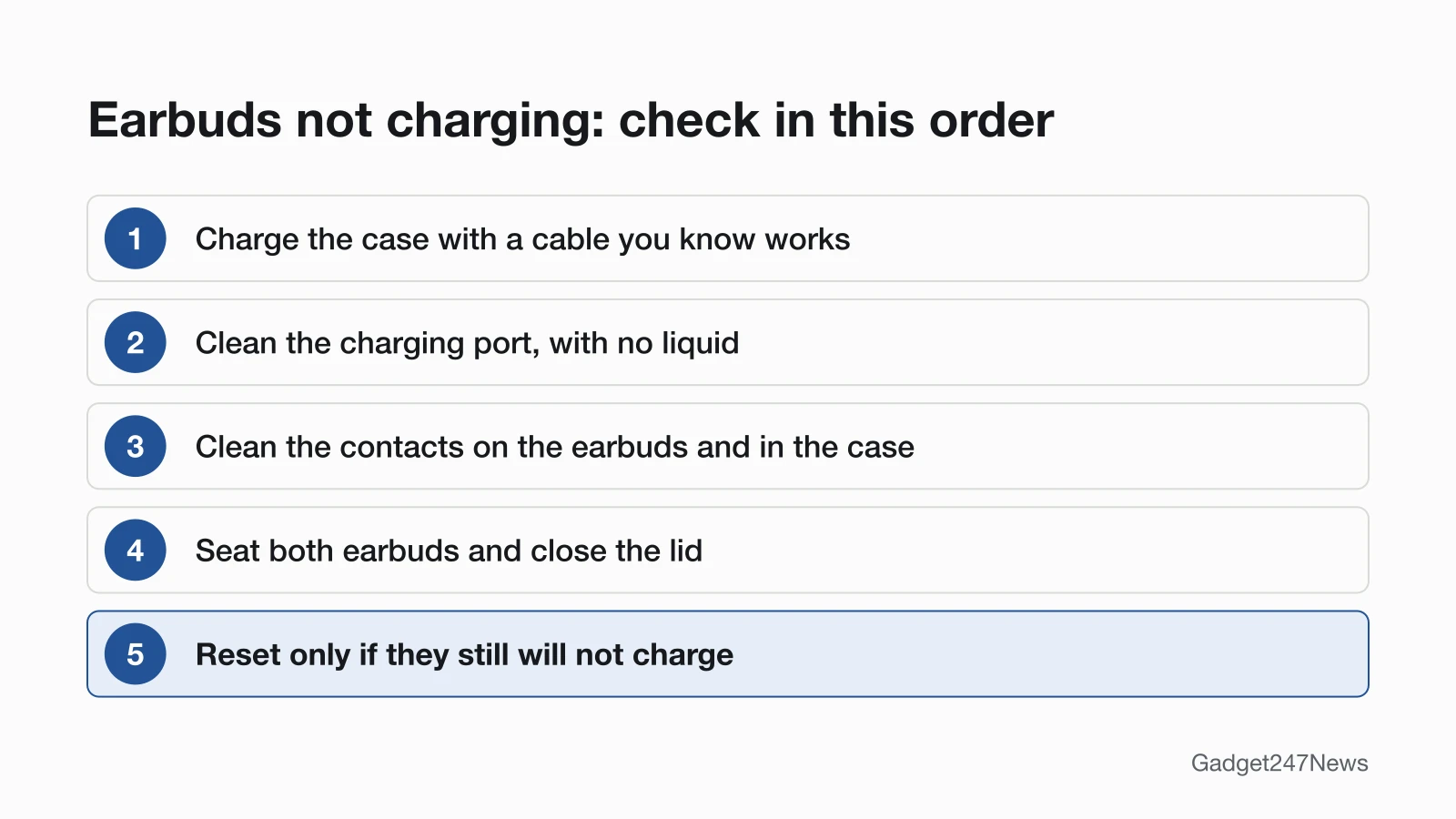
Earbuds usually stop charging because the case itself is flat, or dirt on the charging contacts or port blocks the connection. Charge the case with a cable you know works, clean the contacts on the earbuds and inside the case, then seat both earbuds again. With true wireless earbuds, the case is the battery, so start there. Other faults are routed from the earbuds and Headphones Not Working hub.
A flat case can make healthy earbuds look dead. Skullcandy says that when the case battery is completely dead, the earbuds won't start charging in it and won't power on when you take them out, so check the case before you treat it as a power fault. AirPods owners can go straight to AirPods Not Charging. If only one side charges, check that earbud's contacts first; when that side also plays nothing, the guide to sound from only one earbud takes over.
Find Your Problem: What Isn't Charging?
The table covers six charging symptoms, with the most likely cause and the first fix for each. Rows marked "below" are answered on this page.
| Symptom | Most likely cause | First fix | Full steps |
|---|---|---|---|
| Case won't charge | Cable, adapter or a dirty port | Try another cable and adapter and charge the case for at least 15 minutes. (Apple's time for AirPods; other brands, see the brand table) | Below; AirPods: AirPods Case Not Charging |
| Earbuds won't charge in the case | Dirty contacts, or an earbud not seated | Clean the contacts on the earbuds and in the case, then reseat them. | Below |
| Only one earbud charges | Dirt on that earbud's contacts | Clean that earbud's contacts and reseat it. | Below |
| Case won't charge on a wireless charger | The case's position on the charger | Reposition the case on the charger. | Below |
| Over-ear headphones won't charge | Cable or port | Try another cable and power source. | Below; AirPods Max: AirPods Max Not Turning On |
| Earbuds seem dead or won't turn on | Fully drained battery | Leave them charging in the case, then try again. | Below: revive a dead earbud |
Each first fix is the opening step. The sections below give the rest of the order, starting with the case.
Charging Case Not Charging?
A charging case that won't charge usually has a loose cable, a weak power source or debris in its charging port. The minimum charge time is brand-specific: Apple says to charge AirPods and their case for at least 15 minutes, and Google says to charge Pixel Buds for at least 30 minutes before you pair them again. Check these three things first:
- Plug the cable firmly into the case and into a USB power adapter, and plug the adapter into a working outlet (Apple's check for AirPods).
- Clear debris from the charging port with a clean, dry, soft-bristled brush, and don't get any liquid in the charging port (Apple's rule for AirPods cases).
- Place a wireless-charging AirPods case on the charger with its status light facing up, and reposition it if the light doesn't turn on; Google gives the same reposition step for Pixel Buds cases.
Samsung says to place a Galaxy Buds case directly on the center of a wireless charging pad. Keep the lid closed while the earbuds charge: Sony and Bose both say a closed lid saves the case's battery. Heat and cold matter too, and Bose says to let earbuds or a case that got very hot or cold return to room temperature before you charge again.
Earbuds Not Charging in the Case?
Earbuds that won't charge inside a working case are usually not seated properly, or their charging contacts are dirty. Samsung says that if the earbuds aren't fully in their correct spots, the charging contacts won't connect, and that dust, wax or other debris builds up on the contacts over time. Sony says the same for the WF-1000XM5: earbuds floating in the case may not charge. Wipe the contacts on the earbuds and in the case with a dry, soft cloth, as Google advises for Pixel Buds. Loose eartips stop an earbud seating too, so Google says to check the eartips are securely attached; on Pixel Buds, the case light blinks when each earbud sits correctly.
Only One Earbud Charging?
When only one earbud charges, clean that earbud's contacts and the matching pins in the case, then reseat it. JBL says charging problems are almost always caused by dirt on the metal charging contacts, which sweat, skin grease or earwax can contaminate. Some difference between sides is normal: Sony says one WF-1000XM5 earbud works as the main unit and uses its battery faster, so the two sides can take different times to charge. If one side still won't charge after cleaning, use the one-earbud guide linked above.
How to Check Your Earbuds' Battery on iPhone
To check AirPods battery on iPhone, open the case lid, go to Settings > Bluetooth, tap your AirPods, then tap the Info button next to them. On a Mac, open the lid, hold the AirPods close and check Sound in Control Center. The AirPods case light also reports charge: green means fully charged, and amber means less than one full charge remains. Apple's Beats guide says Beats headphones and earbuds show their charge level on iPhone too.
Can You Charge Earbuds Without the Case?
True wireless earbuds charge through their case. Apple's instruction for AirPods is to put them in the case, which holds multiple full charges, and Sony charges WF-1000XM5 earbuds by setting them into the charging case. None of the support pages we read describes a way to charge the earbuds without it. A lost case is replaceable: Apple says a lost AirPods case can be ordered as a replacement.
Over-Ear Headphones Not Charging?
Over-ear headphones have no charging case, so the cable, the port and the power source are the whole charging path. Bose says to make sure both ends of the USB cable are securely connected, then try a different wall charger, cable or power source. Sony says the WH-1000XM6 won't finish charging through a USB hub and can't charge from a computer in sleep mode. AirPods Max charge by cable plugged into the bottom-right earphone, and Apple says to charge them for at least 5 minutes.
Not Charging? Fixes by Brand
Exact steps vary by maker, so each row gives the brand's first fix and links to its charging, battery drain and power pages. Each first fix comes from that brand's own support pages or owner's guide.
| Brand | First fix | Not charging | Battery draining | Turn on and off |
|---|---|---|---|---|
| AirPods | Clean the case's charging port, put both AirPods in the case, close the lid and charge it by cable for at least 15 minutes. | AirPods Not Charging | AirPods Battery Draining Fast | How to Turn AirPods On and Off |
| Beats | Plug your Beats headphones, or the case with both Beats earbuds inside, into a power outlet with a USB-C cable and a compatible power adapter, then check the charge level on your phone. | Beats headphones charging fixes | Beats headphones battery drain | turn Beats headphones on and off |
| Samsung Galaxy Buds | Clean the charging contacts on the buds and case, then charge with the included USB cable and a Samsung-approved wall adapter. | Samsung Galaxy Buds charging fixes | Samsung Galaxy Buds battery drain | turn Samsung Galaxy Buds on and off |
| Google Pixel Buds | Wipe the charging contacts with a dry, soft cloth, then charge for at least 30 minutes. | Pixel Buds Not Charging | No page yet | No page yet |
| Sony | Plug the USB-C cable into a wall USB adapter, not a USB hub or a sleeping computer, and for earbuds seat both firmly in the case and close the lid. | Sony Headphones Not Charging | Sony Headphones Battery Draining Fast | How to Turn Sony Headphones On and Off |
| Bose | Wipe the charging contacts and seat both earbuds until they snap into the case (Bose headphones: reconnect both ends of the USB-C cable), then try another cable and wall charger. | Bose Headphones Not Charging | Bose Headphones Battery Draining Fast | How to Turn Bose Headphones On and Off |
| JBL | Clean the metal charging contacts on both earbuds and inside the case with a cotton swab lightly dampened with rubbing alcohol, let them dry, then charge again. | JBL Earbuds Not Charging | No page yet | How to Turn JBL Earbuds On and Off |
| Skullcandy | Clear any debris from the charging pins, check the ear gels aren't stopping both earbuds from sitting correctly in the case, then charge the case by USB-C and check its battery light. | Skullcandy Earbuds Not Charging | No page yet | How to Turn Skullcandy Earbuds On and Off |
The rubbing-alcohol method is JBL's own, and JBL says the case must be completely dry before you close it. For other brands, keep liquid away from the contacts and port: Apple's rule is "Don't get any liquid in the charging ports."
How to Revive a Dead Earbud
To revive a dead earbud, charge the case first, clean the contacts, then seat the earbud and leave it charging. The wait is brand-specific: at least 15 minutes for AirPods and their case (Apple), at least 30 minutes for Pixel Buds (Google), and at least 10 minutes for a Galaxy Buds case after you reconnect the charger (Samsung). If it still shows no charge, reset it, the step both Apple and Google put after charging, then contact the maker. The steps to factory reset earbuds cover each brand.
Battery or Charging Changed After an Update?
A software update can change battery life for a short time. Apple says that immediately after an operating system update on its devices, particularly a major release, you might notice a temporary impact on battery life and thermal performance. For AirPods firmware, Apple says updates are delivered automatically while your AirPods are charging and in Bluetooth range of your iPhone, iPad or Mac that's connected to Wi-Fi. Keep the case charging near your phone. If the earbuds also stopped pairing after the update, see Bluetooth headphones not connecting, and check earbud updates on the Update Tracker for known issues. Get an email when an earbud update breaks something, and when it's fixed.
How Long Do Earbud Batteries Last?
None of the support pages we read gives a lifespan figure for earbud batteries. They do say batteries wear: Apple designed Optimized Battery Charging on AirPods Pro and AirPods 3 or later to reduce the wear on the battery and improve its lifespan. Sony's WH-1000XM6 guide says the battery should be replaced if its usage hours decrease significantly, and it advises charging a stored headset once every 6 months to avoid over-discharge. For AirPods, read How Long Do AirPods Last? Battery Lifespan Explained and the options for AirPods battery replacement.
Still Not Charging? When to Contact the Manufacturer
Contact the maker when the case, the contacts and the brand guide have all been checked, in this order:
- Try the next fix: one earbud not working, if one side still won't charge or play.
- Reset your earbuds: use the factory reset earbuds steps linked above (you'll need to pair them again afterwards).
- Contact the maker's support: the official Apple, Samsung, Google, Sony, Bose, JBL and Skullcandy pages we checked are listed under Sources at the end of this page. Have your model name ready.
- Check repair or warranty options on the maker's official service page.
Started after an update? Check the Update Tracker for known issues.
Sources
We checked this page against the pages below, most recently on . How we verify fixes
- If your AirPods won't charge (Apple, support.apple.com)Official
- Charge your AirPods (Apple, support.apple.com)Official
- How to clean your AirPods (Apple, support.apple.com)Official
- About firmware updates for AirPods (Apple, support.apple.com)Official
- About Apple software updates (Apple, support.apple.com)Official
- Apple Service and Repair for AirPods (Apple, support.apple.com)Official
- Charge Beats headphones, earphones, and speakers (Apple, support.apple.com)Official
- Fix Pixel Buds that won't charge (Google, support.google.com)Official
- Samsung earbuds do not turn on or charge (Samsung, samsung.com)Official
- Samsung earbuds don't connect or won't stay connected (Samsung, samsung.com)Official
- WF-1000XM5 Help Guide: Charging (Sony, helpguide.sony.net)Official
- WF-1000XM5 Help Guide: Headset cannot be charged or charging time is too long (Sony, helpguide.sony.net)Official
- WH-1000XM6 Help Guide: Charging the headset (Sony, helpguide.sony.net)Official
- QuietComfort Ultra Earbuds (2nd Gen) owner's guide (Bose, assets.bosecreative.com)Official
- QuietComfort Headphones owner's guide (Bose, assets.bosecreative.com)Official
- Cleaning Instructions for Re-establishing Charging (JBL) (JBL, support.jbl.com)Official
- Skullcandy Rail ANC product help (Skullcandy, skullcandy.com)Official
- Skullcandy Dime 3 product help (Skullcandy, skullcandy.com)Official