Beats Battery Draining Fast? Causes and Fixes

By Suraj Giri, Founder & Publisher. Reviewed by Suraj Giri on .
Published · 7 min read
How this page was made
- Sources. Checked against 15 official pages from Apple and Beats, most recently on . See the sources.
- No device testing. We don't test fixes on physical devices, so nothing on this page is a hands-on result. A fact counts as verified only when it matches an official source page.
- AI use. As with every page on Gadget247News, AI tools helped research, outline, draft and edit this page, and re-read the official pages to flag facts that didn't match. The illustration at the top was generated with Runway and is labelled under the image.
- Human sign-off. Suraj Giri, Founder & Publisher, read this page and signed it off on . The site won't publish a page without that sign-off.
- Changes. The published and updated dates move only when the content changes, and every change gets a dated note. Spot an error or a fix that didn't work? Email info@gadget247news.com.
Read our AI use policy, editorial policy and corrections policy.
Beats battery drain comes in two kinds. Sudden drain usually traces to a setting or an update; gradual drain over months points to the battery ageing. Apple puts it this way: "Battery life depends on device settings, environment, usage, and many other factors." If your Beats won't take a charge at all, that needs a different fix. For every other Beats problem, see our Beats headphones troubleshooting hub.
Earbuds from another brand follow their own steps; start with earbuds not charging in the case.
Why Is My Beats Battery Draining So Fast?
Beats headphones and earbuds usually drain fast because a listening mode is left on. These six causes run from most to least likely:
- Noise cancelling or Transparency left on: Apple rates Beats Studio Pro at up to 24 hours with Active Noise Cancellation, but up to 40 hours with it and Transparency off.
- The wrong comparison figure: Apple's earbud figures apply "when using the charging case," so they aren't the time for one charge of the earbuds alone.
- A recent update: drain that starts right after an iPhone, Android or Beats firmware update.
- Beats left on or out of the case: Apple's tip is to keep earbuds in the case when you're not using them.
- Heat or cold in storage: Apple says to avoid storing Beats in direct sunlight or extreme heat or cold.
- An ageing battery: Apple's Beats service page offers battery service once capacity drops below 80%.
How to Fix Beats That Drain Fast
These follow Apple's Beats pages; reset comes last.
Fix 1: Check Which Battery Is Draining
Check each level before you change anything, so you know whether the earbuds, the case or the headphones are losing charge:
- On iPhone, go to Settings and tap the name of your Beats, or use the battery widget. For earbuds, leave both in the open case and hold it close to the iPhone: the levels for each earbud and the case appear onscreen.
- On Android, open the Beats app, tap the menu button, then tap My Beats; the level shows below the image of your Beats.
A brief press of the system button on Beats Studio Pro or Beats Flex, or the power button on Beats Solo 4 or Beats 360, shows the level on your iPhone screen.
Fix 2: Update Your Phone and Your Beats
Updates arrive differently on Apple and Android devices:
- Install the latest iOS, iPadOS, macOS or Android version, with the device on Wi-Fi.
- Let the Beats firmware install. On Apple devices it arrives automatically over the air. Apple's manual steps say to "fully charge your Beats (or make sure they're connected to power)" and keep them in Bluetooth range for at least 30 minutes. On Android, tap the Update button in the Beats app when it appears.
Beats 360 update automatically by default, so an Android phone may show no Update button. Full steps and version checks are on how to update Beats headphones firmware.
Fix 3: Turn Off Noise Cancelling and Transparency
Switch the listening mode to Off whenever you don't need noise cancelling. Apple's earbud pages say it directly: turning ANC and Transparency mode off maximizes battery life.
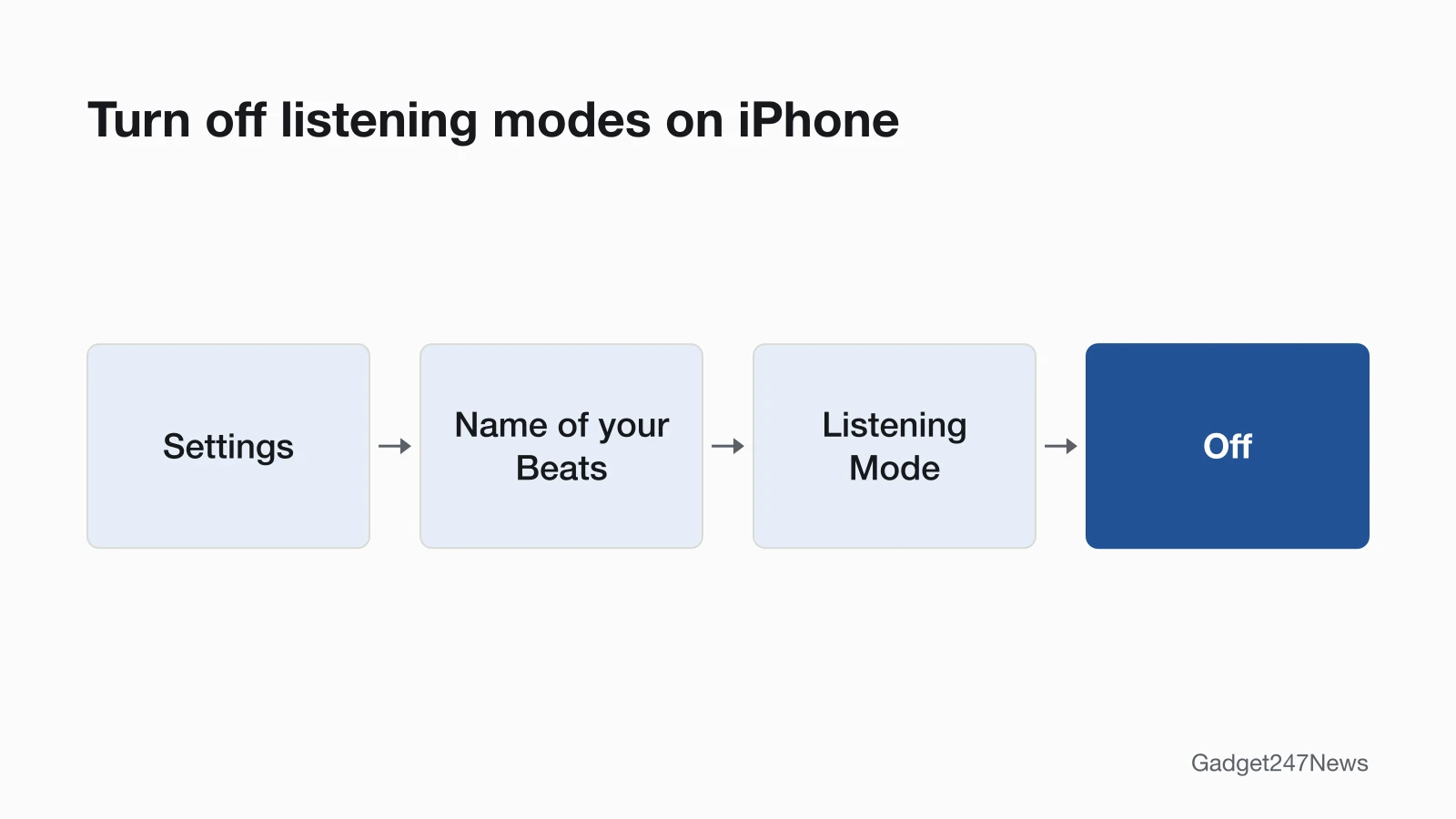
- iPhone: go to Settings, tap the name of your Beats near the top, then under Listening Mode tap Off. Or open Control Center, touch and hold the volume control, and tap the Listening Mode button at the bottom left.
- Android: in the Beats app, tap the menu button, tap My Beats, then tap the icon that turns active noise cancellation off.
- Mac: click the Beats icon in the menu bar and choose a listening mode.
- Buttons: press the system button twice on Beats Studio Pro, or the Listening mode button on Beats 360. On Beats Fit Pro, Powerbeats Fit and Powerbeats Pro 2, press and hold the "b" button; on Beats Studio Buds +, the button above the logo.
Off isn't in the button cycle by default. On iPhone, add it under the name of your Beats in Settings. For earbuds, tap Press and Hold, pick Left or Right, choose Listening Mode and select Off. For Beats 360, select Off under Listening Mode. Apple points Beats Studio Pro owners to the same press-and-hold settings.
Fix 4: Turn Them Off Between Uses
Power the headphones off after each session. Hold the power button for one second on Beats Solo 4, Beats Flex and Beats 360, or the system button on Beats Studio Pro; Beats Pill needs 3 seconds. Beats earbuds go back in the charging case. The Beats pages we checked list no automatic power-off timer, so don't rely on one. Apple documents two cable cases. Beats Solo 4 and Beats Studio Pro turn off automatically when you disconnect the USB-C cable. On the 3.5 mm audio cable they "don't require any battery power." Solo3 Wireless have a wired mode too: Apple suggests the RemoteTalk cable to conserve battery. The full button list per model is in How to Turn Beats On and Off.
Fix 5: Store Them Cool and Dry
Store your Beats in the protective case that came with them, in a clean, dry place. Apple says to avoid storing them in direct sunlight or in extreme heat or cold, and to avoid liquids or high humidity. For Beats Fit Pro, Beats Solo Buds, Beats Studio Buds +, Powerbeats Fit and Powerbeats Pro 2, Apple's battery table adds a hard limit: "Do not heat above 60º C."
Fix 6: Reset Your Beats (Last Step)
Reset only when the drain started suddenly and nothing above helped. After a reset you pair your Beats again to your Apple or Android device. Follow the Beats headphones soft and factory reset steps for your model.
Beats Battery Life by Model
Apple's rated playback times; your results depend on settings and use. Among Apple's figures, Beats Solo 4 rate longest, at up to 50 hours.
| Model | Rated playback | Condition (Apple) | Quick charge |
|---|---|---|---|
| Beats Studio Pro | Up to 24 hours; up to 40 hours | After a 2-hour charge; 40 hours with ANC and Transparency off | 10 min: up to 4 hours |
| Beats Solo 4 | Up to 50 hours | After about a 2-hour-and-15-minute charge | 10 min: up to 5 hours |
| Beats 360 | Up to 32 hours | With Active Noise Cancellation enabled | 5 min: up to 1 hour |
| Beats Fit Pro | 27 hours / 30 hours | ANC on / off, with the charging case | 5 min: up to 1 hour |
| Powerbeats Fit | 27 hours / 30 hours | ANC on / off, with the charging case | 5 min: up to 1 hour |
| Powerbeats Pro 2 | 36 hours / 45 hours | ANC on / off, with the charging case | 5 min: up to 1.5 hours |
| Beats Studio Buds + | 30 hours / 36 hours | ANC on / off, with the charging case | 5 min: up to 1.5 hours |
| Beats Solo Buds | Up to 18 hours | None stated | 5 min: up to 1 hour |
| Beats Flex | Up to 12 hours | After a full charge | 10 min: up to 1.5 hours |
| Beats Pill | Up to 24 hours | With a full charge | 10 min: up to 2 hours |
| Solo3 Wireless | Up to 40 hours | From 2 hours of charging | 5 min: up to 3 hours |
Apple calls the quick-charge feature Fast Fuel. Studio3 Wireless aren't on Apple's playback-time page or in its current Beats User Guide, so we don't list a figure for them.
One Beats Earbud Dies Faster
Open the case with both earbuds inside, hold it near your iPhone and compare the two earbud levels. If one side is lower after a full charge, clean that earbud's charging contacts and reseat it in the case. If that side cuts out or goes silent, see Beats headphones working on one side only.
Still not working?
If the battery still runs down fast, work through this order:
- Try the next fix: dead Beats headphones that won't charge.
- Reset your Beats headphones with the steps in Fix 6 (you'll need to pair them again afterwards).
- Contact Beats Support: Beats Support (external).
- Check repair or warranty options: Beats headphones repair and warranty options.
Started after an update? Check the Update Tracker for known issues.
Draining Faster Since an Update?
If the drain began right after an iPhone or Beats update, check the Update Tracker above for known issues, then confirm which firmware you have. On iPhone, go to Settings, tap the name of your Beats, scroll to About and read the version number. On Android, open the Beats app and scroll to "Under the Hood" for the firmware version.
How Long Do Beats Batteries Last?
Apple doesn't publish a battery lifespan on its Beats pages. Its Beats service page lists battery service that replaces the battery "if the capacity drops below 80%." For costs and coverage, see the Beats repair and warranty options in step 4 above.
Beats Battery: Quick Answers
How long does the Beats Studio Pro battery last?
Beats Studio Pro last up to 24 hours after a 2-hour charge, and up to 40 hours when you turn off Active Noise Cancellation and Transparency mode. A 10-minute charge gives up to 4 hours of playback, according to Apple.
How long does the Beats Solo 4 battery last?
Beats Solo 4 last up to 50 hours after an approximate 2-hour-and-15-minute charge, and a 10-minute charge gives up to 5 hours. On the 3.5 mm audio cable they play without needing any battery power.
How long does the Beats Fit Pro battery last?
Beats Fit Pro last up to 27 hours with ANC on and up to 30 hours with ANC off, counting the charging case. A 5-minute charge gives up to 1 hour of playback.
Sources
We checked this page against the pages below, most recently on . How we verify fixes
- About charging and playback time (Apple, support.apple.com)Official
- Switch between listening modes using your Apple or Android device (Apple, support.apple.com)Official
- Check the charge status (Beats User Guide) (Apple, support.apple.com)Official
- Change press-and-hold settings (Apple, support.apple.com)Official
- Update Beats (Apple, support.apple.com)Official
- Use your Beats Studio Pro (Apple, support.apple.com)Official
- Use your Beats 360 (Apple, support.apple.com)Official
- Use your Beats Fit Pro or Powerbeats Fit (Apple, support.apple.com)Official
- Charge Beats headphones, earphones, and speakers (Apple, support.apple.com)Official
- Clean and store your Beats earphones or headphones (Apple, support.apple.com)Official
- Safety and handling information for Beats headphones and earphones (Apple, support.apple.com)Official
- Reset Beats (Apple, support.apple.com)Official
- Set up and use your Solo3 Wireless headphones (Apple, support.apple.com)Official
- Apple Service and Repair for Beats (Apple, support.apple.com)Official
- Beats Support (Beats, beatsbydre.com)Official