Why Earbuds Keep Disconnecting

By Suraj Giri, Founder & Publisher. Reviewed by Suraj Giri on .
Published · 8 min read
How this page was made
- Sources. Checked against 20 official pages from Apple, Samsung, Google, Microsoft, Sony, Bose, JBL and Skullcandy, most recently on . See the sources.
- No device testing. We don't test fixes on physical devices, so nothing on this page is a hands-on result. A fact counts as verified only when it matches an official source page.
- AI use. As with every page on Gadget247News, AI tools helped research, outline, draft and edit this page, and re-read the official pages to flag facts that didn't match. The illustration at the top was generated with Runway and is labelled under the image.
- Human sign-off. Suraj Giri, Founder & Publisher, read this page and signed it off on . The site won't publish a page without that sign-off.
- Changes. The published and updated dates move only when the content changes, and every change gets a dated note. Spot an error or a fix that didn't work? Email info@gadget247news.com.
Read our AI use policy, editorial policy and corrections policy.
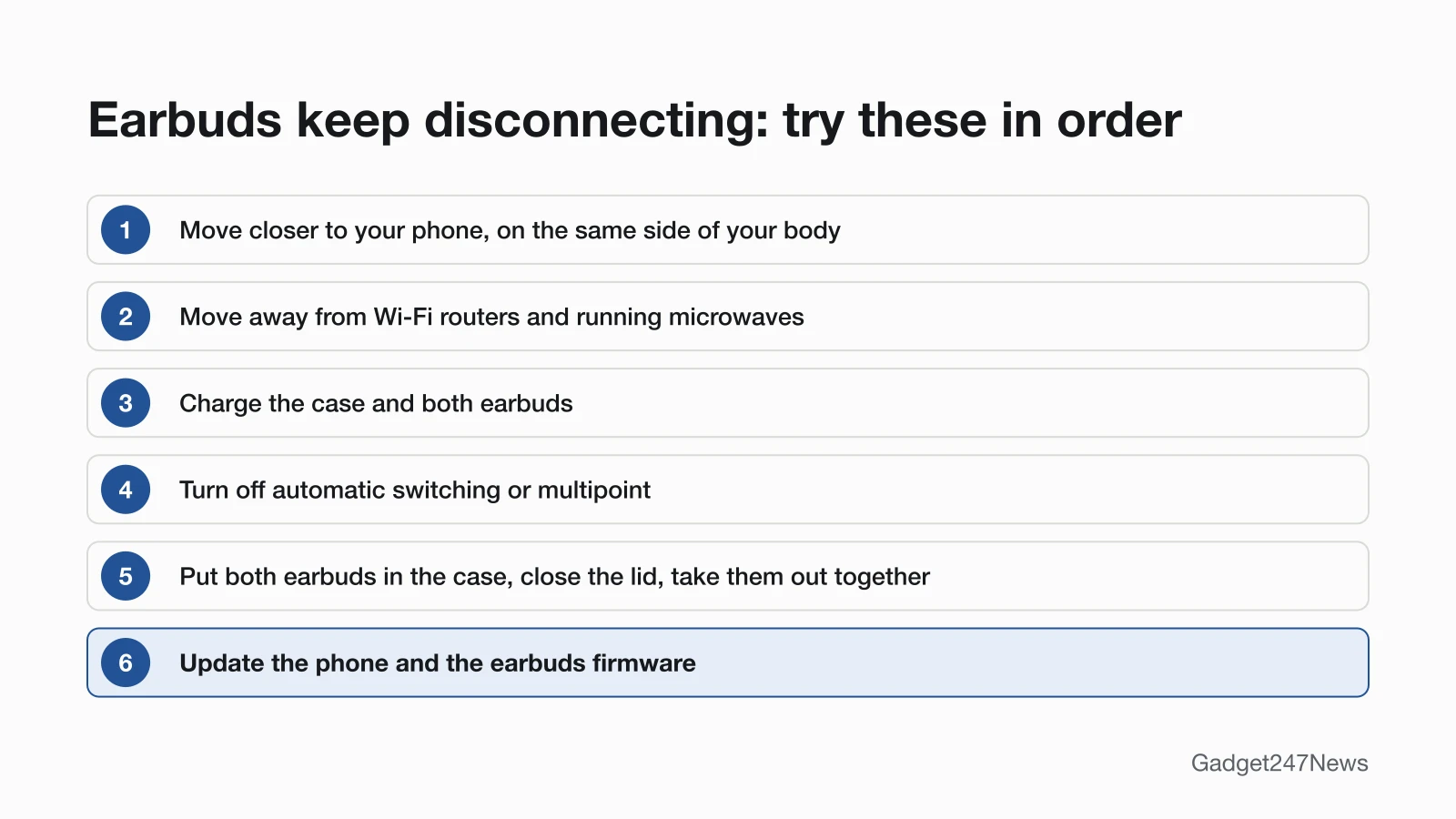
Earbuds usually keep disconnecting because they're too far from the phone, near interference like a Wi-Fi router or running microwave, low on battery, or switching to another device automatically. Stay close, move away from other wireless devices and charge both earbuds first. The table below matches each cause to its first fix; for other faults, start from the guide to fix earbuds and headphones.
Earbuds that keep cutting out, or keep disconnecting and reconnecting, have a working pairing that breaks. If your earbuds won't pair at all, that's a different fault with its own guide. Drops that started suddenly after an update are covered near the end of this page.
Why Your Earbuds Keep Cutting Out: Causes and First Fixes
The table lists six causes in the order to check them, with a sign that points to each one and the first fix to try.
| Cause | How to tell | First fix |
|---|---|---|
| Too far from the phone | Drops when you walk away from the phone | Keep the phone close and on the same side of your body. |
| Interference | Drops in one room, or near a Wi-Fi router | Move away from Wi-Fi routers, running microwaves and other 2.4 GHz devices. |
| Low battery | Your phone shows a low charge for the earbuds | Charge the case and both earbuds. |
| Switching devices | Audio jumps to a laptop, tablet or watch | Turn off automatic switching or multipoint, or disconnect the other device. See What Is Bluetooth Multipoint and Which Earbuds Support It. |
| One earbud dropping on its own | Only one side cuts out | Put both earbuds back in the case and close the lid, then connect them again. See one Earbud Not Working. |
| Old software on the phone or earbuds | Drops began around an update | Update the phone and the earbuds' firmware. |
Work down the rows in order: the first three fixes change nothing on your phone, and the later ones change settings or software.
Too Far From Your Phone?
Bluetooth range shrinks through walls and bodies. For Beats, Apple's troubleshooting page says to place your Beats product and your paired device within 30 feet of each other; figures for other brands sit under the brand table below. JBL adds that Bluetooth signals can't travel through water, which includes the human body, so keep the phone on the same side of your body as the earbuds. Bose says distance and obstacles like walls, doors or other electronics can weaken the Bluetooth signal. On Windows, Microsoft's steps for a device that won't connect include moving it closer to your PC to ensure a stable signal.
What Interferes With Bluetooth Earbuds?
Google's Pixel Buds help names these interference sources, and Samsung lists the first two for Galaxy Buds that won't stay connected:
- Running microwave ovens
- Wi-Fi routers
- Baby monitors, wireless speakers and other wireless devices on the 2.4 GHz band
Google's fix is to move out of the room with those devices, and Samsung's is to move the earbuds and phone away from them. Two other makers add less obvious trouble spots. Sony's WH-1000XM5 guide says audio can drop where other wireless audio devices or other people are nearby, such as in train station premises or on a crowded train. JBL says open spaces such as parks can cause issues because the signal has nothing to reflect from, and warns against standing too close to your Wi-Fi router.
Earbuds Disconnecting and Reconnecting by Themselves?
Earbuds that disconnect and reconnect by themselves are often switching to another device. Automatic switching is Apple's feature that moves supported AirPods between your iPhone, iPad, Mac, Apple Watch and Apple Vision Pro when those devices are signed in with the same Apple Account; a call answered on the Watch, for example, routes to your AirPods. Multipoint keeps one pair of earbuds connected to two devices at once, and switching features move the audio when a call comes in. Samsung says Galaxy Buds+ and newer models use Automatic switching to switch over to your phone so you can take the call, if your devices are signed in to the same Samsung account. Apple adds that sound shouldn't switch automatically while you're in a conversation, such as a phone call, a FaceTime call or a video conference. Turn the feature off, or disconnect the second device. What Is AirPods Automatic Switching? How to Turn It Off has Apple's menus.
Why Does My Left Earbud Keep Disconnecting?
A left or right earbud that keeps disconnecting sends you back to the charging case in both Apple's and Samsung's steps. Apple's steps for no sound in one AirPod start with a fully charged case and a clean charging port, then have you let both AirPods charge in the case for 30 seconds; if an AirPod still isn't working, reset your AirPods. Samsung's steps for Galaxy Buds that won't stay connected say to put the buds back in the case, close the lid and wait for the case light to go out, about 7 seconds, before connecting again. If one side stays silent after that, it's a one-earbud fault rather than a connection drop, and the one-earbud guide in the table above covers it.
Headphones Cutting Out on a Laptop or PC?
On a Windows laptop or PC, Microsoft's page on Bluetooth that keeps disconnecting starts with the automated Bluetooth troubleshooter in the Get Help app. Its next steps point at power saving: select the Battery icon on the taskbar and turn off Energy Saver if it's on, then in Device Manager expand Bluetooth, right-click your Bluetooth device, open the Power Management tab and uncheck Allow the computer to turn off this device to save power. Microsoft's page for Bluetooth that won't connect adds three more steps: move the device closer to your PC; turn Bluetooth off, wait 10 seconds and turn it on again; and make sure Windows is up to date. The 10-second wait is Microsoft's Windows step, not a rule for phones.
Wired Headphones Cutting Out?
Wired headphones don't use Bluetooth, so none of the fixes above apply. Microsoft's Windows sound guide says to check your speaker and headphone connections for loose cords or cables, and to try a different USB port for USB headphones. A damaged plug or cable needs the maker's repair service, not a settings change.
Earbuds Keep Disconnecting? Fixes by Brand
The first fix differs by brand, and each one follows that maker's own troubleshooting steps. Each row's fix is the first step on that brand's disconnecting page.
| Brand | Most likely cause | First fix | Page |
|---|---|---|---|
| AirPods | Automatic switching to another Apple device | Stop automatic switching: go to Settings → Bluetooth → ⓘ next to your AirPods → Connect to This iPhone, then tap When Last Connected to This iPhone. | Why AirPods Keep Disconnecting |
| Beats headphones and earbuds | Distance or interference | Keep your phone within 30 feet of your Beats, away from other Bluetooth devices, microwaves and wireless routers. | Beats headphones keep disconnecting |
| Samsung Galaxy Buds | Interference | Move away from Wi-Fi routers and running microwaves, then restart the buds in the case. | Samsung Galaxy Buds keep disconnecting |
| Google Pixel Buds | 2.4 GHz interference | Move out of the room with running microwaves, Wi-Fi routers or baby monitors. | Pixel Buds not connecting to your phone |
| Sony headphones | Sound-quality-first mode, or obstacles | Switch your Sony headphones to the stable-connection sound quality mode in the Sony | Sound Connect app, and remove any obstacles between your phone and the headphones. | Why Sony Headphones Keep Disconnecting |
| Bose headphones | Distance, obstacles or a second connected device | Move your phone closer to your Bose earbuds or headphones, away from walls and other electronics, and disconnect any other device that's connected. | Why Bose Headphones Keep Disconnecting |
| JBL earbuds | Your body or other Bluetooth devices blocking the signal | Keep your phone on the same side of your body as your JBL earbuds, with a clear line of sight, and turn off Bluetooth devices you aren't using. | Why JBL Earbuds Keep Disconnecting |
| Skullcandy earbuds | Distance, or a second paired device interrupting | Keep your phone within 30 feet (10 meters) of your Skullcandy earbuds, and turn off Multipoint Pairing in the Skullcandy App if a second device keeps interrupting your audio. | Why Skullcandy Earbuds Keep Disconnecting |
Pixel Buds don't have a separate disconnecting guide yet, so that row points to the not-connecting page. Range figures differ by maker, and three of the troubleshooting pages we read on September 26, 2026 give one: Beats, within 30 feet (Apple); Bose QuietComfort Earbuds II, within 33 feet (10 meters); and Skullcandy Dime 3, Rail ANC and Method 360 ANC, up to 30+ feet (10+ meters). Skullcandy adds that your connection experience may vary based on your environment.

Earbuds Started Cutting Out After an Update?
Dropouts that start suddenly after an update call for updating both sides, the phone and the earbuds. Google's Pixel Buds help says to make sure you have the newest firmware, Bose's dropped-connection steps say to check for and install any available product updates, and Apple's AirPods steps start with updating the iPhone, iPad or Mac. AirPods firmware is delivered automatically while your AirPods are charging and in Bluetooth range of an iPhone, iPad or Mac that's connected to Wi-Fi. Check the latest smartwatch and earbud updates for a known issue. If the update left your headphones sound muffled rather than cutting out, that's a separate fix. Get an email when an earbud update breaks something, and when it's fixed.
Still Dropping? When to Contact the Manufacturer
Contact the manufacturer after the first fix and the brand page's steps have failed, working through this order:
Still not working?
- Try the next fix: earbuds won't pair, if the earbuds now won't reconnect at all.
- Reset your earbuds: hard reset wireless earbuds (you'll need to pair them again afterwards).
- Contact your brand's support: Apple Support for AirPods and Beats, or Samsung, Google, Sony, Bose, JBL or Skullcandy support.
- Check repair or warranty options on the maker's official service pages.
Started after an update? Check the Update Tracker for known issues.
Disconnecting Earbuds: Quick Answers
Short answers to three questions about earbuds that drop out.
How do I stop Bluetooth from randomly disconnecting?
Stay close to the phone, move away from Wi-Fi routers and running microwaves, and keep both devices charged. If the audio jumps to another device, turn off automatic switching or multipoint. Then update the phone and the earbuds. Sony's WH-1000XM5 guide also suggests closing unnecessary apps or restarting your smartphone when sound skips. Beats owners have a range figure from Apple: within 30 feet.
Why are my earbuds suddenly not connecting?
Earbuds that won't connect at all have a pairing fault rather than a dropout. Samsung says the device you're connecting them to may need a software or firmware update, and Microsoft says a Bluetooth device must be in pairing mode and within range; the earbuds won't pair guide linked at the top of this page covers the rest.
Do earbuds disconnect when the battery is low?
Yes, a low battery can: Microsoft's Windows troubleshooting page says some Bluetooth devices do not enter pairing mode or maintain a connection when the battery is low, and its fix is to charge the device fully. Samsung's steps for earbuds that won't stay connected say to charge the earbuds for at least 30 minutes, and Google's first step when Pixel Buds lose connection is to confirm that the buds and charging case are charged.
Sources
We checked this page against the pages below, most recently on . How we verify fixes
- If you can't connect to your wireless Beats product (Apple, support.apple.com)Official
- Switch your AirPods to another device (Apple, support.apple.com)Official
- If your AirPods or AirPods Pro won't connect (Apple, support.apple.com)Official
- If your left or right AirPod isn't working (Apple, support.apple.com)Official
- About firmware updates for AirPods (Apple, support.apple.com)Official
- Samsung earbuds don't connect or won't stay connected (Samsung, samsung.com)Official
- How to connect your Samsung Galaxy earbuds (Samsung, samsung.com)Official
- Troubleshoot connectivity issues (Google Pixel Buds Help) (Google, support.google.com)Official
- Troubleshoot Bluetooth not connecting in Windows (Microsoft, support.microsoft.com)Official
- Fix Bluetooth connected but no sound issue on Windows (Microsoft, support.microsoft.com)Official
- Bluetooth keeps disconnecting in Windows (Microsoft, support.microsoft.com)Official
- Fix sound or audio problems in Windows (Microsoft, support.microsoft.com)Official
- WH-1000XM5 Help Guide: Sound skips frequently (Sony, helpguide.sony.net)Official
- WH-1000XM5 Help Guide: About the sound quality mode (Sony, helpguide.sony.net)Official
- Sony | Sound Connect (App Store) (Apple, apps.apple.com)Official
- Dropped Bluetooth Connection: Bose QuietComfort Earbuds II (Bose, support.bose.com)Official
- How to avoid Bluetooth Interference or Interruptions (JBL) (JBL, support.jbl.com)Official
- Dime 3 product help (Skullcandy) (Skullcandy, skullcandy.com)Official
- Rail ANC product help (Skullcandy) (Skullcandy, skullcandy.com)Official
- Method 360 ANC product help (Skullcandy) (Skullcandy, skullcandy.com)Official