Why Bose Headphones Keep Disconnecting

By Suraj Giri, Founder & Publisher. Reviewed by Suraj Giri on .
Published · 7 min read
How this page was made
- Sources. Checked against 7 official pages from Bose, most recently on . See the sources.
- No device testing. We don't test fixes on physical devices, so nothing on this page is a hands-on result. A fact counts as verified only when it matches an official source page.
- AI use. As with every page on Gadget247News, AI tools helped research, outline, draft and edit this page, and re-read the official pages to flag facts that didn't match. The illustration at the top was generated with Runway and is labelled under the image.
- Human sign-off. Suraj Giri, Founder & Publisher, read this page and signed it off on . The site won't publish a page without that sign-off.
- Changes. The published and updated dates move only when the content changes, and every change gets a dated note. Spot an error or a fix that didn't work? Email info@gadget247news.com.
Read our AI use policy, editorial policy and corrections policy.
This page is for Bose headphones or earbuds that connect, then cut out, drop or jump to another device. If they never connect in the first place, that's a pairing fault with its own guide, linked at the end of this page. For every other Bose fault, start from Bose headphones not working.
For AirPods, Sony, JBL and other brands, the cross-brand guide for headphones keep cutting out matches each cause to its first fix.
Why Do My Bose Headphones Keep Disconnecting?
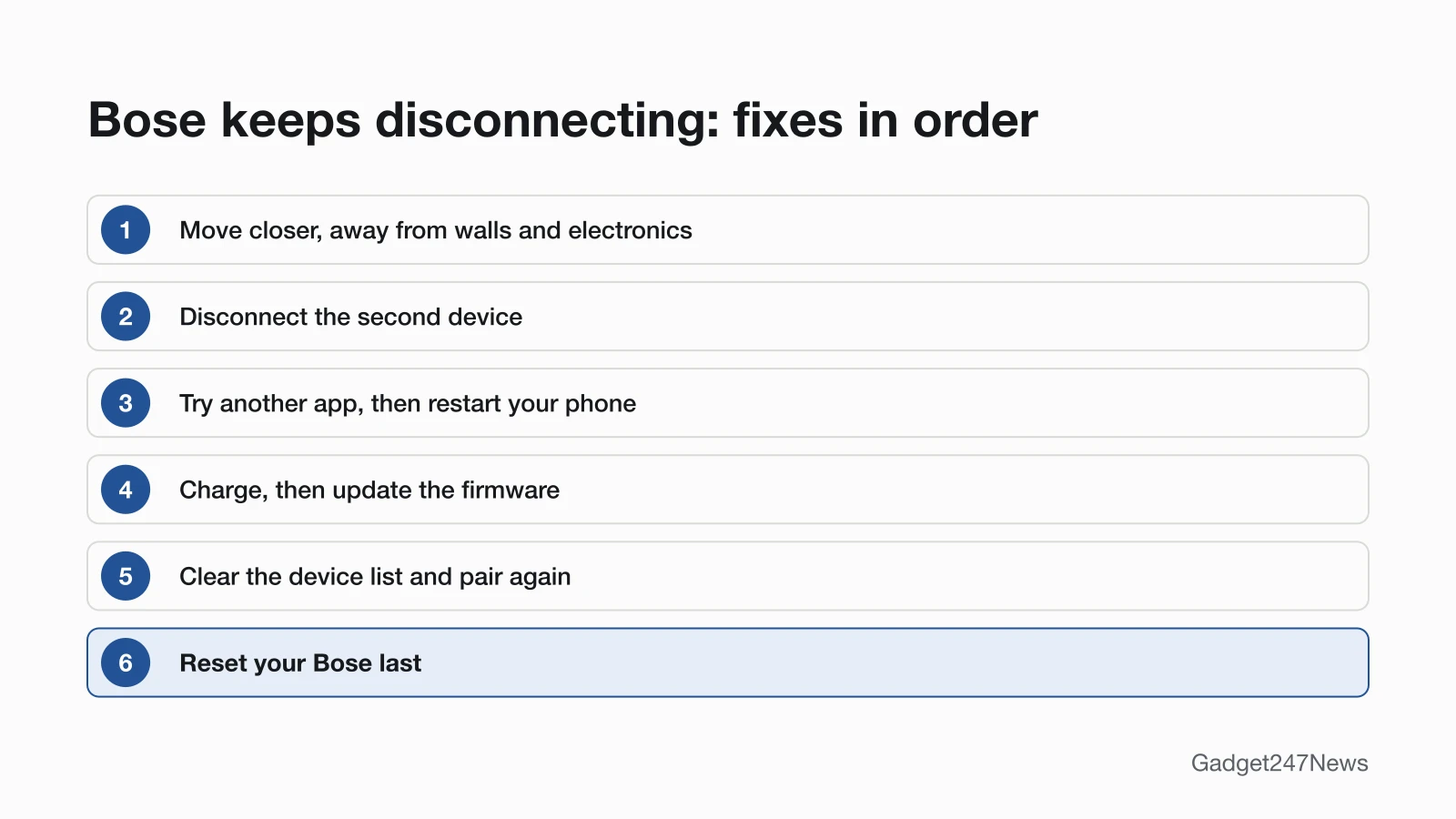
Bose headphones keep disconnecting for six reasons that Bose's troubleshooting pages point to, listed in the order to check them:
- Distance or obstacles: the phone is too far away, or walls, doors or other electronics sit in the path.
- A second device: another phone, tablet or laptop connected through multipoint takes the audio.
- A designed disconnect: QuietComfort Ultra Headphones (2nd Gen) laid flat, an earbud in Standby, or QuietComfort Earbuds (2024) powering off on their own.
- A low battery: charging is the first solution Bose lists for QuietComfort Ultra Earbuds (2nd Gen).
- Old firmware: the same list includes running available software updates in the Bose app.
- A stale pairing: an old entry, or a duplicate listing labeled LE (Low Energy), on your phone.
The first two causes cover the Quick Fix; the rest need the steps below.
How to Fix Bose Headphones That Keep Disconnecting
Fixes 1 to 3 follow Bose's dropped-connection page for the QuietComfort Earbuds II, and Fixes 4 to 7 follow the QuietComfort Ultra Earbuds (2nd Gen) owner's guide, which puts the reset last.
Fix 1: Move Closer and Away From Walls and Electronics
Keep your phone near your Bose, with no walls or doors between them. Bose says distance and obstacles like walls, doors or other electronics can weaken the Bluetooth signal, and it gives two range figures, each on a different page:
- 33 feet (10 meters): the QuietComfort Earbuds II dropped-connection page says to keep your product within this distance of your device.
- 30 ft or 9 m: the owner's guides for the QuietComfort Ultra Earbuds (2nd Gen), QuietComfort Ultra Headphones (2nd Gen), QuietComfort Headphones, QuietComfort Earbuds (2024) and Ultra Open Earbuds give this range for reconnecting.
- Other electronics: Bose suggests moving your phone and your Bose closer together, or relocating devices that may cause interference.
Fix 2: Disconnect Other Devices or Turn Off Multipoint
A second connected device is the next thing Bose checks:
- Open the Bluetooth list on your phone. If another audio device is connected, disconnect it or turn it off, then play your media again.
- Pause audio on your other phone, tablet or laptop. Your Bose can be actively connected to up to two devices at a time, but it plays audio from only one.
- To stop the switching, turn off the multi-point connection in the Bose app's Settings menu. On QuietComfort Earbuds (2024), tap Multi Point on the product control screen of the Bose QCE app. Turning it off disconnects the second device.
How multipoint works across brands, and when it helps, is in multipoint causing earbud dropouts.
Fix 3: Try Another App, Then Restart Your Phone
A single app or source can cause the drops, so test it before you change anything on your Bose:
- Play audio from a different app, media source or device, to see whether the problem follows one source.
- Restart your phone, tablet or computer: Bose says to turn it off for 30 seconds, then turn it back on.
Fix 4: Charge Your Bose
Charging is the first solution in the QuietComfort Ultra Earbuds (2nd Gen) guide:
- Earbuds: put both earbuds in the charging case and connect the case to a USB-A wall charger or a computer.
- Headphones: connect the USB-C cable to the headphones and to a computer or wall charger.
Fix 5: Update the Firmware
Bose earbuds update through the Bose app, and Bose says the earbuds "cannot be updated without being connected to the Bose app":
- Connect your Bose and open the Bose app. On QuietComfort Earbuds (2024), open the Bose QCE app instead.
- When the update message changes to Install Update, tap it, then tap Update Now. In the Bose QCE app, tap the update message on the product control screen.
For the QuietComfort Ultra Earbuds (2nd Gen), Bose's release notes for firmware 8.4.8 read "Improved connection stability through bug fixes and performance enhancements." Every update step is in How to Update Bose Headphones Firmware.
Fix 6: Unpair, Clear the Bose Device List and Pair Again
Clearing both lists removes a stale pairing, and it's also how to unpair Bose headphones from every device at once:
- On your phone, open Bluetooth settings and delete your Bose from the list, including any duplicate listing labeled LE (Low Energy).
- Clear the device list on the Bose itself:
- QuietComfort Ultra Earbuds (2nd Gen) and Ultra Open Earbuds: with both earbuds in the open case, press and hold the button on the back of the case for 15 seconds, until the status light blinks white 2 times and then slowly pulses blue.
- QuietComfort Ultra Headphones (2nd Gen): press and hold the Bluetooth/Power button and Multi-function button together until you hear a tone.
- QuietComfort Headphones: slide the Power/Bluetooth switch to the right and hold for 15 seconds, until you hear "Bluetooth device list cleared. Ready to connect."
- QuietComfort Earbuds (2024): with the earbuds not connected to any device, touch and hold the right earbud for 7 seconds, until you hear "Ready to pair" followed by a tone.
- Delete your Bose from the Bluetooth list on every other device it was connected to.
- Pair again: select your Bose in your phone's Bluetooth list while it's ready to connect.
Fix 7 (Last): Reset Your Bose
Reset your Bose only after the fixes above. On QuietComfort Ultra Earbuds (2nd Gen) and both QuietComfort headphones, a reset reboots the product and doesn't clear device settings; on Ultra Open Earbuds, it also clears the device list. A restore to factory settings clears everything, so you pair again afterward. Each model's button and hold time is in How to Reset Bose Headphones.
Bose Disconnecting by Model and Device
Some Bose drops depend on the model you own or on the device it's connected to.
Headphones Disconnect When You Take Them Off
QuietComfort Ultra Headphones (2nd Gen) disconnect on purpose. Bose says they disconnect from your devices after 3 seconds when you take them off with the earcups laid flat or store them in the case, and after 10 minutes in any other position; put them back on your head to reconnect. Earbuds do something similar: a QuietComfort Ultra Earbud (2nd Gen) that's out of your ear and not moved for 10 minutes switches to Standby, and it wakes when you put it back in. QuietComfort Earbuds (2024) power off after 10 minutes disconnected from your device with noise cancellation off and the controls unused.
Drops on a Windows Laptop
A Windows PC running Microsoft Teams can get in the way. In the owner's guides for the QuietComfort Ultra Earbuds (2nd Gen) and QuietComfort Earbuds (2024), Bose says that if the earbuds were previously connected to a PC running Teams, quit the Teams app; if that doesn't help, turn off Bluetooth on that PC or leave its Bluetooth range. To set the laptop up again, see how to connect Bose headphones to a Windows PC.
Drops on Android
Your phone's Bluetooth list can show your Bose twice, once with the label LE (Low Energy). Delete both entries, then pair Bose headphones with an Android phone again. QuietComfort Ultra Earbuds (2nd Gen), QuietComfort Ultra Headphones (2nd Gen) and Ultra Open Earbuds also support Fast Pair on Android, where a notification prompts you to pair once they're in pairing mode next to the phone.
Still not working?
Work through the next steps in this order:
- Try the next fix: Bose headphones not connecting to your phone (if they won't connect at all).
- Reset your Bose headphones or earbuds: How to reset Bose headphones (after a factory restore, you'll pair them again).
- Contact Bose Support: Bose Support (external).
- Check repair or warranty options: Bose earbuds repair.
Started after an update? Check the Update Tracker for known issues.
Related Problems
Three Bose faults look like dropouts but have their own fixes:
- Bose that won't connect at all: a pairing fault, covered in step 1 of the list above.
- One earbud drops or goes silent: see one side of Bose earbuds not working.
- Sound stays connected but the battery dies fast: see Bose headphones battery drain.
Started Cutting Out After an Update?
If your Bose started cutting out suddenly after a firmware update, check the latest Bose headphones firmware and its known issues, then install any newer version through the Bose app. Bose's dropped-connection page for the QuietComfort Earbuds II gives the same advice for every fault: "Regardless of the issue you are experiencing with your product, try updating it."
Bose Disconnecting: Quick Answers
Short answers to three questions about Bose dropouts.
Why do my Bose headphones keep cutting out?
Bose headphones cut out when distance, walls, doors or other electronics weaken the Bluetooth signal, or when a second connected device takes the audio. Move your phone closer, clear the path between them, and disconnect or turn off the other device. If the drops continue, clear the Bose device list and pair again.
Why do my Bose earbuds keep disconnecting?
Bose earbuds disconnect when an earbud goes to Standby out of your ear, when a second device takes over, or when the pairing is stale. On QuietComfort Ultra Earbuds (2nd Gen) and Ultra Open Earbuds, a 15-second hold of the case button, with both earbuds in the open case, clears the device list so you can pair again.
How do I unpair Bose headphones?
To unpair Bose headphones from one phone, open its Bluetooth settings and delete them from the list, along with any duplicate LE listing. To unpair every device at once, clear the Bose device list as in Fix 6. You can also disconnect a device in the Bose app.
Sources
We checked this page against the pages below, most recently on . How we verify fixes
- Dropped Bluetooth Connection, Bose QuietComfort Earbuds II (Bose, support.bose.com)Official
- Owner's Guide, Bose QuietComfort Ultra Earbuds (2nd Gen) (Bose, assets.bosecreative.com)Official
- Owner's Guide, Bose QuietComfort Ultra Headphones (2nd Gen) (Bose, assets.bosecreative.com)Official
- Owner's Guide, Bose QuietComfort Headphones (Bose, assets.bosecreative.com)Official
- Owner's Guide, Bose QuietComfort Earbuds (2024) (Bose, assets.bosecreative.com)Official
- Owner's Guide, Bose Ultra Open Earbuds (Bose, assets.bosecreative.com)Official
- Updating Your Earbuds, Bose QuietComfort Ultra Earbuds (2nd Gen) (Bose, support.bose.com)Official