Bose Headphones Repair Options

By Suraj Giri, Founder & Publisher. Reviewed by Suraj Giri on .
Published · 6 min read
How this page was made
- Sources. Checked against 9 official pages from Bose, most recently on . See the sources.
- No device testing. We don't test fixes on physical devices, so nothing on this page is a hands-on result. A fact counts as verified only when it matches an official source page.
- AI use. As with every page on Gadget247News, AI tools helped research, outline, draft and edit this page, and re-read the official pages to flag facts that didn't match. The illustration at the top was generated with Runway and is labelled under the image.
- Human sign-off. Suraj Giri, Founder & Publisher, read this page and signed it off on . The site won't publish a page without that sign-off.
- Changes. The published and updated dates move only when the content changes, and every change gets a dated note. Spot an error or a fix that didn't work? Email info@gadget247news.com.
Read our AI use policy, editorial policy and corrections policy.
Try Bose Headphones Problems and Fixes first: Bose's owner's guides tell you to work through their listed solutions before you contact Bose customer service. If your Bose headphones or earbuds are damaged or the battery has failed, start a request on Bose's Start a Repair or Replacement page with your product's serial number to see your options. Coverage depends on your model, Bose's limited warranty and any BoseCare plan you bought.
Apple Watch owners who landed here can compare Apple Watch battery service options in our Apple Watch guide. Everything below is Bose's own process, read on Bose's US pages.
Your Official Bose Repair Options
Bose points owners to four routes across its support site, its BoseCare page and its owner's guides:
| Option | When it applies | Where to start | Source |
|---|---|---|---|
| Repair or replacement request | A fault the fixes don't solve | Start a Repair or Replacement on Bose's support site | Bose support |
| Bose limited warranty | A defect in materials or workmanship within 1 year of purchase | Bose Support Contact Us, "for specific return and shipping instructions" | Bose Limited Warranty |
| BoseCare plan claim | Only if you bought a plan with the product on Bose.com | The BoseCare Consumer Web Portal, run by Servify | BoseCare page |
| Replacement parts and accessories | A replacement charging case, damaged ear cushions or extra eartip sizes | Bose customer service, which the owner's guides name for ordering parts | Bose owner's guides |
Bose's request page carries the heading "Easily review your options and submit online" and asks you to "Enter your product serial number", with a "Where is my serial number?" link for help.
Fix or Repair? How to Tell
Charging, pairing and one-earbud faults get a fix first. Damage, liquid and an error light go to Bose.
| What you see | Where to start |
|---|---|
| Earbuds won't pair, or audio keeps cutting out | A fix: the connection steps in the Bose hub |
| Earbuds don't charge in the case | A fix first: place both earbuds in the case "until they magnetically snap into place" |
| One earbud stays silent | A fix first: the one-side page below |
| Battery drains faster than it used to | A fix first: the battery drain page below |
| Status light blinks amber and white | A repair request: Bose's guides list this light as an error and tell you to contact Bose customer service |
| Cracked case, broken headband or hinge | A repair request, but damage "caused by accident" falls outside the limited warranty |
| Earbuds stopped working after water or sweat | A repair request: Bose rates its QuietComfort earbuds IPX4, which "is not a permanent condition", and the warranty excludes "exposure to liquids" |
| Battery won't hold a charge after the fixes | A repair request: the limited warranty lists battery failure as covered |
Is It Covered?
The Bose limited warranty lasts 1 year from the date of original retail purchase, and Bose includes it with all Bose products. Bose's BoseCare page sets it beside the two paid plans:
| Coverage | Bose limited warranty | BoseCare Protection Plan | BoseCare Accident Protection Plan |
|---|---|---|---|
| Length | 1 year | 2 years, after the warranty ends | Up to 3 years, from the purchase date |
| Mechanical breakdown | Yes | Yes | Yes |
| Battery failure | Yes | Yes | Yes |
| Power surge | No | Yes | Yes |
| Liquid damage | No | No | Yes |
| Accidental damage from handling | No | No | Yes |
Bose's full US warranty text, which applies to Bose products bought from August 8, 2025, adds three exclusions:
- Cosmetic damage such as dents and scratches, unless a defect caused the failure
- Damage from service by anyone other than Bose or a Bose authorized service provider
- Any product whose serial number has been removed or defaced
A repaired or replacement product stays covered for the rest of the original warranty or 90 days, whichever is longer. Shipping and insurance costs for service may be charged to you.
Registering your product is optional. Each owner's guide we read says, "Failure to register will not affect your limited warranty rights."
What About BoseCare?
BoseCare plans are sold only when you buy the product on Bose.com, and each plan covers that one product. They aren't offered for Aviation headsets or Certified Refurbished products. Each plan gives "one (1) repair or replacement", and Bose says there are no service fees when you file a claim. Plans bought after January 15, 2025 are claimed through the BoseCare Consumer Web Portal run by Servify; earlier plans go through Allstate Protection Plans. Servify provides a prepaid shipping label, and a Bose Authorized Repair Center inspects the product. Repairs use "new or refurbished factory-specific parts", and a product that can't be repaired is replaced "with equal or similar features." If inspection finds it isn't covered, you pay to ship it back.
What Bose Says About Batteries
Bose's warranty separates a failed battery from a worn one. The BoseCare comparison marks battery failure as covered by the limited warranty. The full warranty text, though, excludes "normal depletion of consumable parts such as batteries unless failure has occurred due to a defect in materials or workmanship."
The QuietComfort Ultra Headphones (2nd Gen) guide adds: "This product must only be operated with compatible Bose certified batteries. Contact Bose customer service for battery service options." That guide also points to bose.com/batt, which returned Bose's "can't find the page" error when we checked on September 27, 2026. None of the Bose pages we read gives a battery lifespan or a capacity level that triggers service.
How to Start a Bose Repair
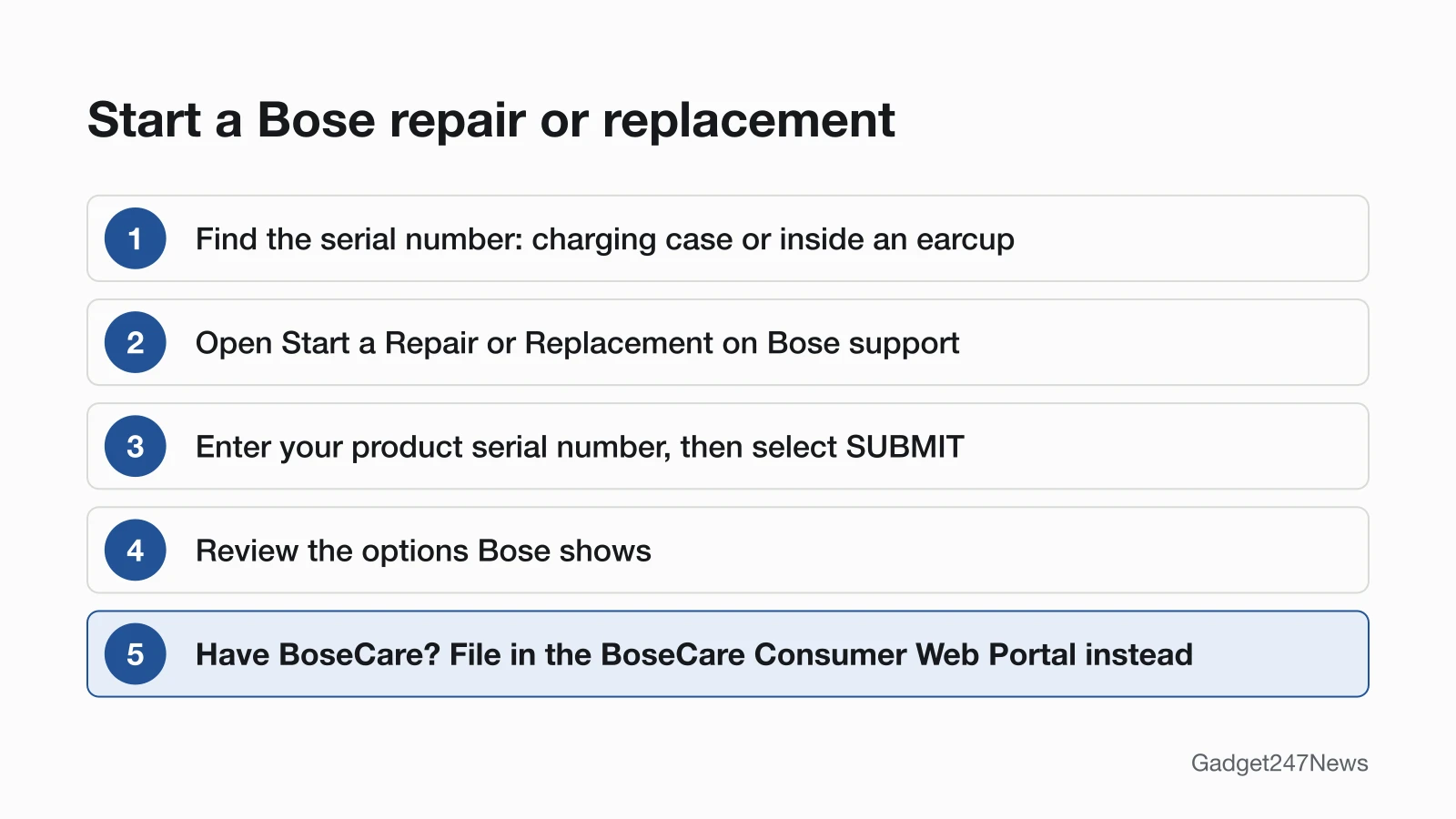
Have the serial number and your receipt ready, then:
- Find the serial number. Its spot depends on your model (table below).
- Open Start a Repair or Replacement, type the number into "Enter your product serial number", select SUBMIT and review the options Bose shows.
- If you bought BoseCare, file the claim in the BoseCare Consumer Web Portal instead. Servify sends you a prepaid shipping label.
- Keep your proof of purchase. Before warranty service, Bose may ask for purchase details such as "a receipt or sales invoice."
| Bose model | Where the serial number is |
|---|---|
| QuietComfort Ultra Earbuds (2nd Gen) | In the charging case well between the earbuds |
| QuietComfort Earbuds (2024) | On the bottom of the charging case |
| Ultra Open Earbuds | In the charging case lid |
| QuietComfort Ultra Headphones (2nd Gen) | Inside the left earcup, under the inner fabric |
| QuietComfort Headphones | Inside the right earcup, under the inner fabric |
To reach the number on either headphone model, the guides say to pull the ear cushion away from the earcup until all its tabs release, then gently peel back the upper edge of the fabric.
Try These Fixes First
Each of these symptoms has its own Bose fix page to work through before you send anything in:
- Charging: Bose headphones not charging opens with seating the earbuds and cleaning the charging contacts.
- Battery: Bose headphones battery draining fast opens by checking which battery is draining.
- One side: one side of Bose earbuds not working opens with a restart in the charging case.
Related Repair Guides
- What Is AppleCare+ for AirPods and Apple Watch: Apple's plan, for readers who also own AirPods or an Apple Watch.
- Beats Headphones Repair Options: Beats service runs through Apple, with Apple's own price estimate per model.
Bose Repair: Quick Answers
Can I get my Bose earbuds repaired?
Yes. Repairs for Bose earbuds, QuietComfort models included, start with the serial number on Bose's repair page. For a warranty defect, Bose chooses the remedy: a repair with new or refurbished parts, an equivalent replacement, or a partial or full refund. The Bose pages we read route service through that online request and shipping, and none of them lists walk-in repair at a store.
How do I replace Bose headphone ear pads?
Order a cushion kit through Bose customer service, which the owner's guides name for replacement parts. For QuietComfort Ultra Headphones (2nd Gen), Bose sells a Cushion Kit with left and right ear cushions and a scrim. To fit a cushion, align its tabs with the slots on the earcup and press until all the tabs snap into their slots: "You will hear and feel a snap."
Can Bose replace the battery in QuietComfort Earbuds?
The QuietComfort Ultra Earbuds (2nd Gen) and QuietComfort Earbuds (2024) guides we read don't describe a battery replacement. The limited warranty lists battery failure as covered, so start a request with the serial number from the case and Bose shows your options. Both BoseCare plans also list battery failure as covered.
Sources
We checked this page against the pages below, most recently on . How we verify fixes
- Start a Repair or Replacement (Bose) (Bose, support.bose.com)Official
- BoseCare (Bose) (Bose, bose.com)Official
- Bose Limited Warranty (US) (Bose, assets.bosecreative.com)Official
- QuietComfort Ultra Earbuds (2nd Gen) owner's guide (Bose, assets.bosecreative.com)Official
- QuietComfort Ultra Headphones (2nd Gen) owner's guide (Bose, assets.bosecreative.com)Official
- QuietComfort Earbuds owner's guide (Bose, assets.bosecreative.com)Official
- QuietComfort Headphones owner's guide (Bose, assets.bosecreative.com)Official
- Ultra Open Earbuds owner's guide (Bose, assets.bosecreative.com)Official
- QuietComfort Ultra Headphones (2nd Gen) Ear Cushion Kit (Bose) (Bose, bose.com)Official