Apple Watch Battery Replacement: Cost and Options

By Suraj Giri, Founder & Publisher. Reviewed by Suraj Giri on .
Published · 5 min read
How this page was made
- Sources. Checked against 6 official pages from Apple, most recently on . See the sources.
- No device testing. We don't test fixes on physical devices, so nothing on this page is a hands-on result. A fact counts as verified only when it matches an official source page.
- AI use. As with every page on Gadget247News, AI tools helped research, outline, draft and edit this page, and re-read the official pages to flag facts that didn't match. The illustration at the top was generated with Runway and is labelled under the image.
- Human sign-off. Suraj Giri, Founder & Publisher, read this page and signed it off on . The site won't publish a page without that sign-off.
- Changes. The published and updated dates move only when the content changes, and every change gets a dated note. Spot an error or a fix that didn't work? Email info@gadget247news.com.
Read our AI use policy, editorial policy and corrections policy.
Prices from Apple's Apple Watch service estimate on support.apple.com/watch/repair, US, checked September 26, 2026. Apple inspects the watch to set the final fee; tax and a shipping fee may apply, and Apple Authorized Service Providers set their own prices.
Apple Watch battery service is Apple replacing the worn battery in your watch. Apple calls all rechargeable batteries consumable components that become less effective as they chemically age, and the charge they hold shrinks as they do. For earbud and headphone problems instead, see how to fix your earbuds or headphones.
If your battery drains fast but Battery Health still shows a high maximum capacity, start with the settings checks in Apple Watch Battery Draining Fast.
How to Check If Your Apple Watch Battery Needs Replacing
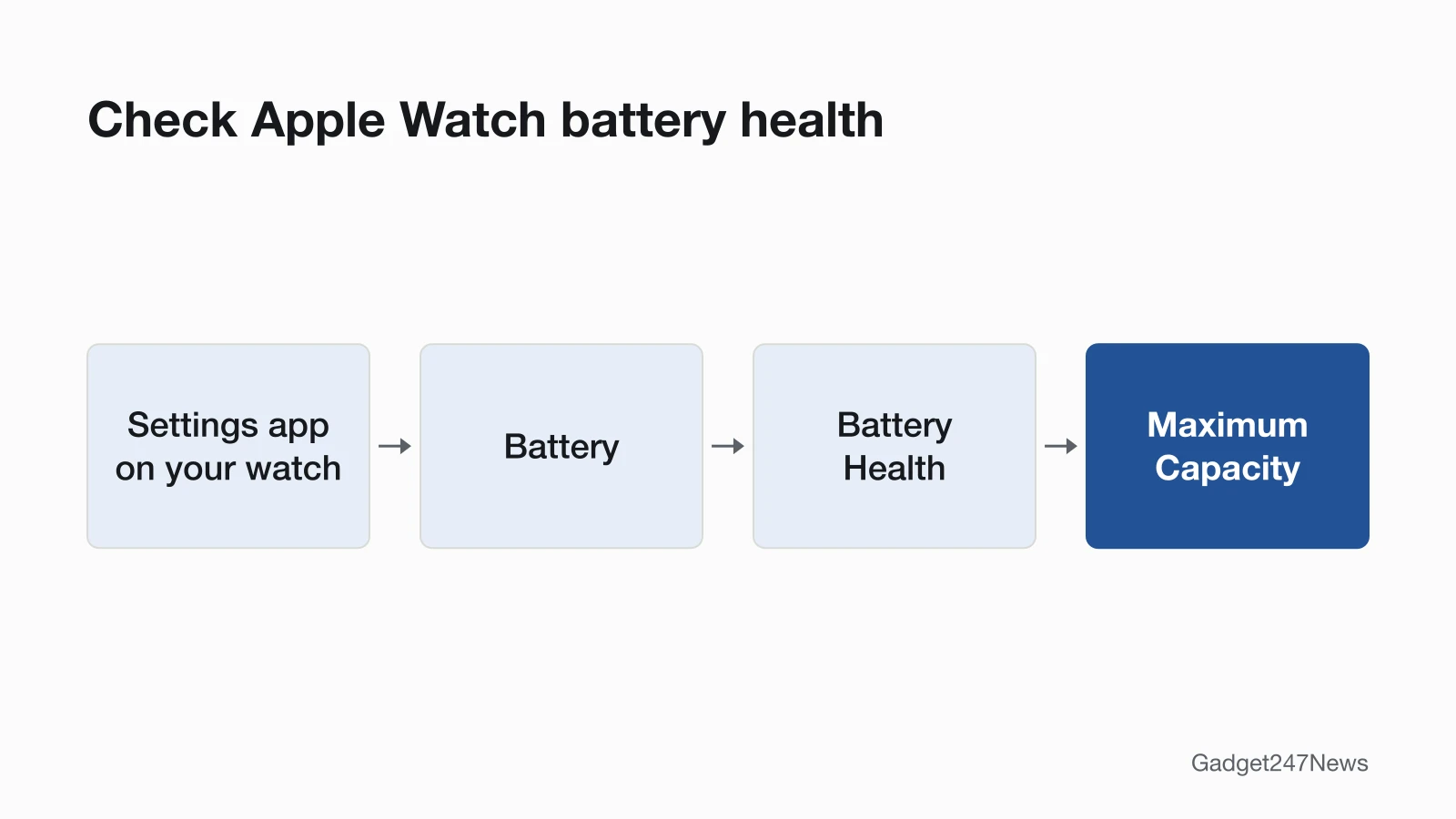
To check if your Apple Watch battery needs replacing, open Battery Health on the watch:
- Open the Settings app on your watch.
- Tap Battery, then tap Battery Health.
- Scroll down to Maximum Capacity. The percentage is your battery's capacity relative to when it was new.
Apple Watch also alerts you when battery capacity is significantly reduced. If Battery Health shows the message Battery Needs Service, or you think the battery needs replacement, Apple says to contact Apple Support. Some models recalibrate and estimate maximum capacity more accurately after a software update: Series 4 and Series 5 after watchOS 9.0, Series 6 (44mm) after watchOS 9.4, Series 7 and SE 2 after watchOS 26, and Series 8 and Ultra after watchOS 26.6. Depending on how long it was between when the watch was made and when it was activated, a new watch might show slightly less than 100 percent.
As batteries age, Apple says it can contribute to changes in Apple Watch performance. On Series 5 and later, SE and later, and Ultra and later, the watch manages performance in conditions such as a chemically aged battery or a low state of charge, and Apple lists possible effects such as longer app launch times, lower frame rates, screen dimming and lower speaker volume. If an aged battery has affected performance, Apple says to contact Apple Support.
When Apple Replaces the Battery for Free
With AppleCare, Apple replaces the battery for no extra charge if the capacity drops below 80%. Without it, the Apple Limited Warranty doesn't cover batteries that wear down from normal use, although Apple says its warranty is in addition to your rights under consumer law in your country or region. What Is AppleCare+ for AirPods and Apple Watch explains the plan.
How Much Does an Apple Watch Battery Replacement Cost?
An Apple Watch battery replacement costs $99 on most models and $79 on Series 3 in Apple's US out-of-warranty estimate, and $0 with AppleCare+. The table groups the 129 watch configurations in Apple's estimate tool (our count on September 26, 2026) by model family.
| Model family | Out-of-warranty battery service | With AppleCare+ |
|---|---|---|
| Series 4 to Series 12, all case sizes and materials (including Hermès, Nike and Edition) | $99 | $0 |
| SE (1st generation), SE (2nd generation), SE 3 | $99 | $0 |
| Ultra, Ultra 2, Ultra 3, Ultra 4 (including Hermès) | $99 | $0 |
| Series 3 | $79 | $0 |
| Series 2, Series 1, Apple Watch (1st generation) | Not in Apple's estimate tool: contact Apple | Not listed |
Apple's estimate, US, checked September 26, 2026. Apple inspects the watch to set the final fee, and for service covered by an AppleCare plan, the fee is the same at Apple and all Apple Authorized Service Providers. Apple's out-of-warranty estimate lists only two services per watch, "Battery service" and "Other damage", with no separate screen line, so display prices aren't in this table: see Apple Watch screen repair.
How to Get Your Apple Watch Battery Replaced
To get your Apple Watch battery replaced, use one of the three routes on Apple's repair page:
- A Genius Bar: technicians inspect your Apple Watch, explain your options and handle it from there.
- An Apple Authorized Service Provider: the same in-person service; providers can set their own fees and give their own estimate.
- Mail-in: Apple sends a prepaid shipping box, so you can mail the watch in on your schedule, without an appointment.
Start on Apple's Apple Watch repair page. You tell Apple what's going on with the watch, and it shows solutions to try or helps you arrange a repair or replacement.
What Happens After You Book
Apple inspects your watch to determine the final service fee. It guarantees the service and replacement parts for 90 days or the remaining term of your Apple warranty, whichever is longer, and the parts may be new or previously used genuine Apple parts that have been tested and pass Apple functional requirements. Service options may vary based on parts availability and location. You can follow the repair by signing in to My Support or the Apple Support app. With AppleCare, Apple can send a replacement Apple Watch before you send yours back; its repair page doesn't say whether that applies to battery service.
Before You Pay: Fixes to Try and Coverage to Check
If your watch won't charge or turn on, check the charging fixes below before you book battery service. A red lightning bolt means the watch doesn't have enough power to turn on: see Apple Watch Stuck on the Red Lightning Bolt. A watch that won't take a charge needs Apple Watch Not Charging, and How to Charge an Apple Watch covers the charger basics. Every other battery and connection fault is listed in Apple Watch sync and battery fixes.
Try These Fixes First
Apple says battery life depends on many factors, including the age of your watch and how you use it. The settings in Apple Watch Battery Draining Fast come first. To help the battery last, Apple says to keep the watch half-charged when you store it for the long term and to avoid charging or leaving it in hot places, including direct sun, for long periods. If battery life dropped after a watchOS update, wait a few days and check again, and check known watchOS issues before you update your Apple Watch.
Does the Apple Warranty Cover the Battery?
The Apple Limited Warranty covers your Apple Watch against manufacturing issues for one year from the date you bought it, but it doesn't cover accidental damage or batteries that wear down from normal use. Apple's repair page links a check of your coverage status.
More Repair Decisions
These guides cover the other repair and battery decisions, one device per page:
- Apple Watch Screen Repair
- How Long Does an Apple Watch Battery Last
- AirPods Battery Replacement and Repair Options
- How Long Do AirPods Last
- What Is AppleCare+ for AirPods and Apple Watch
- Beats Headphones Repair Options
- Bose Headphones Repair Options
Can I replace an Apple Watch battery myself?
Apple's Self Service Repair page lists repair manuals for iPhone, iPad, Mac laptops, Mac desktops, Apple displays and Beats, and Apple Watch isn't among them. Apple's own battery service runs through the Genius Bar, Apple Authorized Service Providers and mail-in, and its 90-day guarantee covers Apple's service and replacement parts.
How long does an Apple Watch battery last?
It depends on how you use the watch and on the battery's chemical age, which Apple says includes the number of charge cycles and how the battery was cared for: see How Long Does an Apple Watch Battery Last.
Sources
We checked this page against the pages below, most recently on . How we verify fixes
- Apple Service and Repair for Apple Watch (with its US price estimate) (Apple, support.apple.com)Official
- Check battery health and usage on Apple Watch (Apple Watch User Guide) (Apple, support.apple.com)Official
- If the battery in your Apple Watch drains too quickly (Apple, support.apple.com)Official
- Apple Watch Battery and Performance (Apple, support.apple.com)Official
- If your Apple Watch won't turn on or won't charge (Apple, support.apple.com)Official
- Self Service Repair (Apple Support) (Apple, support.apple.com)Official