How Long Do AirPods Last? Battery Lifespan Explained

By Suraj Giri, Founder & Publisher. Reviewed by Suraj Giri on .
Published · 6 min read
How this page was made
- Sources. Checked against 11 official pages from Apple, most recently on . See the sources.
- No device testing. We don't test fixes on physical devices, so nothing on this page is a hands-on result. A fact counts as verified only when it matches an official source page.
- AI use. As with every page on Gadget247News, AI tools helped research, outline, draft and edit this page, and re-read the official pages to flag facts that didn't match. The illustration at the top was generated with Runway and is labelled under the image.
- Human sign-off. Suraj Giri, Founder & Publisher, read this page and signed it off on . The site won't publish a page without that sign-off.
- Changes. The published and updated dates move only when the content changes, and every change gets a dated note. Spot an error or a fix that didn't work? Email info@gadget247news.com.
Read our AI use policy, editorial policy and corrections policy.
Try the AirPods battery-drain fixes first, then book Apple's battery service if your AirPods still run down fast.
Apple doesn't publish a lifespan in years for AirPods. It says its lithium-ion batteries are designed to keep 80% of their original capacity for a high number of charge cycles, a number that varies by product, and with AppleCare it replaces an AirPods battery for no extra charge if capacity drops below 80%. Out of warranty, Apple's battery service estimate is $49 for AirPods and AirPods Pro and $79 for AirPods Max.
Estimates from Apple's AirPods service page (support.apple.com/airpods/repair), US, checked September 27, 2026. Prices change: Apple inspects your AirPods to set the final fee, tax and shipping may apply, and Apple Authorized Service Providers set their own prices.
Apple uses two terms. "Battery life" is how long your device runs before it needs to be recharged; "battery lifespan" is how long the battery lasts until it needs to be replaced. If your AirPods drain fast but aren't old, try the fixes for AirPods battery life problems before you pay for service.
AirPods battery lifespan is the time until your AirPods battery needs Apple's battery service. This guide sits with our battery-replacement guides; Apple Watch owners will find the Apple Watch battery replacement cost on the parent page.
How Long AirPods Last on One Charge
AirPods last from up to 4 hours to up to 20 hours on one charge in Apple's ratings, depending on the model and noise setting. Figures from Apple's AirPods compare page, read September 27, 2026 (ANC is Active Noise Cancellation):
| Model | On one charge | With the charging case |
|---|---|---|
| AirPods 5 | Up to 4 hours, ANC on | Up to 20 hours, ANC on |
| AirPods 5 with Wireless Charging Case | Up to 5 hours, ANC on | Up to 22 hours, ANC on |
| AirPods 4 | Up to 5 hours, noise control off | Up to 30 hours, noise control off |
| AirPods 4 with Active Noise Cancellation | Up to 4 hours, ANC on | Up to 20 hours, ANC on |
| AirPods Pro 3 | Up to 8 hours, ANC on | Up to 24 hours, ANC on |
| AirPods Pro 2 | Up to 6 hours, ANC on | Up to 30 hours, ANC on |
| AirPods Max | Up to 20 hours, ANC on | No figure (Smart Case) |
| AirPods Max 2 | Up to 20 hours, ANC on | No figure (Smart Case) |
| AirPods (2nd generation) | Up to 5 hours | More than 24 hours |
| AirPods (3rd generation), Lightning or MagSafe case | Up to 6 hours | Up to 30 hours |
With noise control off, Apple's AirPods 5 specifications list up to 6 hours on one charge (up to 7 hours with the Wireless Charging Case). Apple adds that battery life depends on device settings, environment, usage and many other factors. If you're not sure which model you own, the Which AirPods Do I Have guide identifies it.
How Many Years Do AirPods Batteries Last?
Apple gives no figure in years and no charge-cycle count for AirPods. Its Battery Service and Recycling page lists cycle figures for iPhone, Apple Watch, iPad, iPod and MacBook, with no AirPods section. What Apple publishes covers its lithium-ion batteries in general. You complete one charge cycle when you've used an amount equal to 100% of the battery's capacity, though not necessarily all from one charge. The capacity diminishes slightly with each complete cycle, and the batteries are designed to retain 80% of their original capacity for a high number of cycles. Apple also says your own battery's lifespan will vary with how you use the device and the settings you choose.
How to Slow AirPods Battery Wear
To slow AirPods battery wear, keep two Apple charging features switched on. Apple designs both to preserve battery lifespan:
- Optimized Battery Charging (AirPods Pro, and AirPods 3 or later): your AirPods and iPhone or iPad learn your daily charging routine and hold off on a full charge until right before you need them. It's on by default when you set up your device, or after you update to iOS or iPadOS 15 or later.
- Optimized Charge Limit (AirPods Pro 3): the earbuds learn your daily usage and decide when to stop at an optimized limit and when to allow a full charge. It's on by default with iOS or iPadOS 26 or later.
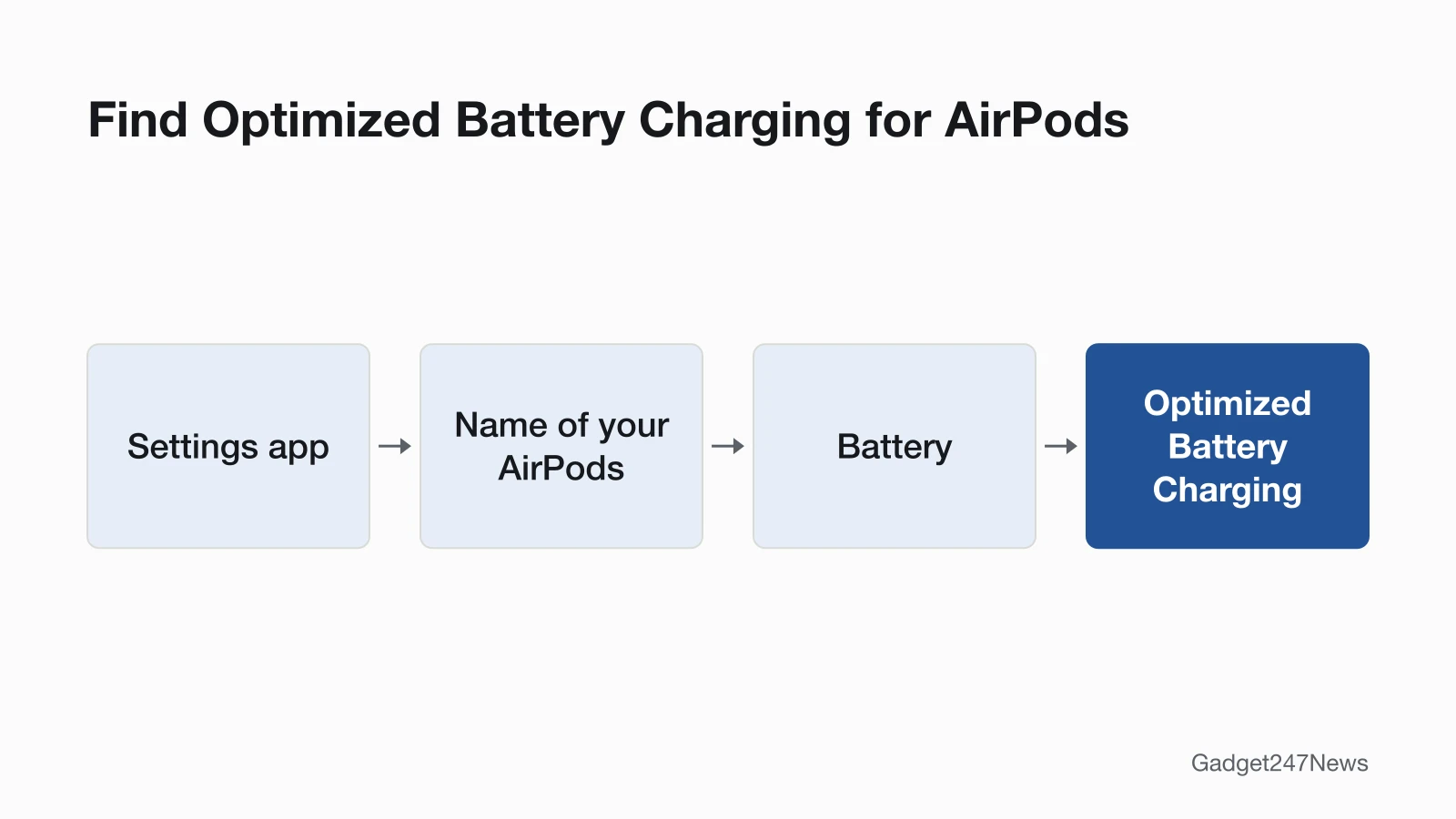
To find both switches:
- Wear your AirPods and make sure they're connected to your iPhone or iPad.
- Open the Settings app and tap the name of your AirPods.
- Tap Battery. The Optimized Battery Charging switch is here, and on AirPods Pro 3 so is Optimized Charge Limit.
Apple says Optimized Battery Charging is designed to reduce wear and improve battery lifespan. For a full charge on AirPods Pro 3, turn off Optimized Charge Limit entirely or for one day.
Your Official Options When the Battery Is Worn
A worn AirPods battery goes through Apple's battery service, and the price depends on your coverage. Apple's US estimates, checked September 27, 2026:
| Option | When it applies | Apple's estimate | Where to start |
|---|---|---|---|
| Battery service, out of warranty | The battery has worn down from normal use | $49 for AirPods and AirPods Pro; $79 for AirPods Max | Get Support |
| Battery service with AppleCare | Capacity has dropped below 80% | $0 | Get Support, signed in |
| Replace a damaged or lost AirPod or case | Damage or loss, not battery wear | Set per model and part | Get Support |
| Apple Authorized Service Provider | Any of the above, in person | Provider sets its own fee | In person, at the provider |
All 15 AirPods and AirPods Pro models in Apple's tool share the $49 figure (our count). Estimates for a damaged or missing earbud or case are on our AirPods case repair page.
Is AirPods Battery Wear Covered?
Not by the standard warranty. The Apple Limited Warranty covers your AirPods against manufacturing issues for one year from the date you bought them, and it doesn't cover batteries that wear down from normal use. With AppleCare, Apple will replace the battery for no extra charge if the capacity drops below 80%. Apple's warranty adds to rights provided by consumer law in your country or region. Check your coverage status on Apple's site, and see Apple warranty vs AppleCare+ for AirPods for how the two differ.
How to Start AirPods Battery Service
To start AirPods battery service, work through these three steps from Apple's AirPods repair page:
- Check your coverage with the link above, so you know whether the $0 AppleCare battery service applies.
- Start a request on Get Support and pick a route: in person at the Genius Bar or an Apple Authorized Service Provider, or by mail with a prepaid shipping box and no appointment.
- Let Apple inspect the AirPods, which sets the final service fee. Apple guarantees its service and replacement parts for 90 days or the remaining term of your Apple warranty, whichever is longer.
To follow the repair, sign in to My Support or the Apple Support app.
Try These Fixes First
Three battery symptoms have their own fix pages, and each one comes before a paid battery service:
- Fast drain on AirPods that aren't old: the AirPods Battery Draining Fast fixes linked at the top.
- The charging case won't charge: AirPods Case Not Charging? Causes and Fixes.
- Neither the AirPods nor the case charge: the AirPods Not Charging guide.
AirPods update themselves. Apple says firmware updates are delivered automatically while your AirPods are charging and in Bluetooth range of your iPhone, iPad or Mac that's connected to Wi-Fi. If the drain began after an update, check the AirPods firmware known issues.
Related Repair Guides
The same questions come up for the watch and for damaged AirPods:
- Apple Watch owners: How Long Does an Apple Watch Battery Last has Apple's rated hours and cycle figure.
- Damaged or lost AirPods: the AirPods case repair page, linked above.
AirPods Battery Questions
Two more AirPods battery questions, answered from Apple's own pages.
Can AirPods batteries be replaced?
Yes, through Apple's battery service, at the Genius Bar, an Apple Authorized Service Provider or by mail. Apple's Self Service Repair program gives access to parts, tools and manuals for out-of-warranty repairs, but its manuals cover iPhone, iPad, Mac laptops and desktops, Apple displays and Beats, with none for AirPods.
Why does one AirPod die faster than the other?
Apple's AirPods battery and repair pages don't give a reason for one side draining first. If one side runs out early or goes silent, follow the steps for when one AirPod stopped working.
Sources
We checked this page against the pages below, most recently on . How we verify fixes
- Batteries: Why Lithium-ion? (Apple) (Apple, apple.com)Official
- Charge your AirPods (Apple, support.apple.com)Official
- Apple Service and Repair for AirPods (with its US price estimate) (Apple, support.apple.com)Official
- AirPods: Compare Models (Apple) (Apple, apple.com)Official
- AirPods 5: Technical Specifications (Apple) (Apple, apple.com)Official
- AirPods Pro 3: Technical Specifications (Apple) (Apple, apple.com)Official
- AirPods Max 2: Technical Specifications (Apple) (Apple, apple.com)Official
- Batteries: Maximizing Performance (Apple) (Apple, apple.com)Official
- Batteries: Service and Recycling (Apple) (Apple, apple.com)Official
- About firmware updates for AirPods (Apple, support.apple.com)Official
- Self Service Repair (Apple Support) (Apple, support.apple.com)Official