AirPods Case Not Charging? Causes and Fixes

By Suraj Giri, Founder & Publisher. Reviewed by Suraj Giri on .
Published · 7 min read
How this page was made
- Sources. Checked against 7 official pages from Apple, most recently on . See the sources.
- No device testing. We don't test fixes on physical devices, so nothing on this page is a hands-on result. A fact counts as verified only when it matches an official source page.
- AI use. As with every page on Gadget247News, AI tools helped research, outline, draft and edit this page, and re-read the official pages to flag facts that didn't match. The illustration at the top was generated with Runway and is labelled under the image.
- Human sign-off. Suraj Giri, Founder & Publisher, read this page and signed it off on . The site won't publish a page without that sign-off.
- Changes. The published and updated dates move only when the content changes, and every change gets a dated note. Spot an error or a fix that didn't work? Email info@gadget247news.com.
Read our AI use policy, editorial policy and corrections policy.
The charging case is the battery for your AirPods: it holds multiple full charges, so a case that won't charge soon leaves the AirPods flat too. This page covers the case itself. If the case charges but the AirPods inside it don't, go to AirPods charging fixes. Other faults start from AirPods pairing, battery and sound fixes, and other brands from earbuds not charging.
Why Your AirPods Case Won't Charge
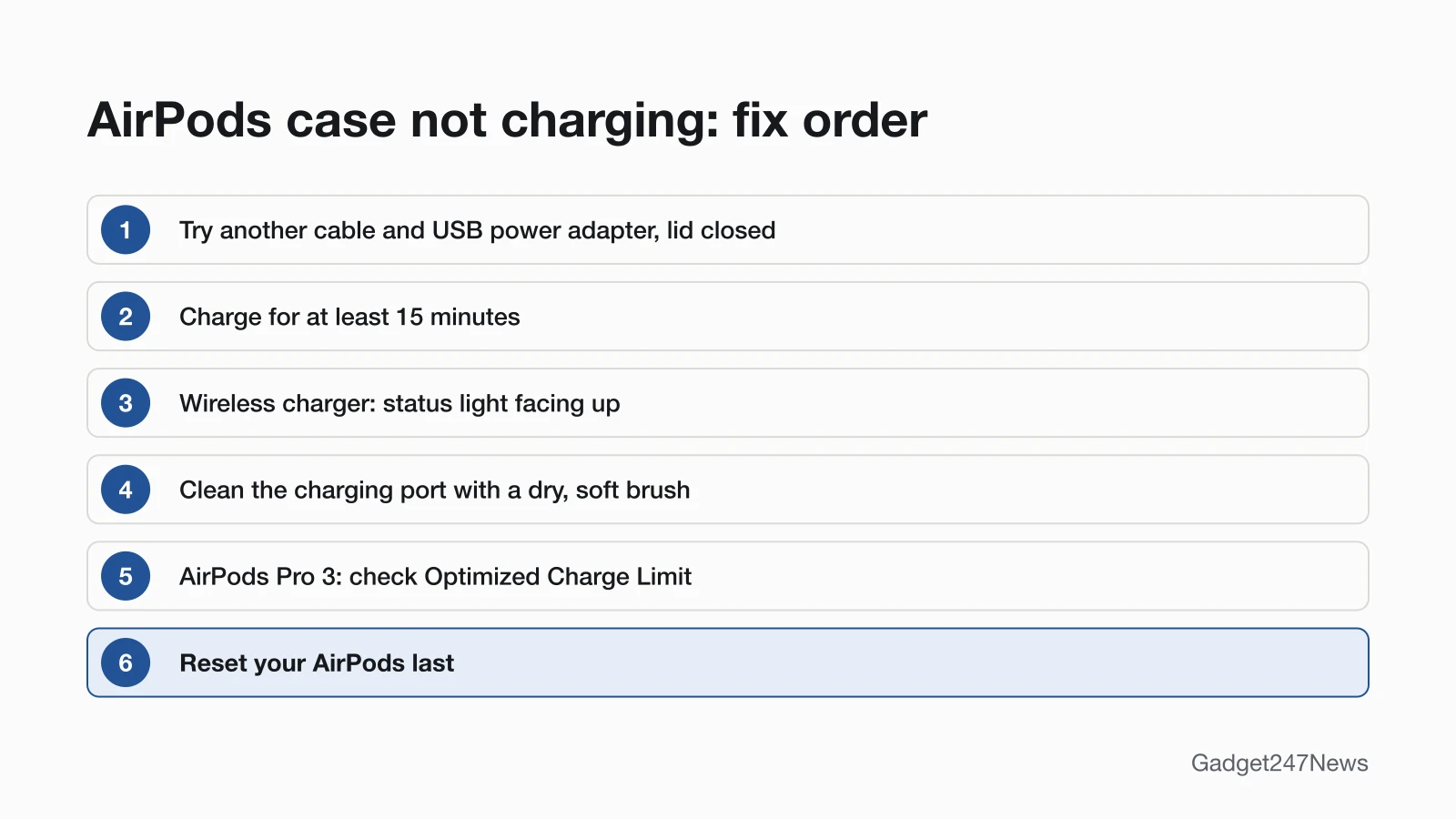
Six causes stop an AirPods charging case from charging, listed in the order to check them:
- The cable, adapter or outlet. Apple asks you to check that the cable is plugged firmly into the case and the USB power adapter, and that the adapter is in a working outlet.
- Too little time on power. Apple asks for at least 15 minutes of charging before you try again.
- A wireless case in the wrong spot. The status light has to face up with the lid closed, and the wireless cases for AirPods 4 (ANC) and AirPods 5 need to sit centered and flat.
- Debris in the charging port. Cleaning the port is a separate step in Apple's order.
- A battery setting that holds the charge back. Optimized Battery Charging, and Optimized Charge Limit on AirPods Pro 3, keep AirPods below full on purpose.
- A fault in the case. Apple's troubleshooting page puts a reset last.
Causes 1 to 4 are about power reaching the case; causes 5 and 6 are settings and faults.
What the Case Status Light Means
The status light shows the AirPods' charge when they're in the case with the lid open, and the case's own charge when the AirPods are out. Apple gives these meanings:
| Status light | What it means |
|---|---|
| Green | Fully charged |
| Amber | Less than one full charge remains |
| Briefly pulses amber | The AirPods or the case are less than 95% charged (AirPods 4 and 5, AirPods Pro 2 and 3, latest firmware) |
| Briefly flashes amber | The AirPods are less than 95% charged and the case is less than 25% charged (same models) |
| No light | The AirPods may need charging before you can use them again |
To read the case's own charge, take the AirPods out first. The wireless and MagSafe cases for AirPods 4 (ANC), AirPods 5, AirPods Pro 2 and AirPods Pro 3 also play a sound when they begin to charge.
How to Fix an AirPods Case That Won't Charge
The six fixes below start by reading the charge and end with a reset, the last step on Apple's troubleshooting page.
Fix 1: Check the Charge on Your iPhone
- iPhone or iPad: open the lid or take the AirPods out, go to Settings → Bluetooth, tap the name of your AirPods, then tap the Info button next to them to see the charge of each AirPod and the case.
- Mac: open the lid or take the AirPods out, hold the AirPods close to the Mac, click Control Center → Sound, then choose your AirPods.
On AirPods Pro 2, AirPods Pro 3, AirPods 4 (ANC) and AirPods 5 with Wireless Charging Case, Charging Notifications (Settings → your AirPods → Battery) also tell you when charging is complete. They need the latest AirPods firmware and iOS or iPadOS 26 or later.
Fix 2: Try Another Cable, Adapter and Outlet
To charge an AirPods case by cable:
- Put the AirPods in the case and close the lid.
- Connect a Lightning or USB-C cable, whichever your case uses, to the case and a USB power adapter.
- Check that the cable is firmly in both the case and the adapter, and that the adapter is in a working outlet. If nothing changes, swap in a different cable and adapter.
- Charge the case for at least 15 minutes.
Charging is fastest from an iPhone or iPad USB charger or from a Mac. The case charges with or without the AirPods inside.
Fix 3: Place a Wireless Case Correctly
To charge a wireless or MagSafe case on a charger:
- Place the case on a Qi-certified or MagSafe charger with the status light facing up and the lid closed. Center the wireless cases for AirPods 4 (ANC) and AirPods 5 flat on the charger.
- Watch the status light: it shows the current charge level for 8 seconds, then turns off while the case keeps charging.
- If the light doesn't turn on, reposition the case. If it still isn't charging, connect it by cable to a USB power adapter.
Apple lists four cases for an Apple Watch charger: the MagSafe Charging Case (Lightning or USB-C) for AirPods Pro 2, the MagSafe Charging Case for AirPods Pro 3, and the Wireless Charging Cases for AirPods 4 (ANC) and AirPods 5. With AirPods Pro, AirPods 3, AirPods 4 (ANC) or AirPods 5 with Wireless Charging Case, tap the case on the charging mat: amber means the AirPods are charging, green means they're fully charged.
Fix 4: Clean the Charging Port
Remove debris from the charging port with a clean, dry, soft-bristled brush. Apple says not to put anything into the charging port, to avoid damaging the metal contacts, and not to get any liquid in it. Wipe the case with a soft, dry, lint-free cloth, dampened slightly with isopropyl alcohol if needed, and let it dry. The care guide covers the other parts, down to how to clean AirPods Max ear cushions.
Fix 5: Check Optimized Charging Settings
Two battery settings hold AirPods below a full charge on purpose, which can look like a charging fault. Optimized Battery Charging (AirPods Pro and AirPods 3 or later) learns your daily routine and waits to charge to full until right before you need the AirPods. On AirPods Pro 3, Optimized Charge Limit charges to a limit that adapts to your use, and a divided charge ring appears when you open the lid. To charge AirPods Pro 3 fully, go to Settings → your AirPods → Battery and turn off Optimized Charge Limit, until tomorrow or entirely, or tap Charge to Full Now when you open the lid.
Fix 6: Reset Your AirPods
Reset the AirPods only after Fixes 1 to 5. Apple says a reset also resets any custom settings you've made, so you'll need to restore them afterwards. The AirPods soft and factory reset steps cover every model, and the list below covers what to do if the case still won't charge.
AirPods Pro, AirPods 4 and AirPods 5 Cases
Which charger works depends on the case, not the earbuds. Apple's case list gives these charging options:
| Case | Charges by | Source |
|---|---|---|
| MagSafe Charging Case (Lightning) for AirPods Pro 2 | Lightning cable; Qi-certified and MagSafe chargers; Apple Watch charger | Apple 109525, 119912 |
| MagSafe Charging Case (USB-C) for AirPods Pro 2, MagSafe Charging Case for AirPods Pro 3 | USB-C cable; Qi-certified and MagSafe chargers; Apple Watch charger | Apple 109525, 119912 |
| Wireless Charging Case for AirPods 4 (ANC) or AirPods 5 | USB-C cable; Qi-certified chargers; Apple Watch charger | Apple 109525 |
| Charging Case for AirPods 4 or AirPods 5 | USB-C cable (Apple lists no wireless charging) | Apple 109525 |
Apple lists only a USB-C port for the standard AirPods 4 and AirPods 5 cases, so charge them by cable. Each AirPods 4 and AirPods 5 case also works only with its own earbuds: the Charging Case for AirPods 4 isn't compatible with AirPods 4 (ANC) earbuds. If you aren't sure which case you have, the model numbers are in Which AirPods Do I Have? Model Numbers Explained.

Still not working?
- Try the next fix: if the case charges but the AirPods inside don't, see AirPods Not Charging.
- Reset your AirPods: How to Reset AirPods (you'll need to pair them again afterwards).
- Contact Apple Support: support.apple.com/airpods.
- Repair or replace the case: AirPods repair options.
Started after an update? Check the Update Tracker for known issues.
AirPods Charging but Not the Case?
When the AirPods charge inside the case but the case's own level doesn't rise, check the case's power, not the AirPods. Take the AirPods out so the status light shows the case's charge, then work through Fixes 2 to 4: the cable and adapter, wireless placement and the charging port.
Related Battery Problems
AirPods that charge fully but run down fast have a different fault, covered in AirPods battery drain.
AirPods Case: Quick Answers
Can only one AirPod be dead?
Yes. Apple's steps for a silent AirPod include charging both in the case for 30 seconds and checking on your iPhone that each one is charging; the full steps are in left or right AirPod not working.
What is the average lifespan of AirPods?
Apple gives no average lifespan on the pages we checked on September 26, 2026. It says Optimized Battery Charging is designed to reduce battery wear and improve its lifespan. How Long Do AirPods Last? Battery Lifespan Explained covers the details, and AirPods battery drain covers fast drain.
Can you charge AirPods without the case?
Apple lists one way to charge AirPods and AirPods Pro: put them in their case and close the lid, where they shut down and charge. Its charging pages give no other method. AirPods Max are different: they charge by cable, and if they won't charge, Apple says to charge them for at least 5 minutes using the cable that came with them.
Sources
We checked this page against the pages below, most recently on . How we verify fixes
- If your AirPods won't charge (Apple, support.apple.com)Official
- Charge your AirPods (Apple, support.apple.com)Official
- Charge AirPods, AirPods Pro, or AirPods Max (AirPods User Guide) (Apple, support.apple.com)Official
- Identify your AirPods (Apple, support.apple.com)Official
- How to clean your AirPods (Apple, support.apple.com)Official
- How to clean your AirPods Pro (Apple, support.apple.com)Official
- If your left or right AirPod isn't working (Apple, support.apple.com)Official