AirPods Battery Draining Fast? Causes and Fixes

By Suraj Giri, Founder & Publisher. Reviewed by Suraj Giri on .
Published · 6 min read
How this page was made
- Sources. Checked against 10 official pages from Apple, most recently on . See the sources.
- No device testing. We don't test fixes on physical devices, so nothing on this page is a hands-on result. A fact counts as verified only when it matches an official source page.
- AI use. As with every page on Gadget247News, AI tools helped research, outline, draft and edit this page, and re-read the official pages to flag facts that didn't match. The illustration at the top was generated with Runway and is labelled under the image.
- Human sign-off. Suraj Giri, Founder & Publisher, read this page and signed it off on . The site won't publish a page without that sign-off.
- Changes. The published and updated dates move only when the content changes, and every change gets a dated note. Spot an error or a fix that didn't work? Email info@gadget247news.com.
Read our AI use policy, editorial policy and corrections policy.
AirPods that die fast show one of two patterns. Drain that starts suddenly is worth checking against your settings and your firmware version first. Battery life that shrinks gradually is battery wear: Apple says its warranty doesn't cover batteries that "wear down from normal use". This guide covers both, for AirPods, the charging case and AirPods Max; for other symptoms, start with our AirPods troubleshooting hub.
AirPods that won't charge at all have a different fault, covered in AirPods Not Charging. For other brands whose earbuds won't charge, see earbuds won't charge.
Why Is My AirPods Battery Draining So Fast?
AirPods drain faster than expected when the battery has worn, a feature is drawing extra power, or AirPods Max sit outside their case. Check these six causes:
- Battery wear: batteries wear down from normal use, so battery life shrinks over time.
- A recent update: Apple's notes for its newest firmware don't mention battery drain, but if drain started right after an update, compare your firmware version with Apple's latest list (Fix 2).
- Active Noise Cancellation left on: Apple rates AirPods 5 at up to 6 hours with noise control off, but up to 4 hours with Active Noise Cancellation on.
- Spatial Audio or workout features: AirPods Pro 3 are rated for up to 8 hours with Active Noise Cancellation, up to 7.5 hours with Spatial Audio and Head Tracking, and up to 6.5 hours with heart rate sensing during workouts.
- AirPods Max outside the Smart Case: Apple says keeping them in the Smart Case puts them into an ultralow power mode.
- A software glitch: Apple says a reset can fix issues beyond charging.
How to Fix AirPods Battery Drain
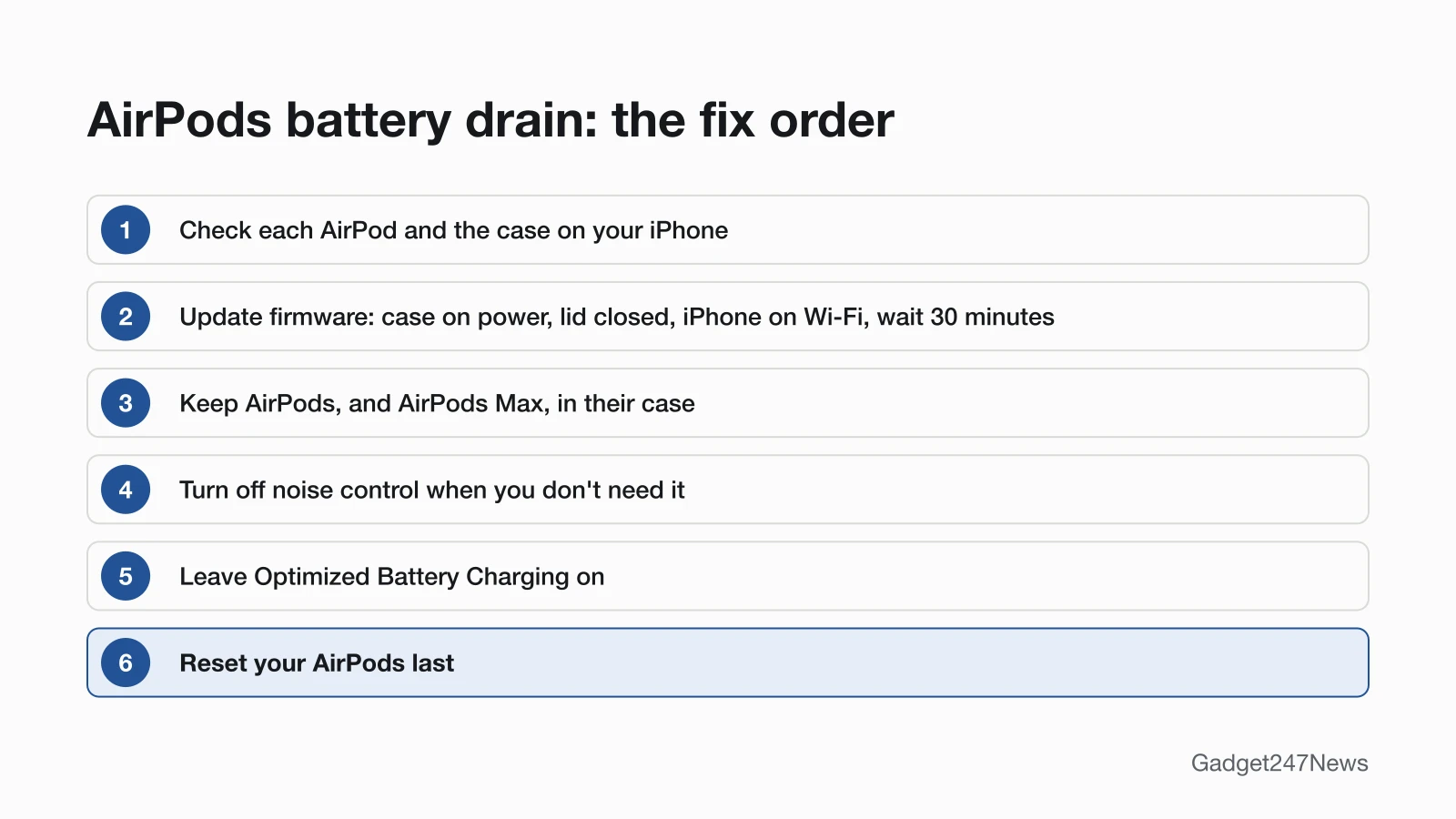
Try these six fixes in order; each targets a cause above, and the reset comes last.
Fix 1: Check Which Battery Is Draining
Check each AirPod on your iPhone and the case on its status light before you change anything:
- Open the lid, or take your AirPods out of the case.
- Go to Settings, tap Bluetooth, tap the name of your AirPods, then tap the Info button (ⓘ) next to them.
With your AirPods out of the case, its status light shows the case's own charge. Your iPhone also warns you: low-battery notifications arrive at 20, 10 and 5 percent, and a tone chimes in the AirPods at 10 percent and again right before they turn off. If one AirPod is always far lower, see the one-AirPod section below; if the case empties first, see the charging case section.
Fix 2: Update Your AirPods Firmware
AirPods firmware is delivered automatically while your AirPods are charging and in Bluetooth range of an iPhone, iPad or Mac that's connected to Wi-Fi. To give the update those conditions:
- Update your iPhone to the latest iOS, turn on Bluetooth, make sure your AirPods are connected and connect your iPhone to Wi-Fi. Then connect the charging case to power, put your AirPods inside, close the lid and keep them in Bluetooth range.
- Wait at least 30 minutes, open the lid to reconnect them, then check the version: Settings → Bluetooth → Info button next to your AirPods → About.
For AirPods Max, Apple's steps plug the charging cable into the bottom-right earphone instead, keep them in Bluetooth range and wait at least 30 minutes.
Compare the number with Apple's list of latest versions. For the full conditions, see how to update AirPods firmware.
Fix 3: Keep AirPods (and AirPods Max) in Their Case
Put your AirPods back in their case whenever you're not using them: Apple says the case holds multiple full charges and keeps them charged. That only works while the case has power, so charge the case too. AirPods Max have their own case rule: Apple says keeping them in the Smart Case puts them into an ultralow power mode that preserves battery charge.
Fix 4: Turn Off Noise Control When You Don't Need It
Active Noise Cancellation shortens listening time on both models whose Apple Tech Specs give figures with it on and off. AirPods 4 (ANC) are rated for up to 4 hours with it on and up to 5 hours with noise control off; AirPods 5, up to 4 hours on and up to 6 hours off. Turn noise control off when you don't need it, such as in a quiet room. The listening-mode controls are covered in How to Turn On Noise Cancelling on AirPods.
Fix 5: Leave Optimized Battery Charging On
Keep Optimized Battery Charging on: Apple designed it to reduce battery wear and improve lifespan by cutting the time AirPods Pro and AirPods 3 or later spend fully charged. AirPods Pro 3 also have Optimized Charge Limit, which charges to a limit that adapts to your daily use. Both are on by default. To check, wear your AirPods connected to your iPhone, open Settings, tap the name of your AirPods, then tap Battery.
Fix 6: Reset Your AirPods (Last Step)
Reset your AirPods only after the five fixes above, because any custom settings reset too and you restore them afterwards. The steps to factory reset AirPods cover every model.
AirPods Battery Life by Model
Apple rates AirPods Pro 3 at up to 8 hours of listening time per charge with Active Noise Cancellation, and up to 24 hours with the charging case. Apple's Tech Specs pages give these figures:
| Model | Listening time per charge | Total with case | Source |
|---|---|---|---|
| AirPods 4 | Up to 5 hours | Up to 30 hours | Apple, AirPods 4 Tech Specs |
| AirPods 4 (ANC) | Up to 4 hours with ANC; up to 5 hours with noise control off | Up to 20 hours with ANC; up to 30 hours with noise control off | Apple, AirPods 4 with Active Noise Cancellation Tech Specs |
| AirPods 5 | Up to 4 hours with ANC; up to 6 hours with noise control off | Up to 20 hours with ANC | Apple, AirPods 5 Tech Specs |
| AirPods Pro 3 | Up to 8 hours with ANC | Up to 24 hours with ANC | Apple, AirPods Pro 3 Tech Specs |
| AirPods Max 2 | Up to 20 hours with ANC | No case figure; the Smart Case preserves charge in an ultra-low-power state | Apple, AirPods Max 2 Tech Specs |
Apple measured these at 50% volume, playing audio until the first AirPod stopped (for AirPods Max 2, until the headphones stopped), and says battery life depends on device settings, environment and usage. On every earbud model above, 5 minutes in the case gives around 1 hour; AirPods Max 2 get around 1.5 hours from 5 minutes of charging.
One AirPod Dies Faster Than the Other
Check both levels with Fix 1 before anything else. Apple's rated hours run until the first AirPod stops playback, so they describe whichever side empties first. Apple's pages don't say why one side drains faster. If one side is consistently much lower, the guide One AirPod Not Working has Apple's charge-and-reset order for a single AirPod.
The Charging Case Dies Fast
A case light that briefly flashes amber means your AirPods are below 95% and the case is below 25%, on AirPods 4, AirPods 5, AirPods Pro 2 and AirPods Pro 3 with the latest firmware. Charge the case before you judge the earbuds. If the case won't hold a charge, see AirPods charging case fixes.
Still not working?
If your AirPods still drain fast, work through this order:
- Try the next fix: AirPods Not Charging, if the AirPods or the case won't fill up at all.
- Reset your AirPods with the steps in Fix 6 (you'll need to reconnect them afterwards).
- Contact Apple Support.
- Check battery service options: AirPods service and battery options.
Started after an update? Check the Update Tracker for known issues.
Drain Started After an Update?
Drain that starts right after new firmware is worth checking against the version list. Compare your version with the AirPods firmware history, which lists each version's changes and any known issues. Apple's release notes for the newest versions, 9A348 and 9A350, describe new features and don't mention battery drain. Get an email when an AirPods update breaks something, and when it's fixed.
How Long Do AirPods Batteries Last?
None of the Apple support and repair pages we read gives a lifespan for AirPods batteries in years. Apple's warranty doesn't cover batteries that wear down from normal use, and with an AppleCare plan, Apple replaces the battery if its capacity drops below 80%. The full explainer is How Long Do AirPods Last? Battery Lifespan Explained.
AirPods Battery: Quick Answers
What is the average lifespan of AirPods?
Apple's AirPods support pages don't give an average lifespan. Batteries wear down from normal use, and Apple treats capacity below 80% as the point for battery replacement under an AppleCare plan. Optimized Battery Charging reduces that wear on AirPods Pro and AirPods 3 or later.
Why does one AirPod run out first?
Apple's support pages don't say why one AirPod runs out first. Check both levels on your iPhone under Settings, Bluetooth and the Info button next to your AirPods. Apple's rated hours already run only until the first AirPod stops. If one side is always much lower, follow One AirPod Not Working.
Sources
We checked this page against the pages below, most recently on . How we verify fixes
- Charge your AirPods (Apple, support.apple.com)Official
- About firmware updates for AirPods (Apple, support.apple.com)Official
- Charge your AirPods Max (Apple, support.apple.com)Official
- How to reset your AirPods and AirPods Pro (Apple, support.apple.com)Official
- Apple Service and Repair for AirPods (Apple, support.apple.com)Official
- AirPods 4 - Tech Specs (Apple, support.apple.com)Official
- AirPods 4 with Active Noise Cancellation - Tech Specs (Apple, support.apple.com)Official
- AirPods 5 - Tech Specs (Apple, support.apple.com)Official
- AirPods Pro 3 - Tech Specs (Apple, support.apple.com)Official
- AirPods Max 2 - Tech Specs (Apple, support.apple.com)Official