How to Reset Earbuds: AirPods, Galaxy Buds, Sony and JBL

By Suraj Giri, Founder & Publisher. Reviewed by Suraj Giri on .
Published · 8 min read
How this page was made
- Sources. Checked against 40 official pages from Apple, Samsung, Google, Sony, Skullcandy, JBL, Bose, JLab, Soundcore and Raycon, most recently on . See the sources.
- No device testing. We don't test fixes on physical devices, so nothing on this page is a hands-on result. A fact counts as verified only when it matches an official source page.
- AI use. As with every page on Gadget247News, AI tools helped research, outline, draft and edit this page, and re-read the official pages to flag facts that didn't match. The illustration at the top was generated with Runway and is labelled under the image.
- Human sign-off. Suraj Giri, Founder & Publisher, read this page and signed it off on . The site won't publish a page without that sign-off.
- Changes. The published and updated dates move only when the content changes, and every change gets a dated note. Spot an error or a fix that didn't work? Email info@gadget247news.com.
Read our AI use policy, editorial policy and corrections policy.
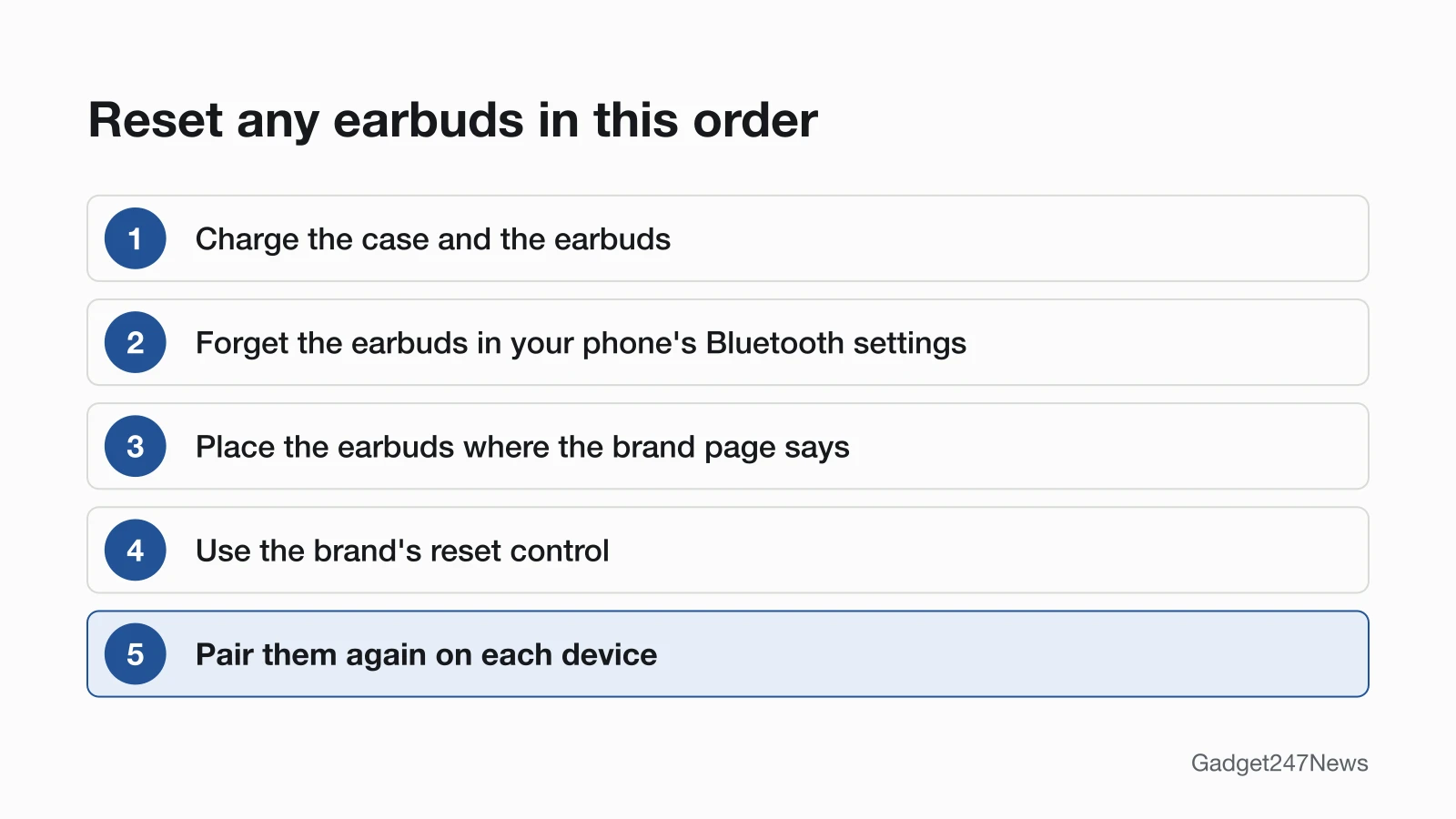
To reset earbuds, forget them in your phone's Bluetooth settings, then use the brand's reset control (usually a button on the case or on the earbuds, or the companion app), and pair them again. A factory reset deletes the pairing and returns the earbuds to their default settings. Before any reset, try a restart, then the case and Bluetooth steps to fix earbuds and headphones.
A reset is the last step for connection problems too: if your earbuds won't connect, work through the fixes for earbuds won't pair first. AirPods owners can go straight to How to Reset AirPods, which carries Apple's hold times and light colors for every model.
Where the Reset Control Is, by Brand
Each brand puts its reset control in a different place, and Galaxy Buds use a phone setting instead of a button. The table gives the location only; button timings and light colors are on each brand's reset page.
| Brand | Where the reset control is | Full steps |
|---|---|---|
| AirPods | The setup button on the back of the case (AirPods 1, 2 and 3, AirPods Pro 1 and 2). AirPods 4, AirPods 5 and AirPods Pro 3 use a series of double-taps on the front of the case instead. | How to Reset AirPods |
| Samsung Galaxy Buds | No reset button. The reset sits in your phone's Settings under your Galaxy Buds (One UI 8.0 or later) or in the Galaxy Wearable app (earlier One UI versions). | reset Samsung Galaxy Buds |
| Sony | Headphones: the power and NC/AMB buttons (WH-1000XM6, WH-1000XM5). On the WH-CH520, the volume + and volume - buttons reset it and the power and volume - buttons initialize it. Earbuds: the button on the back of the charging case (WF-1000XM6, WF-1000XM5, WF-C510), or the buttons on both earbuds (WF-C500). | How to Reset Sony Headphones |
| JBL | Earbuds: a triple-tap-and-hold on either earbud for most Tune, Live, Tour Pro and Reflect Aero models, and a reset button next to the charging port on Smart Case models. Headphones: the Vol + and Vol - buttons (Tune, Live and Tour One). App-compatible models also reset under Support in JBL's Headphone app. | How to Reset JBL Earbuds |
| Beats | Earbuds: the system button on the case (Studio Buds +, Powerbeats Pro 2), the system button with both earbuds in the open case (Beats Fit Pro, Powerbeats Fit), or the button above the logo on both earbuds (Solo Buds). Headphones: the system button on the right earcup (Studio Pro) or two buttons held together (Solo 4, Beats 360). Beats Flex: the volume and power buttons on its control modules. | reset Beats headphones |
| Bose | The button on the back of the charging case (QuietComfort Ultra Earbuds (2nd Gen), Ultra Open Earbuds). The Bluetooth/Power button, plus the Multi-function button for a factory restore (QuietComfort Ultra Headphones (2nd Gen)). A touch and hold on the earbuds (QuietComfort Earbuds (2024)). | How to Reset Bose Headphones |
| Google Pixel Buds | The pairing button on the back of the case. | How to Reset Pixel Buds |
| Skullcandy | Both earbud buttons held together (Dime 3), both touch sensors (Rail ANC), the right earbud button only (Push Active), or a touch and hold on each earbud (Indy Evo, Sesh Evo). | How to Reset Skullcandy Earbuds |
On the Sony WF-1000XM5 and the Bose QuietComfort Ultra Earbuds (2nd Gen) and Ultra Open Earbuds, one case button does both the brand's reset and its factory reset. Read the brand page before you press.
Restart, Reset or Factory Reset: What's the Difference?
A restart turns the earbuds off and on and keeps your settings, while a factory reset deletes the pairing and returns the earbuds to their default settings. The three terms people search for mean this:
- Restart: powers the earbuds off and back on, and your settings and pairing stay. Bose calls it a reboot. "Soft reset" has no fixed meaning: Raycon's soft reset for the Essential Open Earbuds starts by deleting them from your phone's Bluetooth. Samsung's restart for Galaxy Buds is to put them in the case, close the lid, wait at least seven seconds and take them out; they reconnect on their own.
- Reset or factory reset: returns the earbuds to default settings and deletes the pairing information. Samsung says a factory reset "will return your earbuds to their default settings", and JBL says its factory reset "will erase all settings and Bluetooth data from the device".
- Hard reset: a search term, not a standard. On most earbuds it means the factory reset you do with buttons, but makers use it differently: JBL's case-button "hardware reset" keeps your settings, and Google's Pixel Watch hard reset restarts a frozen watch. Follow the brand page.
Sony splits the terms the same way. "Resetting the headset" is a restart that keeps "the pairing information and other settings", and "initializing" restores the factory settings. Bose is the brand to watch: its "reset" reboots the earbuds or headphones without clearing device settings (on Ultra Open Earbuds it also clears the earbud device list), and its wipe is called a "restore to factory settings". A Bose reset is not a factory reset.
When Should You Reset Earbuds?
Reset earbuds after the case, Bluetooth and forget-and-pair steps have failed, when one earbud won't sync with the other, when they change owner, or when the maker's support asks you to. Makers put the reset last. Apple's AirPods connection page ends with "If you still can't connect, reset your AirPods", and JLab's reset guide is written for earbuds that pair one at a time. A reset isn't the first fix for charging, sound or earbuds that disconnect and reconnect either: sort out the case, the volume or the connection first.
Before You Reset
Do these three things before resetting earbuds:
- Charge the case and earbuds. Google has you plug the Pixel Buds case into power first, Samsung asks for at least 15% battery in both Galaxy Buds, and Sony's WF-1000XM6, WF-1000XM5 and WF-C510 won't start initializing when the case charge is low.
- Forget the earbuds on your phone. On iPhone, go to Settings → Bluetooth, tap the More Info button (ⓘ) next to the earbuds, then tap Forget This Device. On Android, swipe down from the top of the screen, touch and hold Bluetooth, tap Settings next to the earbuds, then tap Forget.
- Put both earbuds in the case, unless the brand page says otherwise. Skullcandy's Dime 3, Rail ANC, Push Active, Indy Evo and Sesh Evo, and JBL's Reflect Aero, reset with both earbuds out of the case.
After the Reset: Pair Them Again
A factory reset leaves the earbuds unpaired, so pair them again from your phone's Bluetooth settings or the brand's app. Many go straight back to pairing mode: Pixel Buds are "ready for pairing with your devices" once the light bounces white again, and Beats tells you to pair them again to your Apple or Android device. Sony asks you to delete the headset's pairing information from the connected device, then pair it again. The steps to pair Bluetooth earbuds with a Mac cover macOS.
Where Is the Reset Button on Earbuds?
On most earbuds with a charging case, the reset button is on the back of the case: AirPods 1 to 3 and AirPods Pro 1 and 2, Pixel Buds, the Sony WF-1000XM5 and the Bose QuietComfort Ultra Earbuds (2nd Gen) all work this way. Others use a gesture instead. AirPods 4, AirPods 5 and AirPods Pro 3 take a series of double-taps on the front of the case, and most JBL earbuds take a triple-tap-and-hold on one earbud. JBL Smart Case models have a reset button next to the charging port. Galaxy Buds have no reset button, and headphones use button combinations on the earcups.
How to Do a Hard Reset on Earbuds
To hard reset earbuds, forget them on your phone, use the brand's reset control until the light or a tone confirms it, then pair them again. On most earbuds, "hard reset" means this button-based factory reset. Hold times differ by brand and model, so take the count from the brand page. Check the brand's own word first: JBL's case-button "hardware reset" "resets the earbuds without restoring the settings to the factory defaults", and Raycon's Essential Open Earbuds manual calls closing the earbuds in the capsule a "hard reset".
How to Reset Samsung Galaxy Buds
Restart Galaxy Buds first: put them in the case, close the lid, wait at least seven seconds, then take them out, and they reconnect on their own. If the problem stays, factory reset them from your phone. On One UI 8.0 or later, open Settings, tap your Galaxy Buds, tap Manage connections, then tap Reset and Reset again to confirm. On earlier One UI versions the reset is in the Galaxy Wearable app; Samsung's US page gives Earbud settings → Reset for the Galaxy Buds+, Buds Live, Buds Pro and Buds2.
How to Reset JLab, soundcore, Raycon and Other Earbuds
For JLab, soundcore and Raycon earbuds, use the same order as other brands: forget them, place them as the manual says, use the reset control, then pair again. JLab's help page lists two methods: a tap sequence on each earbud while both sit in the open case (JBuds Air, Go Air and Epic Air models, among others), and a reset button on the case (GO Pods ANC, Flex Open Earbuds, JBuds Pods ANC, Epic Pods ANC). soundcore uses a case button on models such as the Liberty 4 NC and P40i, and the touch areas on both earbuds on the P30i and A30i. Raycon's Everyday Earbuds Pro have a reset button near the charging port on the capsule.
Does a Reset Undo a Firmware Update?
No: a reset keeps the firmware your earbuds already have, according to the makers that address it. Sony's Help Guides for the WF-1000XM6, WF-1000XM5, WF-C510 and WF-C500 say updated software "is retained updated even if you initialize the headset". Apple uses the reset the other way round: if AirPods firmware won't update, reset the AirPods, then try the update again. No maker page we read describes a reset that rolls firmware back. Problems a reset can't clear are listed under earbud updates on the Update Tracker. Get an email when an earbud update breaks something, and when it's fixed.
Reset Earbuds From a Previous Owner
A reset doesn't remove second-hand AirPods from the previous owner's Apple Account. Apple says the previous owner "needs to remove the device or item from their Apple Account before you can pair it with a new account", and Apple can't remove that lock for you. How to Reset AirPods Without the Previous Owner covers what to ask for. Pixel Buds work the other way: Google requires a reset to transfer used Pixel Buds Pro 2 or Pixel Buds 2a to you.
Reset Didn't Work? When to Contact the Manufacturer
When a reset changes nothing, work down this list before you send the earbuds anywhere:
Still not working?
- Try the next fix: check the case and the charge, starting with one earbud not charging.
- Repeat the reset with the earbuds placed exactly as the brand page says. Google's Pixel Buds tip: "If buds aren't placed correctly in the charging case, the reset process won't begin."
- Contact the manufacturer's support with your model name and the steps you've already tried.
- Check repair or warranty options: when a reset doesn't help, Sony's Help Guides point you to Sony support or a Sony dealer, and Samsung's reset page points you to a walk-in service center or an online repair booking.
Started after an update? Check the Update Tracker for known issues.
Sources
We checked this page against the pages below, most recently on . How we verify fixes
- Apple: How to reset your AirPods and AirPods Pro (Apple, support.apple.com)Official
- Apple: If your AirPods or AirPods Pro won't connect (Apple, support.apple.com)Official
- Apple: If your AirPods won't charge (Apple, support.apple.com)Official
- Apple: Connect a third-party Bluetooth accessory to your iPhone or iPad (Apple, support.apple.com)Official
- Apple: About firmware updates for AirPods (Apple, support.apple.com)Official
- Apple: If an item or device is connected to another Apple Account (Apple, support.apple.com)Official
- Apple Beats User Guide: Reset Beats (Apple, support.apple.com)Official
- Samsung: How to restart or reset your Samsung earbuds (Samsung, samsung.com)Official
- Samsung UK: How to reset your Samsung Galaxy Buds (Samsung, samsung.com)Official
- Google: Reset your Google Pixel Buds (Google, support.google.com)Official
- Google Android Help: Find and set up Bluetooth devices near your Android device (Google, support.google.com)Official
- Google Pixel Watch Help: Fix a blank, frozen, or error message on the Google Pixel Watch screen (Google, support.google.com)Official
- Sony WH-1000XM6 Help Guide: Initializing the headset to restore factory settings (Sony, helpguide.sony.net)Official
- Sony WH-1000XM6 Help Guide: Resetting the headset (Sony, helpguide.sony.net)Official
- Sony WH-1000XM5 Help Guide: Initializing the headset to restore factory settings (Sony, helpguide.sony.net)Official
- Sony WH-CH520 Help Guide: Resetting the headset (Sony, helpguide.sony.net)Official
- Sony WH-CH520 Help Guide: Initializing the headset to restore factory settings (Sony, helpguide.sony.net)Official
- Sony WF-1000XM6 Help Guide: Initializing the headset to restore factory settings (Sony, helpguide.sony.net)Official
- Sony WF-1000XM5 Help Guide: Initializing the headset to restore factory settings (Sony, helpguide.sony.net)Official
- Sony WF-1000XM5 Help Guide: Resetting the headset (Sony, helpguide.sony.net)Official
- Sony WF-C510 Help Guide: Initializing the headset to restore factory settings (Sony, helpguide.sony.net)Official
- Sony WF-C500 Help Guide: Initializing the headset to restore factory settings (Sony, helpguide.sony.net)Official
- JBL: Factory Reset Procedure: Tune Series (JBL, support.jbl.com)Official
- JBL: Factory Reset Procedure: Live Series (JBL, support.jbl.com)Official
- JBL: Factory Reset Procedure: Tour Series (JBL, support.jbl.com)Official
- JBL: Factory Reset Procedure: Reflect Series (JBL, support.jbl.com)Official
- JBL: How to Perform a Hardware Reset (JBL, support.jbl.com)Official
- Bose: QuietComfort Ultra Earbuds (2nd Gen) owner's guide (Bose, assets.bosecreative.com)Official
- Bose: QuietComfort Ultra Headphones (2nd Gen) owner's guide (Bose, assets.bosecreative.com)Official
- Bose: Ultra Open Earbuds owner's guide (Bose, assets.bosecreative.com)Official
- Bose: QuietComfort Earbuds (2024) owner's guide (Bose, assets.bosecreative.com)Official
- Skullcandy Product Help: Dime 3 (Skullcandy, skullcandy.com)Official
- Skullcandy Product Help: Rail ANC (Skullcandy, skullcandy.com)Official
- Skullcandy Product Help: Push Active (Skullcandy, skullcandy.com)Official
- Skullcandy Product Help: Indy Evo (Skullcandy, skullcandy.com)Official
- Skullcandy Product Help: Sesh Evo (Skullcandy, skullcandy.com)Official
- JLab: How To Factory Reset JLab Earbuds (JLab, help.jlab.com)Official
- soundcore: How to Reset Your soundcore Headphones (Soundcore, service.soundcore.com)Official
- Raycon: The Everyday Earbuds Pro Full User Manual (Raycon, rayconglobal.com)Official
- Raycon: Essential Open Earbuds User Manual (Raycon, rayconglobal.com)Official