How to Reset AirPods Without the Previous Owner

By Suraj Giri, Founder & Publisher. Reviewed by Suraj Giri on .
Published · 4 min read
How this page was made
- Sources. Checked against 7 official pages from Apple, most recently on . See the sources.
- No device testing. We don't test fixes on physical devices, so nothing on this page is a hands-on result. A fact counts as verified only when it matches an official source page.
- AI use. As with every page on Gadget247News, AI tools helped research, outline, draft and edit this page, and re-read the official pages to flag facts that didn't match. The illustration at the top was generated with Runway and is labelled under the image.
- Human sign-off. Suraj Giri, Founder & Publisher, read this page and signed it off on . The site won't publish a page without that sign-off.
- Changes. The published and updated dates move only when the content changes, and every change gets a dated note. Spot an error or a fix that didn't work? Email info@gadget247news.com.
Read our AI use policy, editorial policy and corrections policy.
Only the previous owner can remove AirPods from their Apple Account. Apple can't remove Find My Lock for you. A reset stops the AirPods sharing your location with them, but you still can't add them to your account.
If Find My says your AirPods are paired to another Apple Account, the seller or previous owner has to remove them. Ask them to follow the steps below on their iPhone, iPad or Mac, or at iCloud.com. For other AirPods problems, see AirPods pairing and battery fixes; for other brands' resets, see How to Reset Earbuds.
What "Paired to Another Apple Account" Means
The message means your AirPods are still linked to someone else's Apple Account through Find My Lock. Apple says AirPods "can be paired with only one Apple Account at a time," and defines Find My Lock as "the association of the device or item with an Apple Account." You see the message in the Find My app when you try to set the AirPods up. The previous owner has to remove them before you can pair them with a new account, and "Apple can't remove Find My Lock for you."
How the Previous Owner Removes AirPods
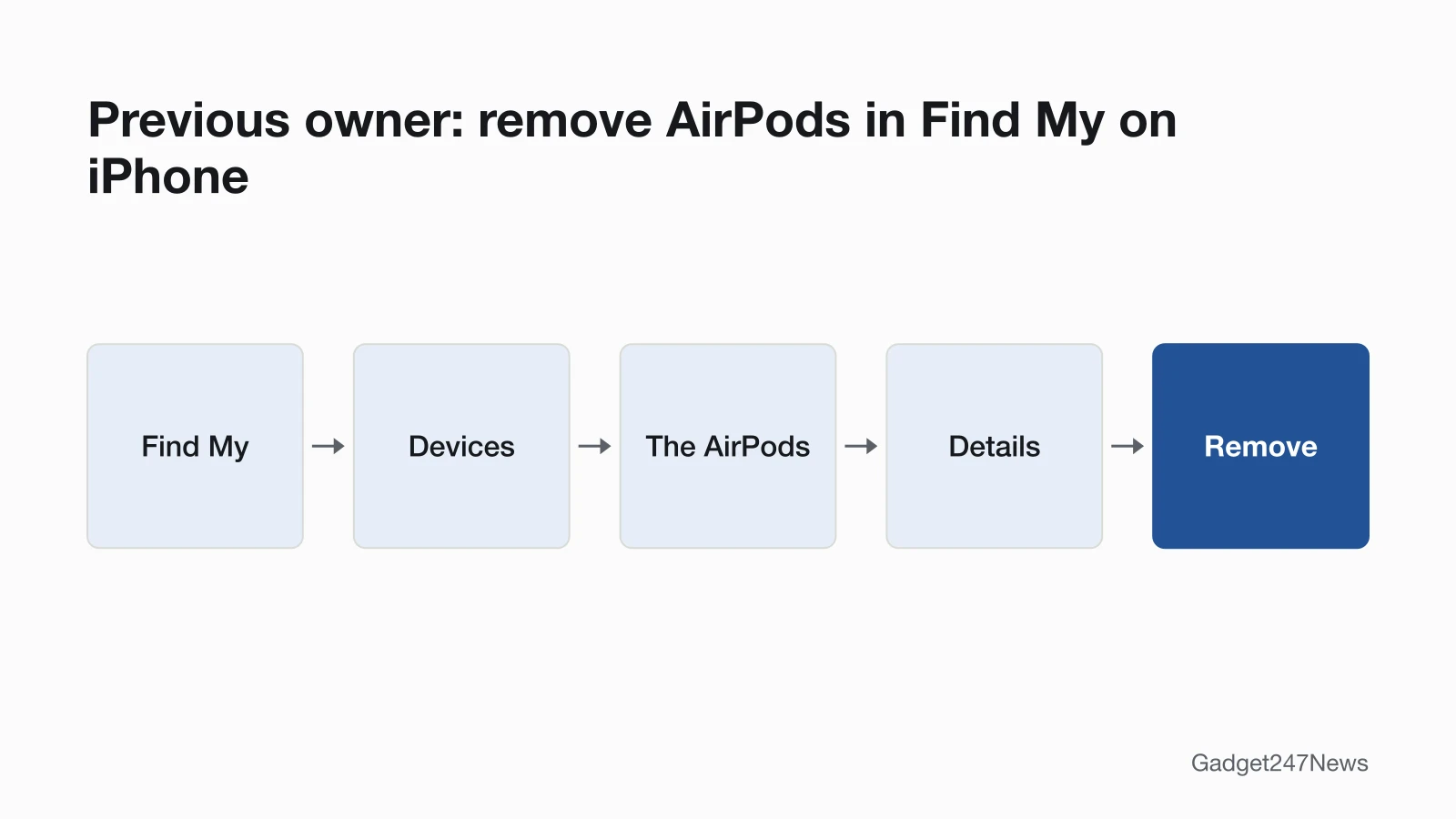
The previous owner removes the AirPods in Find My on an iPhone, iPad or Mac, or at iCloud.com.
On iPhone or iPad:
- Open the Find My app, then tap Devices.
- Tap the AirPods, then tap the Details button.
- Tap Remove or Remove This Device, then tap Remove to confirm.
On a Mac:
- Open the Find My app and click Devices.
- Select the AirPods, click the More button, then click the More Info button on the map.
- Click Remove or Remove This Device.
On iCloud.com:
- Go to icloud.com/find and sign in with the Apple Account.
- Find the AirPods in the devices list.
- Tap the name, then tap Remove or Remove This Device.
A short message to the seller can help: "Hi, Find My says the AirPods I bought from you are still on your Apple Account. Could you remove them in Find My under Devices?"
Removing AirPods From Your Own Apple ID (Before You Sell)
To remove AirPods from your own Apple ID before you sell or give them away, use Find My on your iPhone or iPad:
- Open the Find My app.
- Select the Devices tab and tap your AirPods.
- Swipe up.
- Tap Remove This Device, then tap Remove to confirm.
Your AirPods don't have to be connected to your device, and removing them on one device is enough. The new owner can then use every feature, including Find My, the app you'd use to track lost AirPods.
If You Can't Reach the Previous Owner
Reset the AirPods. Apple says a reset prevents them from sharing your location with the previous owner, but you still won't be able to pair them with your Apple Account. Apple's support page doesn't say whether locked AirPods still work as plain Bluetooth headphones. The lock itself only comes off from the owner's side, so go back to the seller or the store you bought them from, or ask Apple Support.
How to Reset AirPods (Every Model)
Each AirPods model resets with its own control. For AirPods with a case, Apple's steps start with the lid closed for 30 seconds. Then, on a paired iPhone or iPad, go to Settings, then Bluetooth; if the AirPods are listed, tap the More Info button next to them, then Forget This Device.
- AirPods 1 to 3, AirPods Pro 1 and 2: hold the setup button on the back of the case for about 15 seconds, until the status light flashes amber, then white.
- AirPods 4, AirPods 5, AirPods Pro 3: double-tap the front of the case three times as the light changes, until it flashes amber, then white.
- AirPods Max: charge to at least 50%, then hold the listening mode button and the Digital Crown for 15 seconds, until the LED flashes amber, then white.
For every step and timing, see how to hard reset AirPods.
How to Check the Lock Is Gone
Apple describes one sign of the lock: the Find My message that the AirPods are paired to another Apple Account. After the owner removes them, connect AirPods to an iPhone again and watch for the message during setup. If the message is still there, the AirPods are still on the other account; ask the owner to check their device list again.
AirPods Still Won't Connect?
Once the lock is gone, a failed connection is a pairing problem, not an account one. Put both AirPods back in the case, close the lid for 15 seconds, open it and try again. If they still won't show up, follow the steps to fix AirPods that won't connect, where Apple's order ends with a reset.
AirPods Reset: Quick Answers
To reset AirPods with a case, close them in the case for 30 seconds, forget them in your iPhone's Bluetooth settings, then use your model's reset control until the light flashes amber, then white. AirPods Max use the listening mode button and Digital Crown instead. A reset returns your custom settings to their defaults too, so for noise cancelling that stopped working, start with AirPods ANC not working instead.
How do you reset AirPods when one is not working?
Charge both AirPods in the case for 30 seconds and test them again before you reset; Apple's steps for sound from only one AirPod end with a reset only if an AirPod still isn't working. How to Reset AirPods has the reset itself.
How to fix unresponsive AirPods?
Put both AirPods in the case and close the lid for 30 seconds, then reset them with the control for your model. How to Reset AirPods has every step, including AirPods Max.
Sources
We checked this page against the pages below, most recently on . How we verify fixes
- If an item or device is connected to another Apple Account (Apple, support.apple.com)Official
- Before you sell, give away, return, or recycle your AirPods (Apple, support.apple.com)Official
- How to reset your AirPods and AirPods Pro (Apple, support.apple.com)Official
- How to restart or reset AirPods Max (Apple, support.apple.com)Official
- If your left or right AirPod isn't working (Apple, support.apple.com)Official
- If your AirPods or AirPods Pro won't connect (Apple, support.apple.com)Official
- If your AirPods won't charge (Apple, support.apple.com)Official