AirPods Noise Cancelling Not Working? How to Fix It

By Suraj Giri, Founder & Publisher. Reviewed by Suraj Giri on .
Published · 6 min read
How this page was made
- Sources. Checked against 11 official pages from Apple, most recently on . See the sources.
- No device testing. We don't test fixes on physical devices, so nothing on this page is a hands-on result. A fact counts as verified only when it matches an official source page.
- AI use. As with every page on Gadget247News, AI tools helped research, outline, draft and edit this page, and re-read the official pages to flag facts that didn't match. The illustration at the top was generated with Runway and is labelled under the image.
- Human sign-off. Suraj Giri, Founder & Publisher, read this page and signed it off on . The site won't publish a page without that sign-off.
- Changes. The published and updated dates move only when the content changes, and every change gets a dated note. Spot an error or a fix that didn't work? Email info@gadget247news.com.
Read our AI use policy, editorial policy and corrections policy.
Check your model before anything else: noise cancelling only exists on some AirPods, and the table below shows which. If yours has it, work through the checks on Apple's troubleshooting page, from the listening mode to a reset. For other AirPods problems, see AirPods pairing and sound fixes; if the sound itself is dull on any brand, see earbuds sound muffled.
Which AirPods Have Noise Cancelling?
Active Noise Cancellation (ANC) is on AirPods Pro 1, 2 and 3, AirPods 4 (ANC), both AirPods 5 models and AirPods Max. If your model isn't on the list, there's nothing to fix:
| Model | Active Noise Cancellation | Fit check |
|---|---|---|
| AirPods Pro 1 and 2 | Yes | Ear Tip Fit Test |
| AirPods Pro 3 | Yes | Acoustic Seal Test |
| AirPods 4 (ANC) | Yes | None on Apple's page |
| AirPods 5 (both models) | Yes | None on Apple's page |
| AirPods Max 1 and 2 | Yes, switched with the listening mode button | None on Apple's page |
| AirPods 1, 2 and 3, and AirPods 4 (without ANC) | No: not on Apple's ANC list | Not applicable |
AirPods 4 come in two versions, and only AirPods 4 (ANC) can switch to noise cancelling. The model number in Settings → Bluetooth → ⓘ tells them apart; identify your AirPods model lists every number.
Why AirPods Noise Cancelling Stops Working
Noise cancelling on supported AirPods stops working for six common reasons, and Apple's support pages cover each one:
- The listening mode is set to Adaptive, Transparency or Off instead of Noise Cancellation.
- Out-of-date software on your iPhone, iPad or Mac, or old AirPods firmware.
- One AirPod in use without the Noise Cancellation with One AirPod setting.
- A loose fit or the wrong ear tip size on AirPods Pro.
- Blocked or dirty microphones, which ANC relies on to hear outside sound.
- A fault that needs a reset or, after that, service.
How to Fix AirPods Noise Cancelling
Most likely first, using Apple's steps. Wear both AirPods and keep them connected for each check.
Fix 1: Check the Listening Mode
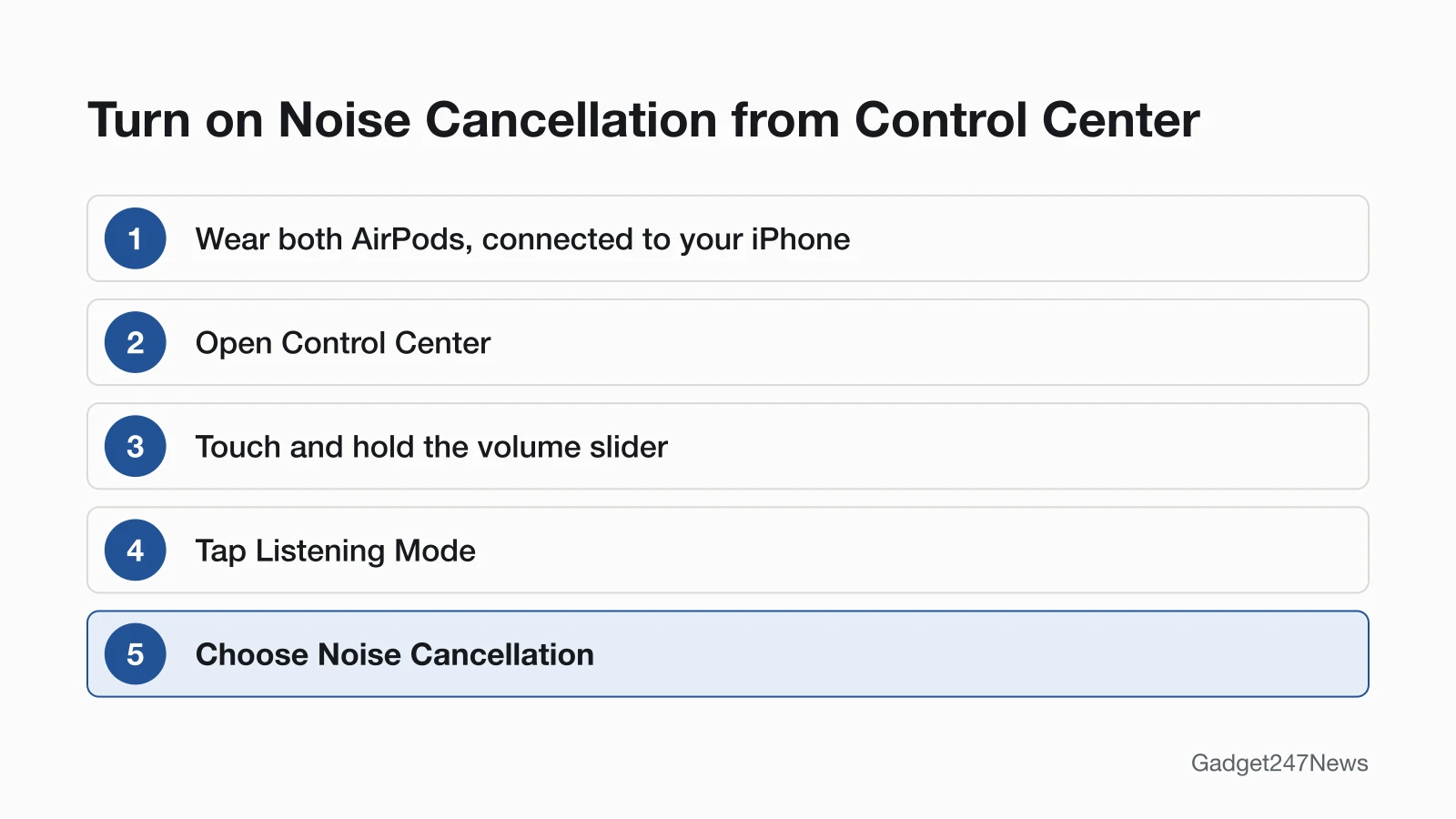
Set the listening mode to Noise Cancellation, the name iPhone uses for Active Noise Cancellation:
- Wear both AirPods and make sure they're connected to your iPhone or iPad.
- Open Control Center, then touch and hold the volume slider until more controls appear.
- Tap Listening Mode, then choose Noise Cancellation.
You can also switch from the AirPods. On AirPods 4 (ANC), AirPods 5 and AirPods Pro, press and hold the stem until you hear a chime; on AirPods Max, press the listening mode button. Apple's steps also ask you to make sure Adaptive Audio isn't enabled. The other ways to activate noise cancellation on AirPods, from a Mac or an Apple Watch, have their own page.
Fix 2: Update iOS and Your AirPods Firmware
Update your devices first, then let the AirPods update themselves. Apple says firmware updates "are delivered automatically while your AirPods are charging and in Bluetooth range of your iPhone, iPad, or Mac that's connected to Wi-Fi."
- Update your iPhone, iPad or Mac to the latest software.
- Put the AirPods in their case, close the lid, connect the case to power and keep it near your device on Wi-Fi for at least 30 minutes.
- Check the version in Settings → Bluetooth → ⓘ next to your AirPods, under About.
The steps for a firmware that won't install are in how to update AirPods firmware.
Fix 3: Turn On Noise Cancellation With One AirPod
Noise cancelling needs a setting to work in one ear. Turn on Noise Cancellation with One AirPod:
- Open Settings, then tap Accessibility.
- Below Accessories, tap AirPods, then tap the name of your AirPods.
- Turn on Noise Cancellation with One AirPod.
The setting exists for AirPods 4 (ANC), AirPods 5 and AirPods Pro. Press and hold the stem afterwards to switch modes.
Fix 4: Check the Fit
AirPods Pro need a good seal for noise cancelling. Run Apple's seal test:
- With your AirPods Pro in your ears, open Settings and tap Bluetooth.
- Tap the Info button (ⓘ) next to your AirPods.
- Tap Ear Tip Fit Test (AirPods Pro 1 and 2) or Test Acoustic Seal (AirPods Pro 3), tap Continue, then tap Play.
If the result asks for a change, reposition the AirPods first, then try a different ear tip size; each ear can need its own size. Our guide on how to wear AirPods so they don't fall out covers placement.
Fix 5: Clean the Microphones and Mesh
Keep the external microphones uncovered and clean. Apple says blocked or covered microphones may cause temporary high-pitched squeals, chirps or feedback. If you hear less bass or more background sound with noise cancelling on, clean your AirPods using Apple's steps for your model. How to Clean AirPods and the Charging Case walks through each one.
Fix 6: Reset Your AirPods
Reset your AirPods if you can't turn on noise cancelling from Settings or Control Center, or if it still misbehaves after Fixes 1 to 5. Apple gives one more reset sign: audio that doesn't pause when you take one AirPod out. A reset returns your custom settings to their defaults. The steps for your model are on how to hard reset AirPods.
AirPods Max Noise Cancelling Not Working
AirPods Max switch modes with the listening mode button: press it to move between Active Noise Cancellation and Transparency, and on AirPods Max 2, Adaptive Audio too. Choose which modes it cycles in Settings → your AirPods Max → Button Cycles Between. Apple's ANC troubleshooting page doesn't cover AirPods Max, so update the firmware next (cable in the bottom-right earphone, then wait at least 30 minutes). To restart, charge them to at least 50 percent, then hold the listening mode button and the Digital Crown until the LED flashes amber. AirPods Max Not Turning On covers a dark LED.
Still not working?
If noise cancelling still fails after Apple's steps, work through these:
- Try the next fix: for low or muffled sound, see the checks for AirPods so quiet.
- Reset your AirPods: How to Reset AirPods (you'll need to pair them again afterwards).
- Contact Apple Support: support.apple.com/airpods. Apple says noise cancelling that still isn't working after a reset might need service.
- Check repair or warranty options: AirPods case repair.
Started after an update? Check the Update Tracker for known issues. You can also check what the latest AirPods update changed.
How Noise Cancelling Works (and What It Can't Block)
Active Noise Cancellation uses microphones and anti-noise. An outward-facing microphone picks up outside sound, and the AirPods counter it with anti-noise before you hear it; an inward-facing microphone does the same for unwanted sound inside your ear. Apple doesn't say how much sound ANC removes, only that it works best when AirPods Pro fit well. Our explainer on how noise cancelling works on earbuds goes further, and Transparency Mode vs Noise Cancelling: What's the Difference compares the two modes.
AirPods Noise Cancelling: Quick Answers
Why are my AirPods not noise cancelling anymore?
Noise cancelling that stopped after working fine points to three things Apple's steps check: the listening mode, out-of-date software or firmware, and the seal. Check the mode in Control Center first, then update, then run the fit test.
How to reset noise cancelling on AirPods?
Apple's pages give no separate reset for noise cancelling. You can switch the listening mode away from Noise Cancellation and back in Control Center. If you can't turn it on from Settings or Control Center at all, Apple says to reset the AirPods, which also returns custom settings to their defaults.
Why can I still hear noise with noise cancellation AirPods?
Adaptive Audio blends noise cancelling with Transparency to control how much noise you hear, and it can be set to allow more or less. Apple also says noise cancelling works best with a good fit. Choose Noise Cancellation, then run the Ear Tip Fit Test or Acoustic Seal Test.
Why are my AirPods hissing with noise cancellation on?
Apple doesn't describe hissing by name. Keep the microphones clear, clean the AirPods and update the firmware. If the sound stays after a reset, contact Apple Support, because Apple says noise cancelling that still misbehaves after a reset might need service.
Sources
We checked this page against the pages below, most recently on . How we verify fixes
- If Active Noise Cancellation isn't working as expected on your AirPods (Apple, support.apple.com)Official
- Active Noise Cancellation and Transparency modes for AirPods (Apple, support.apple.com)Official
- Adjust listening mode settings on AirPods (AirPods User Guide) (Apple, support.apple.com)Official
- Use Adaptive Audio with your AirPods (Apple, support.apple.com)Official
- Use controls and gestures with your AirPods (AirPods User Guide) (Apple, support.apple.com)Official
- About firmware updates for AirPods (Apple, support.apple.com)Official
- Identify your AirPods (Apple, support.apple.com)Official
- Find the right fit with AirPods Pro (AirPods User Guide) (Apple, support.apple.com)Official
- Connect and use your AirPods Max (Apple, support.apple.com)Official
- How to restart or reset AirPods Max (Apple, support.apple.com)Official
- If your AirPods won't charge (Apple, support.apple.com)Official