What Is Noise Cancelling and How Does It Work on Earbuds

By Suraj Giri, Founder & Publisher. Reviewed by Suraj Giri on .
Published · 6 min read
How this page was made
- Sources. Checked against 8 official pages from Apple, Google and Samsung, most recently on . See the sources.
- No device testing. We don't test fixes on physical devices, so nothing on this page is a hands-on result. A fact counts as verified only when it matches an official source page.
- AI use. As with every page on Gadget247News, AI tools helped research, outline, draft and edit this page, and re-read the official pages to flag facts that didn't match. The illustration at the top was generated with Runway and is labelled under the image.
- Human sign-off. Suraj Giri, Founder & Publisher, read this page and signed it off on . The site won't publish a page without that sign-off.
- Changes. The published and updated dates move only when the content changes, and every change gets a dated note. Spot an error or a fix that didn't work? Email info@gadget247news.com.
Read our AI use policy, editorial policy and corrections policy.
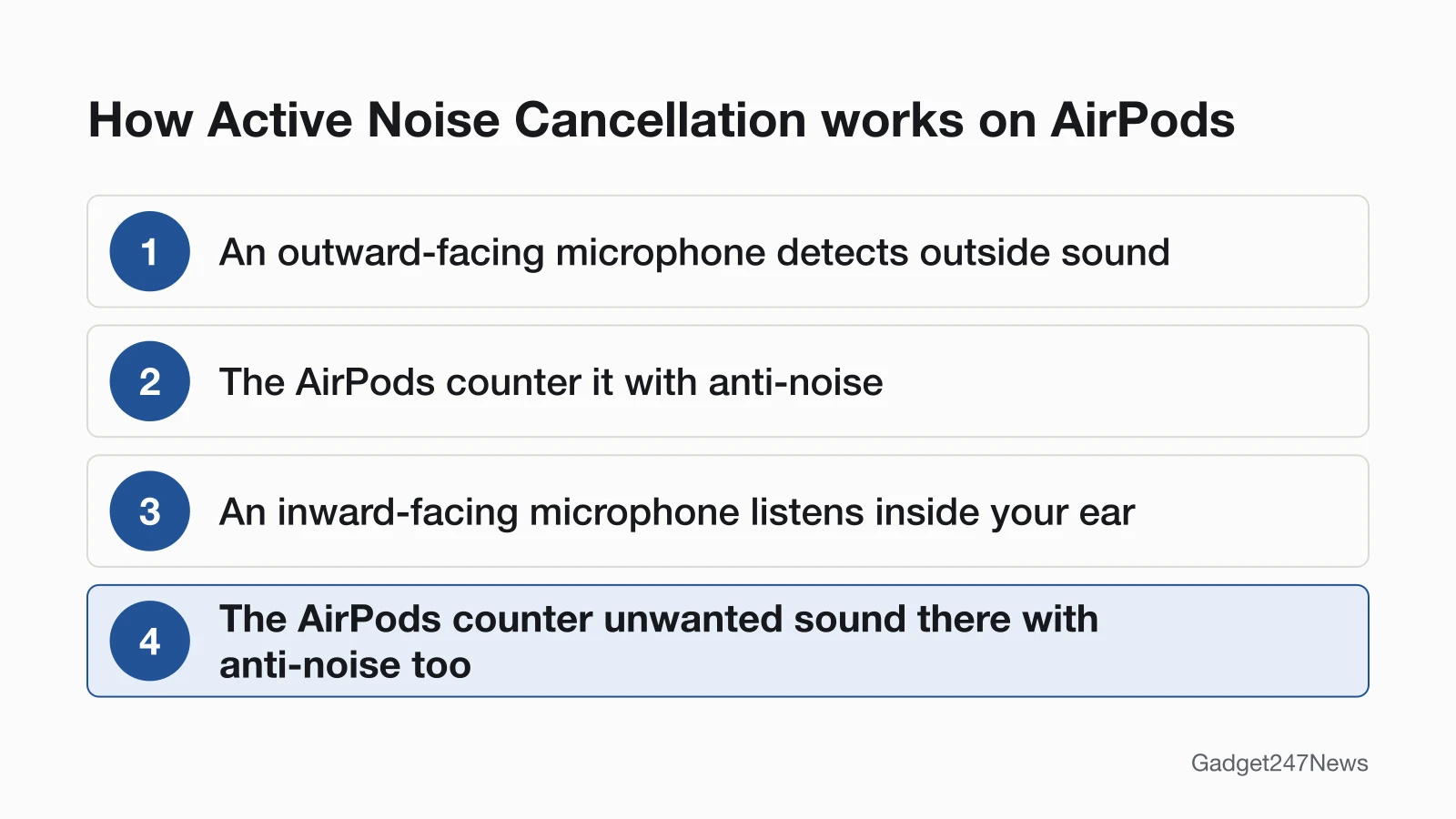
Noise cancelling (active noise cancellation, or ANC) uses microphones on your earbuds to detect outside sound and plays "anti-noise" that cancels it before you hear it. Apple describes it as outward- and inward-facing microphones countering sound with anti-noise.
In everyday terms, your earbuds listen to the noise around you and answer it with sound of their own. The ear tip does a different, physical job: it seals your ear canal. You'll find ANC on AirPods, Google Pixel Buds, Samsung Galaxy Buds and several Beats models; Samsung's menus spell it noise canceling.
For the AirPods steps, go straight to How to Turn On Noise Cancelling on AirPods. If your earbuds or headphones have stopped working altogether, start at headphone problems and fixes instead.
How Does Noise Cancelling Work?
Noise cancelling on earbuds works with microphones and anti-noise, and on AirPods Apple describes two sets of microphones: one listening outside your ear and one listening inside it. The outward-facing microphone or microphones detect external sounds, which the AirPods then counter with anti-noise, canceling those sounds before you hear them. An inward-facing microphone listens inside your ear for unwanted internal sounds, and the AirPods counter those with anti-noise too. Google names the same feature Active Noise Control on Pixel Buds, and its Noise Cancellation mode "blocks outside noise". Samsung describes the result from your side: with Active noise canceling on, "less noise will get through". The ear tips matter as well. Apple says the tips should make a good seal with your ear canal for the best sound quality and noise cancellation, and that ANC works best when AirPods Pro fit well.
Does Noise Cancelling Work With One Earbud?
Noise cancelling works with one AirPod once you turn on a setting: go to Settings → Accessibility → AirPods, tap the name of your AirPods, then turn on Noise Cancellation with One AirPod. On Pixel Buds, Google says you can still use all the noise control modes while wearing only one earbud. Galaxy Buds differ. On most compatible models, Samsung says, ANC only works with both earbuds in your ears.
Which Earbuds and Headphones Have Noise Cancelling?
Noise cancelling comes on named models from AirPods, Google Pixel Buds, Samsung Galaxy Buds and Beats, and the model matters: one product line can come with and without ANC. Apple lists AirPods 4 and AirPods 4 (ANC) as two models, and only AirPods 4 (ANC) is on its noise cancelling list. The table lists the models each maker names on its own support pages.
| Brand | Models with ANC | How to switch on the earbud | Source |
|---|---|---|---|
| AirPods | AirPods 4 (ANC), AirPods 5 (both models), AirPods Pro 1, 2 and 3, AirPods Max 1 and 2 | Press and hold the force sensor on the stem; on AirPods Max, press the listening mode button | Apple |
| Google Pixel Buds | Pixel Buds Pro, Pixel Buds Pro 2, Pixel Buds 2a | Touch and hold either earbud | |
| Samsung Galaxy Buds | Galaxy Buds Live, Buds Pro, Buds2, Buds2 Pro, Buds3, Buds3 Pro (not the original Galaxy Buds or Galaxy Buds+) | Touch and hold one earbud while wearing both | Samsung |
| Beats | Beats 360, Beats Studio Pro, Beats Fit Pro, Powerbeats Fit, Powerbeats Pro 2, Beats Studio Buds + | Controls on the Beats, or Control Center on iPhone | Apple (Beats User Guide) |
Samsung's page lists models up to the Galaxy Buds3 Pro. Sony, Bose and JBL aren't in the table: check your model's help guide on the brand's own support site.
How to Turn Noise Cancelling On or Off
Most earbuds switch noise cancelling with a press-and-hold on the earbud or a control in the companion app; on Galaxy Buds, the same touch and hold turns it off again.
AirPods and AirPods Pro
- Wear both AirPods.
- Press and hold the force sensor on the stem of either AirPod until a chime plays. Press and hold again to move to the next mode.
- Or open Control Center, touch and hold the volume slider, then tap the listening mode you want.
Full steps for every AirPods model, including AirPods Max and Apple Watch, are in our AirPods guide.
Google Pixel Buds
- Touch and hold either earbud to switch between Noise Cancellation (a single chime) and Transparency (a double chime).
- Or open the Pixel Buds app, go to Device details and pick a mode under Active noise control.
Adaptive mode is on Pixel Buds Pro 2 only. Off disables all the other ANC modes.
Samsung Galaxy Buds
- Wear both earbuds, then touch and hold one earbud. A beep tells you Active noise canceling is on; touch and hold again to turn it off.
- Or open the Galaxy Wearable app and tap Active noise canceling. On Galaxy Buds3, Buds3 Pro and Buds2 Pro, tap Off to turn it off.
The touchpads can be set to other commands, so a touch and hold may do something else on your Buds.
Noise Cancelling vs Transparency Mode
Noise cancelling blocks outside sound; Transparency mode lets it in. Apple says Transparency "lets outside sound in, so you can hear what's going on around you", and Google's Transparency mode lets sound in "so you can hear the world around you". Adaptive modes sit between the two: Apple's Adaptive Audio adjusts the noise cancellation to your surroundings, and Pixel Buds Pro 2 have an Adaptive mode. The side-by-side table is in transparency mode vs noise cancelling. If you switched modes and still hear everything, the mode may not be the problem.
Noise Cancelling and Other Earbud Features
Two topics sit next to noise cancelling in the same settings: problems with the mode itself, and the other listening features your earbuds have.
Noise Cancelling Not Working?
Weak or changing noise cancelling has a first check in the settings before any fix. The table gives Apple's first check for AirPods and the page with the full order.
| Symptom | First check | Fix page |
|---|---|---|
| No difference when ANC is on | Both AirPods in, the mode set to Noise Cancellation, and a good seal (Ear Tip Fit Test on AirPods Pro 1 and 2) | fix AirPods noise cancelling |
| Squeals or chirps with ANC on | Don't block or cover the external microphones | AirPods Noise Cancelling Not Working |
| Mode keeps changing | Turn off Adaptive Audio, then check which modes the press and hold cycles through | How to Use AirPods Controls |
On Galaxy Buds, Samsung says humming or vibration can turn on Detect conversations by mistake, which temporarily turns off Active noise canceling.
More Earbud Features Explained
The features section explains each of these listening features on its own page:
- Sound placed around you, with head tracking: What Is Spatial Audio and How to Turn It on
- Staying connected to more than one device: What Is Bluetooth Multipoint and Which Earbuds Support It
- How your phone and earbuds encode sound: Bluetooth codecs explained
- Hearing features built into AirPods: How to Use AirPods as a Hearing Aid
- Translating a conversation through your AirPods: How to Use Live Translate on AirPods
- AirPods moving between your Apple devices: What Is AirPods Automatic Switching
- The newer Bluetooth audio standard and broadcast audio: LE Audio and Auracast explained
Noise Cancelling: Quick Answers
These answers stay on the device side: what the makers say about your ears, and why some sound still gets through.
Is noise cancelling bad for your ears?
Apple, Google and Samsung's noise cancelling help pages don't describe any risk to your ears from the feature itself. Apple does say listening modes on AirPods Pro 2, AirPods Pro 3 and AirPods Max 2 can also reduce your exposure to loud environmental sounds. For questions about your own hearing, ask a hearing professional. This covers device settings only and isn't medical advice.
Why can I still hear some noise with noise cancelling on?
Noise cancelling reduces outside sound rather than removing all of it; Samsung puts it as "less noise will get through". A loose fit lets more in, since Apple says a good ear-tip seal gives better noise cancellation. If background sound grows when you turn ANC on, Apple says your AirPods might need cleaning. AirPods Noise Cancelling Not Working has the full order.
Sources
We checked this page against the pages below, most recently on . How we verify fixes
- Active Noise Cancellation and Transparency modes for AirPods (Apple, support.apple.com)Official
- Use Active Noise Control on Google Pixel Buds (Google, support.google.com)Official
- Use Active noise canceling on your Samsung Galaxy earbuds (Samsung, samsung.com)Official
- About charging and playback time (Beats User Guide) (Apple, support.apple.com)Official
- Switch between listening modes using your Apple or Android device (Beats User Guide) (Apple, support.apple.com)Official
- If Active Noise Cancellation isn't working as expected on your AirPods (Apple, support.apple.com)Official
- Choose your AirPods Pro ear tips (Apple, support.apple.com)Official
- Identify your AirPods (Apple, support.apple.com)Official