Transparency Mode vs Noise Cancelling: What's the Difference

By Suraj Giri, Founder & Publisher. Reviewed by Suraj Giri on .
Published · 5 min read
How this page was made
- Sources. Checked against 11 official pages from Apple, Google, Samsung and Sony, most recently on . See the sources.
- No device testing. We don't test fixes on physical devices, so nothing on this page is a hands-on result. A fact counts as verified only when it matches an official source page.
- AI use. As with every page on Gadget247News, AI tools helped research, outline, draft and edit this page, and re-read the official pages to flag facts that didn't match. The illustration at the top was generated with Runway and is labelled under the image.
- Human sign-off. Suraj Giri, Founder & Publisher, read this page and signed it off on . The site won't publish a page without that sign-off.
- Changes. The published and updated dates move only when the content changes, and every change gets a dated note. Spot an error or a fix that didn't work? Email info@gadget247news.com.
Read our AI use policy, editorial policy and corrections policy.
Transparency mode lets outside sound in so you can hear what's around you; noise cancelling blocks it out. Adaptive modes on newer AirPods and Pixel Buds Pro 2 blend the two for you.
Both modes sit on the same control on your earbuds, so switching from one to the other takes a single press and hold on AirPods and Pixel Buds. How the microphones and anti-noise cancel sound is covered in noise cancelling explained for earbuds and headphones.
On AirPods, that press and hold is on the stem, and Control Center on your iPhone switches modes too. To switch AirPods listening modes step by step, including AirPods Max, use the AirPods guide.

Transparency Mode vs Noise Cancelling at a Glance
Transparency, noise cancelling and Off are three settings of one control. The table compares them on the points Apple, Google and Samsung describe.
| Transparency | Noise cancelling | Off | |
|---|---|---|---|
| What it does | Lets outside sound in | Blocks outside sound with anti-noise | Turns both modes off |
| Uses the microphones? | Yes, to let outside sound in | Yes, outward- and inward-facing | Neither mode runs |
| Best for | Traffic, talking, announcements | Flights, commutes, focused work | When you want neither effect |
| What you hear | Your audio plus your surroundings | Your audio with less outside noise | Your audio with no mode applied |
| Found on | AirPods, Pixel Buds, Beats (Samsung: Ambient sound) | AirPods, Pixel Buds, Galaxy Buds, Beats | The same earbuds, as its own option |
| Switch with | Press and hold, or the app | Press and hold, or the app | Same controls (AirPods Pro 2 and 3: turn on Off Listening Mode first) |
The difference is direction: Transparency adds outside sound to what you hear, and noise cancelling takes it away.
What Is Transparency Mode?
Transparency mode is a listening mode that lets outside sound in while you wear your earbuds, so you can hear what's going on around you. Apple and Google both call it Transparency. Samsung calls it Ambient sound on Galaxy Buds and says it uses the external microphones on your earbuds to let you hear outside noises. Sony's WF-1000XM5 help guide calls it Ambient Sound Mode and says the built-in microphones make ambient sound easier to hear.
When to Use Transparency Mode Instead of Noise Cancelling
Transparency mode suits moments when you need to hear the people and sounds around you:
- Near traffic, when you want to hear what's around you
- Talking to someone without taking your earbuds out
- Listening for announcements at a station or airport
- Working out outdoors
Noise cancelling suits flights, commutes and focused work, where outside sound is what you want gone. Transparency has limits too: Sony's WF-1000XM5 guide says ambient sounds may not be heard even in Ambient Sound Mode, depending on your surroundings and your volume.
What Is Adaptive Audio?
Adaptive Audio is Apple's mode that blends Active Noise Cancellation and Transparency and adjusts the level of noise you hear to the changing noise around you. Apple lists it for AirPods 4 (ANC), AirPods 5, AirPods Pro 2, AirPods Pro 3 and AirPods Max 2; AirPods Pro 2 got it in firmware 6A300/6A301. Pixel Buds Pro 2 have an Adaptive mode, and Galaxy Buds3 Pro offer Adaptive sound in the Galaxy Wearable app.
What Brands Call Transparency Mode
Each brand uses its own words for the same two jobs. The table gives the names you'll see in each brand's menus.
| Brand | Name for "let sound in" | Name for "block sound" | Adaptive option |
|---|---|---|---|
| AirPods | Transparency | Noise Cancellation | Adaptive (AirPods 4 (ANC), AirPods 5, Pro 2, Pro 3, Max 2) |
| Google Pixel Buds | Transparency | Noise Cancellation | Adaptive (Pixel Buds Pro 2 only) |
| Samsung Galaxy Buds | Ambient sound | Active noise canceling | Adaptive sound (Galaxy Buds3 Pro) |
Apple's feature name is Active Noise Cancellation, but iPhone, iPad, Mac and Apple Watch menus show it as Noise Cancellation.
How to Switch Between Transparency and Noise Cancelling
You switch between Transparency and noise cancelling with a press and hold on the earbud or a control on your phone.
| Brand | On the earbud | In the app or on the phone |
|---|---|---|
| AirPods | Press and hold the force sensor on the stem until a chime plays (AirPods Max: the listening mode button) | Control Center: touch and hold the volume slider, then tap the mode |
| Google Pixel Buds | Touch and hold either earbud: a single chime for Noise Cancellation, a double chime for Transparency | Pixel Buds app: Device details, then Active noise control |
| Samsung Galaxy Buds | Touch and hold one earbud while wearing both (Samsung describes this for Active noise canceling) | Galaxy Wearable app: tap Ambient sound or Active noise canceling |
On Galaxy Buds2 Pro and Buds2, Samsung says Ambient sound needs both earbuds in and the Galaxy Wearable app on an Android device.
How to Turn Off Transparency Mode on AirPods Pro
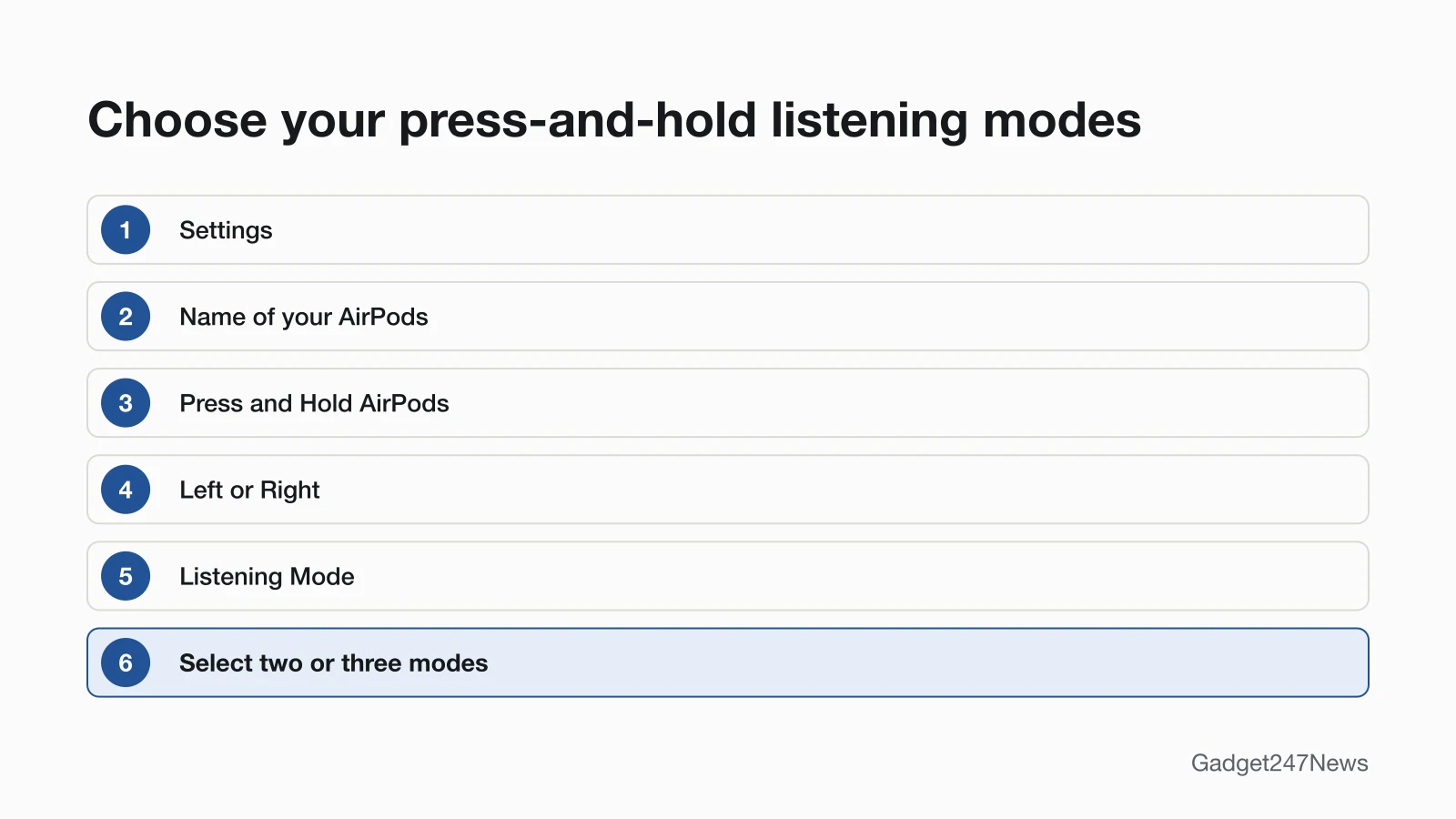
To turn off Transparency mode on AirPods Pro, press and hold the stem again to move to Noise Cancellation, or pick another mode in Control Center. To choose which modes the press and hold cycles through, open Settings, tap the name of your AirPods, then under Press and Hold AirPods tap Left or Right. Full AirPods steps: see the noise cancelling guide.
Listening Mode Problems
A listening mode that won't turn on, or that changes by itself, starts with a settings check. If sound is quiet in every mode, see headphones volume too low instead. Broadcast audio and the newer Bluetooth audio standard are covered in LE Audio and Auracast Explained.
Why Won't Transparency or Noise Cancelling Turn On?
Transparency or noise cancelling won't turn on when one earbud is out on a model that needs both, or when the press and hold is set to something else. On AirPods, noise cancelling needs both AirPods in unless Noise Cancellation with One AirPod is on. Galaxy Buds3 Pro need both earbuds for Active noise canceling and Adaptive sound, and at least one for Ambient sound. The press and hold can be set to Siri, and with Camera Remote on and a camera app open it doesn't change modes, so change AirPods tap and press controls if that's the cause. For AirPods noise cancelling that stays off, fix AirPods noise cancelling has Apple's full order.
Spatial Audio: the Other Listening Setting
Spatial Audio sits next to the listening mode control in Control Center on iPhone: touch and hold the volume control, and Spatial Audio is at the lower right. It changes where sound seems to come from, not how much outside sound you hear. Its Off, Fixed and Head Tracked options are explained in spatial audio on earbuds.
Transparency Mode: Quick Answers
Two short answers: battery use per mode, and whether Off is the same as Transparency.
Does transparency mode use more battery than noise cancelling?
Apple's listening mode page and Google's Active Noise Control page give no battery figure for each mode. Beats gives one figure that groups the two: Beats Studio Pro play for up to 24 hours after a 2-hour charge, and up to 40 hours when you turn off Active Noise Cancellation and Transparency mode.
Is transparency mode the same as turning noise cancelling off?
No. Transparency lets outside sound in on purpose, while Off turns the listening modes off, so neither Transparency nor noise cancelling runs. Google describes Off on Pixel Buds as all other ANC modes disabled, and Apple's Off Listening Mode on AirPods Pro 2 and 3 turns off all listening mode technology.
Sources
We checked this page against the pages below, most recently on . How we verify fixes
- Active Noise Cancellation and Transparency modes for AirPods (Apple, support.apple.com)Official
- Use Active Noise Control on Google Pixel Buds (Google, support.google.com)Official
- Use Ambient sound on your Samsung Galaxy earbuds (Samsung, samsung.com)Official
- Use Active noise canceling on your Samsung Galaxy earbuds (Samsung, samsung.com)Official
- Automatic noise adjustments on the Galaxy Buds3 Pro (Samsung, samsung.com)Official
- Use Adaptive Audio with your AirPods (Apple, support.apple.com)Official
- About firmware updates for AirPods (Apple, support.apple.com)Official
- Change the settings of your AirPods and AirPods Pro (Apple, support.apple.com)Official
- Control Spatial Audio and head tracking on AirPods (AirPods User Guide) (Apple, support.apple.com)Official
- About charging and playback time (Beats User Guide) (Apple, support.apple.com)Official
- WF-1000XM5 Help Guide: Listening to ambient sound during music playback (Ambient Sound Mode) (Sony, helpguide.sony.net)Official