What Is Spatial Audio and How to Turn It On

By Suraj Giri, Founder & Publisher. Reviewed by Suraj Giri on .
Published · 5 min read
How this page was made
- Sources. Checked against 7 official pages from Apple and Google, most recently on . See the sources.
- No device testing. We don't test fixes on physical devices, so nothing on this page is a hands-on result. A fact counts as verified only when it matches an official source page.
- AI use. As with every page on Gadget247News, AI tools helped research, outline, draft and edit this page, and re-read the official pages to flag facts that didn't match. The illustration at the top was generated with Runway and is labelled under the image.
- Human sign-off. Suraj Giri, Founder & Publisher, read this page and signed it off on . The site won't publish a page without that sign-off.
- Changes. The published and updated dates move only when the content changes, and every change gets a dated note. Spot an error or a fix that didn't work? Email info@gadget247news.com.
Read our AI use policy, editorial policy and corrections policy.
Spatial audio makes sound seem to come from around you instead of inside your head. On AirPods, Fixed turns it on without head tracking, and Head Tracked adds head tracking so the audio sounds like it's coming from your iPhone or Mac.
Spatial audio is a listening setting, like active noise cancellation on earbuds, but it changes where sound seems to come from rather than how much outside sound you hear. Apple says supported AirPods use Spatial Audio and head tracking to create "an immersive theater-like environment with sound that surrounds you" for supported shows, movies, songs, games and FaceTime calls.
Apple's steps for the setting start with your AirPods in your ears and connected to your device. If they aren't paired yet, sync AirPods to your iPhone first, then come back to Control Center.
Off vs Fixed vs Head Tracked: What Each Setting Does
Off turns spatial audio off, Fixed turns it on without head tracking, and Head Tracked turns on both. The table uses Apple's own descriptions.
| Setting | Spatial audio | Head tracking | Apple's description |
|---|---|---|---|
| Off | Off | Off | "Turns off both Spatial Audio and head tracking." |
| Fixed | On | Off | "Turns on Spatial Audio without head tracking." |
| Head Tracked | On | On | "Turns on both Spatial Audio and head tracking. The audio you're listening to will sound like it's coming from your iPhone or Mac." |
Pick Fixed if you'd rather the sound didn't shift when you turn your head, and Head Tracked if you want it to stay with the screen. Your choice is saved for each app: pick Fixed in the Music app, and Music uses Fixed the next time you play a song.
What Is Spatialize Stereo?
Spatialize Stereo is the name the Spatial Audio control takes when your audio isn't Spatial Audio with Dolby Atmos. Apple's Beats User Guide says it directly: "If your audio source isn't Spatial Audio with Dolby Atmos, the control is labeled Spatialize Stereo." The same label appears with AirPods. For AirPods Pro 1 and 2, AirPods Max and AirPods 3, Apple's steps say to tap Spatial Audio or Spatialize Stereo, then tap Off.
How Head Tracking Works
Head tracking pans the audio based on the position of your head in relation to your iPhone, iPad or Mac, as Apple's Beats guide describes it. Its example: turn your head to the left, and the audio sounds like it's coming more from the right. On AirPods, Apple sums up the result for Head Tracked as audio that sounds like it's coming from your iPhone or Mac. To hear the difference, open Settings, tap the name of your AirPods, then tap See & Hear How It Works below Spatial Audio (tap Audio & Routing first if you don't see it). To keep spatial audio but drop head tracking, choose Fixed.
What Is Personalized Spatial Audio?
Personalized Spatial Audio uses your iPhone to create a representation of your ear and head shape, so the spatial audio profile better matches how you hear sound. You need an iPhone with iOS 16 or later and the TrueDepth camera. Set it up when you hold the open case near your iPhone, or go to Settings → [your AirPods] → Audio & Routing → Personalized Spatial Audio, then tap Personalize Spatial Audio. Your profile syncs across your Apple devices signed in to the same Apple Account, and Apple says the camera data is processed entirely on your device and images are not stored.
Which AirPods and Beats Support Spatial Audio?
Apple lists spatial audio for AirPods 3, AirPods 4, AirPods 5, AirPods Pro and AirPods Max, and names six Beats models for Personalized Spatial Audio.
| Brand | Models Apple lists | Where Apple lists them |
|---|---|---|
| AirPods | AirPods 3, AirPods 4, AirPods 5, AirPods Pro, AirPods Max | AirPods User Guide (spatial audio and head tracking) |
| Beats | Beats 360, Beats Fit Pro, Beats Studio Pro, Beats Solo 4, Powerbeats Pro 2, Powerbeats Fit | Personalized Spatial Audio support page |
Apple adds a condition for every model: "Spatial Audio isn't available for all apps or content." On a Mac, spatial audio needs Apple silicon and macOS 12.3 or later. AirPods Max 1 (USB-C) and AirPods Max 2 also play spatial audio over a USB-C cable, with iOS 18.4, iPadOS 18.4 or macOS 15.4 or later.
How to Turn Spatial Audio On or Off
You turn spatial audio on or off from Control Center on iPhone or iPad, and from the menu bar on a Mac.
On iPhone or iPad
- Wear your AirPods, make sure they're connected, and play something.
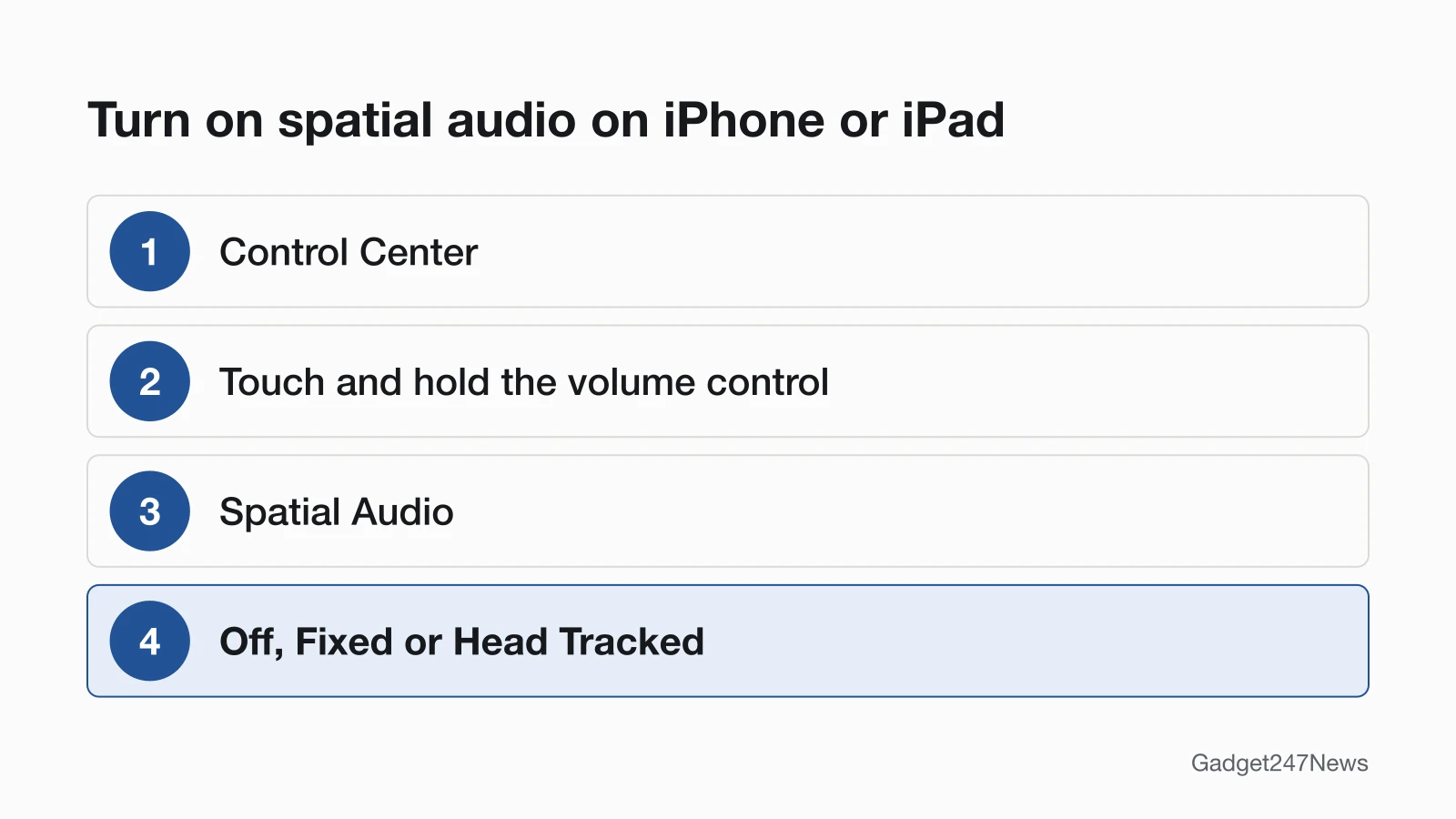
- Open Control Center, touch and hold the volume control, then tap Spatial Audio at the lower right.
- Choose Off, Fixed or Head Tracked.
If what you're playing isn't Spatial Audio with Dolby Atmos, the button reads Spatialize Stereo instead.
On a Mac
- Wear your AirPods and make sure they're connected to your Mac.
- Click the AirPods icon in the menu bar. If it isn't there, open System Settings, click Menu Bar, then select Sound below Menu Bar Controls.
- Below Spatial Audio, choose Off, Fixed or Head Tracked.
Spatial Audio Problems
Spatial audio problems come down to the model, the connection or what you're playing. Noise control is a separate setting in the same Control Center screen, compared in transparency mode vs ANC on earbuds.
Why Is Spatial Audio Not Available on My AirPods?
Spatial audio is not available when one of these four conditions applies:
- Your AirPods model isn't on Apple's list in the table above.
- Your AirPods aren't connected, or aren't in your ears.
- The app or track doesn't support it: Apple says spatial audio "isn't available for all apps or content".
- Your Mac doesn't have Apple silicon and macOS 12.3 or later.
If the AirPods won't connect at all, the fix starts with connecting them to your iPhone. If spatial audio disappeared suddenly after an update, check the AirPods firmware release notes for what changed.
Spatial Audio vs Multipoint
Spatial audio and multipoint answer different questions. Spatial audio decides where sound seems to come from; multipoint, as Google describes it for Pixel Buds, lets you keep connections to two devices at the same time. Multipoint is a connection feature, not a sound setting, and it has its own explainer: What Is Bluetooth Multipoint and Which Earbuds Support It.
Spatial Audio: Quick Answers
Two short answers: Android support and battery use.
Does spatial audio work on Android?
Apple's AirPods guide covers the Spatial Audio controls on iPhone, iPad, Mac and Apple TV 4K. For Android, Apple's Beats guide says Apple Music subscribers can listen to select songs in Spatial Audio with Dolby Atmos. Google's own earbuds support it too: Pixel Buds Pro and Pro 2 support Spatial Audio with head tracking on a Pixel 6, Pixel 6 Pro or newer Pixel phone, and Pixel Buds 2a get stereo Spatial Audio without head tracking.
Does spatial audio use more battery?
Spatial audio with head tracking shortens listening time a little on the AirPods where Apple gives figures. AirPods Pro 3 play for up to 8 hours with Active Noise Cancellation enabled, or up to 7.5 hours with Spatial Audio and Head Tracking enabled. AirPods Pro 2 play for up to 6 hours, or up to 5.5 hours with both enabled.
Sources
We checked this page against the pages below, most recently on . How we verify fixes
- Control Spatial Audio and head tracking on AirPods (AirPods User Guide) (Apple, support.apple.com)Official
- Control Spatial Audio and head tracking on Apple devices (Beats User Guide) (Apple, support.apple.com)Official
- Listen with Personalized Spatial Audio for AirPods and Beats (Apple, support.apple.com)Official
- Listen to a binaural Logic Pro spatial audio mix on iPhone and other devices (Apple, support.apple.com)Official
- AirPods Pro 3 - Tech Specs (Apple, support.apple.com)Official
- AirPods Pro 2 - Tech Specs (Apple, support.apple.com)Official
- Use Spatial Audio and head tracking (Google Pixel Buds Help) (Google, support.google.com)Official