Smartwatch Not Working? Fixes for Sync, Battery and Pairing

By Suraj Giri, Founder & Publisher. Reviewed by Suraj Giri on .
Published · 10 min read
How this page was made
- Sources. Checked against 29 official pages from Apple, Google, Garmin, Samsung and Oura, most recently on . See the sources.
- No device testing. We don't test fixes on physical devices, so nothing on this page is a hands-on result. A fact counts as verified only when it matches an official source page.
- AI use. As with every page on Gadget247News, AI tools helped research, outline, draft and edit this page, and re-read the official pages to flag facts that didn't match. The illustration at the top was generated with Runway and is labelled under the image.
- Human sign-off. Suraj Giri, Founder & Publisher, read this page and signed it off on . The site won't publish a page without that sign-off.
- Changes. The published and updated dates move only when the content changes, and every change gets a dated note. Spot an error or a fix that didn't work? Email info@gadget247news.com.
Read our AI use policy, editorial policy and corrections policy.
If your smartwatch won't turn on after charging, leave it on the charger for up to 30 minutes, then force restart it; a fully drained Apple Watch can need that long before it responds. Most other smartwatch problems trace back to Bluetooth, the companion app or a flat battery, and a watch that shows disconnected starts with smartwatch Not Connecting to Phone. Find your symptom below.
This page covers smartwatches, fitness trackers and smart rings from Apple, Garmin, Fitbit, Google, Samsung and Oura. Steps, workouts or sleep that never reach the phone app are a sync fault, covered in smartwatch Not Syncing. If the watch stopped working suddenly, check the update section near the end before you reset anything. Earbuds or headphones not working on the same phone have their own guide.
Find Your Problem: Symptom, Cause and First Fix
The table lists eight smartwatch problems, from connection to updates, with the most likely cause and the first fix the makers' support pages give for each.
| Symptom | Most likely cause | First fix | Full steps |
|---|---|---|---|
| Won't connect to your phone | Bluetooth off, Airplane Mode on, or the watch out of range | Bring the watch next to your phone, check Bluetooth is on and Airplane Mode is off, then restart both. | smartwatch Not Connecting to Phone |
| Won't turn on after charging | A fully drained battery | Leave it on the charger for up to 30 minutes, then force restart it (Apple Watch figures; brand timings below). | smartwatch Not Charging |
| Not charging | Watch off-center on the charger, dirty contacts or the wrong cable | Use the charger that came with your watch, line it up so a charging sign appears, and clean both surfaces. | smartwatch Not Charging |
| Battery drains fast | The display, distance from the phone, or background tasks after an update | Turn on your watch's low-power mode and keep it near your phone. | smartwatch Battery Draining Fast |
| Frozen, or needs a reset | A glitch that a restart clears | Use a force restart if the screen is frozen, and a factory reset only as the last step. | How to Reset Any Smartwatch |
| Not syncing | Lost Bluetooth link, or a power-saving mode limiting background data | Keep the watch near your phone, open its app, and restart both. | smartwatch Not Syncing |
| Not getting notifications | Apple Watch: iPhone in use, watch locked or disconnected, or a Focus turned on | Lock your iPhone and make sure your Apple Watch is connected and not locked; then check Focus and the app's notification settings. | Apple Watch Not Getting Notifications |
| Stopped working after an update | A new watch, phone or app update, or a service outage | Check the known issues listed for your watch's latest update. | wearable updates on the Update Tracker |
Each first fix is the opening step of the linked page, which carries the rest of the order for your brand.
Smartwatch Won't Connect to Your Phone or Keeps Disconnecting
A smartwatch that won't connect or keeps disconnecting needs the gentle fixes before a new pairing. Apple's order for Apple Watch: keep the watch and iPhone close together, make sure Airplane Mode is off and Wi-Fi and Bluetooth are on, then restart the watch and the iPhone. On an Apple Watch, a red iPhone icon or a red X in Control Center means the two aren't connected, and the green iPhone icon appears once they connect again. To relink an Apple Watch that still won't connect, unpair it from your iPhone and pair it again, as the last step. Google's first checks for a Pixel Watch match: Bluetooth on and Airplane Mode off on both devices. Each brand's order is on smartwatch Not Connecting to Phone.
Why Won't My Smartwatch Turn On After Charging?
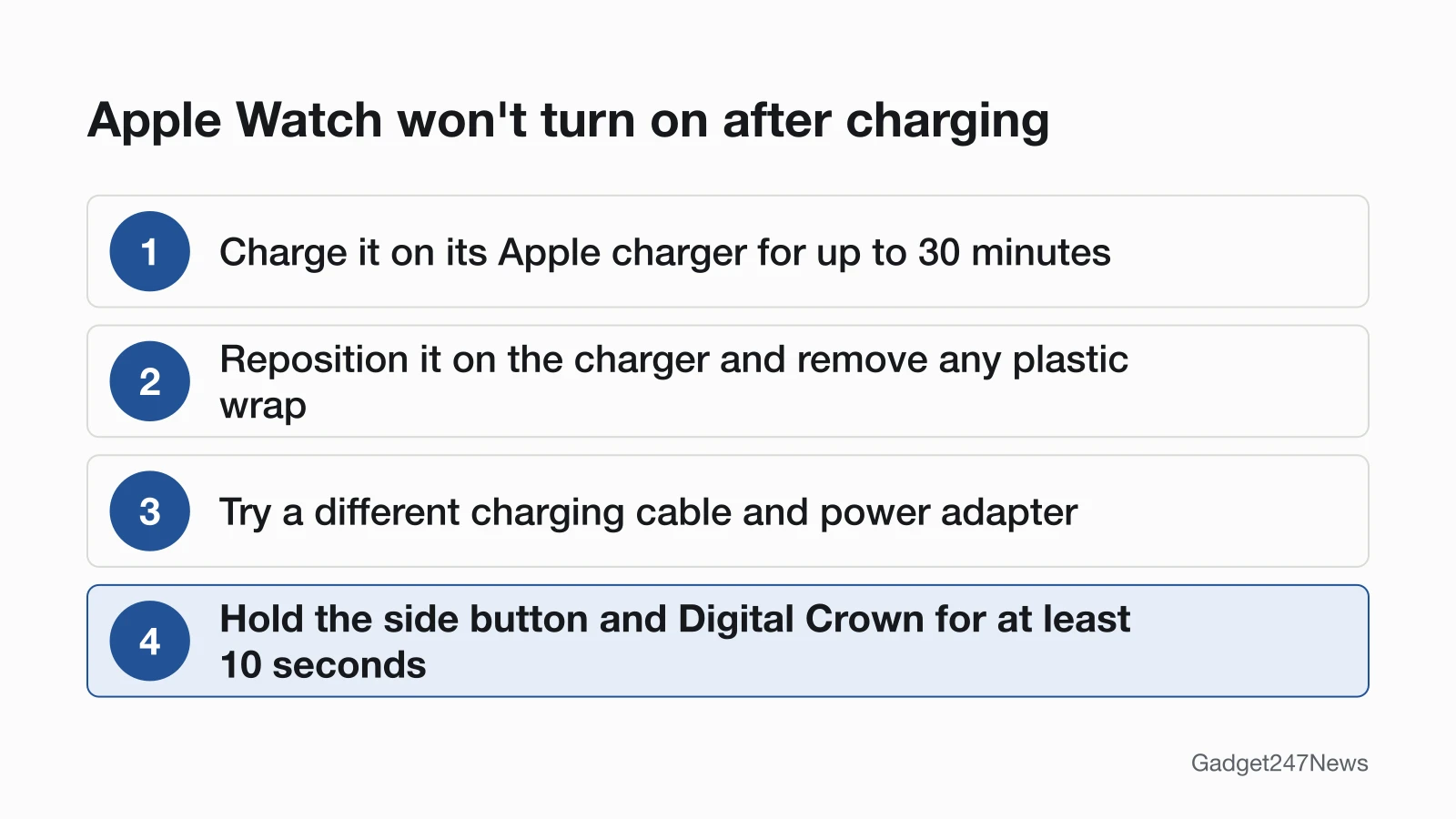
A smartwatch that won't turn on after charging is usually drained flat and needs more time on its own charger. On an Apple Watch, charge for up to 30 minutes, reposition the watch on the charger, remove any plastic wrap and try a different cable and adapter; then force restart it by holding the side button and Digital Crown for at least 10 seconds. Samsung tells Galaxy Watch owners to charge for at least 1 hour, then press the Home (Power) key. Garmin's fix is to connect the watch to a wall outlet or computer and hold the power button for a full 60 seconds. The steps for each brand are on smartwatch Not Charging.
Smartwatch Not Charging?
For a smartwatch that's not charging, or won't turn on after charging, Apple's and Samsung's support pages start with three checks: the right charger, clean contacts and the watch's position on the charger.
- Use the charger that came with your watch, plugged all the way into the adapter and the outlet.
- Clean the back of the watch and the charger, and remove any plastic wrap.
- Reposition the watch on the charger until a charging sign appears.
Samsung also warns that some metal bands interfere with charging and suggests removing the band while it charges. A watch that still won't charge goes to the maker's support team (see the end of this page).
Smartwatch Battery Draining Fast?
Apple and Google both tie smartwatch battery drain to the always-on display, and Apple adds distance from the iPhone and background tasks after an update. Apple says an Apple Watch is most efficient on a Bluetooth link to its iPhone, so keep the two within range, and Low Power Mode turns off the Always On display. On a Google Pixel Watch, Battery Saver in Settings → Battery turns off the Always-on Display and limits background activity. After a watchOS update, Apple says some tasks keep running in the background: wait a few days, then check again. The full brand list is on smartwatch Battery Draining Fast.
How to Reset a Smartwatch (Restart vs Factory Reset)
A restart turns the watch off and on and usually keeps your data; a factory reset erases the watch, so you set it up and pair it again afterwards. Restart first. Garmin warns that its restart steps can lose some data, such as recent steps or the current time. Reset only when a restart and the fixes above have failed, or before you sell or give the watch away. On an Apple Watch, erase it on the watch in Settings → General → Reset → Erase All Content and Settings, or unpair it from the iPhone: unpairing restores factory settings and removes Activation Lock. The buttons and menus for every brand are on How to Reset Any Smartwatch.
Smartwatch Frozen or Won't Turn Off?
A frozen smartwatch needs a force restart, which is a different step from a factory reset. On an Apple Watch, hold the side button and Digital Crown for at least 10 seconds, or until the Apple logo appears. For an unresponsive Garmin watch with a physical button, restart first: hold the power button until the watch turns off (up to 30 seconds), then press it again to turn it back on. On a Samsung Galaxy Watch, a force reboot means holding the Home (Power) key and the Back key together until "Rebooting..." appears. The reset section above and the brand table below cover the other models.
Smartwatch Not Syncing With the App?
A smartwatch that's not syncing with its app has most likely lost its Bluetooth link to the phone, or a power-saving mode is limiting its background data. Keep the watch near your phone with Bluetooth on and open the companion app. Google's first step for a Fitbit is to uninstall the Google Health app (formerly the Fitbit app) from other nearby phones and tablets signed in to the same account, then restart the Fitbit and sync it by hand. The Fitbit app became the Google Health app starting May 19, 2026. Garmin watches sync through the Garmin Connect app, and Garmin's first step is to turn on Bluetooth on your phone and watch, make sure the phone is online, then restart both devices. Every brand's order is on smartwatch Not Syncing.
Suddenly Not Getting Notifications?
Missing notifications usually mean the watch has lost its phone connection, or a Focus such as Do Not Disturb is on; Apple and Google both list missing notifications as a sign of a disconnected watch. On an Apple Watch, alerts go to the watch only when the iPhone is locked or asleep and the watch itself isn't locked, which is why Apple Watch Not Getting Notifications, linked in the table above, starts with locking your iPhone.
Fixes by Brand: Apple Watch, Garmin, Fitbit, Pixel Watch, Galaxy Watch and Oura
Smartwatch steps depend on the exact brand and model, because each maker uses its own companion app and menu names. The table gives each brand's app, where the model name shows, and the brand page with the full fixes.
| Brand | Companion app | Where the model name is shown | Brand fix page |
|---|---|---|---|
| Apple Watch | Apple Watch app | Apple Watch app → My Watch → General → About → Model Number (tap it to see the number starting with "A") | Apple Watch Problems and Fixes |
| Garmin | Garmin Connect app | Settings → System → About shows the Unit ID on most models; Garmin identifies a model by its full product name | Garmin Watch Problems and Fixes |
| Fitbit | Google Health app | Listed by name under Connections in the Google Health app | Fitbit Problems and Fixes |
| Google Pixel Watch | Google Pixel Watch app for setup; Google Health app for fitness data | Settings → System → About shows the serial number; the Google Store's Your Devices page lists the model for most Google devices | Pixel Watch Problems and Fixes |
| Samsung Galaxy Watch | Galaxy Wearable app | On the watch: Settings → About watch (or About device) → Model number | Samsung Galaxy Watch problems and fixes |
| Oura Ring | Oura app | Oura app → battery icon → My Devices shows the ring model, size and generation | Oura Ring Problems and Fixes |
Menu names differ by brand, so use the fix page for your own watch.
Not Sure Which Model You Have?
Each brand shows the model name in a different place, and the third column of the table above tells you where to look. For Apple Watch, the full list of model numbers is in Which Apple Watch Do I Have.
Updates, Outages and Other Causes
Some smartwatch problems start outside the watch, with a software update or a service outage, and a few aren't faults at all.
Did an Update or Outage Cause It?
A smartwatch that suddenly stopped working often follows a watch, phone or app update, or a service outage. An Apple Watch update needs the watch at least 50 percent charged and left on its charger, with the iPhone connected to Wi-Fi and kept near the watch until the update completes. If you still need help with the update, Apple's first checks are that the watch is connecting properly to its charger, then a restart of the watch and the iPhone. We list current versions and known issues under wearable updates on the Update Tracker. If a Garmin watch stopped syncing all at once, check the Garmin Connect Status page before you reset anything, and see Garmin Connect sync problems during an outage. Get an email when a smartwatch update breaks something, and when it's fixed.
Smartwatch Not Tracking Sleep or Steps?
Missing sleep or step data starts with two device checks: the tracking setting and the sync. On an Apple Watch, sleep data needs Sleep Tracking turned on, and Apple asks you to charge the watch to at least 30% before bed; the watch then adds sleep data to the Health app on your iPhone. Steps that show on the watch but not in the app point to sync: Garmin lists daily steps not updating in the app as a sign the watch isn't syncing. Apple's Track your sleep on Apple Watch and use Sleep on iPhone and the Apple Watch User Guide's Track your sleep page cover setup, and our guide How to Track Sleep on Apple Watch walks through it. This covers device settings only and isn't medical advice.
Set Up and Customize Your Watch
A watch face or setting that changed isn't a fault, so no fix on this page switches it back. Setup and customization tasks, such as picking a new face on an Apple Watch, live in our how-to guides, starting with How to Change the Apple Watch Face.
Earbuds or Headphones Acting Up Too?
Earbuds and headphones use the same phone and the same Bluetooth connection as your watch, so when both act up, start with the phone: Apple, Google, Samsung and Garmin all include a phone restart in their watch steps. The earbuds and headphones not working guide then routes each audio symptom.
When to Contact the Manufacturer
Contact the maker when the table and the linked page have both failed, in this order:
- Try the next fix on the linked page for your symptom.
- Reset the watch with the steps on How to Reset Any Smartwatch, and pair it again afterwards.
- Contact official support for your brand: Apple Support, Garmin Support, Google Health Help for Fitbit, Google Pixel Watch Help, Samsung Support or Oura Support.
- Ask about repair or warranty service. Water damage and a cracked screen go straight to this step.
Smartwatch Problems: Quick Answers
These two answers cover a wet watch and a watch that keeps dropping its phone connection.
Can a water-damaged smartwatch be fixed?
A water-damaged smartwatch goes to its maker for service. Apple says an Apple Watch is water resistant, but not waterproof, that its water resistance can diminish over time, and that it can't be rechecked or resealed. To remove water, Apple says to wipe the watch with a nonabrasive, lint-free cloth. If it still misbehaves once dry, contact your brand's support.
Why does my smartwatch keep disconnecting from my phone?
A smartwatch keeps disconnecting when it moves out of Bluetooth range, when Airplane Mode or Bluetooth is off, or when a power-saving mode cuts the link. Garmin says Battery Saver and Stealth Modes on some watches disable Bluetooth. Keep the watch near the phone, check both settings, then restart the watch and the phone.
Sources
We checked this page against the pages below, most recently on . How we verify fixes
- Apple: If your Apple Watch won't turn on or won't charge (Apple, support.apple.com)Official
- Apple: If your Apple Watch isn't connected or paired with your iPhone (Apple, support.apple.com)Official
- Apple: Update your Apple Watch (Apple, support.apple.com)Official
- Apple: If the battery in your Apple Watch drains too quickly (Apple, support.apple.com)Official
- Apple: Unpair and erase your Apple Watch (Apple, support.apple.com)Official
- Apple: Notifications on your Apple Watch (Apple, support.apple.com)Official
- Apple: How to get notifications on your iPhone and Apple Watch (Apple, support.apple.com)Official
- Apple: Identify your Apple Watch (Apple, support.apple.com)Official
- Apple: Track your sleep on Apple Watch and use Sleep on iPhone (Apple, support.apple.com)Official
- Apple Watch User Guide: Track your sleep on Apple Watch (Apple, support.apple.com)Official
- Apple: About Apple Watch water resistance (Apple, support.apple.com)Official
- Google Health Help: What is new with the redesigned Google Health app (Google, support.google.com)Official
- Google Health Help: Why won't my Fitbit device sync? (Google, support.google.com)Official
- Google Health Help: Update your Fitbit device (Google, support.google.com)Official
- Google Health Help: Restart your Fitbit device (Google, support.google.com)Official
- Google Pixel Watch Help: Set up Google Pixel Watch (Google, support.google.com)Official
- Google Pixel Watch Help: Fix Bluetooth, connection, and LTE issues on Google Pixel Watch (Google, support.google.com)Official
- Google Pixel Watch Help: Charge Google Pixel Watch and tips to improve battery life (Google, support.google.com)Official
- Google Store Help: Find your device serial number & model (Google, support.google.com)Official
- Garmin: My Device Is Not Syncing Data to the Garmin Connect App (Garmin, support.garmin.com)Official
- Garmin: Garmin Connect App Bluetooth Troubleshooting (Garmin, support.garmin.com)Official
- Garmin: My Garmin Watch Freezes or Reboots (Garmin, support.garmin.com)Official
- Garmin: My Garmin Wearable or Edge Device Will Not Turn On (Garmin, support.garmin.com)Official
- Garmin: How to Locate the Serial Number or Unit ID on a Garmin Wearable (Garmin, support.garmin.com)Official
- Garmin: How Do I Identify My Product Model? (Garmin, support.garmin.com)Official
- Samsung: Samsung smart watch will not hold charge or power on (Samsung, samsung.com)Official
- Samsung: Cannot sync content between phone and Samsung smart watch (Samsung, samsung.com)Official
- Samsung: Get your Samsung smart watch's information (Samsung, samsung.com)Official
- Oura: Set Up an Oura Ring (Oura, support.ouraring.com)Official