How to Track Sleep on Apple Watch

By Suraj Giri, Founder & Publisher. Reviewed by Suraj Giri on .
Published · 4 min read
How this page was made
- Sources. Checked against 3 official pages from Apple, most recently on . See the sources.
- No device testing. We don't test fixes on physical devices, so nothing on this page is a hands-on result. A fact counts as verified only when it matches an official source page.
- AI use. As with every page on Gadget247News, AI tools helped research, outline, draft and edit this page, and re-read the official pages to flag facts that didn't match. The illustration at the top was generated with Runway and is labelled under the image.
- Human sign-off. Suraj Giri, Founder & Publisher, read this page and signed it off on . The site won't publish a page without that sign-off.
- Changes. The published and updated dates move only when the content changes, and every change gets a dated note. Spot an error or a fix that didn't work? Email info@gadget247news.com.
Read our AI use policy, editorial policy and corrections policy.
Open the Sleep app on your Apple Watch, tap Continue, then set your sleep goal and first sleep schedule. Then wear the watch to bed with Sleep Tracking on, and it adds sleep data to the Health app on your iPhone. This covers device settings only and isn't medical advice. For other faults, see how to fix your smartwatch.
A flat battery stops sleep tracking: Apple says that if your watch battery dies, it won't track your sleep data. If the charge often runs out before morning, check Apple Watch battery draining fast.
How to Set Up Sleep Tracking on Apple Watch
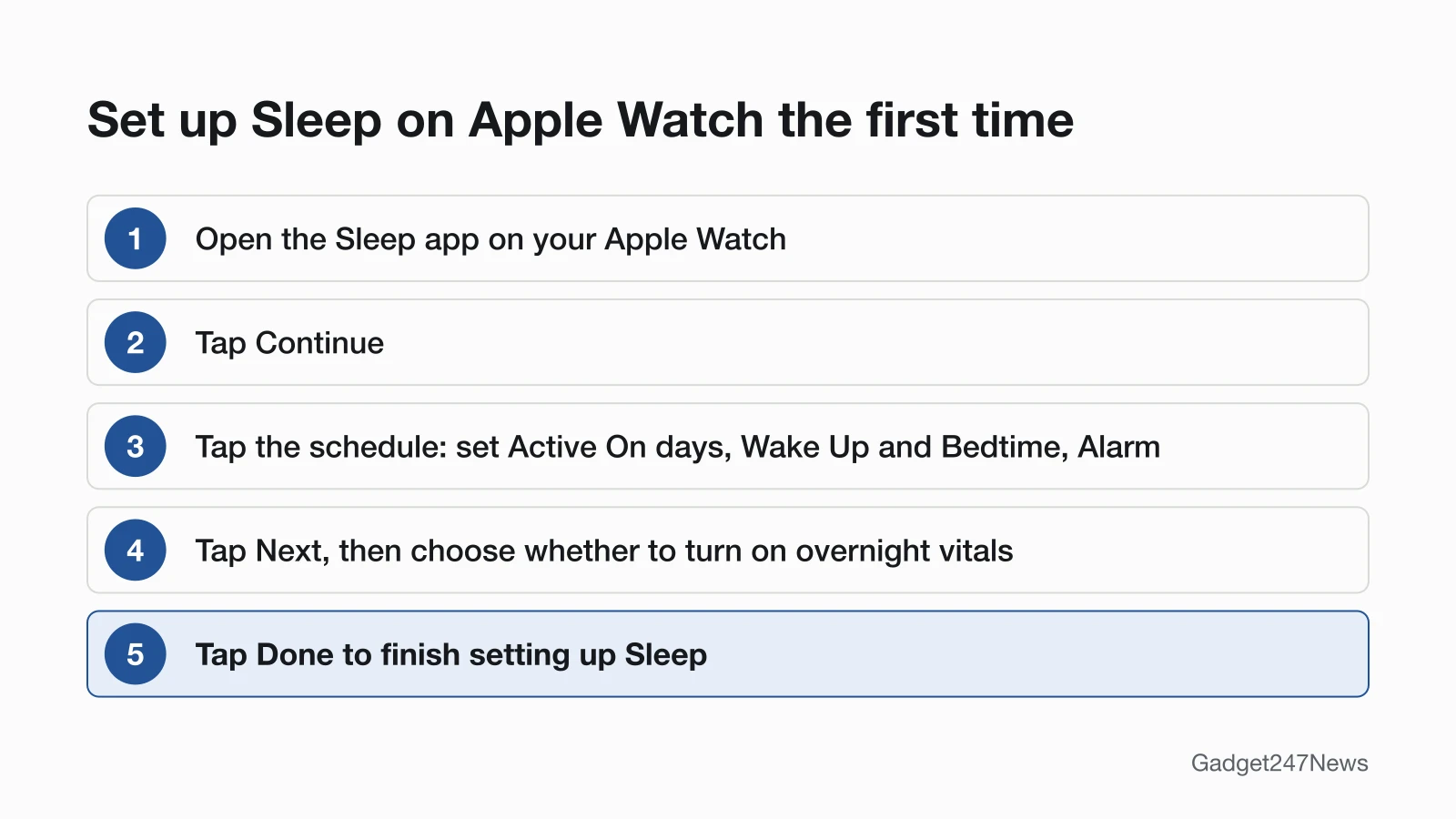
To set up sleep tracking on Apple Watch, run the first-time setup in the Sleep app:
- Open the Sleep app on your Apple Watch.
- Tap Continue.
- Tap the sleep schedule. Tap below Active On to choose the days, tap Wake Up or Bedtime and turn the Digital Crown to set each time (tap the Check button to save it), then turn Alarm on or off.
- Tap Next, then choose whether to turn on overnight vitals.
- Tap Done to finish setting up Sleep.
For different weekend times, tap the Back button and choose Add a Schedule For Other Days.
Set Up Sleep From Your iPhone
The Health app on iPhone has its own Sleep setup:
- Open the Health app on your iPhone.
- Tap Get Started under Set Up Sleep, then tap Next.
- Follow the prompts for Sleep Goals, Bedtime and Wake Up times, Sleep Focus and Track Sleep with Apple Watch.
That last option appears during setup if the watch is already paired. Pair it later and you can still turn it on afterwards.
Make Sure Sleep Tracking Is On
On the watch, open Settings, tap Sleep, then turn on Sleep Tracking and Charging Reminders. In Apple's words, "When Sleep Tracking is on, your Apple Watch tracks your sleep and adds sleep data to the Health app on your iPhone." The same options sit in the Apple Watch app on iPhone under My Watch, then Sleep.
Where to See Your Sleep Data
Your sleep data shows up in the Sleep app on the watch and in the Health app on iPhone. Worn to bed, Apple Watch can estimate the time you spent in each sleep stage (REM, Core and Deep) and when you might have woken up.
On the watch, the Sleep app shows your sleep score, time in each stage, last night's total and your average over the last 14 days. On iPhone, open Health, tap Browse, then Sleep. The bar graph opens on D (daily); tap W, M or 6M for longer views. Show More Sleep Data opens Stages, Amounts and Comparisons. Each morning brings a Sleep Score from 0 to 100 for the night before.
Wear It the Way Apple Recommends
Wear your Apple Watch at a comfortable fit. Apple gives the reason: "If your watch is too loose, the accelerometer might register too much movement during your natural sleep." Keep Charging Reminders on so the watch reminds you to charge before your wind down time.
Which Apple Watch Models Support It
Apple sets one software requirement for sleep tracking and separate limits for two extras:
| Feature | Who can use it |
|---|---|
| Sleep tracking | Apple Watch on the latest watchOS, with an iPhone on the latest iOS; not on watches set up with Apple Watch For Your Kids |
| Wrist temperature comparisons | Apple Watch Series 8 or later, or any Apple Watch Ultra |
| Respiratory Rate while asleep | Not available for users under 13 |
If Your Apple Watch Isn't Tracking Sleep
A night with no sleep data maps to one of Apple's conditions. Check them in this order:
- The battery ran out. A watch that dies overnight won't track sleep. Charge it to at least 30% before bed; see how to charge your Apple Watch.
- Sleep Tracking is off. Turn it on in Settings, then Sleep.
- You wore it for less than an hour. Apple asks for at least 1 hour each night.
- Track Sleep with Apple Watch is off. Apple says you must turn it on to receive sleep data.
- The night is on the watch but missing on iPhone. That points to syncing: see Apple Watch data not updating in the app.
Apple's Sleep Documentation
Apple covers sleep tracking in Track your sleep on Apple Watch and use Sleep on iPhone and in the Apple Watch User Guide page Track your sleep on Apple Watch. Its respiratory rate note states that "Apple Watch is not a medical device".
More Health Tracking Guides
Each guide below covers one tracked measure, grouped by device.
Apple Watch:
- How to Track Steps on Apple Watch
- How to Add a Workout on Apple Watch
- How to Check Heart Rate on Apple Watch
Other brands:
- Fitbit Not Tracking Sleep
- Fitbit Not Counting Steps
- Oura Ring Not Tracking Sleep
- Garmin GPS tracking problems
- Why Smartwatch Heart Rate Jumps (any brand)
Sleep Tracking Questions
These three come up after setup: a missing night, wear time and battery use.
Why didn't my Apple Watch track my sleep last night?
The device-side reasons in Apple's conditions are a battery that died, Sleep Tracking switched off, or less than 1 hour of wear. Check them in that order: the charge level, then the Sleep Tracking switch in Settings, then how long the watch was on your wrist.
How long do I have to wear my Apple Watch to bed?
Apple asks you to wear your Apple Watch to sleep for at least 1 hour each night, with Track Sleep with Apple Watch turned on. If you don't wear it to sleep, Apple notes that your graph might not show any data.
Does sleep tracking drain the battery?
Apple doesn't say how much charge a night of sleep tracking uses. It asks for at least 30% charge before bed, and Charging Reminders also notify you when the watch is fully charged. In the morning, the greeting shows how much charge remains. For a watch that empties faster than it used to, use the battery-drain guide near the top of this page.
Sources
We checked this page against the pages below, most recently on . How we verify fixes
- Track your sleep on Apple Watch and use Sleep on iPhone (Apple, support.apple.com)Official
- Set up sleep schedules on Apple Watch (Apple Watch User Guide) (Apple, support.apple.com)Official
- Track your sleep on Apple Watch (Apple Watch User Guide) (Apple, support.apple.com)Official