How to Check Heart Rate on Apple Watch

By Suraj Giri, Founder & Publisher. Reviewed by Suraj Giri on .
Published · 4 min read
How this page was made
- Sources. Checked against 7 official pages from Apple, most recently on . See the sources.
- No device testing. We don't test fixes on physical devices, so nothing on this page is a hands-on result. A fact counts as verified only when it matches an official source page.
- AI use. As with every page on Gadget247News, AI tools helped research, outline, draft and edit this page, and re-read the official pages to flag facts that didn't match. The illustration at the top was generated with Runway and is labelled under the image.
- Human sign-off. Suraj Giri, Founder & Publisher, read this page and signed it off on . The site won't publish a page without that sign-off.
- Changes. The published and updated dates move only when the content changes, and every change gets a dated note. Spot an error or a fix that didn't work? Email info@gadget247news.com.
Read our AI use policy, editorial policy and corrections policy.
Open the Heart Rate app on your Apple Watch and wait for the watch to measure your heart rate. That's Apple's own method for a heart rate (HR) check, and Apple says you can check it any time. This covers device settings only and isn't medical advice.
Heart-rate data that shows on the watch but never reaches the Health app on your iPhone is a sync problem: see Apple Watch Not Syncing. Missing sleep data has its own guide, Apple Watch not recording sleep.
How to Check Your Heart Rate on Apple Watch
Check your heart rate in the Heart Rate app on the watch:
- Open the Heart Rate app on your Apple Watch.
- Wait while Apple Watch measures your heart rate. Your current heart rate appears on screen, with your last measurement in smaller type below it.
The watch keeps measuring your heart rate as long as you're wearing it.
A Faster Way: Touch the Digital Crown
On Apple Watch Series 4 and later and all Apple Watch Ultra models, the Digital Crown gives a faster heart rate check:
- Open the Heart Rate app.
- Place your finger on the Digital Crown.
This method uses the electrical heart sensor, and Apple says you get a measurement every second instead of every 5 seconds. In the Health app, heart rate entries recorded this way show "ECG" in Heart Rate Context.
Where to See Your Heart Rate Data
Your heart rate history sits in two places: the Heart Rate app on the watch and the Health app on your iPhone.
- On the watch: open the Heart Rate app and turn the Digital Crown to Range, Resting Rate or Walking Average to show your heart rate throughout the day. Tap the Info button for details.
- On your iPhone: open the Health app, tap Browse, tap Heart, then tap an entry. You can show heart data for the last hour, day, week, month or year.
Apple Watch Series 12 and Apple Watch Ultra 4 add a chart of your heart rate measurements that updates in real time, and a Recovery HRV view you reach with the Digital Crown.
Turn Heart Rate Data On
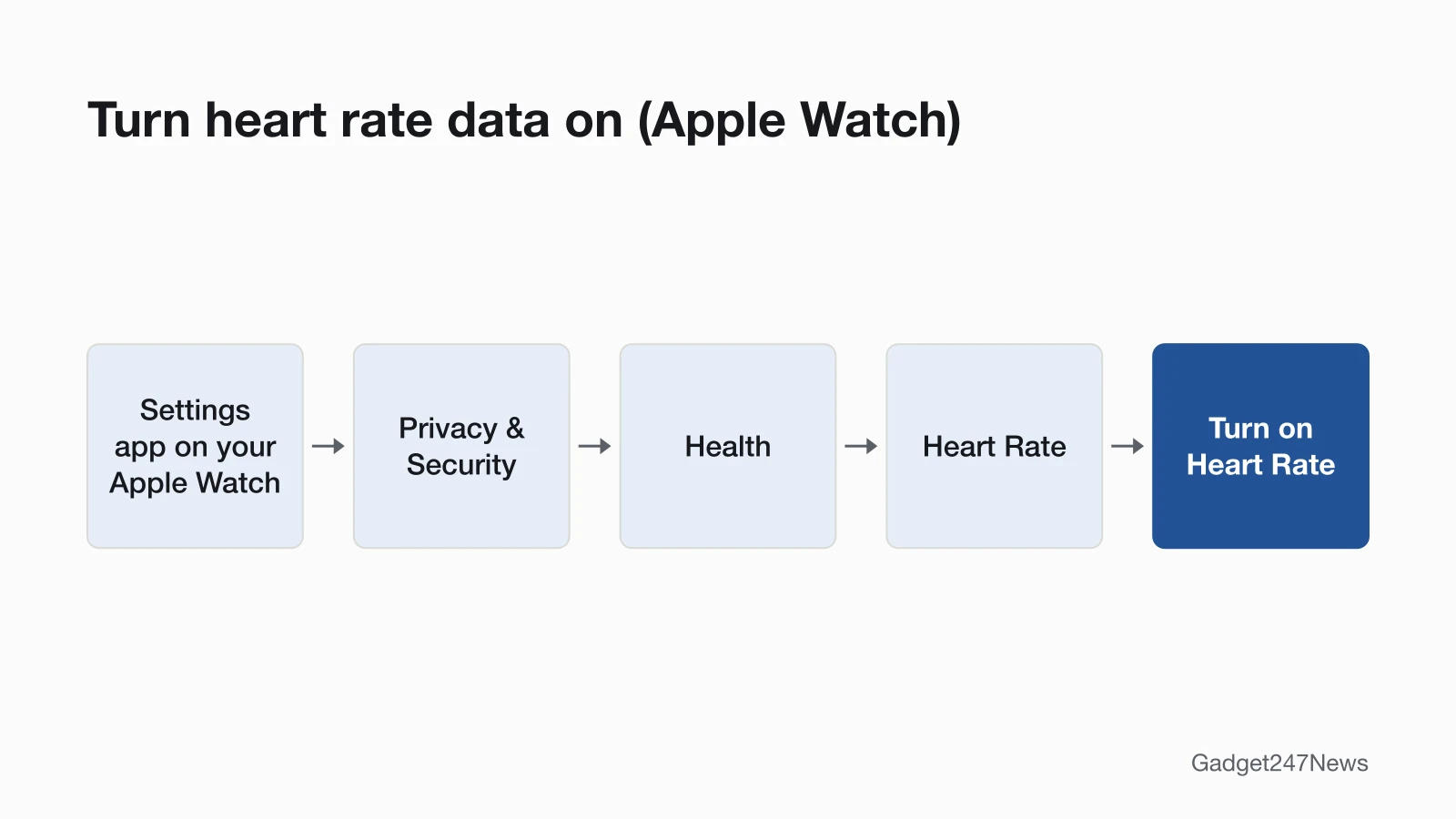
Heart rate data is on by default: Apple Watch monitors your heart rate for the Heart Rate app, workouts, and Breathe and Reflect sessions. If you turned it off, switch it back on:
- Open the Settings app on your Apple Watch.
- Tap Privacy & Security, then tap Health.
- Tap Heart Rate, then turn on Heart Rate.
From your iPhone, open the Apple Watch app, tap My Watch, tap Privacy, then turn on Heart Rate.
Wear It the Way Apple Recommends
Apple says your Apple Watch should be snug but comfortable, worn above the wrist bone (towards your elbow, not your hand), because the heart sensors need the back of the watch touching your skin. Apple suggests you tighten the band for workouts, then loosen it a bit when you're finished. Apple also lists conditions that affect the heart rate sensor: exercising in the cold, some tattoos, and irregular movements like tennis or boxing.
Which Apple Watch Models Do What
Apple ties three heart rate features to specific models:
| Feature | Models, per Apple |
|---|---|
| Heart Rate app | Apple's watchOS 27 guide doesn't limit it to certain models |
| Digital Crown measurement (electrical heart sensor) | Apple Watch Series 4 and later, and all Apple Watch Ultra models |
| ECG app | Not supported on Apple Watch SE; available only in certain countries and regions |
| Live chart, Continuous Measurements and Recovery HRV | Apple Watch Series 12 and Apple Watch Ultra 4 |
Apple gives two routes to turn off Continuous Measurements on those two models. Its user guide uses the Apple Watch app on iPhone (Apps, then Heart), and its heart rate article uses the Settings app on the watch (Heart).
If Your Apple Watch Isn't Showing Heart Rate
When your Apple Watch isn't showing heart rate, work through these five checks in order:
- Heart Rate is off. With Heart Rate off in Privacy settings, Apple says you won't get a heart rate measurement.
- Wrist Detection is off. Heart rate tracking and notifications turn off. Open Settings on the watch, tap Passcode and turn on Wrist Detection.
- The watch sits loose or off the top of the wrist. Apple says the sensors work only when you wear the watch on the top of your wrist.
- Your wrist or the watch is wet or sweaty. Clean and dry both.
- Low Power Mode is on. It turns off background heart rate measurements, including during sleep.
Heart rate that reaches the watch but not your iPhone needs the sync fix linked at the top.
Apple's Heart Rate Documentation
Apple covers the Heart Rate app in Apple's heart rate guide. Its article Monitor your heart rate with Apple Watch, published September 14, 2026, explains how the optical heart sensor works.
Related Health Guides
- Numbers that swing from minute to minute: Why Smartwatch Heart Rate Jumps.
- Heart rate during exercise shows in a workout, so learn how to start a workout on Apple Watch.
- Tracking sleep with a Fitbit instead: Fitbit Not Tracking Sleep.
Heart Rate Questions
Short answers from Apple's support pages.
Why is my Apple Watch not showing my heart rate?
Your Apple Watch stops measuring heart rate when either of two settings Apple names is off: Heart Rate or Wrist Detection. Heart Rate sits in the watch's Settings app under Privacy & Security, then Health; Wrist Detection sits under Passcode. If both are on, check the fit: the sensors work only on the top of your wrist.
Can I see my heart rate on my iPhone?
Yes, your iPhone shows your Apple Watch heart rate history in the Health app. Tap Browse, tap Heart, then tap an entry and pick a time range, from the last hour up to the last year.
Does Low Power Mode stop heart-rate tracking?
Low Power Mode stops background heart rate measurements, including during sleep, and heart rate notifications. In the Workout app, Apple says heart rate is still measured. Apple's Low Power Mode page doesn't say whether the Heart Rate app measures when you open it.
Sources
We checked this page against the pages below, most recently on . How we verify fixes
- Apple Watch User Guide: Check your heart rate on Apple Watch (Apple, support.apple.com)Official
- Apple Support: Monitor your heart rate with Apple Watch (Apple, support.apple.com)Official
- Apple Support: Apple Watch measurement tips (article 105002) (Apple, support.apple.com)Official
- Apple Support: Wearing your Apple Watch (Apple, support.apple.com)Official
- Apple Watch User Guide: Wake and unlock Apple Watch (Apple, support.apple.com)Official
- Apple Watch User Guide: Start a workout on Apple Watch (Apple, support.apple.com)Official
- Apple Support: Use Low Power Mode on your Apple Watch (Apple, support.apple.com)Official