Fitbit Not Tracking Sleep

By Suraj Giri, Founder & Publisher. Reviewed by Suraj Giri on .
Published · 6 min read
How this page was made
- Sources. Checked against 7 official pages from Google, most recently on . See the sources.
- No device testing. We don't test fixes on physical devices, so nothing on this page is a hands-on result. A fact counts as verified only when it matches an official source page.
- AI use. As with every page on Gadget247News, AI tools helped research, outline, draft and edit this page, and re-read the official pages to flag facts that didn't match. The illustration at the top was generated with Runway and is labelled under the image.
- Human sign-off. Suraj Giri, Founder & Publisher, read this page and signed it off on . The site won't publish a page without that sign-off.
- Changes. The published and updated dates move only when the content changes, and every change gets a dated note. Spot an error or a fix that didn't work? Email info@gadget247news.com.
Read our AI use policy, editorial policy and corrections policy.
A Fitbit not tracking sleep either records no night at all or records one that never shows in the Google Health app (formerly the Fitbit app). This guide covers the sync, the battery, the way you wear it and the way Google detects sleep. This covers device settings only and isn't medical advice. For Fitbit problems beyond sleep, such as pairing or battery, start with Fitbit troubleshooting. On an Apple Watch, see Apple Watch sleep tracking instead.
Google says wrist-based Fitbit devices detect your sleep automatically when you wear them to bed. When your body is completely at rest and you haven't moved for about an hour, the Fitbit records that you're asleep. Google describes this sleep feature as "intended for general wellness purposes only" in Track sleep with Google Health.
Why Your Fitbit Isn't Tracking Sleep
Google's sleep and restart pages point to six causes of a missing night:
- It hasn't synced since you woke up. Google says to sync your device each morning to review your sleep data.
- The battery is critically low. Google's sleep troubleshooting starts by ruling that out.
- It was in a clip or pendant. Google recommends a snug wristband during sleep and says not to use a clip or pendant accessory.
- It sat low on your wrist. For sleep, Google wants it higher, about 2 to 3 finger widths above the wrist bone.
- You didn't stay still long enough. The Fitbit records sleep after about an hour without movement, and naps from 20 minutes.
- The Fitbit needs a restart. Google lists a device that "doesn't register steps or other data" as a reason to restart.
How to Fix a Fitbit That Isn't Tracking Sleep
Fixes 1 and 2 are Google's own steps for a missing sleep session, in Google's order; the restart comes last.
Fix 1: Refresh the Sleep Tab
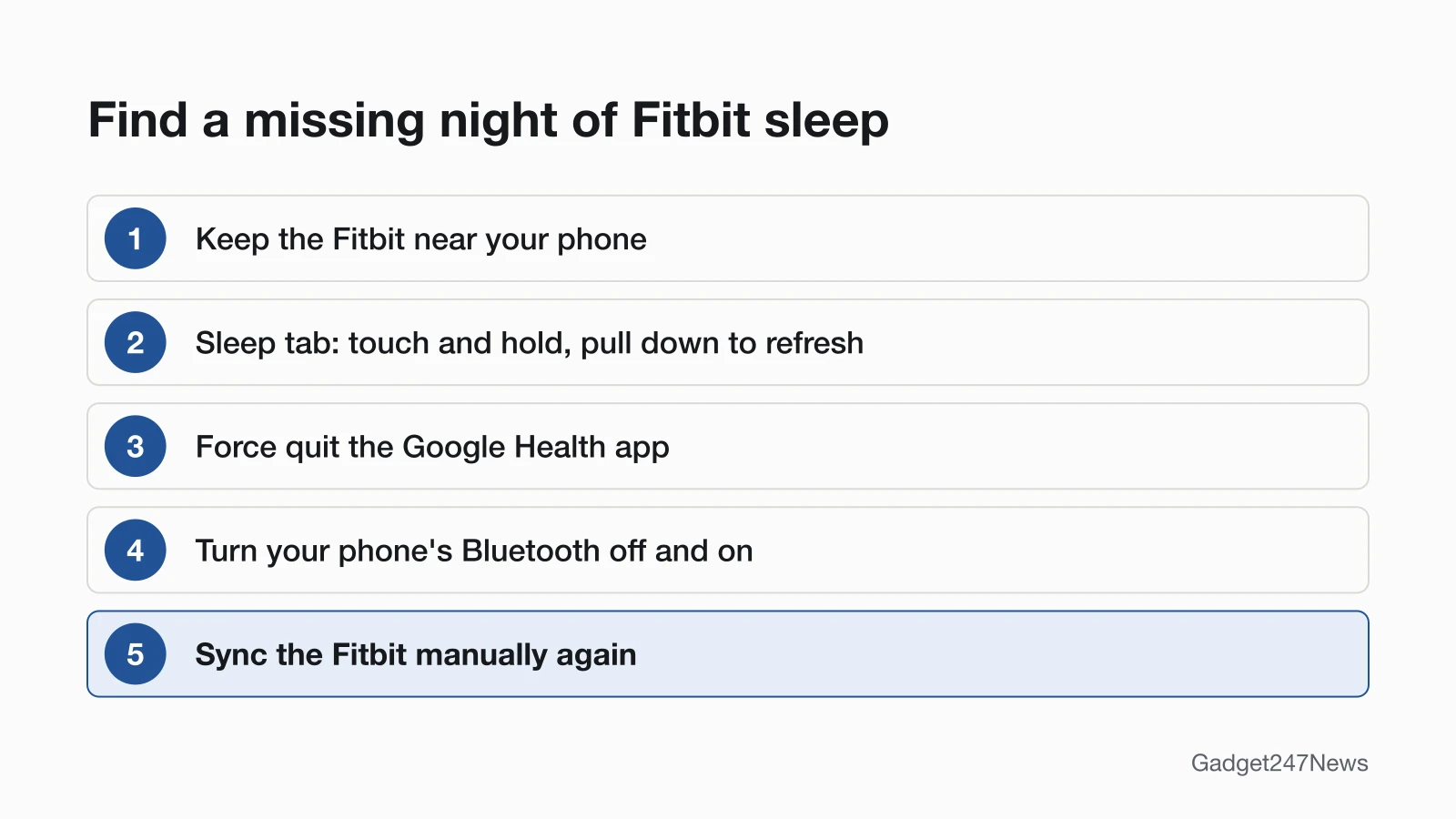
Refresh the Sleep tab first, because your Fitbit usually syncs when it's near your phone and you open the Google Health app:
- Keep the Fitbit near your phone.
- Open the Google Health app and tap the Sleep tab.
- Touch and hold on the screen, then pull down to refresh.
The Fitbit shows its own copy too: swipe up from the clock face to find Fitbit Today, then tap the Sleep tile. If the tile is missing, tap Settings at the bottom of Fitbit Today and turn the sleep tile on.
Fix 2: Force Quit the App and Reset Bluetooth, Then Sync
If the night still doesn't appear, Google's next steps are:
- Force quit the Google Health app.
- Turn your phone's Bluetooth off, then back on.
- Sync your Fitbit manually again.
When the sync itself fails, Google points you to its full sync troubleshooting. Our guide to Fitbit data not updating in the app follows those steps in order.
Fix 3: Charge It Before Bed
Charge the Fitbit before you go to bed, since Google's sleep checks begin with a battery that isn't critically low. In the Google Health app, go to the Today tab and tap Connections; the battery level sits to the right of your device. On the Fitbit itself, a Charge 6 or Inspire 3 shows it in the top left after you swipe up from the clock face, and a Sense 2 or Versa 4 shows it at the bottom of the screen after you swipe down.
Fix 4: Wear It the Way Google Recommends for Sleep
For sleep, Google asks for a snug band worn a little higher than usual:
- A snug wristband: never a clip or pendant accessory.
- Higher on the wrist: about 2 to 3 finger widths above the wrist bone.
- Secure but not too tight: Google's words for how the band should feel.
- A sleep-friendly band: Google says its leather, metal, knit and woven accessory bands aren't intended for sleep.
Google's general fitting advice on its wear page is looser: wear the band "loosely enough that it can move back and forth on your wrist." The sleep page asks for the snug, higher fit above, so tighten the band at bedtime.
Fix 5: Update the App and Your Fitbit
Update both pieces of software, with the Fitbit charged:
- Make sure the Google Health app on your phone is the latest version.
- Open the Google Health app with your Fitbit nearby, tap Connections at the top left, tap your device, then tap Update.
The Update button only appears when an update is available. Google says an update may take more than one hour, and the Google Health app has to keep running while it loads.
Fix 6 (Last): Restart Your Fitbit
Restart the Fitbit if it still records no sleep. Google says a restart turns the device off and on "without the loss of any activity data." The method depends on the model: an Inspire 2 restarts from the Settings app with Reboot Device, while a Sense or Sense 2 restarts when you hold the button for 10 seconds until the Fitbit logo appears. Use the steps to restart a Fitbit for your model.
Sleep Tracking by Model and Situation
Four cases need their own fix: an Inspire worn in a clip, a night logged at the wrong times, a night that's missing completely, and the change to the Google Health app.
Inspire Worn in a Clip
Google says not to wear a Fitbit in a clip for sleep, so move an Inspire from its clip to its wristband at night. Then confirm the tracker is set to WORN on Wrist on Inspire 3, or On Wrist on Inspire and Inspire 2.
A Night Logged at the Wrong Times
To fix a night logged with the wrong start or end time, edit the sleep log:
- Open the Google Health app and tap the Sleep tab.
- Tap the Sleep duration tile.
- Scroll to the day and tap it.
- Tap Edit at the top right, then adjust your bedtime and wake up time.
The same screen has Delete if you'd rather remove the log.
Add a Missed Night Yourself
A night with no sleep recorded has to be added before it can be edited, Google says:
- Open the Google Health app and tap the Sleep tab.
- Tap Sleep duration.
- Tap Add at the top right.
- Enter the day, your Bedtime and your Wake up time.
- Tap Save.
Google gives these same steps for logging a nap by hand.
After the Switch to the Google Health App
Starting May 19, 2026, the Fitbit app became the Google Health app, and five Sleep tab features are no longer available: Sleep Sensitivity settings, Sleep Profile with its monthly sleep animals, Estimated Oxygen Variation (EOV), Skin Temperature minute-by-minute data, and Snore Detection for Fitbit Sense and Versa 3 users. Google also says it has improved the sleep tracking and sleep score algorithms. The dates and account changes are in our story on the Fitbit app becoming the Google Health app.
Still not working?
If your Fitbit still isn't tracking sleep after all six fixes, work down this list:
- Try the next fix: Fitbit Not Syncing, if steps and other data have stopped updating too.
- Reset your Fitbit: How to Restart or Factory Reset a Fitbit (you'll need to set it up again after a factory reset).
- Contact Google Health Support: Google Health Help.
- Read Google's sleep documentation: Track sleep with Google Health.
Steps missing as well? See Fitbit Not Counting Steps.
Started after an update? Check the Update Tracker for known issues.
Fitbit Sleep Tracking: Quick Answers
Short answers, based on Google's sleep and restart help.
Why didn't my Fitbit track my sleep last night?
Start with the sync: refresh the Sleep tab by touching, holding and pulling down, since Google says to sync each morning. If last night still isn't there, check that the battery didn't run critically low and that you wore the Fitbit in a snug wristband, not a clip or pendant.
Does Fitbit track naps?
Yes, Fitbit devices detect and record naps that are at least 20 minutes long, according to Google. Naps show in separate tabs under the date in your daily sleep log, and you can log one by hand with the Add steps above.
Why did my Fitbit stop tracking my sleep?
A Fitbit that stopped tracking sleep needs the two basic checks first: a sync and a charged battery. If it stopped after the May 2026 switch to the Google Health app, compare the changes listed above. If it stopped after a Fitbit update, check the Fitbit and Pixel Watch update tracker for known issues.
Sources
We checked this page against the pages below, most recently on . How we verify fixes
- Google Health Help: Track sleep with Google Health (Google, support.google.com)Official
- Google Health Help: How to wear your Fitbit device (Google, support.google.com)Official
- Google Health Help: Charge your Fitbit device (Google, support.google.com)Official
- Google Health Help: Update your Fitbit device (Google, support.google.com)Official
- Google Health Help: Restart your Fitbit device (Google, support.google.com)Official
- Google Health Help: What is new with the redesigned Google Health app (Google, support.google.com)Official
- Google Health Help Center (Google, support.google.com)Official