Fitbit Not Syncing? How to Force a Sync

By Suraj Giri, Founder & Publisher. Reviewed by Suraj Giri on .
Published · 7 min read
How this page was made
- Sources. Checked against 14 official pages from Google, most recently on . See the sources.
- No device testing. We don't test fixes on physical devices, so nothing on this page is a hands-on result. A fact counts as verified only when it matches an official source page.
- AI use. As with every page on Gadget247News, AI tools helped research, outline, draft and edit this page, and re-read the official pages to flag facts that didn't match. The illustration at the top was generated with Runway and is labelled under the image.
- Human sign-off. Suraj Giri, Founder & Publisher, read this page and signed it off on . The site won't publish a page without that sign-off.
- Changes. The published and updated dates move only when the content changes, and every change gets a dated note. Spot an error or a fix that didn't work? Email info@gadget247news.com.
Read our AI use policy, editorial policy and corrections policy.
If your Fitbit is not syncing, the data it collects isn't reaching your Google Health account through the Google Health app (formerly the Fitbit app). Syncing is that data transfer; connecting is the Bluetooth link it rides on. A Fitbit that won't pair at all needs the connection guide linked in Fix 1. Charging and battery problems start from the Fitbit fixes hub.
Google lists five signs of a Fitbit that has dropped its link to your phone: the Google Health app doesn't show updated stats even after a manual sync, the app shows a sync error, notifications stop arriving, the Fitbit's clock is wrong, or the Fitbit shows a Phone disconnected icon. A clock that's off by an hour or more comes first: follow How to Change the Time on a Fitbit. A clock only a few minutes out points to Google's Bluetooth and internet check, Fix 3 below. For other brands, see what to do when a smartwatch won't sync.
How Fitbit Syncing Works
A Fitbit syncs over Bluetooth to one phone or tablet, and Google says the Fitbit "must remain near your phone to sync." Three rules from Google's sync page explain when data moves:
- Bluetooth Low Energy: Fitbit trackers and watches use Bluetooth Low Energy (BLE) to sync with phones and tablets.
- Throughout the day: data syncs to the Google Health app automatically.
- Every app launch: each time you open the Google Health app, a nearby Fitbit syncs on its own.
To check when your Fitbit last synced, open the Google Health app and tap Connections, then your device. The "last synced when" note sits below the device's image.
Why Your Fitbit Isn't Syncing
Google's troubleshooting steps check six causes, in this order:
- Another phone or tablet nearby has the Google Health app. Google says a Fitbit "can only sync with one device at a time."
- The Fitbit needs a restart. A Fitbit that "won't sync with the Google Health app" tops Google's list of reasons to restart.
- Bluetooth or the internet is off. The Google Health app "must be connected to the internet to sync."
- Something is out of date: the phone's software, the Google Health app or the Fitbit's own software.
- A phone permission is off. Android needs Location and Nearby devices; an iPhone needs Bluetooth, Background App Refresh and Cellular Data.
- The Fitbit needs a charge. Charging is a separate step in Google's order.
How to Force a Fitbit to Sync
These fixes follow Google's own order; removing and setting up the Fitbit again comes last.
Fix 1: Remove the App From Other Nearby Phones
Uninstall the Google Health app on any other phone or tablet nearby that's signed in to the same account. Then open the Settings app on each of those devices, tap Connected devices or Bluetooth, and remove your Fitbit if it's listed: Settings › Forget on Android, or the Information icon › Forget This Device on an iPhone or iPad. If the Fitbit shows as disconnected or won't pair, use the guide for when your Fitbit won't connect to the app.
Fix 2: Restart Your Fitbit, Then Sync Manually
A restart turns the Fitbit off and on "without the loss of any activity data," and the steps differ by model.
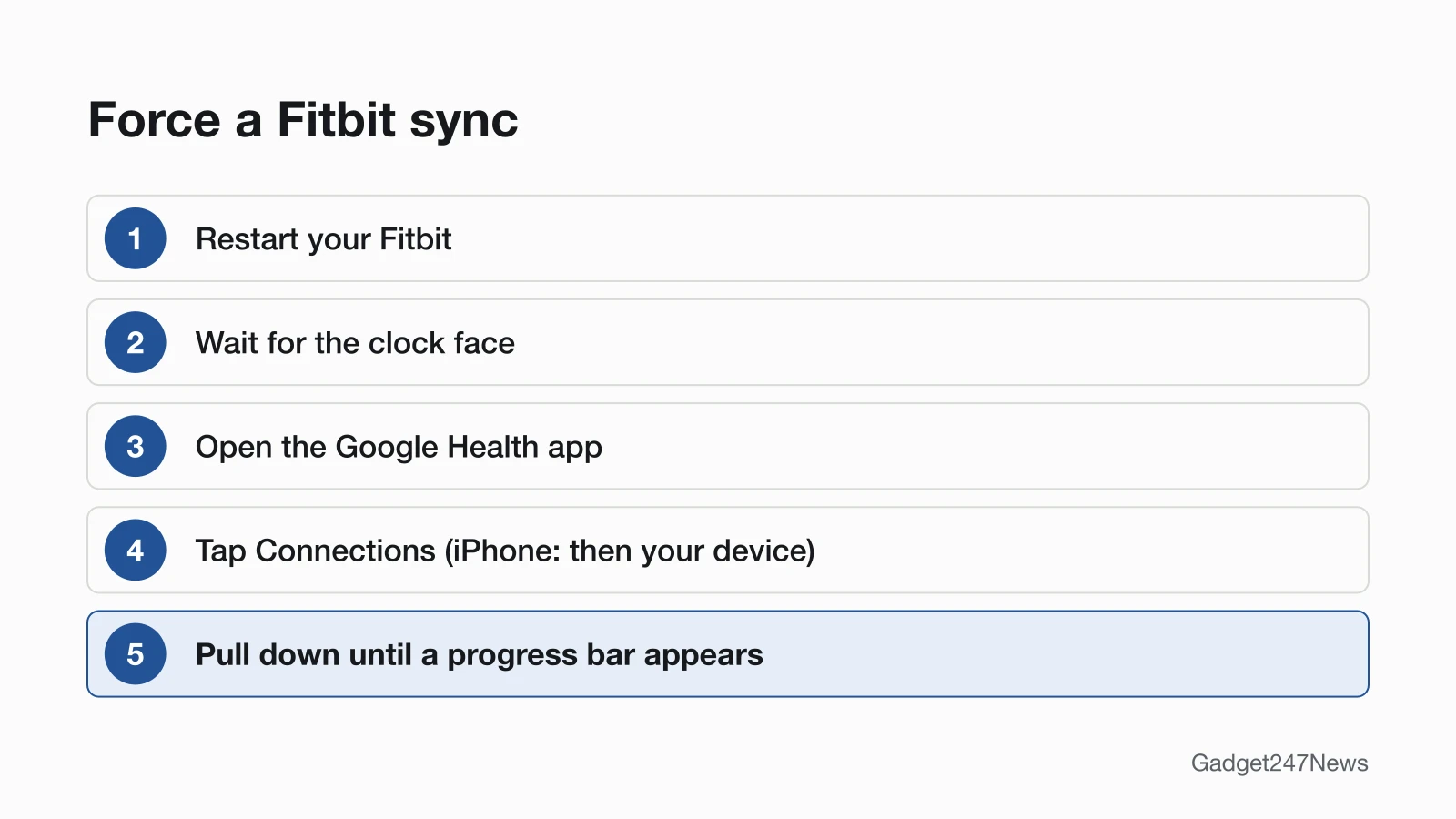
- Restart your Fitbit.
- Wait until it finishes restarting and shows the clock face.
- With the Fitbit nearby, open the Google Health app.
- At the top left, tap Connections. On an iPhone, tap Connections, then your device.
- Tap and hold on the screen, pull down until a progress bar appears at the top, then release and wait for the bar to fill.
Google also lists a Sync Now route: tap Connections › Sync. The restart steps for each model are in the reset guide linked under Fix 7.
Fix 3: Turn Bluetooth Off and On, and Check the Internet
Google's Step 4 checks the phone's Bluetooth and internet access:
- Open the Bluetooth setting: on Android, Settings › Connected devices › Connection preferences › Bluetooth; on an iPhone, Settings › Bluetooth.
- Turn Bluetooth off, wait at least 3 seconds, then turn it back on.
- Check that the phone is on Wi-Fi or cellular data, then try the sync again.
Fix 4: Restart Your Phone and Update Everything
Restart your phone, open the Google Health app and try the sync. If it still fails, update the three things Google names in its Step 6: the phone's operating system, the Google Health app and the Fitbit. The app runs on Android 11 or higher and on iOS 16.4 or higher. To update the Fitbit, open the Google Health app with the Fitbit nearby and tap Connections, your device, then Update; that button appears only when an update is available. How to Update Fitbit has the rest.
Fix 5: Check the Google Health App's Permissions
Google's Step 7 asks you to confirm these permissions for the Google Health app, and the list differs by phone:
| Phone | Where to look | Permissions Google lists |
|---|---|---|
| Android | Settings app › Apps › Google Health › Permissions | Location and Nearby devices (Android 12.0+) |
| iPhone | Settings app › Apps › Google Health | Bluetooth, Background App Refresh and Cellular Data, "at a minimum" |
Turn on anything that's off, then sync again.
Fix 6: Charge Your Fitbit
Connect the Fitbit to its charger, and once it starts charging, try the sync again. To see the battery level, open the Google Health app and tap Connections on the Today tab; the level shows to the right of your device.
Fix 7 (Last): Reinstall the App, Then Set the Fitbit Up Again
Google's last two steps differ by phone, and the removal step deletes any data you haven't synced from the Fitbit you remove:
- Android: reinstall the Google Health app. Check first that the phone runs Android 11 or higher; on an older version, Google says, "you won't be able to reinstall the app."
- iPhone: pair the Fitbit again. In Settings › Bluetooth, tap the Information icon next to your Fitbit, then Forget This Device. Open the Google Health app and wait; when it asks to let your Fitbit pair with your phone, tap Pair.
- Both: remove other Fitbit devices. In the Google Health app, tap Connections, tap any other Fitbit tracker or watch listed, then System › Disconnect device. Remove them from the phone's Bluetooth list too.
A factory reset isn't one of Google's sync steps. Use it only as a last resort, with the steps in How to Restart or Factory Reset a Fitbit.
Syncing Problems by Situation
Three situations have causes of their own: the app switch, third-party health apps, and Google's newer devices.
Fitbit Not Syncing After the Switch to Google Health
Starting May 19, 2026, the Fitbit app became the Google Health app. After that date, Google says, "you can no longer access Fitbit with your Fitbit account." If you still sign in with a Fitbit account, move it to a Google Account, update the Google Health app from the Google Play Store or the App Store, then sync. The dates and deadlines are in our story on Fitbit's move to Google.
Not Syncing to Apple Health or Health Connect
Sharing data with Apple Health or Health Connect is a separate connection from the Fitbit's own sync. On an iPhone (iOS 16.4 or higher), confirm in the Apple Health app that your permissions for Google Health are still active; after a reinstall, you'll need to reconnect Google Health to Apple Health. On Android (Android 9 or higher), tap Connections › Partner apps › Manage Health Connect; "Synced just now" means the sync worked. Setup steps are in How to Pair a Fitbit With Your iPhone or Android Phone. This covers device settings only and isn't medical advice.
Pixel Watch and Fitbit Air
To sync a Google Pixel Watch by hand, tap the Today tab in the Google Health app, then press and hold on the screen and pull down. Google warns that Battery saver mode and Bedtime mode limit background data, and Pixel Watch data "will only sync once they're turned off." Google Fitbit Air is a screenless tracker, and all its data syncs through Bluetooth to the Google Health app.
Still not working?
If your Fitbit still won't sync after all seven fixes, work down this list:
- Try the next fix: Fitbit not getting notifications (if alerts have stopped too).
- Reset your Fitbit: How to Restart or Factory Reset a Fitbit (you'll need to set it up again afterwards).
- Contact Google Health Support: Google Health Help. Google's last sync step ends with "contact Customer Support."
- Check repair or warranty options: File a warranty claim for your Fitbit device.
Started after an update? Check the Update Tracker for known issues.
Started After an Update?
If syncing stopped right after a Fitbit or Google Health app update, check the Fitbit firmware known issues for your model before you reset anything. Google sends Fitbit updates out gradually. Avoid updating at midnight: Google says an update "right as the day changes" can leave your step count wrong for a day. Get an email when a Fitbit update breaks something, and when it's fixed.
Fitbit Sync: Quick Answers
Why has my Fitbit suddenly stopped syncing?
A Fitbit that suddenly stops syncing most likely has a connection issue, according to Google. Look for another phone or tablet nearby with the Google Health app, check that Bluetooth, the internet and the app's permissions are on, then restart the Fitbit. After an update, see the section above.
How can I force my Fitbit to sync?
To force a Fitbit to sync, open the Google Health app with the Fitbit nearby, because opening the app starts a sync on its own. For a manual sync, tap and hold on the Today tab and pull down, or tap Connections › Sync. If the progress bar never fills, restart the Fitbit and try again.
Sources
We checked this page against the pages below, most recently on . How we verify fixes
- Google Health Help: Why won't my Fitbit device sync? (Google, support.google.com)Official
- Google Health Help: How do Fitbit devices sync their data? (Google, support.google.com)Official
- Google Health Help: Restart your Fitbit device (Google, support.google.com)Official
- Google Health Help: Charge your Fitbit device (Google, support.google.com)Official
- Google Health Help: How do I set up my Fitbit device? (Google, support.google.com)Official
- Google Health app setup requirements (Google, support.google.com)Official
- Google Health Help: What is new with the redesigned Google Health app (Google, support.google.com)Official
- Google Health Help: How to move your Fitbit Account to a Google Account (Google, support.google.com)Official
- Google Health Help: How do I use Apple Health with the Google Health app? (Google, support.google.com)Official
- Google Health Help: How do I use Health Connect with the Google Health app? (Google, support.google.com)Official
- Google Health Help: How to fix a blank, unresponsive, rebooting, or flickering Fitbit device screen (Google, support.google.com)Official
- Google Health Help: Get started with Google Fitbit Air (Google, support.google.com)Official
- Google Health Help: Update your Fitbit device (Google, support.google.com)Official
- Google Health Help: File a warranty claim for your Fitbit device (Google, support.google.com)Official