Earbuds Not Connecting? Fixes for AirPods, Beats and More

By Suraj Giri, Founder & Publisher. Reviewed by Suraj Giri on .
Published · 8 min read
How this page was made
- Sources. Checked against 26 official pages from Apple, Samsung, Google, Microsoft, Sony, Bose, JBL, Skullcandy and JLab, most recently on . See the sources.
- No device testing. We don't test fixes on physical devices, so nothing on this page is a hands-on result. A fact counts as verified only when it matches an official source page.
- AI use. As with every page on Gadget247News, AI tools helped research, outline, draft and edit this page, and re-read the official pages to flag facts that didn't match. The illustration at the top was generated with Runway and is labelled under the image.
- Human sign-off. Suraj Giri, Founder & Publisher, read this page and signed it off on . The site won't publish a page without that sign-off.
- Changes. The published and updated dates move only when the content changes, and every change gets a dated note. Spot an error or a fix that didn't work? Email info@gadget247news.com.
Read our AI use policy, editorial policy and corrections policy.
Earbuds usually won't connect because they're still connected to another device, Bluetooth is off, or they need to be forgotten and paired again. Put them back in the case, turn Bluetooth off and on, then forget them and pair again. Find your symptom or brand below for the exact first fix; for charging, sound or reset faults, start from earbuds and headphones not working.
If you've never paired these earbuds before, start with the guide to pair Bluetooth earbuds with an iPhone or another device instead. If they connect and then drop, that's a different fault, covered in why headphones keep cutting out.
Find Your Problem: Symptom, Cause and First Fix
The table covers seven ways earbuds fail to connect or pair, with the likely cause and the first fix for each.
| Symptom | Most likely cause | First fix | Full steps |
|---|---|---|---|
| Phone can't find the earbuds | Not in pairing mode, or still connected to another device | Put your earbuds in pairing mode and hold them next to your phone with Bluetooth on. | phone can't find Bluetooth earbuds |
| Paired but won't connect | An old pairing record | Forget the earbuds in Bluetooth settings, then pair them again. | Phone section below |
| Won't connect to a laptop or PC | Not discoverable, or Windows sends sound elsewhere | Put the earbuds in pairing mode, then add them in Settings > Bluetooth & devices. | Laptop section below |
| Connects, then drops | Distance or interference | Move closer and away from Wi-Fi routers and running microwaves. | headphones keep cutting out |
| Only one earbud connects | One bud flat or out of sync | Charge both earbuds in the case, then take them out together. | left or right earbud not working |
| Stopped connecting after an update | A phone OS or firmware change | Check the Update Tracker for known issues, then pair again. | earbud and smartwatch Update Tracker |
| Earbuds or case dead | A flat battery | Charge the case and earbuds, then try again. | earbuds Not Charging |
Start with the first row that matches what you see; the phone and laptop rows are covered on this page.
Why Won't My Earbuds Connect to My Phone?
Earbuds usually won't connect to a phone for one of three reasons: they're still connected to another phone, tablet or laptop; Bluetooth is off or the phone needs an update; or the pairing record is out of date. These fixes appear across the makers' support pages:
- Put both earbuds back in the case, close the lid, then open it.
- Turn Bluetooth off and on.
- Forget the earbuds, then pair them again.
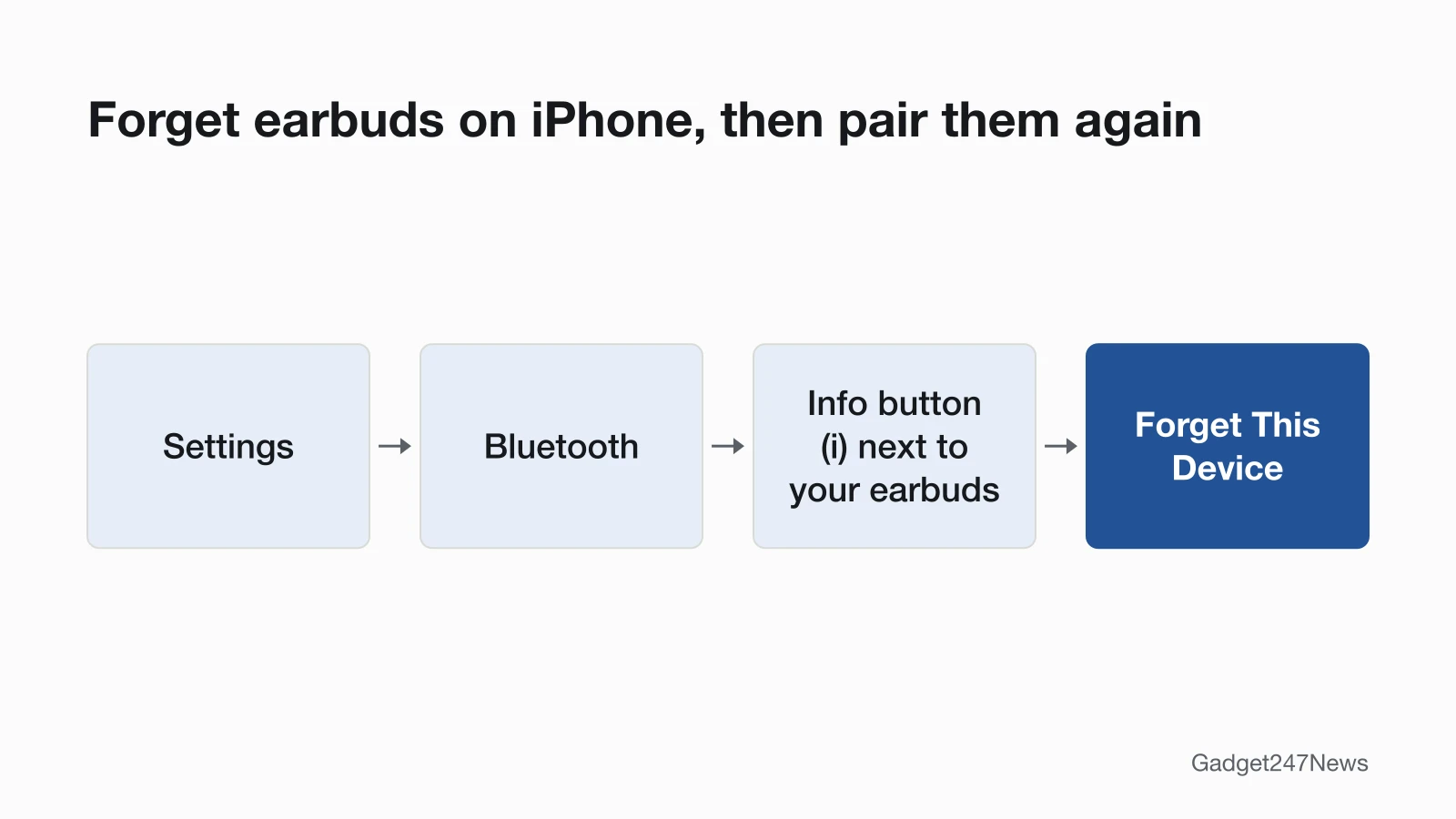
On an iPhone, forget them in Settings > Bluetooth > (i) > Forget This Device. On Android, swipe down from the top of the screen, touch and hold Bluetooth, tap Settings next to your earbuds, then tap Forget. Samsung Galaxy phones call the same step Unpair, under Settings > Connections > Bluetooth.
If the earbuds don't appear in the list at all, the problem is visibility, not connection.
Phone Not Detecting Your Earbuds?
If your earbuds don't show up in the Bluetooth list, they aren't in pairing mode or are still connected to another device. Our guide to why your phone can't find Bluetooth earbuds covers every cause.
Earbuds Won't Connect to a Laptop or PC?
A laptop or PC connects only to earbuds that are discoverable, so put them in pairing mode first, then add them in Settings > Bluetooth & devices. If your computer is not detecting your headphones, Microsoft's order on Windows 11 starts with the Bluetooth troubleshooter in the Get Help app, then checks pairing mode and range, removes the device and adds it again, and checks the battery. Next it turns Bluetooth off for 10 seconds and on again, then installs Windows updates. If the earbuds connect but play nothing, select them under Output in Start > Settings > System > Sound. Mac steps are on each brand's connect page in the table below.
Why Do My Headphones Keep Disconnecting?
Headphones that connect and then drop are usually too far from the phone, near interference, low on battery, or switching to another device automatically. Samsung names Wi-Fi routers and running microwaves as interference, and Google adds wireless speakers, baby monitors and other devices on the 2.4 GHz band. Microsoft notes that some Bluetooth devices can't hold a connection when the battery is low. Switching can be a feature, not a fault: Samsung's Auto switch moves Galaxy Buds over to another of your devices when a call comes in. Wired headphones that cut out are a cable or plug question, which is outside this page. The full list of causes is in our disconnecting guide.
Earbuds Not Connecting? Fixes by Brand
The first fix differs by brand because each maker publishes its own order. Each row gives that brand's first connection fix, and the brand page has the full steps.
| Brand | Most likely cause | First fix | Brand fix page |
|---|---|---|---|
| AirPods | Still connected elsewhere, or out of sync | Put both AirPods in the case, close the lid, wait 15 seconds, then open it next to your iPhone. | AirPods Not Connecting |
| Beats headphones and earbuds | Distance or interference | Move your Beats within 30 feet of your phone, away from microwaves and Wi-Fi routers, then forget them in Bluetooth settings and pair them again. | Beats headphones not connecting |
| Samsung Galaxy Buds | Interference, or buds that need a restart | Put both buds in the case, close the lid until the case light goes out (about 7 seconds), then take them out and connect again. | Galaxy Buds Not Connecting |
| Google Pixel Buds | A stuck Bluetooth link | Turn Bluetooth off and back on, then wait for your Pixel Buds to reconnect automatically. | Pixel Buds Not Connecting |
| Sony headphones | Connected to the last device they used | Turn off Bluetooth on the last phone or laptop your Sony headphones used, then select them in your device's Bluetooth list. | Sony Headphones Not Connecting |
| Bose headphones | A stuck Bluetooth link or an old pairing | Turn Bluetooth off and on, then delete your Bose earbuds or headphones from your device's Bluetooth list, including any duplicate "LE" entry, and pair them again. | Bose Headphones Not Connecting |
| JBL earbuds | Connected to another device | Turn off Bluetooth on any other phone or tablet your JBL earbuds used, then select them in your phone's Bluetooth list. | JBL Earbuds Not Connecting |
| Skullcandy earbuds | The two earbuds out of sync, or a stale pairing | Put both Skullcandy earbuds back in the charging case until their lights come on, take them out together, then forget them in your Bluetooth settings and pair them again. | Skullcandy Earbuds Not Connecting |
The numbers in these fixes belong to one brand each: 15 seconds is Apple's AirPods wait, 30 feet is Apple's Beats range, and about 7 seconds is Samsung's case-light wait. JBL's pairing page adds a caution: when another phone holds the connection, disconnect that phone instead of forgetting the product, because forgetting it means repeating the pairing steps.
How to Force Samsung Galaxy Buds Into Pairing Mode
Samsung Galaxy Buds enter pairing mode in a different way on each generation, per Samsung's support pages:
- Galaxy Buds4 and Buds4 Pro: press and hold the connect button on the back of the charging case for more than 3 seconds.
- Galaxy Buds3 and Buds3 Pro: close the lid, reopen it, then press and hold the Connect button on the bottom of the case for three seconds.
- Galaxy Buds2 and Buds2 Pro: place both buds in the case, then touch and hold both touchpads until the case lights flash.
- Galaxy Buds, Buds+, Buds Live and Buds Pro: wear them and hold both touchpads for a few seconds.
If your Galaxy Buds3 won't go into pairing mode, restart them in the case first, then reset them if it still fails; How to Pair and Connect Bluetooth Earbuds and Headphones has the full pairing steps.
JLab, soundcore and Other Earbuds
We don't have brand pages for JLab, Raycon or soundcore yet, so use the order that works across brands: the case, Bluetooth off and on, forget and pair again, and a reset last. When the two earbuds won't pair together, that brand's reset is the usual fix: JLab's help page sends earbuds that "will not pair together" to a reset and a fresh pairing. Our earbud reset steps by brand show where each reset control sits.
When to Reset Your Earbuds
Reset your earbuds only after the case, Bluetooth and forget-and-pair fixes have failed. A factory reset deletes the pairing, so you pair the earbuds again afterwards. Apple's AirPods and Beats connection pages end with a reset, Google's Pixel Buds page puts a reset right before contacting support, and Samsung's Galaxy Buds page restarts and unpairs the buds before it suggests service.
Lost Earbuds, Not Disconnected?
Earbuds that seem disconnected may be out of range or lost, and finding earbuds that aren't connected is a lost-device question. For AirPods, Apple says that when the Find My network is off or not supported, the Find My app "shows the last time and place they were connected," and you can track lost AirPods with the steps in our guide. Some other brands build a finder into the earbuds; Skullcandy puts Tile technology in each Dime 3 earbud.
Earbuds Suddenly Not Connecting After an Update?
Earbuds that suddenly stop connecting often follow a phone OS or earbud firmware update. AirPods get firmware without any action from you: Apple says updates "are delivered automatically while your AirPods are charging and in Bluetooth range of your iPhone, iPad, or Mac that's connected to Wi-Fi." Samsung puts updating the phone and the earbud software after its restart and unpair steps for Galaxy Buds, and Bose sends QuietComfort Ultra Earbuds (2nd Gen) updates to the Bose app, where you tap to install them. Before you reset anything, check the earbud and smartwatch Update Tracker for a known issue with your model.
Get an email when an earbud update breaks something, and when it's fixed.
Still Not Connecting? When to Contact the Manufacturer
Contact the maker once the fixes above and on your brand page are used up.
Still not working?
- Try the next fix: Why Earbuds Keep Disconnecting.
- Reset your earbuds: How to Reset Earbuds (you'll need to pair them again afterwards).
- Contact your brand's support: Apple, Beats, Samsung, Google, Sony, Bose, JBL or Skullcandy.
- Check repair or warranty options on the maker's official service pages.
Started after an update? Check the Update Tracker for known issues.
Earbuds Not Connecting: Quick Answers
These answers cover the connection questions that come up most often.
Why does my left earbud keep disconnecting?
One earbud that keeps dropping is usually low on charge or has lost its link to the other earbud, so charge both in the case and take them out together. If one side stays silent after that, see left or right earbud not working; the full list of drop causes is on the disconnecting page.
Why won't my earbuds connect to my laptop?
Your laptop can't see earbuds that aren't discoverable, and earbuds still connected to your phone may not switch over. Put them in pairing mode, then add them in Settings > Bluetooth & devices on Windows. If they connect but stay silent, Windows is sending sound to another output; pick them under Output in Sound settings.
Do earbuds need an app to connect?
Usually not. Samsung says Galaxy Buds in pairing mode connect "via the Galaxy Wearable app, or your phone's Bluetooth settings." It adds that models such as Galaxy Buds3 and Buds3 Pro pair with an iPhone over Bluetooth even though there is no app support on iOS. On Galaxy phones with One UI 8, Samsung says "You no longer need to use the Galaxy Wearable app to pair Galaxy Buds"; tap Connect on the QuickPair pop-up. Brand apps add extras: Bose, for example, sends earbud updates to the Bose app.
Sources
We checked this page against the pages below, most recently on . How we verify fixes
- If your AirPods or AirPods Pro won't connect (Apple, support.apple.com)Official
- If you can't connect to your wireless Beats product (Apple, support.apple.com)Official
- Connect a third-party Bluetooth accessory to your iPhone or iPad (Apple, support.apple.com)Official
- If your left or right AirPod isn't working (Apple, support.apple.com)Official
- About firmware updates for AirPods (Apple, support.apple.com)Official
- Find your AirPods (AirPods User Guide) (Apple, support.apple.com)Official
- Connect to Bluetooth devices (Android Help) (Google, support.google.com)Official
- Troubleshoot connectivity issues (Google Pixel Buds Help) (Google, support.google.com)Official
- Samsung earbuds don't connect or won't stay connected (Samsung, samsung.com)Official
- How to connect your Samsung Galaxy earbuds (Samsung, samsung.com)Official
- How to connect Samsung Galaxy Buds series to a laptop to listen to music (Samsung UK) (Samsung, samsung.com)Official
- How to pair Galaxy Buds using Bluetooth in Samsung One UI 8 (Samsung Australia) (Samsung, samsung.com)Official
- How to restart or reset your Samsung earbuds (Samsung, samsung.com)Official
- How to reset your Samsung Galaxy Buds (Samsung UK) (Samsung, samsung.com)Official
- Use Auto switch with your Galaxy buds and paired devices (Samsung, samsung.com)Official
- Pair a Bluetooth device in Windows (Microsoft, support.microsoft.com)Official
- Troubleshoot Bluetooth not connecting in Windows (Microsoft, support.microsoft.com)Official
- Fix Bluetooth connected but no sound issue on Windows (Microsoft, support.microsoft.com)Official
- WF-1000XM5 Help Guide: Unable to make a Bluetooth connection (Sony, helpguide.sony.net)Official
- WH-1000XM5 Help Guide: Unable to make a Bluetooth connection (Sony, helpguide.sony.net)Official
- Owner's Guide, Bose QuietComfort Ultra Earbuds (2nd Gen) (Bose, assets.bosecreative.com)Official
- Earbuds Will Not Connect, Bose QuietComfort Ultra Earbuds (2nd Gen) (Bose, support.bose.com)Official
- Bluetooth Pairing & Connecting (JBL) (JBL, support.jbl.com)Official
- Updating Your Earbuds, Bose QuietComfort Ultra Earbuds (2nd Gen) (Bose, support.bose.com)Official
- Dime 3 product help (Skullcandy) (Skullcandy, skullcandy.com)Official
- Resetting and Pairing Your JLab True Wireless Earbuds (JLab, help.jlab.com)Official