Smartwatch Not Connecting to Phone? How to Fix It

By Suraj Giri, Founder & Publisher. Reviewed by Suraj Giri on .
Published · 8 min read
How this page was made
- Sources. Checked against 22 official pages from Apple, Google, Samsung, Garmin and Oura, most recently on . See the sources.
- No device testing. We don't test fixes on physical devices, so nothing on this page is a hands-on result. A fact counts as verified only when it matches an official source page.
- AI use. As with every page on Gadget247News, AI tools helped research, outline, draft and edit this page, and re-read the official pages to flag facts that didn't match. The illustration at the top was generated with Runway and is labelled under the image.
- Human sign-off. Suraj Giri, Founder & Publisher, read this page and signed it off on . The site won't publish a page without that sign-off.
- Changes. The published and updated dates move only when the content changes, and every change gets a dated note. Spot an error or a fix that didn't work? Email info@gadget247news.com.
Read our AI use policy, editorial policy and corrections policy.
A smartwatch that won't connect usually has Bluetooth off, sits too far from the phone, or needs a restart. Bring the watch next to your phone, check that Bluetooth is on and Airplane Mode is off, then restart both. Unpairing and pairing again is the last step, not the first. Find your brand below. This page sits under smartwatch Not Working, and Apple Watch owners can go straight to Apple Watch Not Connecting to Your Phone.
The fixes cover smartwatches, fitness trackers and smart rings on an iPhone or an Android phone: Apple Watch, Google Pixel Watch, Samsung Galaxy Watch, Fitbit, Garmin and Oura Ring. You pair a watch once, then it connects to the phone over Bluetooth every day, so this page covers both jobs. If the watch shows as connected but your steps or workouts never reach the app, the connection is fine and the data is stuck: learn how to sync a smartwatch with your phone instead.
Find Your Problem: Brand, Cause and First Fix
The table lists each brand's most likely cause and the first fix its own support page gives, then links to the full steps.
| Watch | Most likely cause | First fix | Full steps |
|---|---|---|---|
| Apple Watch won't connect | Out of range, Airplane Mode on, or Bluetooth off | Keep your Apple Watch and iPhone close, turn Airplane Mode off and Wi-Fi and Bluetooth on, then restart both. | Apple Watch Not Connecting to Your Phone |
| Apple Watch and a new iPhone | The watch is still tied to the old iPhone | Back up your old iPhone, set up the new one, then open the Apple Watch app with the watch unlocked on your wrist. | How to Pair an Apple Watch With a New iPhone |
| Google Pixel Watch | Bluetooth off, or the Pixel Watch app's nearby permission blocked | Turn on Bluetooth, turn off Airplane Mode on your phone and watch, and set the Pixel Watch app's nearby permission to Allow. | Pixel Watch Not Connecting to Your Phone |
| Fitbit | The Google Health app (formerly the Fitbit app) on another nearby phone, or a Fitbit that needs a restart | Uninstall the Google Health app from any other phones or tablets nearby, then restart your Fitbit. | Fitbit Not Connecting to Your Phone |
| Garmin | A Bluetooth glitch on the phone or the watch | Turn your phone's Bluetooth off and on, then restart both your phone and your Garmin watch. | Garmin Watch Not Connecting to Your Phone |
| Samsung Galaxy Watch | The watch needs a restart, Bluetooth is off, or the watch is out of range | Restart your Galaxy Watch, then make sure Bluetooth is on and the watch is within about 30 feet of your phone. | Galaxy Watch Not Connecting to Your Phone |
| Oura Ring | Phone power saving, distance or Wi-Fi interference | Update the Oura app, put your Oura Ring on its charger, and set your plugged-in phone next to it with Wi-Fi off. | Oura Ring Not Connecting to Your Phone |
| Setting up for the first time | Not paired yet | Use your brand's pairing guide. | How to Pair an Apple Watch With Your iPhone · How to Pair a Pixel Watch With Your Android Phone · How to Pair a Galaxy Watch With Your Android Phone · How to Pair a Fitbit With Your iPhone or Android Phone · How to Pair a Garmin Watch With Your iPhone or Android Phone · How to Pair an Oura Ring With Your iPhone or Android Phone |
Every brand page picks up where its first fix ends and carries the maker's full order of steps.
Try These First on Any Smartwatch
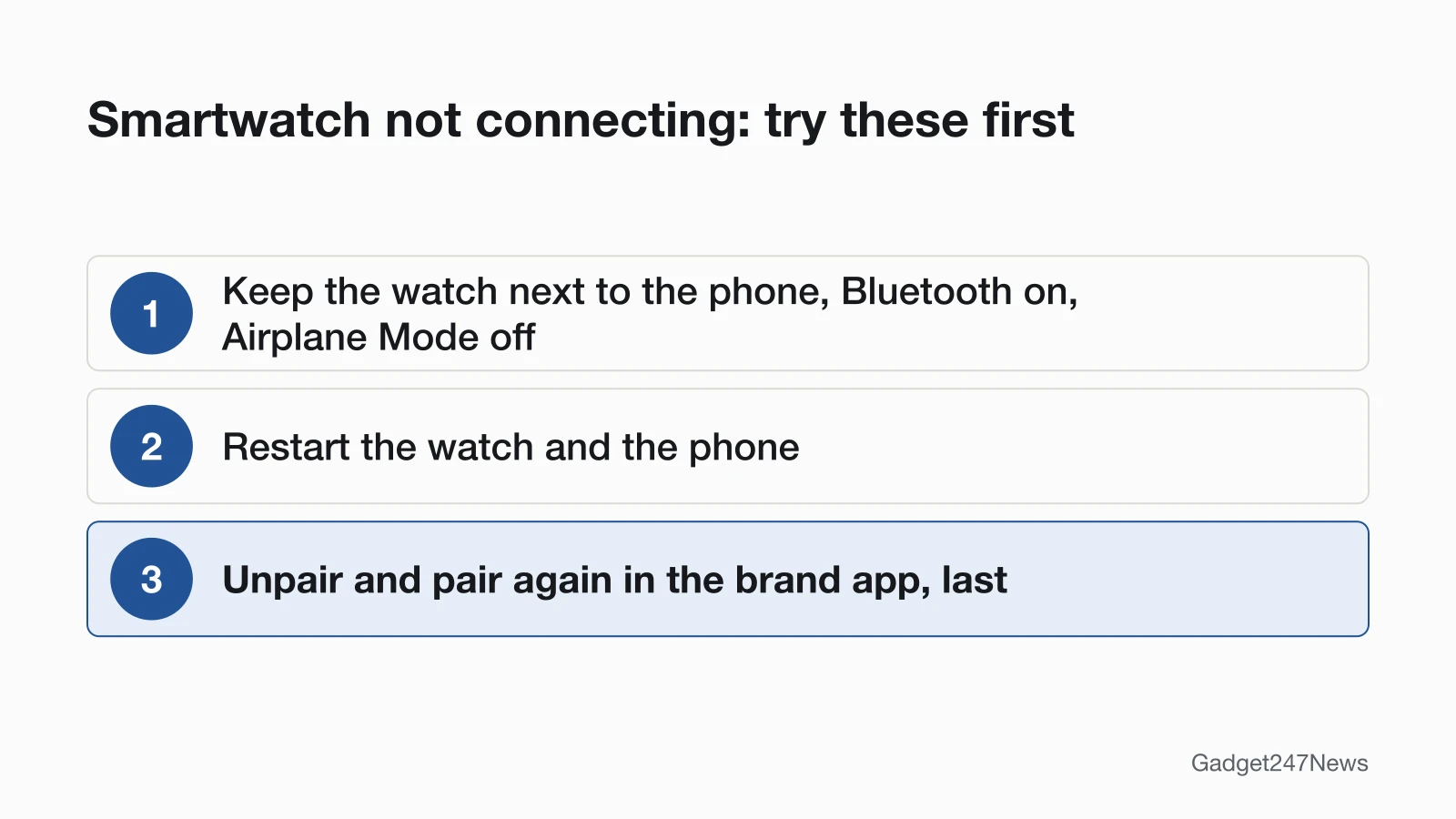
Start with these three checks, in this order, on any smartwatch:
- Keep the watch next to the phone, with Bluetooth on and Airplane Mode off.
- Restart the watch and the phone.
- Only then forget or unpair the watch and pair it again through its app.
The order comes from the makers. Apple says to unpair and pair again only if the Apple Watch "still can't connect" after the restart step. Samsung lists unpairing after the restart and the Bluetooth check, and Garmin says many Bluetooth issues clear up after you restart the phone and the Garmin device. Garmin explains that a phone restart re-initializes Bluetooth.
Connecting vs Pairing: What's the Difference?
Pairing is the one-time setup that links a watch to one phone through the brand's app. Connecting is the everyday Bluetooth link between the two, and it drops when the phone is out of range or a setting blocks it. A watch that paired fine and now shows as disconnected needs the connection fixes above, not a new pairing. On an Apple Watch, pairing again means unpairing first, and unpairing erases the watch.
Connect a Smartwatch to an iPhone
To connect a smartwatch to an iPhone, use the brand's own app. An Apple Watch pairs through the Apple Watch app: you hold the watch close to the iPhone, and Apple lists an iPhone 11 or later with iOS 27 or later for the Apple Watch Series 12 and Apple Watch Ultra 4. Garmin says you must pair directly through the Garmin Connect app, not from the iPhone's Bluetooth settings. The Oura App runs on iPhones with iOS 16 or higher. When an Apple Watch and its iPhone aren't connected, a red iPhone icon or a red X appears in the watch's Control Center. First-time owners can follow How to Set Up an Apple Watch Step by Step.
Pair a Smartwatch With an Android Phone
To pair a smartwatch with an Android phone, start in the maker's companion app. A Pixel Watch pairs through the Google Pixel Watch app. Google lists the Android version each model needs, from Android 8.0 or newer for the first Pixel Watch to Android 12.0 or newer for the Pixel Watch 5. A Samsung Galaxy Watch pairs through the Galaxy Wearable app. A Fitbit pairs through the Google Health app, covered in How to Pair a Fitbit With Your iPhone or Android Phone. A Garmin watch pairs only in the Garmin Connect app; see How to Pair a Garmin Watch With Your iPhone or Android Phone. An Oura Ring pairs in the Oura App on Android 11 or higher with Google Play services. An Apple Watch sets up with an iPhone, so read Can You Use an Apple Watch with Android first.
Smartwatch Keeps Disconnecting?
A smartwatch that keeps disconnecting is usually drifting out of Bluetooth range or losing the link to a power or radio setting. Keep the phone close and check Airplane Mode on both devices. On Android, Samsung's steps also have you allow all permissions for Google Play services in the phone's app settings. Garmin says Battery Saver, Stealth Mode or Expedition Mode can disable Bluetooth on the watch, and asks you to confirm the watch isn't paired to more than one phone or tablet. Oura suggests plugging your phone into its charger so its power saving features are off, and turning off Wi-Fi, which can interfere with Bluetooth. Then restart both devices. Garmin Watch Not Connecting to Your Phone, Fitbit Not Connecting to Your Phone and Pixel Watch Not Connecting to Your Phone carry each brand's full list.
When to Unpair and Pair Again
Unpair and pair again only after restarting both devices has failed, because unpairing removes more than the Bluetooth link. Unpairing an Apple Watch erases it, restores factory settings and removes Activation Lock, and the iPhone backs the watch up first; How to Unpair an Apple Watch From Your iPhone has the steps. On a Pixel Watch, the app's Reset and unpair watch option is a factory reset that erases all your apps, settings and data. An Oura factory reset erases data on the ring, but data already synced to your Oura account stays. Galaxy Watch Not Connecting to Your Phone and Oura Ring Not Connecting to Your Phone explain when those brands call for it.
Which Watch Do You Have?
Your model decides the steps, because app names, button names and phone requirements differ from brand to brand and between generations. Apple Watch owners can check theirs in Which Apple Watch Do I Have before following a brand page.
Got a New Phone?
A watch paired to an old phone has to move to the new one. Apple and Garmin both run that move through their own apps. Apple Watch has a transfer flow of its own, set out in How to Pair an Apple Watch With a New iPhone; if the new iPhone asks you to Start Pairing, Apple says to unpair the watch first. Garmin says to remove the watch from the old phone in the Garmin Connect app and the phone's Bluetooth menu, turn the old phone off, then add the watch in the Garmin Connect app on the new phone.
Is It an Update or a Service Outage?
A watch that suddenly won't connect right after a watch, phone or app update may be hitting a known issue rather than a setting. Check smartwatch updates on the Update Tracker before you unpair anything. For Garmin, a service outage can look like a connection fault: Garmin's sync help tells you to rule out system outages on the Garmin Connect Status page. Current software matters too: Samsung's connection steps end with updating the Galaxy Wearable app, and Oura's begin with the latest phone software and Oura App.
When to Contact the Manufacturer
Contact the maker when the table and your brand's page have both failed, in this order:
- Try the next fix on your brand's page in the table above.
- Reset the watch, then pair it again; restart vs reset on a smartwatch explains which reset each brand uses.
- Contact the maker's own support: Apple Support, Google Pixel Watch Help or Google Health Help, Samsung Support, Garmin Support or Oura Member Care.
- Ask the maker about repair or warranty service for your model.
Smartwatch Connection: Quick Answers
Three Apple Watch questions about pairing again get short answers here, each with the page that owns the full steps.
How do I reset my Apple Watch to pair again?
Unpair it in the Apple Watch app on your iPhone: that erases the watch and removes Activation Lock, and the iPhone keeps a backup. Then pair it again and tap Restore from Backup, as How to Unpair an Apple Watch From Your iPhone explains.
How do I get my Apple Watch to pair again?
After unpairing, tap Start Pairing on your iPhone (or Add Watch if more than one watch was paired), follow the onscreen steps, and tap Restore from Backup to bring your data back. How to Pair an Apple Watch With Your iPhone walks through each screen.
How do I relink my Apple Watch to my iPhone?
To relink an Apple Watch to an iPhone, keep the two close, turn Airplane Mode off and Bluetooth on, and restart both. Apple says to unpair and pair again only if the watch still can't connect; How to Pair an Apple Watch With Your iPhone covers that last step.
Sources
We checked this page against the pages below, most recently on . How we verify fixes
- If your Apple Watch isn't connected or paired with your iPhone (Apple, support.apple.com)Official
- Unpair and erase your Apple Watch (Apple, support.apple.com)Official
- Back up your Apple Watch (Apple, support.apple.com)Official
- Pair your Apple Watch with a new iPhone (Apple, support.apple.com)Official
- Set up your Apple Watch (Apple, support.apple.com)Official
- If your Apple Watch is stuck on the Apple logo (Apple, support.apple.com)Official
- Fix Bluetooth, connection, and LTE issues on Google Pixel Watch (Google, support.google.com)Official
- Set up Google Pixel Watch (Google, support.google.com)Official
- Compatibility requirements & region availability for Pixel Watch (Google, support.google.com)Official
- Fix a blank, frozen, or error message on the Google Pixel Watch screen (Google, support.google.com)Official
- Why won't my Fitbit device sync? (Google, support.google.com)Official
- What is new with the redesigned Google Health app (Google, support.google.com)Official
- Samsung smart watch will not connect to a phone (Samsung, samsung.com)Official
- How to connect your Galaxy Watch9 or Watch Ultra2 to your phone (Samsung, samsung.com)Official
- Pairing Your Watch to the Garmin Connect App (Garmin, support.garmin.com)Official
- Garmin Connect App: Device or Accessory Not Found During the Pairing Process (Garmin, support.garmin.com)Official
- Garmin Connect App Bluetooth Troubleshooting (Garmin, support.garmin.com)Official
- How Do I Pair My Watch to a New Phone? (Garmin) (Garmin, support.garmin.com)Official
- My Device Is Not Syncing Data to the Garmin Connect App (Garmin, support.garmin.com)Official
- Troubleshooting Connection Issues (Oura) (Oura, support.ouraring.com)Official
- Set Up an Oura Ring (Oura, support.ouraring.com)Official
- Factory Reset an Oura Product (Oura, support.ouraring.com)Official