How to Pair a Garmin Watch With Your iPhone or Android Phone

By Suraj Giri, Founder & Publisher. Reviewed by Suraj Giri on .
Published · 4 min read
How this page was made
- Sources. Checked against 13 official pages from Garmin, most recently on . See the sources.
- No device testing. We don't test fixes on physical devices, so nothing on this page is a hands-on result. A fact counts as verified only when it matches an official source page.
- AI use. As with every page on Gadget247News, AI tools helped research, outline, draft and edit this page, and re-read the official pages to flag facts that didn't match. The illustration at the top was generated with Runway and is labelled under the image.
- Human sign-off. Suraj Giri, Founder & Publisher, read this page and signed it off on . The site won't publish a page without that sign-off.
- Changes. The published and updated dates move only when the content changes, and every change gets a dated note. Spot an error or a fix that didn't work? Email info@gadget247news.com.
Read our AI use policy, editorial policy and corrections policy.
To connect a Garmin watch to your phone, open the Garmin Connect app, tap More › Garmin Devices › Add Device, put the watch in pairing mode, and confirm the six-digit code. Garmin watches pair with iPhone (iOS 18.2 or later) and Android phones (Android 9 or later) through the Garmin Connect app. This page is part of Garmin watch problems and fixes; for another brand, start with smartwatch not connecting.
How to Pair Your Garmin Watch With Your Phone
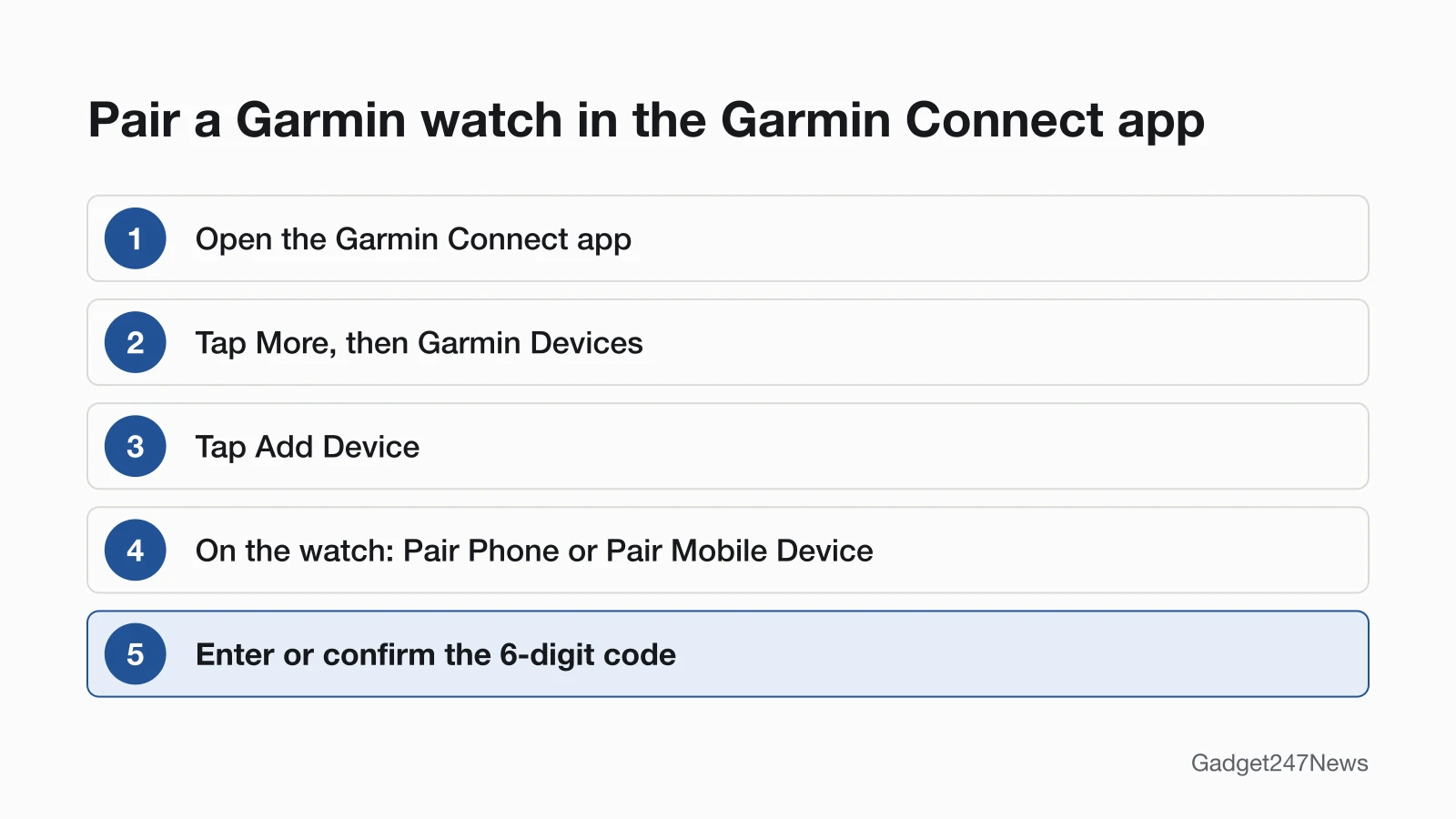
Garmin's order is the app first, then the watch, then a code.
- Open the Garmin Connect app.
- Tap More (bottom right).
- Tap Garmin Devices, then Add Device. On an iPhone, tap Find Nearby Accessories if asked.
- Put the watch in pairing mode, typically Menu › Connectivity or Phone › Pair Phone (some models say Pair Mobile Device).
- When the app detects the watch, tap Start, Connect It or Set Up.
- Enter or confirm the 6-digit code shown on the watch, then follow the prompts.
Garmin says a sync should run during this setup.
Pairing on iPhone vs Android
The last screens and the code step differ by phone.
iPhone: after Find Nearby Accessories, tap Set Up once the app finds the watch, check that the six-digit code on the watch matches the app, then tap Done.
Android: tap Start or Connect it, then type the watch's six-digit code into the prompt. Android 12 or higher also has a Nearby devices permission that must be set to Allow (More › Settings › Phone Permissions › Manage Permissions › Permissions › Nearby devices permission). It's on by default; if it's off, the app won't find the watch.
Where to Find Pairing Mode on Your Garmin Watch
Pairing mode is in the watch's own menu, and Garmin notes the steps vary by model.
| Watch | Pairing mode path | Source |
|---|---|---|
| Forerunner 265 | Hold UP › Connectivity › Phone › Pair Phone, then scan the QR code | Forerunner 265 manual |
| Instinct 3 Solar | Hold MENU › Connectivity › Phone › Pair Phone, then scan the QR code | Instinct 3 Solar manual |
| Other models | Settings › Connectivity, Bluetooth or Phone › Pair Mobile Device or Pair Phone | Garmin new-phone FAQ |
A new watch asks to pair during first setup (select the checkmark); the manual paths above are for a watch that skipped it.
How to Pair Your Garmin Watch Again or With a New Phone
For a new phone, clear the watch from the old one first:
- On the old phone, remove the watch in Garmin Connect (More › Garmin Devices › your watch › three-dot menu › Remove Device) and from the Bluetooth menu.
- Turn the old phone off so it can't try to pair with the watch again.
- On the new phone, remove the watch from the Bluetooth menu if it's listed.
- Install Garmin Connect on the new phone.
- Pair the watch with the steps above.
Garmin Connect 5.21 and newer may remove the watch from the Bluetooth menu for you when you remove it in the app.
After a factory reset, watches with Back Up & Restore offer to apply your stored backup when you pair again.
How to Check Your Garmin Watch Is Paired
Garmin Connect shows two signs of a connection:
- A green dot at the top of the app's Home screen.
- A syncing animation next to the image of your watch when you open the app.
Does a Garmin Watch Work With iPhone?
Yes. A Garmin watch works with an iPhone on iOS 18.2 or higher, through the Garmin Connect app.
| Phone | Requirement | Source |
|---|---|---|
| iPhone | iOS 18.2 or higher | Garmin Connect App Compatibility Requirements |
| Android phone or tablet | Android 9 or higher, native Google Play Store, not Android (Go edition) | Garmin Connect App Compatibility Requirements |
Garmin warns an unsupported OS "may lead to a loss of app functionality" and lists phones that "did not pass internal tests", including Huawei phones, on Garmin's compatibility page.
If Your Garmin Watch Won't Pair
Garmin's first step is to turn your phone's Bluetooth off and on, restart the phone, and try again. If the app still can't find the watch, check these:
- Bluetooth menu pairing: remove the watch from the phone's Bluetooth list.
- Another phone: remove the watch from the other phone or tablet first.
- Android permission: allow Nearby devices on Android 12 or higher.
- Old app: update Garmin Connect from the App Store or Play Store.
Every fix, in Garmin's order, is on Garmin watch not connecting to your phone.
Paired but Your Data Isn't Showing Up?
A paired watch can still fail to sync. If the green dot shows but daily steps or recorded workouts don't appear, use Garmin watch not syncing with Garmin Connect.
Connect Garmin Connect to Strava, Apple Health and Connect IQ
Strava: in the Strava app, tap You › Settings › Connect an app or device › Garmin › Connect Garmin, then agree to the terms and conditions.
Apple Health: in the Health app, tap Summary › your profile picture › Apps and Services › Connect app, then turn on categories such as Steps. Garmin Connect sends data after each device sync but doesn't pull data from Apple Health.
Connect IQ: in Garmin Connect, tap More › Connect IQ Store, then pick the app, widget or watch face; see install Connect IQ apps on a Garmin watch.
Pairing Questions
Is there currently a problem with Garmin Connect?
Check the Garmin Connect Status page (connect.garmin.com/status), which Garmin's sync help names for system outages. If it shows a problem, check back until it's resolved. Our Garmin Connect outage page has our last dated check.
How do I put my Garmin watch in pairing mode?
Select Pair Phone in the watch menu, usually under Connectivity › Phone. Start Add Device in Garmin Connect first; pairing mode "wakes up" the watch so the app can find it.
Can I pair a Garmin watch from my phone's Bluetooth settings?
No. Garmin's pairing guide says: "Do not pair your Garmin device directly through the Bluetooth settings of your smartphone."
Sources
We checked this page against the pages below, most recently on . How we verify fixes
- Pairing Your Watch to the Garmin Connect App (Garmin, support.garmin.com)Official
- How Do I Pair My Watch to a New Phone? (Garmin, support.garmin.com)Official
- Garmin Connect App: Device or Accessory Not Found During the Pairing Process (Garmin, support.garmin.com)Official
- Remove and Add a Device From the Garmin Connect App (Garmin, support.garmin.com)Official
- Can a Garmin Device Be Paired to More Than One Phone? (Garmin, support.garmin.com)Official
- Garmin Connect App Compatibility Requirements (Garmin, support.garmin.com)Official
- Forerunner 265 Series Watch Owner's Manual: Pairing Your Phone (Garmin, www8.garmin.com)Official
- Instinct 3 Solar Series Owner's Manual: Pairing Your Phone (Garmin, www8.garmin.com)Official
- My Device Is Not Syncing Data to the Garmin Connect App (Garmin, support.garmin.com)Official
- Using the Back Up and Restore Feature on Select Garmin Watches (Garmin, support.garmin.com)Official
- Garmin Connect Data Is Not Syncing Over to My Third-Party App (Garmin, support.garmin.com)Official
- Sharing Your Garmin Connect Data With Apple Health (Garmin, support.garmin.com)Official
- Accessing the Connect IQ Store (Garmin, support.garmin.com)Official