How to Track Steps on Apple Watch

By Suraj Giri, Founder & Publisher. Reviewed by Suraj Giri on .
Published · 4 min read
How this page was made
- Sources. Checked against 7 official pages from Apple, most recently on . See the sources.
- No device testing. We don't test fixes on physical devices, so nothing on this page is a hands-on result. A fact counts as verified only when it matches an official source page.
- AI use. As with every page on Gadget247News, AI tools helped research, outline, draft and edit this page, and re-read the official pages to flag facts that didn't match. The illustration at the top was generated with Runway and is labelled under the image.
- Human sign-off. Suraj Giri, Founder & Publisher, read this page and signed it off on . The site won't publish a page without that sign-off.
- Changes. The published and updated dates move only when the content changes, and every change gets a dated note. Spot an error or a fix that didn't work? Email info@gadget247news.com.
Read our AI use policy, editorial policy and corrections policy.
Open the Activity app on your Apple Watch and turn the Digital Crown past your rings to see your total steps. The same screen lists total distance and flights climbed, and on iPhone you can view your step count in the Fitness app. This covers device settings only and isn't medical advice. If the watch shows steps that your iPhone doesn't, check Apple Watch not syncing.
For the overnight side of tracking, see how to track sleep on Apple Watch. Workouts and heart rate have their own guides, linked further down.
How to Check Your Steps on Apple Watch
To check your steps on Apple Watch, use the Activity app:
- Open the Activity app on your Apple Watch.
- Turn the Digital Crown past the Move, Exercise and Stand rings to see your total steps, total distance and flights climbed.
Keep scrolling to reach your activity history. The Weekly Summary button shows a daily average and weekly total of your progress toward closing your rings.
How to See Your Steps on iPhone
Your step count also appears in the Fitness app on iPhone:
- Open the Fitness app on your iPhone.
- Tap Summary, then tap the Step Count or Step Distance area.
The Summary screen is editable: scroll down and tap Edit Summary to add, move or remove metric cards.
How to Turn On Activity Tracking
Activity tracking starts with the Activity app's setup screens. The watch offers them while you set it up; if you skipped them, open the app:
- Open the Activity app on your Apple Watch.
- Use the Digital Crown to read the Move, Exercise and Stand descriptions, then tap Get Started.
If you told the watch you use a wheelchair, the Stand ring becomes the Roll ring. It shows how many times in the day you rolled for at least one minute per hour, and Apple measures brisk activity in brisk pushes.
Settings and Habits That Affect Step Tracking
Apple says the Activity app "relies on arm motion and an accelerometer to track movement". Its measurement tips cover three things you control: Wrist Detection, arm swing and calibration.
Keep Wrist Detection On
With Wrist Detection off, Apple says some Activity measurements are unavailable and the watch can't track your Stand progress. To check it, open the Watch app on your iPhone, tap My Watch, then Passcode, and make sure Wrist Detection is on. On the watch itself, it sits in Settings under Passcode.
Let Your Arm Swing (Wear It the Way Apple Recommends)
On walks, let the arm with your Apple Watch swing naturally. Apple gives this tip for earning Exercise credit, with the example of walking a pet: the watch arm swings while the other hand holds the leash. Wear the watch snug but comfortable, on the top of your wrist, where Apple says the sensors work. For walks where your hands are busy, start a workout instead; see how to add a workout on Apple Watch.
Calibrate Your Apple Watch
Calibration helps the watch learn your fitness level and stride, and Apple says it improves your distance, pace and calorie measurements:
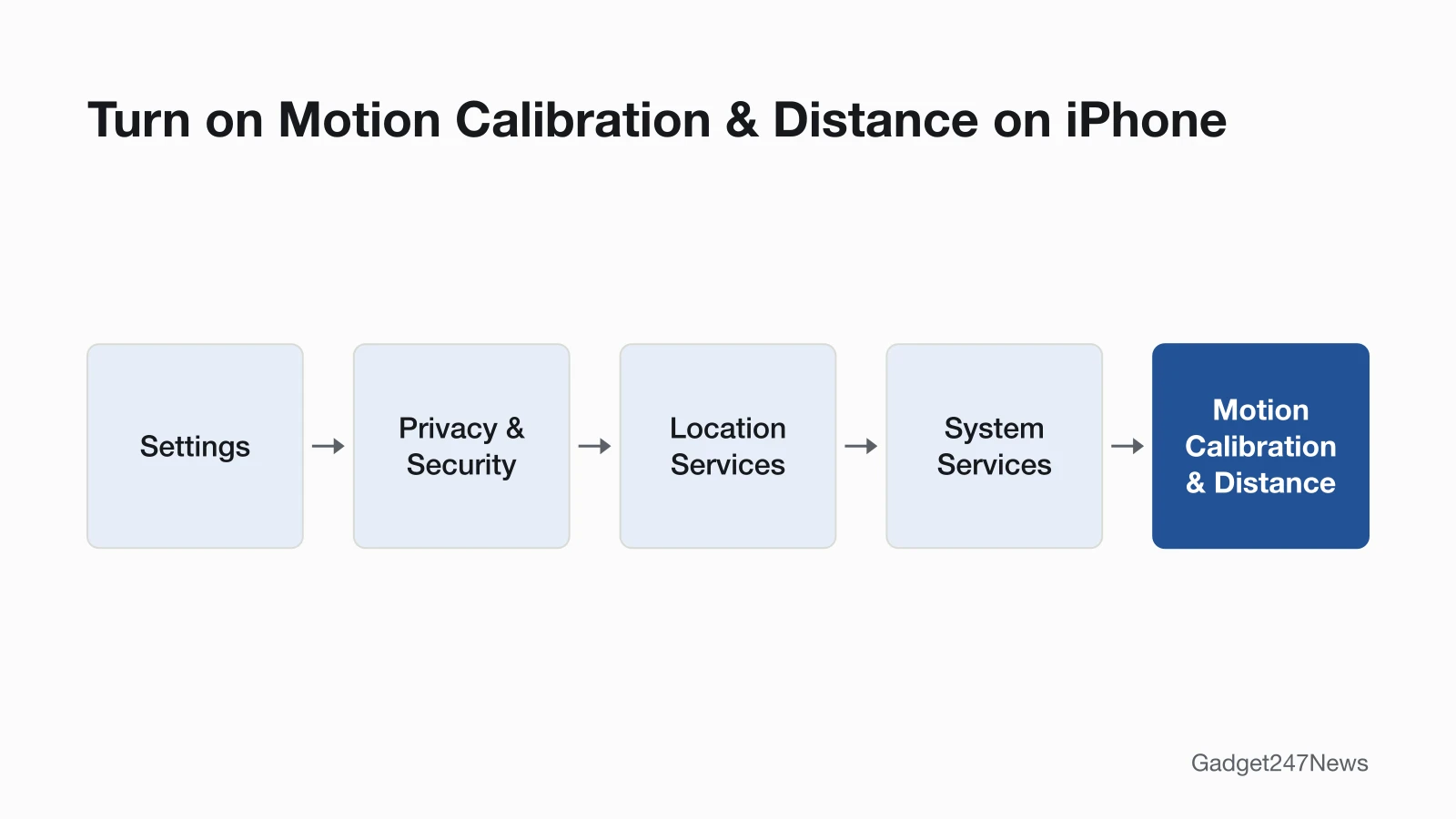
- On iPhone, open Settings, tap Privacy & Security, then Location Services and make sure it's on. Scroll down, tap System Services and turn on Motion Calibration & Distance.
- Wearing your watch, go to a flat, open outdoor area with good GPS reception and clear skies.
- Open the Workout app, tap Outdoor Walk or Outdoor Run, and walk or run at your normal pace for about 20 minutes.
You can split the 20 minutes across several outdoor Workout sessions. If you walk or run at different speeds, Apple says to calibrate for 20 minutes at each speed.
If Your Apple Watch Isn't Counting Steps
Work through these checks in order:
- Steps show on the watch but not on iPhone. In the Health app, tap the Profile button, then Devices, your Apple Watch and Privacy Settings, and turn on Fitness Tracking. The sync guide linked at the top covers the rest.
- Wrist Detection is off. Turn it back on in the Watch app under Passcode.
- Your watch arm isn't moving. With both hands on a stroller or cart, use an Outdoor Walk workout.
- The watch isn't calibrated. Do the 20-minute outdoor walk or run above.
For the Heart Rate app on the same watch, see how to check heart rate on Apple Watch.
Apple's Activity Documentation
Apple's guide Track daily activity with Apple Watch covers each Activity screen, and its measurement tips for Apple Watch cover fit, Wrist Detection and calibration. The guide also states: "Your Apple Watch is not a medical device."
Step Tracking Questions
Three short answers: strollers, iPhone counts and past days.
Why doesn't my Apple Watch count steps when I push a stroller?
Pushing a stroller takes both hands, and Apple says the Activity app relies on arm motion and an accelerometer to track movement. For walks like that, Apple says you can still earn Exercise credit with the Workout app: open it and tap Outdoor Walk. The Workout app can use the accelerometer, the heart rate sensor and GPS.
Does my iPhone count steps too?
Yes. In Apple's words, "When you carry your iPhone with you, motion sensors track your steps, distance, and flights climbed to estimate active calories burned." The Step Count area in the Fitness app shows your steps metrics. The Apple pages we checked don't explain how iPhone and watch counts are combined, so we don't describe it.
Can I see my step history?
Yes, in the Fitness app on iPhone. Tap Summary, tap the Activity rings, tap the Calendar button, then tap a date to see that day's activity summary. Step metrics sit in the Step Count area of the same Summary screen. On the watch, keep scrolling in the Activity app to reach your activity history.
Sources
We checked this page against the pages below, most recently on . How we verify fixes
- Track daily activity with Apple Watch (Apple Watch User Guide) (Apple, support.apple.com)Official
- See your activity summary in Fitness on iPhone (iPhone User Guide) (Apple, support.apple.com)Official
- Apple Watch measurement tips (Apple Support article 105002) (Apple, support.apple.com)Official
- Calibrate your Apple Watch (Apple Support article 105048) (Apple, support.apple.com)Official
- Wake and unlock Apple Watch (Apple Watch User Guide) (Apple, support.apple.com)Official
- Wearing your Apple Watch (Apple, support.apple.com)Official
- Manage Health data on your iPhone, iPad, or Apple Watch (Apple, support.apple.com)Official