How to Wear AirPods So They Don't Fall Out

By Suraj Giri, Founder & Publisher. Reviewed by Suraj Giri on .
Published · 4 min read
How this page was made
- Sources. Checked against 3 official pages from Apple, most recently on . See the sources.
- No device testing. We don't test fixes on physical devices, so nothing on this page is a hands-on result. A fact counts as verified only when it matches an official source page.
- AI use. As with every page on Gadget247News, AI tools helped research, outline, draft and edit this page, and re-read the official pages to flag facts that didn't match. The illustration at the top was generated with Runway and is labelled under the image.
- Human sign-off. Suraj Giri, Founder & Publisher, read this page and signed it off on . The site won't publish a page without that sign-off.
- Changes. The published and updated dates move only when the content changes, and every change gets a dated note. Spot an error or a fix that didn't work? Email info@gadget247news.com.
Read our AI use policy, editorial policy and corrections policy.
To wear AirPods so they don't fall out, gently press each AirPod into your ear and rotate it toward your face so it feels snug and secure. On AirPods Pro, the ear tip size matters most: Apple ships three to five sizes, and tips that are too small feel loose or fall out when you move your head.
A poor fit can also change how each side sounds. If one AirPod still seems quiet after you refit it, use the steps for one AirPod not working. Earwax on the tips or mesh affects sound too, so clean AirPods before you judge the fit.
How to Wear AirPods 3, AirPods 4 or AirPods 5
To wear AirPods 3, AirPods 4 or AirPods 5, gently press the AirPods in your ears and rotate them toward your face. Apple's guide gives that one step for all three models and no other adjustment; your AirPods should then feel snug and secure. To confirm which model you have, look up the AirPods model numbers.
How to Wear AirPods Pro
To wear AirPods Pro, insert the ear tip, rotate the stem toward your face, then press gently:
- Gently insert the ear tip into your ear canal opening. Each AirPod is marked L (left) or R (right).
- Rotate the stem toward your face.
- Press gently to secure the fit, adjusting the rotation and angle of each AirPod.
Choose the Right AirPods Pro Ear Tip Size
To choose the right AirPods Pro ear tip size, start with the medium tips and change size only if the fit feels wrong:
- Start with the medium (M) ear tips, which come attached. The other sizes are in the box your AirPods came in.
- Wear your AirPods for 10 to 15 minutes during normal activity, such as walking, and notice how they feel.
- Read the signs: tips that are too small feel loose or fall out when you move your head; tips that are too big feel compressed or uncomfortable.
- Switch sizes if either happens. To check a tip's size, unroll its edge and look for XXS, XS, S, M or L etched inside, near its base.
AirPods Pro come with three to five sizes of ear tips, depending on the model. You might need a different size in each ear.
Run the Ear Tip Fit Test or Acoustic Seal Test
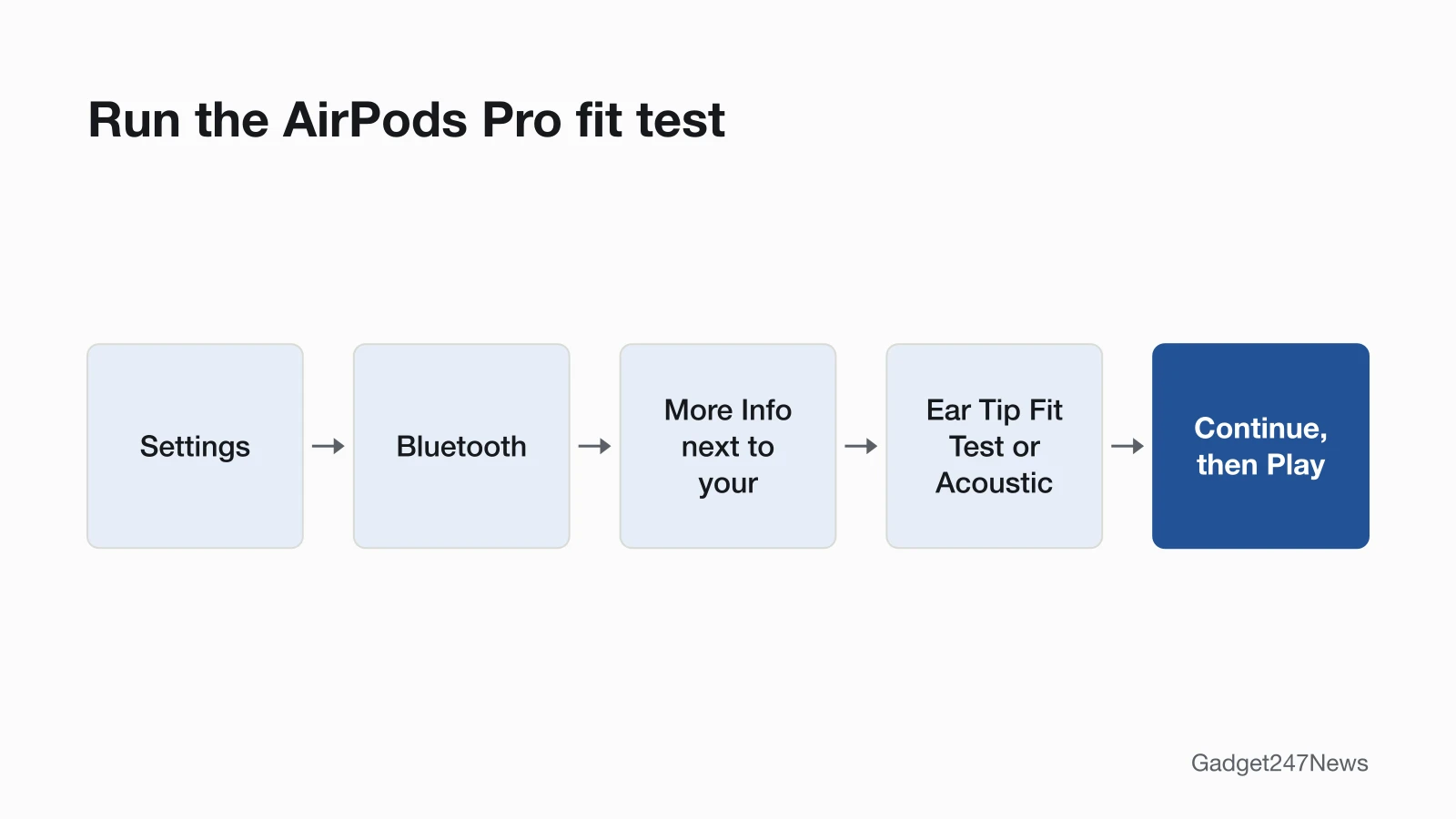
To run the fit test, wear your AirPods Pro, connected to your iPhone or iPad, and follow these steps:
- Go to Settings, then tap Bluetooth.
- Tap the More Info button next to your AirPods in the list of devices.
- Tap Ear Tip Fit Test (AirPods Pro 1 or AirPods Pro 2) or Acoustic Seal Test (AirPods Pro 3 with iOS or iPadOS 26 or later).
- Tap Continue, then tap the Play button.
If the test suggests a change, adjust your AirPods Pro and test again, then try a different size. Apple's AirPods User Guide also shows a second route: open Settings, tap the name of your AirPods Pro near the top of the screen, then tap Test Acoustic Seal or Ear Tip Fit Test. Use whichever label your iPhone shows.
How to Remove and Change AirPods Pro Ear Tips
To remove an AirPods Pro ear tip, grip it near its base and pull straight out. Try these in order:
- Grip the ear tip with your fingers near its base, where it's attached to the AirPod, and pull straight out using steady pressure.
- For more grip, hold the tip near its base with a clean, lint-free cloth and pull straight out.
- For more leverage, roll the rubber edge of the tip inside-out, then grip it firmly and pull straight out.
To attach a new ear tip:
- Line up the ear tip with the oval-shaped connector on the AirPod.
- Push the tip onto the connector until you hear it click into place.
Use the ear tips that come with your AirPods Pro. Apple designs each set for its model: AirPods Pro 1 tips have a noticeably denser mesh than AirPods Pro 2 tips, and AirPods Pro 2 tips are stiffer than the silicone foam tips on AirPods Pro 3.
How to Check the Fit Is Right
The fit is right when your AirPods feel snug and secure without excessive pressure, stay put when you move your head, and the fit test shows a good seal. Apple says that when the fit is right, you get better noise cancellation, and music has a rich bass sound.
Still Falling Out or Sounding Different?
If an AirPods Pro ear tip still slips, move to the next size up and run the fit test again; your left and right ears may need different sizes. If one AirPod plays quietly or not at all even when it's seated well, use the one-side fixes linked at the top of this page.
Related Care Guides
- Apple Watch owners: How to Change an Apple Watch Band
- Owners of other earbuds: how to clean earwax out of earbuds safely
Fit Questions
Quick answers from Apple's ear tip and fit guides.
Can I use a different ear tip size in each ear?
Yes. Apple says you might need different sizes for your left and right ears. Fit each ear on its own, then run the Ear Tip Fit Test or Acoustic Seal Test again after you change either tip.
Can I use AirPods Pro 2 tips on AirPods Pro 3?
Apple says to use the ear tips that come with your AirPods Pro, because each set is designed specifically for its model. The two differ: AirPods Pro 2 tips are stiffer than the silicone foam tips made for AirPods Pro 3.
Where do I get replacement AirPods Pro ear tips?
You can buy a new set of ear tips for your AirPods Pro from the Apple Online Store, an Apple Store or another authorized retailer, Apple says. Buy the set made for your AirPods Pro model.
Sources
We checked this page against the pages below, most recently on . How we verify fixes
- Choose your AirPods Pro ear tips (Apple, support.apple.com)Official
- Find the right fit with AirPods Pro (AirPods User Guide) (Apple, support.apple.com)Official
- Find the right fit with AirPods 3, AirPods 4, or AirPods 5 (AirPods User Guide) (Apple, support.apple.com)Official