How Long Does an Apple Watch Battery Last?

By Suraj Giri, Founder & Publisher. Reviewed by Suraj Giri on .
Published · 6 min read
How this page was made
- Sources. Checked against 10 official pages from Apple, most recently on . See the sources.
- No device testing. We don't test fixes on physical devices, so nothing on this page is a hands-on result. A fact counts as verified only when it matches an official source page.
- AI use. As with every page on Gadget247News, AI tools helped research, outline, draft and edit this page, and re-read the official pages to flag facts that didn't match. The illustration at the top was generated with Runway and is labelled under the image.
- Human sign-off. Suraj Giri, Founder & Publisher, read this page and signed it off on . The site won't publish a page without that sign-off.
- Changes. The published and updated dates move only when the content changes, and every change gets a dated note. Spot an error or a fix that didn't work? Email info@gadget247news.com.
Read our AI use policy, editorial policy and corrections policy.
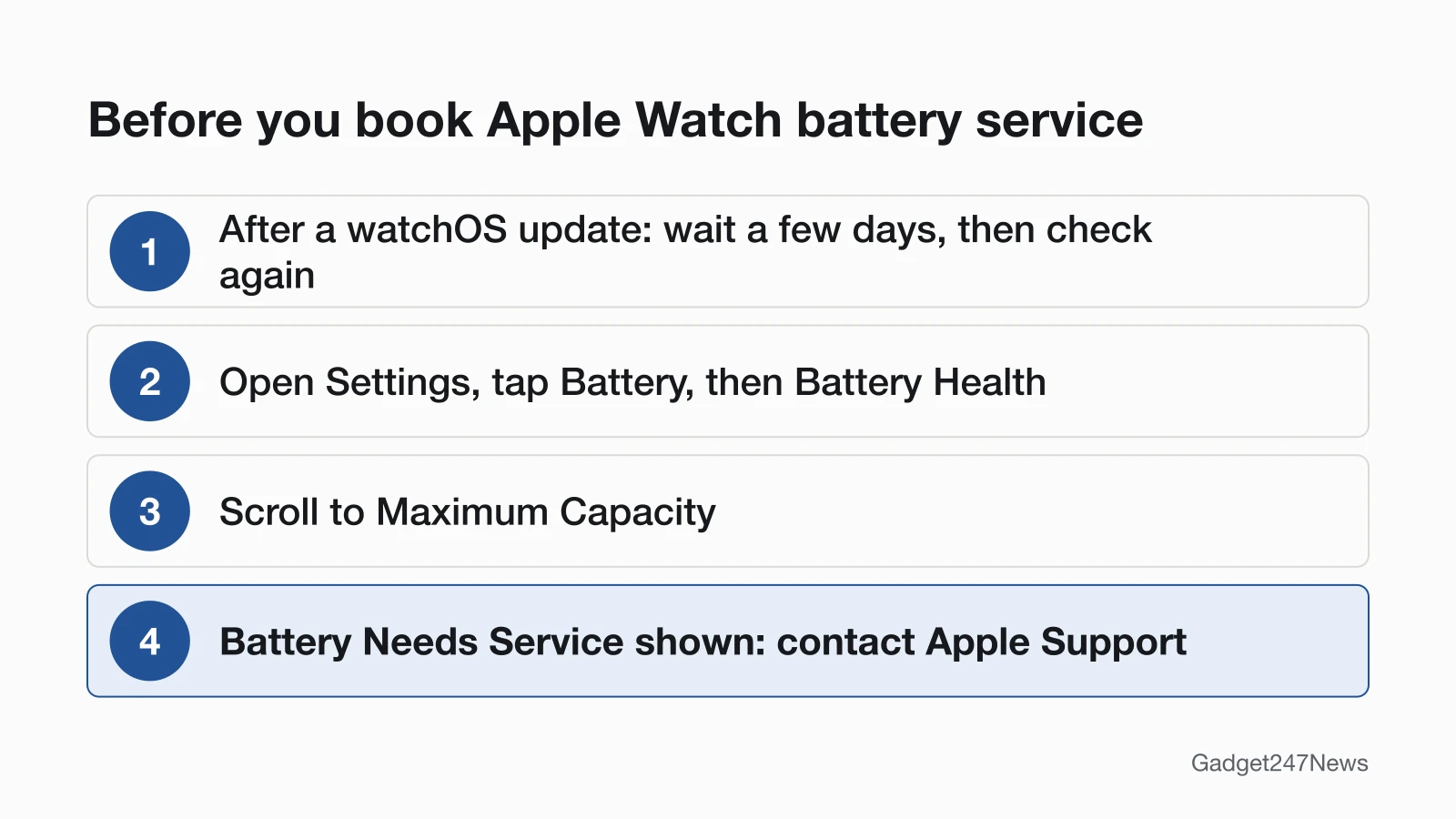
Open Settings on your Apple Watch, tap Battery, then Battery Health, and check Maximum Capacity before you decide on battery service.
On one charge, Apple rates Apple Watch Series 12 at up to 24 hours, SE 3 at up to 18 hours and Ultra 4 at up to 50 hours, based on its own tests, and says actual results will vary. Over time, Apple says the battery is designed to retain up to 80% of its original capacity at 1000 complete charge cycles. If Battery Health shows Battery Needs Service, Apple's advice is to contact Apple Support.
Apple keeps two ideas apart. "Battery life" is the amount of time a device runs before it needs to be recharged, and "battery lifespan" is the amount of time a battery lasts until it is no longer useful. Apple adds that watch battery life depends on many factors, including the age of your watch and how you use it. If yours runs down faster than it used to, start with the fixes for Apple Watch battery life problems.
Apple Watch battery lifespan is the time until the watch battery is no longer useful and needs replacing. When the battery itself is worn, the guide to Apple Watch battery replacement options has Apple's service routes and prices.

Apple Watch Battery Life by Model
Apple Watch battery life runs from up to 18 hours on SE 3 to up to 50 hours on Ultra 4 per charge, for the three models on the Apple Watch battery page at apple.com (read September 27, 2026):
| Model | One charge | Low Power Mode | Workout tracking | Charge time |
|---|---|---|---|---|
| Series 12 | Up to 24 hours | Up to 38 hours | Up to 10 hours | About 30 minutes to 80%, about 1 hour to 100% |
| SE 3 | Up to 18 hours | Up to 32 hours | Up to 7 hours | About 45 minutes to 80%, about 75 minutes to 100% |
| Ultra 4 | Up to 50 hours (over 2 days) | Up to 84 hours (over 3 days) | Up to 18 hours; up to 25 with Extended Workout, up to 45 with Max Extended Workout | About 45 minutes to 80%, about 75 minutes to 100% |
Apple ran these tests itself in July and August 2026 (Series 12, Ultra 4) and July and August 2025 (SE 3), with a set mix of time checks, notifications, app use and workouts. It says battery life varies by use, configuration, cellular network, signal strength and many other factors. A 15-minute charge gives up to 12 additional hours on Series 12, up to 18 additional hours on Ultra 4 and up to 8 hours of battery life on SE 3.
Apple's compare page for Apple Watch lists a one-charge rating for older models:
| Older model | One charge |
|---|---|
| Series 11 | Up to 24 hours |
| Ultra 3 | Up to 42 hours |
| Ultra 2 and the original Ultra | Up to 36 hours |
| Series 1 to 10, SE and SE 2 | Up to 18 hours |
How Many Years Does an Apple Watch Battery Last?
Apple doesn't give a lifespan in years for an Apple Watch battery. Its battery service page says the battery is designed to retain up to 80% of its original capacity at 1000 complete charge cycles. A charge cycle is 100% of the battery's capacity used in total, not necessarily from one charge: in Apple's example, 75% one day and 25% the next add up to one cycle. Apple ties lifespan to the battery's "chemical age", which is more than the passage of time and includes the number of charge cycles and how the battery was cared for.
As the battery chemically ages, the charge it can hold shrinks, so the watch needs charging sooner, and its "peak power" may drop. Apple Watch Series 5 and later, SE and later, and Ultra and later run an automatic system that manages performance to reduce those effects.
How to Check Your Apple Watch Battery Health
Your Apple Watch battery health appears as a Maximum Capacity percentage on the watch:
- On your Apple Watch, open the Settings app.
- Tap Battery, then Battery Health.
- Scroll to Maximum Capacity, a measure of today's capacity against the battery when new.
A Battery Needs Service message on that screen is Apple's cue to contact Apple Support. A brand-new watch may read slightly under 100 percent, Apple notes, depending on the time between manufacture and activation.
What Apple Does to Slow Battery Ageing
Apple slows battery ageing with two charging features, and it gives two care tips for owners:
- Optimized Battery Charging (watchOS 7 and later): the watch learns your daily charging habits and cuts the time it spends fully charged, holding the battery between 75% and 80% in some situations. On Series 9 and later and any Ultra, it's always on.
- Optimized Charge Limit (watchOS 10 or later, on SE and later, Series 6 and later, and Ultra and later): the watch learns your daily usage and determines when to charge only to an optimized limit and when to allow a full charge. Apple warns that turning it off can increase wear on your battery and reduce its lifespan.
- Half charge for storage: keep Apple Watch half-charged when you store it for the long term.
- Heat: Apple Watch works best at 32° to 95° F (0° to 35° C) ambient temperatures, and temperatures above 95° F (35° C) can permanently damage battery capacity. Don't charge or leave the watch in hot places, including direct sun, for long periods.
When to Replace the Battery, and Your Options
Replace the battery when Battery Health shows Battery Needs Service, or when you think the battery needs replacement: in both cases Apple's route is to contact Apple Support. What you pay depends on coverage:
| Option | When it applies | Apple's estimate (US) |
|---|---|---|
| Battery service, out of warranty | A worn battery | $99 for Series 4 and later, SE and Ultra; $79 for Series 3 |
| Battery service with AppleCare | Capacity below 80% | $0 |
| Apple Authorized Service Provider | Either case | The provider sets its own fee |
Apple's estimates from support.apple.com/watch/repair, US, checked September 27, 2026. Prices change, and Apple inspects the watch to set the final fee. Apple's tool doesn't list Series 1, Series 2 or the first-generation Apple Watch.
Is Battery Wear Covered?
No, normal wear isn't covered by the standard warranty. Apple's one-year Limited Warranty is for manufacturing issues, and Apple's watch repair page rules out "batteries that wear down from normal use". An AppleCare plan changes that: Apple replaces a battery whose capacity has dropped below 80% for no extra charge. Check your coverage status on Apple's site, and read AppleCare+ for AirPods and Apple Watch for what the plan includes.
Try These Fixes First
Before paying for battery service, match your symptom to one of these guides:
- Fast drain: the battery life fixes linked at the top of this page.
- Drain that began after a watchOS update: Apple says update tasks keep running in the background, so wait a few days and then check again. Before the next update, check known watchOS issues before you update your Apple Watch.
- No charge at all: Apple Watch Not Charging? Causes and Fixes.
Related Repair Guides
Two other repair guides answer the same service question for different devices:
- Beats owners: Beats Headphones Repair Options covers Apple's service options for Beats.
- AirPods owners: AirPods battery lifespan covers rated hours and battery service for each AirPods model.
Battery Life Questions
Three short answers, each taken from Apple's own battery and support pages.
How many years does an Apple Watch battery last?
Apple doesn't publish a figure in years. It designs the battery to retain up to 80% of its original capacity at 1000 complete charge cycles, and your own battery's lifespan varies with how you use the watch and the settings you choose.
Why did my battery capacity change after an update?
Some models recalibrate and then estimate maximum battery capacity more accurately after a software update, Apple says. Apple lists Series 7 and SE 2 after watchOS 26 or later, and Series 8 and the original Ultra after watchOS 26.6 or later. Series 4 and Series 5 recalibrate after watchOS 9.0, and Series 6 (44mm) after watchOS 9.4.
Does Low Power Mode hurt the battery?
Apple doesn't say it does. Apple presents Low Power Mode as a way to save battery life by reducing the power the watch uses. It turns off automatically when the battery is charged to 80%, unless you chose to turn it on for a number of days.
Sources
We checked this page against the pages below, most recently on . How we verify fixes
- Apple Watch - Battery (Apple) (Apple, apple.com)Official
- Apple Watch - Compare Models (Apple) (Apple, apple.com)Official
- Batteries - Service and Recycling (Apple) (Apple, apple.com)Official
- Batteries - Why Lithium-ion? (Apple) (Apple, apple.com)Official
- Batteries - Maximizing Performance (Apple) (Apple, apple.com)Official
- If the battery in your Apple Watch drains too quickly (Apple, support.apple.com)Official
- Apple Watch Battery and Performance (Apple, support.apple.com)Official
- About Optimized Battery Charging on Apple Watch (Apple, support.apple.com)Official
- Use Low Power Mode on your Apple Watch (Apple, support.apple.com)Official
- Apple Service and Repair for Apple Watch (with its US price estimate) (Apple, support.apple.com)Official