Bose Headphones Not Connecting? Causes and Fixes

By Suraj Giri, Founder & Publisher. Reviewed by Suraj Giri on .
Published · 6 min read
How this page was made
- Sources. Checked against 10 official pages from Bose, most recently on . See the sources.
- No device testing. We don't test fixes on physical devices, so nothing on this page is a hands-on result. A fact counts as verified only when it matches an official source page.
- AI use. As with every page on Gadget247News, AI tools helped research, outline, draft and edit this page, and re-read the official pages to flag facts that didn't match. The illustration at the top was generated with Runway and is labelled under the image.
- Human sign-off. Suraj Giri, Founder & Publisher, read this page and signed it off on . The site won't publish a page without that sign-off.
- Changes. The published and updated dates move only when the content changes, and every change gets a dated note. Spot an error or a fix that didn't work? Email info@gadget247news.com.
Read our AI use policy, editorial policy and corrections policy.
This page is for Bose earbuds or headphones that never show up in your Bluetooth list, won't pair, or that the Bose app can't find. If they connect and then drop out, that's a separate fault, covered below. For battery, sound and other faults, start from Bose headphones pairing, battery and sound fixes.
Other brands pair with different buttons and lights, so if your earbuds won't connect and they aren't Bose, use the cross-brand page for earbuds won't connect.
Why Won't My Bose Earbuds Connect?
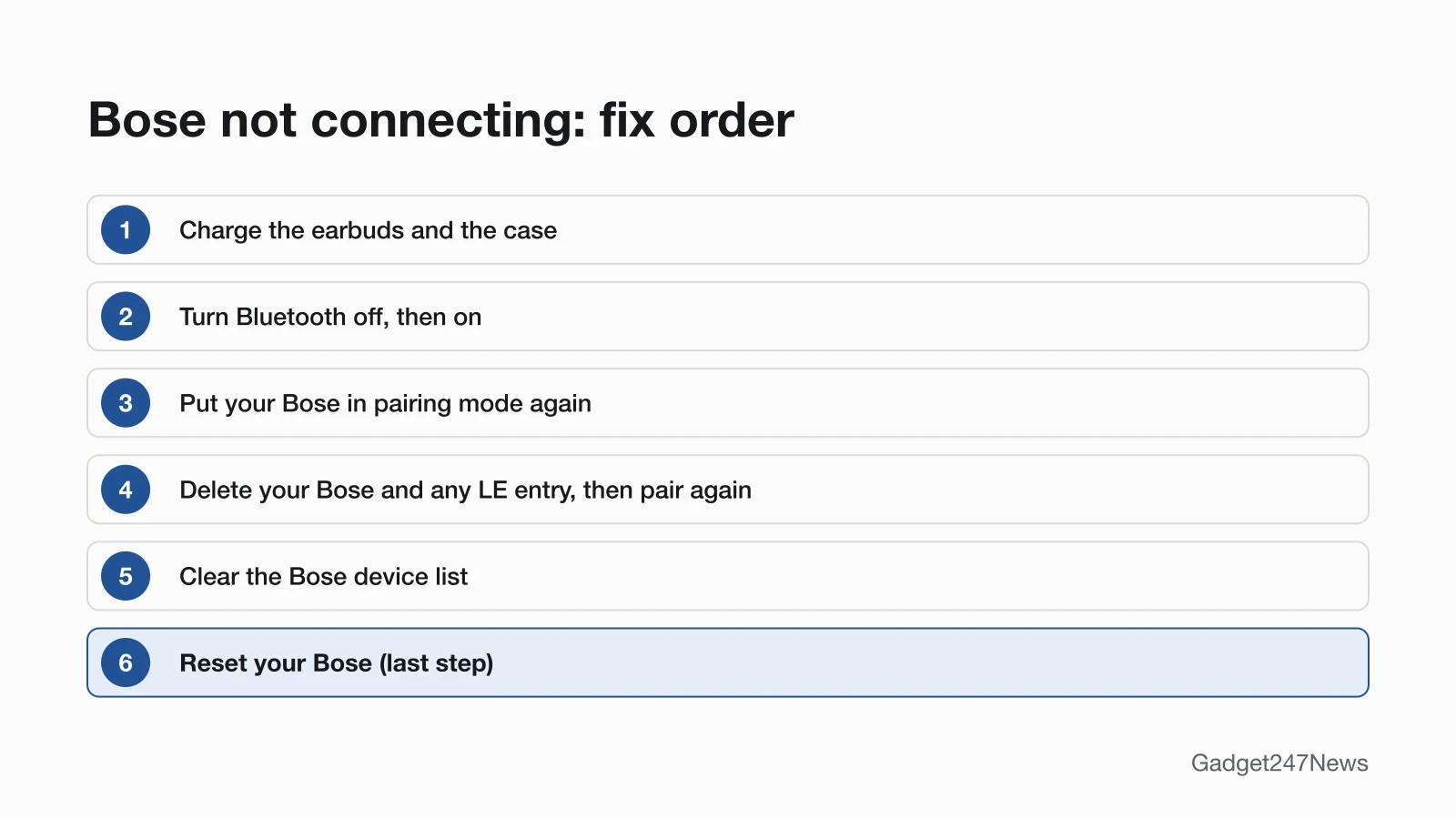
Six problems keep Bose earbuds from connecting, and each one matches a fix in Bose's troubleshooting pages, in the same order:
- Flat earbuds or a flat case. Bose checks the battery first, because a low case "won't charge the earbuds properly."
- A stuck Bluetooth link on your phone or computer, which a Bluetooth restart refreshes.
- Earbuds not in pairing mode. Case-button models need both earbuds in the case with the case open.
- An old pairing, often a second listing labeled "LE (Low Energy)" next to the normal one.
- An earbud not seated securely in the charging case.
- Old software on your phone or your Bose.
A reset is Bose's last step, not a cause, so it stays at the end.
How to Fix Bose Earbuds That Won't Connect
These fixes start with Bose's own first checks (battery, Bluetooth, pairing mode) and end with Bose's last step, the reset.
Fix 1: Charge the Earbuds and the Case
- Put the earbuds in the charging case and connect the case to a power source.
- Give the case time to charge as well: Bose says that if the case itself is low, it won't charge the earbuds properly. QuietComfort Ultra Headphones (2nd Gen) charge through the USB-C port on the left earcup.
QuietComfort Earbuds (2024) used for the first time need one extra step: wait until the status light starts to glow before you take them out, which activates the battery.
Fix 2: Turn Bluetooth Off and On
- Open your device's settings and make sure Bluetooth is turned on.
- Turn Bluetooth off, then back on, to refresh the connection.
Bose's pages give no wait time between off and on.
Fix 3: Put Your Bose in Pairing Mode Again
Bose's fix for earbuds missing from the list of available devices is pairing mode. Use your model's control, then select the Bose in Bluetooth settings:
| Bose model | Hold | Ready when |
|---|---|---|
| QuietComfort Ultra Earbuds (2nd Gen), Ultra Open Earbuds | The button on the back of the case, with both earbuds inside and the case open | The light slowly pulses blue |
| QuietComfort Earbuds (2024) | Either earbud, 4 seconds | You hear "Ready to pair" |
| QuietComfort Ultra Headphones (2nd Gen) | The Bluetooth/Power button, past the power-off tone | The light pulses blue |
| QuietComfort Headphones | The Power/Bluetooth switch, slid right, 3 seconds | You hear "Ready to connect" |
Names, lights and every host's menu are in How to Connect and Pair Bose Headphones With Any Device.
Fix 4: Delete Your Bose (and the "LE" Entry) and Pair Again
- In your device's Bluetooth list, choose Forget or Remove for your Bose, "including any duplicate listings labeled LE (Low Energy)."
- Put your Bose back in pairing mode (Fix 3).
- Connect again from your device's Bluetooth settings.
Fix 5: Clear the Bose Device List
Your Bose keeps its own list of past devices, and Bose's guides clear it before the delete-and-pair step. Clear the list, then delete the Bose from each device that used it:
| Bose model | How to clear the list | Devices it stores |
|---|---|---|
| QuietComfort Ultra Earbuds (2nd Gen), Ultra Open Earbuds | Case open, both earbuds in: hold the case button 15 seconds until the light blinks white twice, then slowly pulses blue | Up to six |
| QuietComfort Ultra Headphones (2nd Gen) | Hold the Bluetooth/Power and Multi-function buttons together until you hear a tone | Up to six |
| QuietComfort Headphones | Slide the switch right and hold 15 seconds until you hear "Bluetooth device list cleared. Ready to connect." | Up to eight |
| QuietComfort Earbuds (2024) | Not connected to any device: touch and hold the right earbud 7 seconds until "Ready to pair" and a tone | Up to five |
Fix 6: Seat Both Earbuds, Then Close and Reopen the Case
- Place both earbuds in the charging case until they magnetically snap into place.
- Close and re-open the case; the status light shows the charging status. Then connect again.
Fix 7: Update Your Phone and Your Bose
- Update your phone or computer's operating system; Bose says updates can sometimes resolve connectivity issues.
- Open the Bose app and run available software updates (QuietComfort Earbuds (2024): the Bose QCE app). The earbud steps are in our guide How to Update Bose Headphones Firmware.
Fix 8 (Last): Reset Your Bose
On QuietComfort Ultra Earbuds (2nd Gen), a reset reboots the earbuds and case and "doesn't clear any device settings"; a restore to factory settings clears all settings, and you set them up again. The steps for each model are in How to Reset Bose Headphones.
Bose Not Connecting by Model and Device
The fixes above apply to every model; these cases add a model or device detail.
QuietComfort Earbuds and QuietComfort Ultra Earbuds Won't Pair
Case-button earbuds only pair when "both earbuds are in the case and the case is open," so check both before you hold the button. QuietComfort Earbuds (2024) have no case button: touch and hold either earbud for 4 seconds instead. For QuietComfort Earbuds II, Bose's "Resetting your product" article plugs the case into a USB wall charger ("not a computer or laptop"), keeps the lid open and holds the Bluetooth button on the back of the case for 30 seconds. If only one earbud stays silent, see left or right Bose earbud not working.
The Bose App Can't Find Your Earbuds
When the Bose app can't find your earbuds, Bose's guides list these steps:
- Give the Bose app access to Bluetooth connections in your phone's Settings menu.
- Uninstall the Bose app, then reinstall it.
- Place both earbuds in the case, close and re-open it, remove them, then put them in pairing mode.
- If they were last connected to a PC running Microsoft Teams, quit Teams; if that fails, turn off that PC's Bluetooth or move out of its range.
On QuietComfort Earbuds (2024), connect in Bluetooth settings first, then open the Bose QCE app.
Not Connecting to a Laptop or Android Phone
The same pairing mode works on every host. Bose lists Fast Pair for "Android devices only," so on a laptop you add your Bose from the computer's Bluetooth settings ("Add a Bluetooth Device" on Windows). See How to Connect Bose Headphones to a Windows PC and How to Connect Bose Headphones to Android for each system's labels.
Still not working?
- Try the next fix: Why Bose headphones keep disconnecting (if they connect and then drop out).
- Reset your Bose headphones or earbuds: How to reset Bose headphones (after a factory restore, you'll pair them again).
- Contact Bose Support: Bose Support.
- Check repair or warranty options: Bose headphones repair and warranty options.
Started after an update? Check the Update Tracker for known issues.
Stopped Connecting After an Update?
Bose earbuds that suddenly stop connecting after an update may be on new firmware from the Bose app. Bose's June 10, 2026 notes for QuietComfort Ultra Earbuds (2nd Gen) version 8.4.8 read "Improved connection stability through bug fixes and performance enhancements." Bose's voice-prompt update installs automatically once your product connects to the Bose app, and "it can't be undone." We log Bose versions and reports under Sony, Bose and JBL headphone update known issues.
Bose Not Connecting: Quick Answers
Why won't my Bose earbuds connect to my phone?
Bose's first fixes target a stuck Bluetooth link or an old pairing. Turn Bluetooth off and on, delete the earbuds and any "LE" duplicate from your phone's Bluetooth list, then put them in pairing mode and pair again.
Why won't my Bose earbuds go into pairing mode?
Case-button models need both earbuds in the case with the lid open before you hold the button, so check that both are seated and charged. QuietComfort Earbuds (2024) use a 4-second touch and hold on either earbud instead.
Why won't my Bose earbuds connect to the Bose app?
Give the app access to Bluetooth connections in your phone's settings, pair the earbuds in Bluetooth settings, and reinstall the app if it still can't find them. QuietComfort Earbuds (2024) use the Bose QCE app, not the Bose app.
Sources
We checked this page against the pages below, most recently on . How we verify fixes
- Earbuds Will Not Connect | Bose QuietComfort Ultra Earbuds (2nd Gen) (Bose, support.bose.com)Official
- Owner's Guide, Bose QuietComfort Ultra Earbuds (2nd Gen) (Bose, assets.bosecreative.com)Official
- Owner's Guide, Bose QuietComfort Ultra Headphones (2nd Gen) (Bose, assets.bosecreative.com)Official
- Owner's Guide, Bose QuietComfort Headphones (Bose, assets.bosecreative.com)Official
- Owner's Guide, Bose QuietComfort Earbuds (Bose, assets.bosecreative.com)Official
- Owner's Guide, Bose Ultra Open Earbuds (Bose, assets.bosecreative.com)Official
- Resetting your product | Bose QuietComfort Earbuds II (Bose, support.bose.com)Official
- Updating Your Earbuds | Bose QuietComfort Ultra Earbuds (2nd Gen) (Bose, support.bose.com)Official
- Voice Prompt Changes | Bose QuietComfort Ultra Headphones (2nd Gen) (Bose, support.bose.com)Official
- Connecting a Bluetooth Device | Bose QuietComfort Ultra Earbuds (2nd Gen) (Bose, support.bose.com)Official