How to Reset Bose Headphones

By Suraj Giri, Founder & Publisher. Reviewed by Suraj Giri on .
Published · 4 min read
How this page was made
- Sources. Checked against 8 official pages from Bose, most recently on . See the sources.
- No device testing. We don't test fixes on physical devices, so nothing on this page is a hands-on result. A fact counts as verified only when it matches an official source page.
- AI use. As with every page on Gadget247News, AI tools helped research, outline, draft and edit this page, and re-read the official pages to flag facts that didn't match. The illustration at the top was generated with Runway and is labelled under the image.
- Human sign-off. Suraj Giri, Founder & Publisher, read this page and signed it off on . The site won't publish a page without that sign-off.
- Changes. The published and updated dates move only when the content changes, and every change gets a dated note. Spot an error or a fix that didn't work? Email info@gadget247news.com.
Read our AI use policy, editorial policy and corrections policy.
Bose has two resets. A reset reboots your headphones or earbuds and, on most models, keeps your settings, so try it first. A restore to factory settings wipes everything. For other Bose problems, start at Bose headphones fixes.
For other brands, see how to factory reset earbuds.
Reset vs Restore Factory Settings: What's the Difference?
A reset reboots your Bose and keeps your settings; a restore to factory settings erases them.
| Action | What it does (Bose's words) | When to use it |
|---|---|---|
| Reset (soft reset) | "Resets the product controls and reboots" them; "doesn't clear any device settings". Ultra Open Earbuds: "clears the earbud device list", nothing else. | They're unresponsive. |
| Restore factory settings (factory reset) | "Clears all settings" and returns them to their "original out-of-box state". | The reset didn't help, or Bose asks you to. |
How to Reset (Soft Reset) Bose Headphones and Earbuds
To reset Bose earbuds or headphones, find your model's row:
| Model | What to do | How you know |
|---|---|---|
| QuietComfort Ultra Earbuds (2nd Gen) | Earbuds in the case, lid closed, case plugged into power. Hold the case button about 30 seconds (guide: up to 30). | The case light turns off. |
| Ultra Open Earbuds | Earbuds in the case, lid open. Hold the case button up to 30 seconds. | Lights blink white twice, pulse blue, turn off. |
| QuietComfort Earbuds II | Earbuds in, lid closed, case on power. Once the front light comes on, hold the case button. | The front light turns off. |
| QuietComfort Earbuds (2024) | Hold each earbud 15 seconds until a tone (it powers off), then 1 second to power on. | A tone per earbud. |
| QuietComfort Ultra Headphones (2nd Gen) | Remove them from Bluetooth. Hold Bluetooth/Power while you plug the USB-C cable into a computer or wall charger, then release. | White blinks for 3 seconds. |
| QuietComfort Headphones | Slide the Power/Bluetooth switch right as you plug the USB cable into a computer or wall charger. | The light shows the charge level. |
How to Factory Reset Bose Earbuds (QuietComfort Ultra Earbuds (2nd Gen) and Ultra Open)
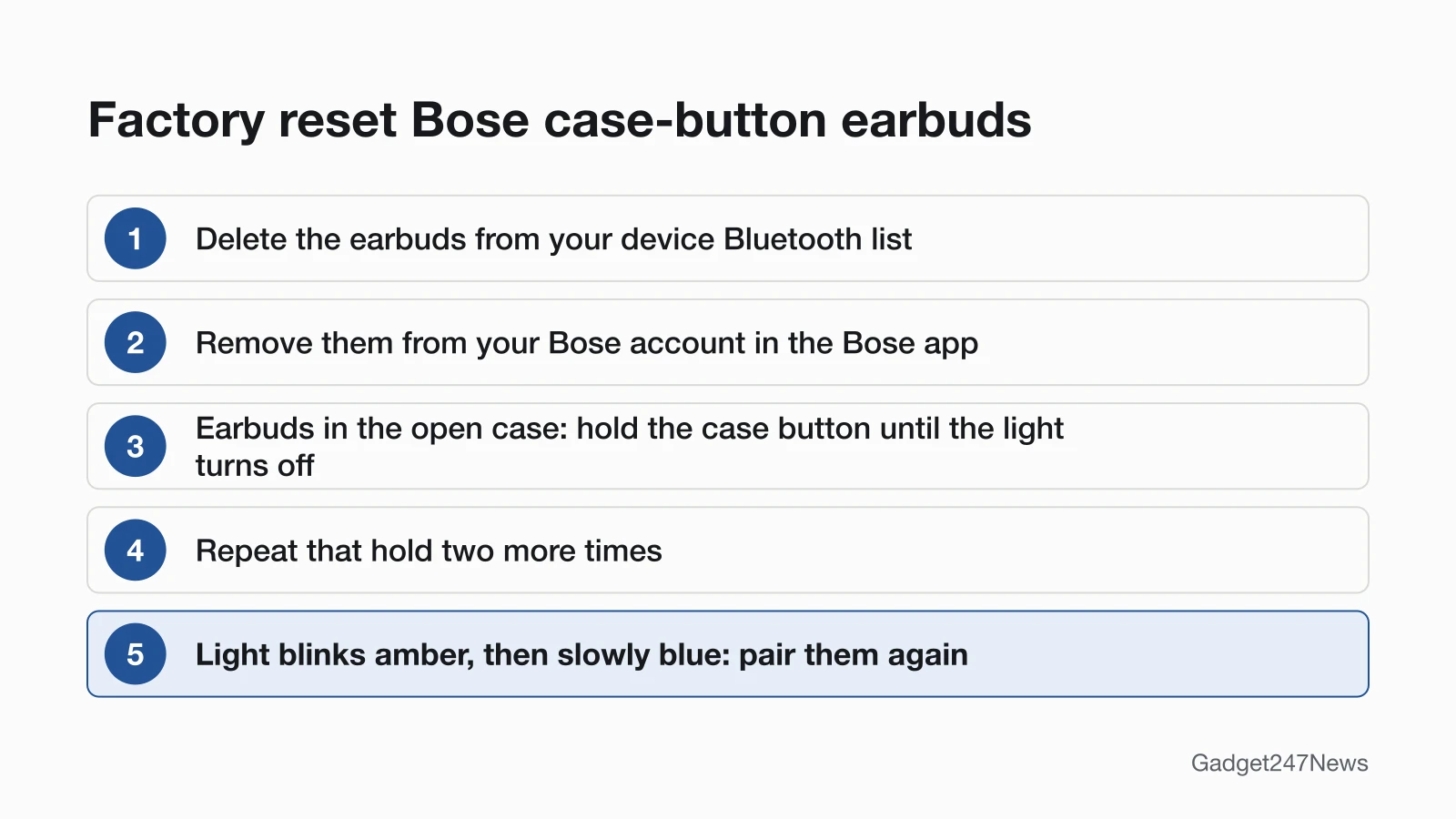
To factory reset these earbuds, hold the case button three times with the lid open:
- Delete the earbuds from your device's Bluetooth list.
- Remove them from your Bose account (see below).
- With both earbuds in the open case, hold the button on the back until the light blinks white twice, pulses blue and turns off. Bose's article says 25 seconds; both owner's guides say up to 30 seconds.
- Repeat step 3 two more times. After the third, the light blinks amber for 3 seconds.
- When it slowly blinks blue (Ultra Open: slowly pulses blue), pair them again.
How to Factory Reset Bose Headphones
To factory reset QuietComfort Ultra Headphones (2nd Gen), hold two buttons for 15 seconds:
- Delete the headphones from your device's Bluetooth list.
- Remove them from your Bose account.
- Hold Bluetooth/Power and Multi-function together. The light blinks amber for 5 seconds; keep holding 15 seconds in total, until it glows solid white.
- When it pulses blue, pair them again.
QuietComfort Headphones: after steps 1 and 2, hold the Power/Bluetooth switch right while you hold the Action button for 30 seconds. The light blinks amber for 2 to 3 seconds, then slowly blue.
QuietComfort Earbuds (2024) and QuietComfort Earbuds II
QuietComfort Earbuds (2024): with the earbuds not connected to any device, touch and hold the left earbud for 7 seconds until you hear "Ready to pair" followed by a tone. The same hold on the right earbud only clears the device list.
QuietComfort Earbuds II: plug the case into a USB wall charger ("not a computer or laptop"), earbuds in, lid open, and hold the case's Bluetooth button for 30 seconds. After you release, the light blinks white 5 times, then slowly blue. Bose calls this clearing the pairing list.
Remove Them From the Bose App First
In the Bose app, tap the Account icon (upper right) > Manage Products > Edit > your earbuds > Delete > Remove. Then clear them from your phone's Bluetooth list; Bose says to look for "Clear," "Unpair" or "Forget".
How to Check the Reset Worked
A reset or restore worked when you get your model's signal:
- Watch for the signal in the tables above.
- After a restore, wait for slow blue. Bose says they can then "be configured as if they were being set up for the first time".
- Pair them from Bluetooth settings or the Bose app (QuietComfort Earbuds (2024): the Bose QCE app). Every host: How to Connect and Pair Bose Headphones With Any Device.
If Resetting Bose Headphones Doesn't Work
If the reset worked but they still won't pair, see Bose headphones not connecting to your phone.
The Light Doesn't Change or They Still Won't Pair
Seat the earbuds until they snap in and the lights show charging, then hold for the full time again (QuietComfort Earbuds II: press the buds down if the LEDs stay dark). Blinking amber and white on QuietComfort Ultra Earbuds (2nd Gen) or Ultra Open Earbuds is an error: Bose says to contact Bose customer service.
Resetting Bose: Quick Answers
How do I reset Bose QuietComfort Earbuds?
QuietComfort Earbuds (2024) reboot with a 15-second hold on each earbud and restore with a 7-second hold on the left one. QuietComfort Earbuds II: hold the case button 30 seconds, lid open, case on a wall charger.
How do I factory reset Bose QuietComfort Ultra Earbuds?
For the 2nd Gen, remove them from Bluetooth and the Bose app, then hold the case button (lid open) until the light turns off, three times.
How do I reset Bose Sport Earbuds?
We couldn't open a Bose reset article for Sport Earbuds on September 27, 2026, so we give no button sequence. Ask Bose support for that model's steps.
Sources
We checked this page against the pages below, most recently on . How we verify fixes
- Resetting your product | Bose QuietComfort Ultra Earbuds (2nd Gen) (Bose, support.bose.com)Official
- Resetting your product | Bose QuietComfort Earbuds II (Bose, support.bose.com)Official
- Dropped Bluetooth Connection | Bose QuietComfort Earbuds II (Bose, support.bose.com)Official
- Owner's Guide, Bose QuietComfort Ultra Earbuds (2nd Gen) (Bose, assets.bosecreative.com)Official
- Owner's Guide, Bose Ultra Open Earbuds (Bose, assets.bosecreative.com)Official
- Owner's Guide, Bose QuietComfort Earbuds (Bose, assets.bosecreative.com)Official
- Owner's Guide, Bose QuietComfort Ultra Headphones (2nd Gen) (Bose, assets.bosecreative.com)Official
- Owner's Guide, Bose QuietComfort Headphones (Bose, assets.bosecreative.com)Official