Why Sony Headphones Keep Disconnecting

By Suraj Giri, Founder & Publisher. Reviewed by Suraj Giri on .
Published · 6 min read
How this page was made
- Sources. Checked against 14 official pages from Sony, most recently on . See the sources.
- No device testing. We don't test fixes on physical devices, so nothing on this page is a hands-on result. A fact counts as verified only when it matches an official source page.
- AI use. As with every page on Gadget247News, AI tools helped research, outline, draft and edit this page, and re-read the official pages to flag facts that didn't match. The illustration at the top was generated with Runway and is labelled under the image.
- Human sign-off. Suraj Giri, Founder & Publisher, read this page and signed it off on . The site won't publish a page without that sign-off.
- Changes. The published and updated dates move only when the content changes, and every change gets a dated note. Spot an error or a fix that didn't work? Email info@gadget247news.com.
Read our AI use policy, editorial policy and corrections policy.
This guide is for Sony headphones or earbuds that connect and then skip, cut out, drop the connection or switch themselves off. If they never connect in the first place, the Still not working? list below points to the right page, and every other Sony fault starts from Sony headphones fixes.
The fixes here quote Sony's own Help Guides, model by model, because the setting names differ between the WF-1000XM5 earbuds and the WH-1000XM5 and WH-1000XM6 headphones. For AirPods, Galaxy Buds and other brands, use the cross-brand guide for headphones keep cutting out.
Why Do My Sony Headphones Keep Disconnecting?
Sony headphones keep disconnecting for seven reasons named on Sony's "Sound skips frequently." and power pages, in the order the fixes below take them:
- A sound-quality-first mode. Prioritize Sound Quality is the WH-1000XM6's default, and Sony says to pick [Prioritize Stable Connection] when you hear "only intermittent sound".
- Your body, metal or a wall between your phone and the headset's antenna.
- Wi-Fi, running microwaves or crowds, such as "train station premises or on a crowded train".
- Two devices at once, through multipoint.
- Another Bluetooth device on your phone, such as a smartwatch, or Service Link in the app.
- Low latency or LE Audio: on the WH-1000XM6, [Low latency] is an LE Audio connection with "a lower connection stability".
- Auto power-off after 15 minutes of not being worn, which looks like a dropped connection.
Two things only look like a fault. Speak-to-Chat pauses or mutes your music when you talk, and Adaptive Sound Control can pause it for a moment; Sony says neither is a malfunction.
How to Stop Sony Headphones Disconnecting
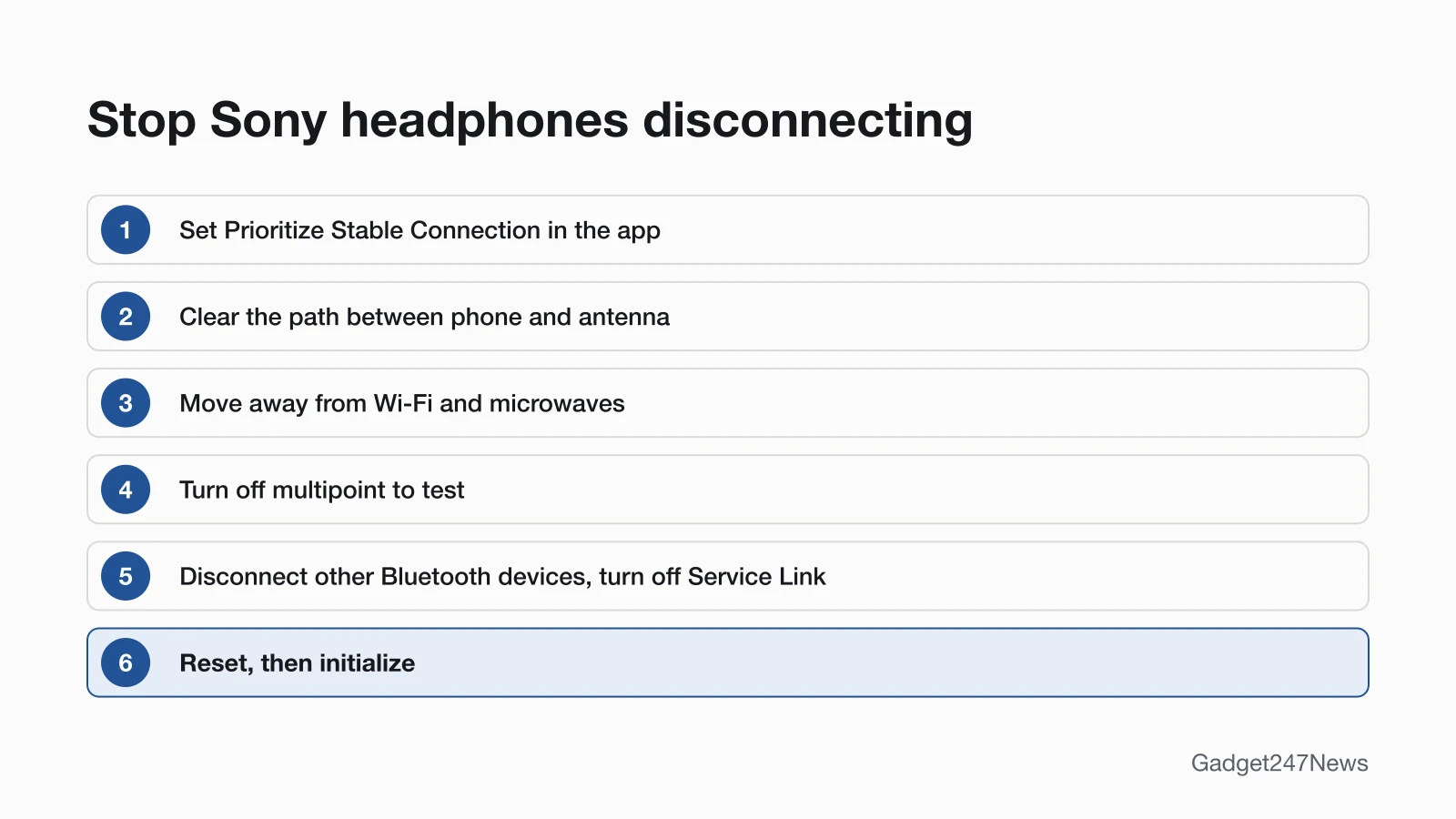
These fixes follow Sony's "Sound skips frequently." pages in order, with reset and initialize last.
Fix 1: Turn On the Stable-Connection Mode
- Open the Sony | Sound Connect app and set the sound quality mode to [Prioritize Stable Connection] on the WH-1000XM6 or WF-1000XM5, or to "Priority on stable connection" on the WH-1000XM5.
- On the WF-1000XM5, if your phone lets you choose the codec between SBC and AAC, set it to AAC.
The WF-1000XM5 already starts on the stable mode; the WH-1000XM6 and WH-1000XM5 start on the sound quality mode. Sony adds that intermittent sound "may still occur" even with the stable mode, depending on your surroundings, so keep going if the skips continue. How SBC, AAC and LDAC differ is covered in Bluetooth Codecs Explained: AAC, aptX and LDAC.
Fix 2: Keep the Phone Close and in Line With the Antenna
- Clear the path: Sony lists "a part of the body, metal, or a wall" between the headset's antenna and your phone as a cause of dropout, and moving the phone closer to the antenna may help.
- On the WH-1000XM5, if your body is between the phone and the headset, "put the Bluetooth device in the same direction as the antenna of the headset". On the WF-1000XM5, keep your hand off the phone's antenna area.
A phone in a back pocket puts your body between it and the headset, the first condition on Sony's WH-1000XM5 list.
Fix 3: Move Away From Wi-Fi and Microwaves
Move away from other radio sources. Sony's WF-1000XM5 guide lists wireless LAN, "microwave ovens in use" and places crowded with other wireless audio devices or people, such as a busy train. The same guide gives two phone settings: connect your phone's Wi-Fi in the 5 GHz band, and turn Wi-Fi off when you aren't using it.
Fix 4: Check Multipoint
- Turn off [Connect to 2 devices simultaneously] in the Sony | Sound Connect app (the WH-1000XM6 label), then test with one phone. Sony's WF-1000XM5 guide says that with 2 devices connected "it may be easier for the sound to skip".
- If the sound jumps to the other device at the wrong moment, turn off the notification and operation sounds on that phone, or lower its volume.
A third device also bumps one of the two: Sony's WH-1000XM6 guide says the connection with the other device "will be disconnected". How the feature works across brands is in multipoint causing earbud dropouts.
Fix 5: Disconnect Other Bluetooth Devices and Service Link
- Disconnect a smartwatch or any other Bluetooth device from your phone; Sony's WF-1000XM5 guide says this "may improve the symptoms".
- Turn off Service Link in the app. Sony's WF-1000XM5 and WH-1000XM5 guides both say this "may reduce the amount of audio dropout".
WF-1000XM5 earbuds on an LE Audio connection need one more change: in the app, select [LE Audio connection setting for headphones], then [Classic Audio only (conventional connection method)], and set [Prioritize Stable Connection] again. The background is in LE Audio and Auracast on earbuds.
Fix 6: Check Auto Power-Off
Sony headphones that go silent after a quiet spell may have turned themselves off. The WH-1000XM6 and WH-1000XM5 "automatically turn off after 15 minutes of not being worn", and you can change that in the app. WF-1000XM5 earbuds turn off after about 15 minutes out of your ears, and the WF-C510 turns off "After 15 minutes of Bluetooth disconnection". Turn WH-1000XM6 headphones off before you pack them, because Sony says wearing detection "may react incorrectly" in a bag. Button steps are in How to Turn Sony Headphones On and Off.
Music Pauses When You Talk? That's Speak-to-Chat
Speak-to-Chat pauses or mutes your music when you speak, and Adaptive Sound Control can pause it briefly when it adjusts noise canceling; Sony says neither is a malfunction. Disable Speak-to-Chat in the Sony | Sound Connect app if the pauses bother you.
Fix 7 (Last): Reset, Then Initialize
Reconnect first: put the earbuds in the case, close the lid and take them out again, or close unneeded apps and restart your phone. If the skipping continues, reset Sony headphones, which keeps your pairings, then initialize them, which deletes every pairing so you pair again.
Sony Earbuds vs Headphones Cutting Out
Sony's earbud and headphone guides give different first moves, so check which column matches yours:
| Sony earbuds (WF-1000XM5) | Sony headphones (WH-1000XM5) | |
|---|---|---|
| Where the antenna is | In each earbud | Built into the headset |
| Sony's first fixes | Rotate the earbuds in your ears, then try AAC and [Prioritize Stable Connection] | Set "Priority on stable connection" |
| Phone position | Move the phone closer to the earbuds; keep your hand off the phone's antenna | Put the phone in the same direction as the headset's antenna |
| Settings to change | Multipoint, Service Link, LE Audio to Classic Audio only | Service Link |
On the WF-1000XM5, Sony says "audio dropout may be improved by rotating the headset", depending on the shape of your ear.
Still not working?
- Try the next fix: Sony headphones won't connect (if they won't reconnect at all).
- Reset your Sony headphones: reset Sony headphones (after an initialize you'll need to pair them again).
- Contact Sony Support: Sony Support.
- Check repair or warranty options: Sony Product Repair.
Started after an update? Check the Update Tracker for known issues.
Started Cutting Out After an Update?
Sony delivers headphone software through the Sony | Sound Connect app, and with automatic updates on, the WH-1000XM6 can install an update by itself at around night time while it's off. If the cutting out started suddenly right after an update, check your version in the app ("Check the headset software version") and compare it with the latest Sony headphones firmware.
Sony Headphones Disconnecting: Quick Answers
Why do my Sony earbuds keep connecting while in the case?
The case may not register that its lid is closed. Sony's WF-1000XM5 guide says phones, magnetic wireless chargers and other magnetic accessories near the case "may affect the detection of the opening and closing of the charging case lid". Close the lid fully and keep the case away from magnets.
Why do my Sony headphones keep cutting out?
Sony's guides name obstacles, radio interference and a sound-quality-first mode among the causes. Switch to the stable-connection mode in the Sony | Sound Connect app, keep your phone close with nothing in between, and turn off multipoint to test.
Why do my Sony headphones turn off by themselves?
Auto power-off switches them off after 15 minutes unworn on the WH-1000XM6 and WH-1000XM5 (about 15 minutes on the WF-1000XM5), or after 15 minutes of Bluetooth disconnection on the WF-C510. Change it in the Sony | Sound Connect app.
Sources
We checked this page against the pages below, most recently on . How we verify fixes
- WF-1000XM5 Help Guide: Sound skips frequently. (Sony, helpguide.sony.net)Official
- WH-1000XM5 Help Guide: Sound skips frequently. (Sony, helpguide.sony.net)Official
- WH-1000XM6 Help Guide: About the sound quality mode (Sony, helpguide.sony.net)Official
- WF-1000XM5 Help Guide: About the sound quality mode (Sony, helpguide.sony.net)Official
- WH-1000XM5 Help Guide: About the sound quality mode (Sony, helpguide.sony.net)Official
- WH-1000XM6 Help Guide: Connecting the headset to 2 devices simultaneously (multipoint connection) (Sony, helpguide.sony.net)Official
- WH-1000XM6 Help Guide: What you can do with the "Sony | Sound Connect" app (Sony, helpguide.sony.net)Official
- WH-1000XM6 Help Guide: Turning off the headset (Sony, helpguide.sony.net)Official
- WH-1000XM5 Help Guide: Turning off the headset (Sony, helpguide.sony.net)Official
- WF-1000XM5 Help Guide: Turning on the headset (Sony, helpguide.sony.net)Official
- WF-C510 Help Guide: Turning on the headset (Sony, helpguide.sony.net)Official
- WF-1000XM5 Help Guide: The available operating time is short (Sony, helpguide.sony.net)Official
- WH-1000XM6 Help Guide: How to keep the software up-to-date (Sony, helpguide.sony.net)Official
- Support for Sony products (Sony USA) (Sony, sony.com)Official