Bose Headphones Not Charging? Causes and Fixes

By Suraj Giri, Founder & Publisher. Reviewed by Suraj Giri on .
Published · 6 min read
How this page was made
- Sources. Checked against 6 official pages from Bose, most recently on . See the sources.
- No device testing. We don't test fixes on physical devices, so nothing on this page is a hands-on result. A fact counts as verified only when it matches an official source page.
- AI use. As with every page on Gadget247News, AI tools helped research, outline, draft and edit this page, and re-read the official pages to flag facts that didn't match. The illustration at the top was generated with Runway and is labelled under the image.
- Human sign-off. Suraj Giri, Founder & Publisher, read this page and signed it off on . The site won't publish a page without that sign-off.
- Changes. The published and updated dates move only when the content changes, and every change gets a dated note. Spot an error or a fix that didn't work? Email info@gadget247news.com.
Read our AI use policy, editorial policy and corrections policy.
This guide covers Bose earbuds that won't charge in the case, a case that won't charge, and Bose headphones that won't charge over USB, in the order of Bose's owner's guides. If they charge but run down fast, that's a battery-drain problem; for everything else, see Bose headphones fixes.
For AirPods, Galaxy Buds and other brands, see earbud case not charging.
Why Won't My Bose Earbuds Charge?
Bose earbuds usually won't charge because they aren't sitting on the charging pins. Bose's troubleshooting rows and light tables point to six causes:
- An earbud not seated on the pins. Stability bands in the wrong position can stop the contacts lining up; on Ultra Open Earbuds, the plastic film in the case can get in the way.
- Dirt or debris on the earbud contacts or the case pins.
- The cable, wall charger or power source.
- A fully drained case that needs time on the cable.
- Heat or cold outside Bose's charging range (Fix 7).
- A fault that Bose flags with an amber and white light (Fix 5).
How to Fix Bose Earbuds That Won't Charge
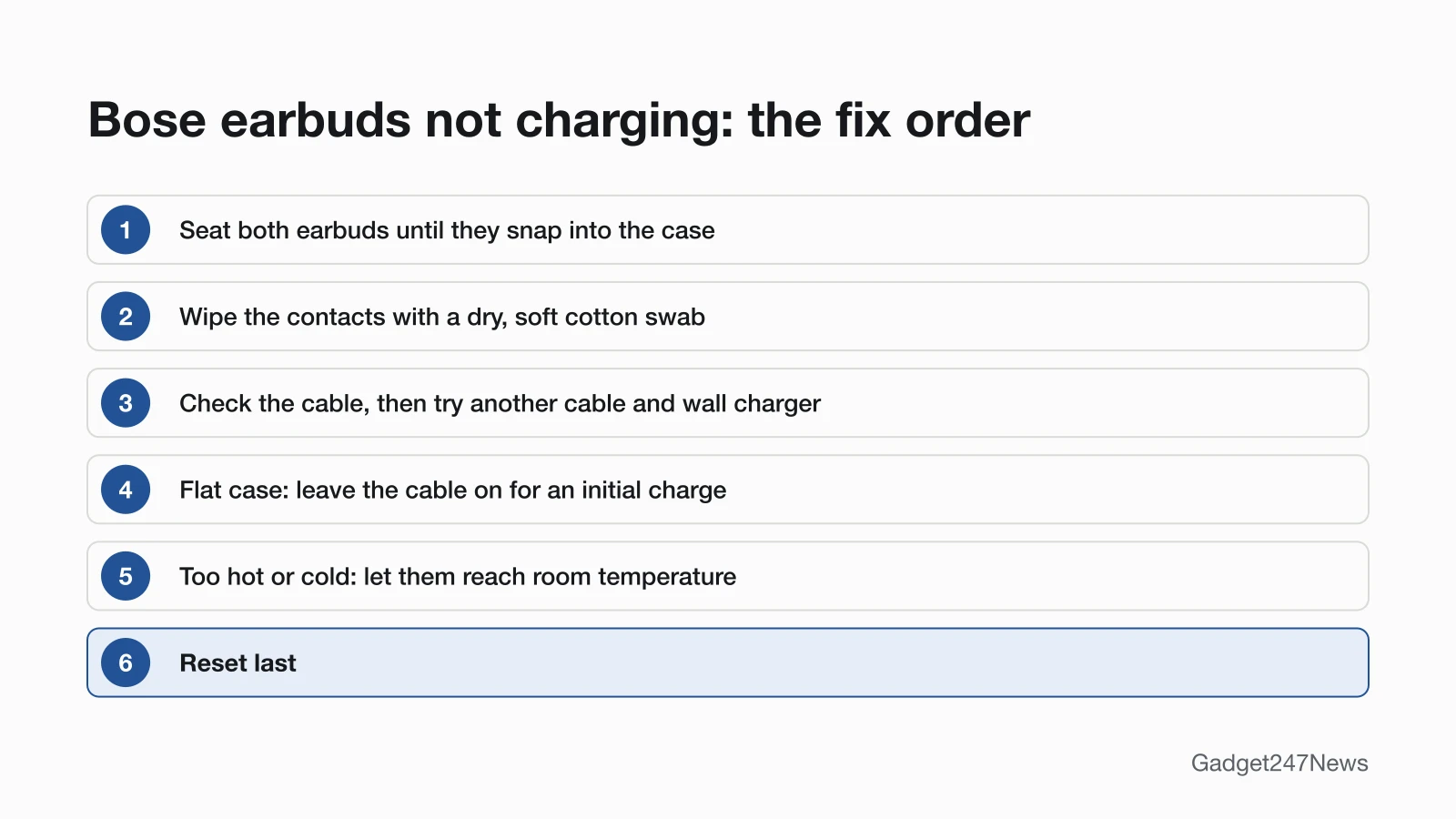
These fixes follow Bose's own order where Bose gives one; the reset comes last.
Fix 1: Seat Both Earbuds in the Case
To seat Bose earbuds, line up the contacts and press until each one snaps in:
- Align the charging contacts on each earbud with the charging pins on the same side of the case, then place it until it "magnetically snaps into place".
- Check the stability bands sit correctly. If they don't, Bose warns, the contacts "may not align with the charging pins in the case" (QuietComfort Ultra Earbuds (2nd Gen), QuietComfort Earbuds (2024)).
- Ultra Open Earbuds: remove the plastic film from the case surface under each earbud. An earbud light that quickly blinks amber means it isn't placed properly.
Close the lid while they charge; Bose says a closed case helps preserve battery life.
Fix 2: Clean the Charging Contacts
To clean the contacts, use a dry swab and check the pins:
- Wipe the charging contacts on each earbud with a "dry, soft cotton swab or equivalent". Bose recommends doing this regularly to prevent corrosion.
- Look for dirt or debris on the charging pins in the case (Ultra Open Earbuds: liquid too), then seat the earbuds again.
For eartips and the rest of the earbud, see how to clean earbuds.
Fix 3: Check the Cable, Wall Charger and Port
Bose's checks for the cable side:
- The USB cable is "correctly aligned with the port" (on QuietComfort Ultra Earbuds (2nd Gen), the USB-C port on the bottom of the case).
- Both ends of the cable are secure.
- Try another USB cable, then another wall charger. The QuietComfort Earbuds (2024) guide puts it as "Try another USB cable, wall charger, or power source."
- Case accessories are properly installed and don't stop the cable connecting securely (QuietComfort Ultra Earbuds (2nd Gen)).
Fix 4: Give a Flat Case Time to Wake Up
A completely drained case needs the cable left on for a while:
- If the case battery is fully depleted, keep the USB cable attached long enough for the case to gain an initial charge.
- Bose's rule: "If you remove the cable and the charging case status light goes out, reattach the USB cable."
Fix 5: Read the Charging Light
The charging light tells you whether power is getting through. Bose's light meanings by model:
| Model | Charging | Full | Other states |
|---|---|---|---|
| QuietComfort Ultra Earbuds (2nd Gen) | Earbud light (inside the case) and case light (front) slowly pulse amber | Earbud light solid white; case light solid white on power | Case blinks amber 2 times: under 10%, needs a charge |
| QuietComfort Earbuds (2024) | Front light slowly pulses amber | Solid green | Case off power, no earbuds: solid red for 5 seconds means 1% to 29% |
| Ultra Open Earbuds | Earbud lights slowly pulse amber | Solid white | Quickly blinks amber: earbud not placed properly |
| QuietComfort Ultra Headphones (2nd Gen) | Solid amber | Solid white | None listed here |
| QuietComfort Headphones | Blinks white for 10 seconds as charging starts | Solid white | None listed here |
On QuietComfort Ultra Earbuds (2nd Gen), Ultra Open Earbuds and QuietComfort Headphones, a light that blinks amber and white is an error, and Bose's light table says to contact Bose customer service.
Fix 6: Wireless Charging (QuietComfort Ultra Earbuds (2nd Gen), QuietComfort Earbuds)
Both cases charge on a compatible third-party wireless charger, but placement matters:
- QuietComfort Ultra Earbuds (2nd Gen): align the button on the back of the case with the center of your wireless charger.
- QuietComfort Earbuds (2024): place the case "directly in the center" of the charger.
The case light then glows according to its charging status.
Fix 7: Let Them Reach Room Temperature
If the earbuds or case got very hot or cold, let them return to room temperature, then charge again. For QuietComfort Ultra Earbuds (2nd Gen), QuietComfort Earbuds (2024) and Ultra Open Earbuds, Bose says to charge at room temperature, "between 46° F (8° C) and 102° F (39° C)".
Fix 8 (Last): Reset Your Bose
A reset reboots the earbuds and case without clearing your settings. On QuietComfort Ultra Earbuds (2nd Gen), put the earbuds in the case, close the lid, plug the case into power, and hold the button on the back for about 30 seconds, until the case light turns off. For other models, see how to reset Bose headphones.
One Earbud, the Case or Headphones Not Charging
When only one part won't charge, check that part on its own.
Left or Right Earbud Not Charging
To get one Bose earbud charging again:
- Wipe that earbud's contacts with a dry cotton swab and check its pins in the case.
- Reseat it until it snaps in, with its stability band positioned correctly (Ultra Open Earbuds: film removed, no fast amber blink).
- Check the earbud battery level in the Bose app. On QuietComfort Ultra Earbuds (2nd Gen), when one earbud is lower than the other, the earbud light "reflects the lower battery level".
If it charges but stays silent in use, see Bose headphones working on one side only.
Bose Headphones Not Charging
QuietComfort Ultra Headphones (2nd Gen) charge from a computer or wall charger over USB-C. The light glows solid amber while charging and solid white when full; Bose says to "Allow up to 3 hours", and you can keep listening in Bluetooth, AUX or USB audio mode while they charge. QuietComfort Headphones blink white for 10 seconds when charging starts and need up to 2.5 hours, and they "don't play and aren't available in the Bose app while charging".
If they won't charge, make sure both ends of the USB cable are secure, try "a different USB-A wall charger, USB cable, or AC (mains) power source", and let hot or cold headphones reach room temperature first. We haven't read the QuietComfort 45 or 700 guides, so those models aren't covered here.
Still not working?
- Try the next fix: Bose headphones battery draining fast (if they charge but don't last).
- Reset your Bose headphones or earbuds: reset Bose headphones (after a factory restore, you'll pair them again).
- Contact Bose Support: Bose Support.
- Check repair or warranty options: Bose headphones repair.
Started after an update? Check the Update Tracker for known issues.
Related Battery Problems
- They charge but drain fast: use the battery-drain link above.
- They won't turn on at all: start with How to turn Bose headphones on and off.
Bose Charging: Quick Answers
Why are my Bose earbuds not charging in the case?
Usually an earbud isn't sitting on the charging pins, or the contacts are dirty. A stability band out of place or, on Ultra Open Earbuds, the film in the case can block the contacts. Reseat both earbuds until they snap in and wipe the contacts with a dry, soft cotton swab.
Why is one Bose earbud not charging?
Clean that earbud's contacts, check its pins and reseat it until it snaps into place. On Ultra Open Earbuds, an earbud light that quickly blinks amber means it isn't placed properly; remove the plastic film under it and try again.
How do I know my Bose earbuds are charging?
The earbud light slowly pulses amber while they charge. It turns solid white when full on QuietComfort Ultra Earbuds (2nd Gen) and Ultra Open Earbuds, and solid green on QuietComfort Earbuds (2024).
Sources
We checked this page against the pages below, most recently on . How we verify fixes
- Owner's Guide, Bose QuietComfort Ultra Earbuds (2nd Gen) (Bose, assets.bosecreative.com)Official
- Owner's Guide, Bose QuietComfort Earbuds (Bose, assets.bosecreative.com)Official
- Owner's Guide, Bose Ultra Open Earbuds (Bose, assets.bosecreative.com)Official
- Owner's Guide, Bose QuietComfort Ultra Headphones (2nd Gen) (Bose, assets.bosecreative.com)Official
- Owner's Guide, Bose QuietComfort Headphones (Bose, assets.bosecreative.com)Official
- Resetting your product | Bose QuietComfort Ultra Earbuds (2nd Gen) (Bose, support.bose.com)Official