Garmin Watch Battery Draining Fast? Causes and Fixes

By Suraj Giri, Founder & Publisher. Reviewed by Suraj Giri on .
Published · 7 min read
How this page was made
- Sources. Checked against 10 official pages from Garmin, most recently on . See the sources.
- No device testing. We don't test fixes on physical devices, so nothing on this page is a hands-on result. A fact counts as verified only when it matches an official source page.
- AI use. As with every page on Gadget247News, AI tools helped research, outline, draft and edit this page, and re-read the official pages to flag facts that didn't match. The illustration at the top was generated with Runway and is labelled under the image.
- Human sign-off. Suraj Giri, Founder & Publisher, read this page and signed it off on . The site won't publish a page without that sign-off.
- Changes. The published and updated dates move only when the content changes, and every change gets a dated note. Spot an error or a fix that didn't work? Email info@gadget247news.com.
Read our AI use policy, editorial policy and corrections policy.
Garmin rates battery life per model and mode: a Forerunner 265 is rated for up to 13 days in smartwatch mode and up to 20 hours of GPS Only activity, and Garmin adds that "the actual battery life depends on the features enabled on your watch." This page is for a battery that runs down faster than its rating. Sudden drain points to something that changed: a setting, a Connect IQ watch face or a software update. Slow fading over years is battery age, covered near the end. Charging and power faults are on the Garmin watch fixes hub.
Other brands name their saver modes differently, and the cross-brand guide to smartwatch battery drain covers Apple Watch, Galaxy Watch, Pixel Watch and more.
Why Your Garmin Watch Battery Drains Fast
Garmin's battery FAQ lists the features that pull a watch's battery down faster, and they fall into seven groups:
- Display brightness and Always On Display. "High display brightness significantly drains the battery," and so does a display that wakes often.
- GPS during activities, most of all in multi-system modes. Garmin says "using multiple systems can reduce battery life more quickly than using GPS only."
- Pulse Ox set to All-Day or During Sleep, which Garmin says "will use the battery at a higher rate."
- Constant phone features over Bluetooth, plus Wi-Fi and LTE on watches that have them. Infrequent texts cost little, but "continuous use of features like texting, calls, music control, or weather updates will drain the battery more significantly."
- Music and voice features. Playing music uses more battery, and for OK Garmin and Phone Assistant Garmin says "Enabling hands-free voice features will reduce battery life."
- Connect IQ watch faces, apps, widgets and data fields, which "may draw more power depending on functions or the use of GPS positioning."
- A software update in progress, which causes "a one-time increase in battery drain while the device is updating."
How to Fix a Garmin Watch That Drains Fast
These fixes start with the display, the first items on Garmin's longest-battery-life list, and end with Garmin's two steps for a watch that is "still rapidly draining": a software update and a power cycle. Menu names vary by model, and Garmin points to your owner's manual "for feature compatibility and the location of each setting."
Fix 1: Lower the Brightness and Turn Off Always On Display
Change three display settings on the watch:
- Lower the brightness of the display or backlight.
- Turn off Always On Display.
- Reduce the display timeout.
On a Forerunner 265, Garmin also suggests a watch face "that is not updated every second." The trade-off is large on a vívoactive 5: Always On display mode cuts its rated life from up to 11 days to up to 5 days.
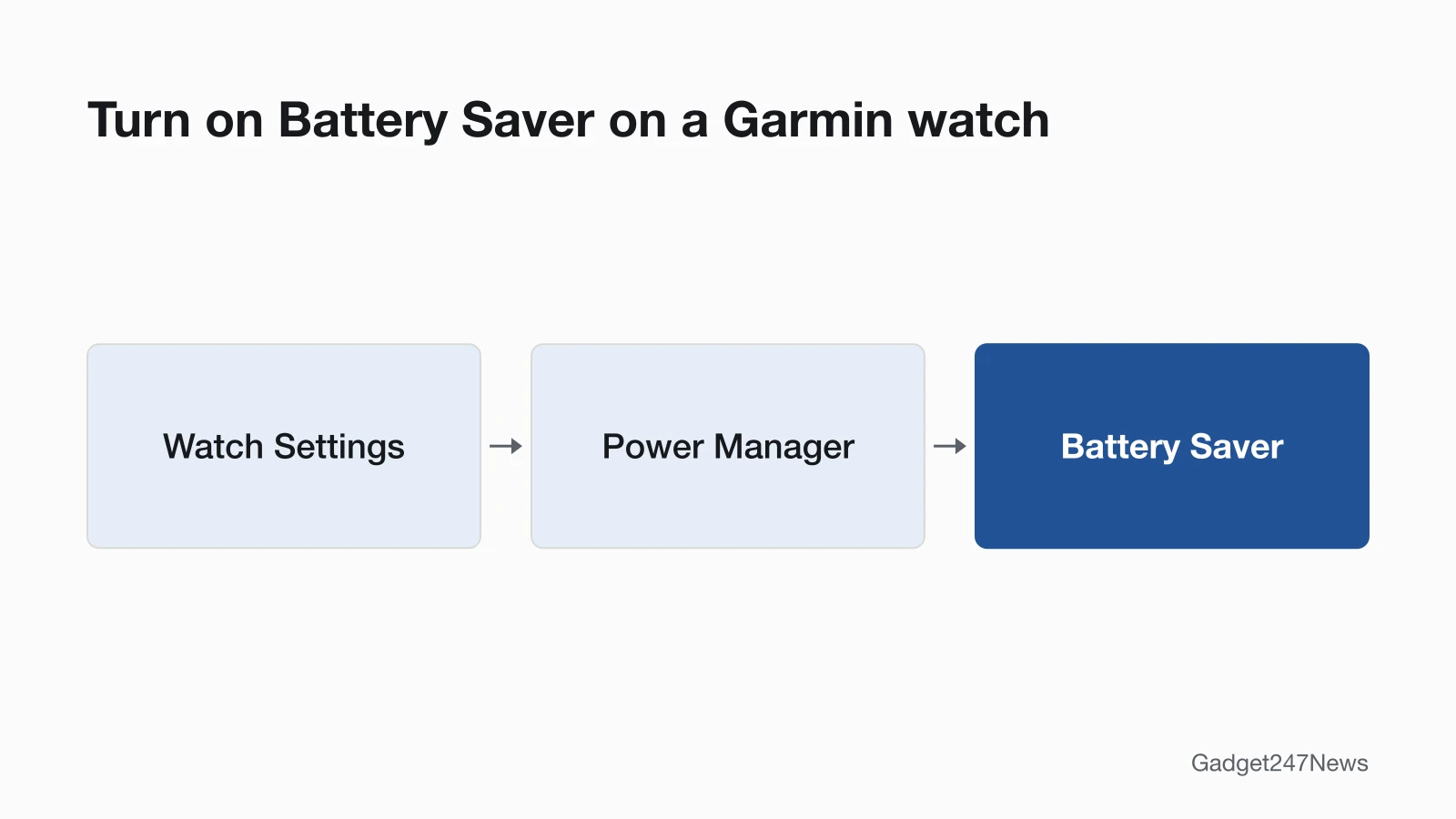
Fix 2: Turn On Battery Saver in Power Manager
Turn on Battery Saver from the watch's Power Manager:
- Open Watch Settings › Power Manager › Battery Saver. On some models the path is Watch Settings › System › Battery Manager › Battery Saver.
- Turn Battery Saver on. Select models let you choose Edit to pick what it changes, and show an estimate of how each change affects battery life.
- Expect trade-offs. By default, Battery Saver may dim the display, turn off Bluetooth and Wi-Fi, turn off wrist heart rate and Pulse Ox, and switch to a simplified watch face.
Garmin warns that Battery Saver "can stop certain features from working." When the battery falls to 10%, the watch asks whether to turn Battery Saver on.
Fix 3: Use Less GPS and Sensor Power
Four GPS and sensor changes stretch the battery:
- Choose GPS Only over All Systems or All + Multi-Band when you don't need them. On the Forerunner 970, Garmin rates GPS Only at up to 26 hours and All + Multi-Band at up to 21 hours.
- Set Pulse Ox to Manual or On Demand instead of All-Day or During Sleep, which Garmin recommends "to conserve battery life."
- Use Smart recording in place of Every Second recording; Garmin's list says "Use Smart Data Recording."
- Pick a Power Mode for long outings. Max Battery "disables most power-intensive features and sets GPS recording to UltraTrac mode," and Garmin says UltraTrac "increases battery life but decreases the quality of recorded activities." Not every watch has every preset.
The fēnix 9 series renames these settings: GPS Only is Extended Battery and UltraTrac is Max Battery.
Fix 4: Trim Alerts, Notifications and Connections
Cut the alerts and radios you don't use:
- Choose audio tones or vibration for alerts, not both.
- Limit the phone notifications the watch displays. To choose which apps notify you, see Garmin watch not getting notifications.
- Turn off Wi-Fi, and LTE on compatible watches, when you don't need them.
- Stop broadcasting heart rate data to paired Garmin devices, and limit ANT+ or Bluetooth sensors.
Turning Bluetooth off saves power too, but Garmin's Smart Notifications and LiveTrack run over Bluetooth, so they stop with it.
Fix 5: Update the Software
Update the watch if it still drains after the settings changes:
- Check for new software with Garmin Express. Garmin recommends it "to make sure your software is the most current version."
- Expect a short spike while the update installs. Garmin says "Battery drain should return to normal after the update is installed."
The full steps are in How to update your Garmin watch.
Fix 6 (Last): Restart the Watch, Then Reset
Power the watch off and on, which Garmin says "will end any background processes." On 5-button watches, hold the upper-left button and select Power Off; on 2-button watches, hold the upper-right button. A factory reset comes only after that, and the steps are in How to restart or factory reset a Garmin watch.
Garmin Watch Battery Life by Model
Garmin's owner's manuals rate battery life per mode, and each page repeats that the actual battery life depends on the features you turn on.
| Model | Smartwatch mode | GPS Only | Other rated modes | Source |
|---|---|---|---|---|
| Forerunner 265 | Up to 13 days | Up to 20 hr | Auto Select up to 16 hr; All + Multi-Band up to 14 hr | Forerunner 265 manual |
| Forerunner 265S | Up to 15 days | Up to 24 hr | Auto Select up to 18 hr; All + Multi-Band up to 15 hr | Forerunner 265 manual |
| vívoactive 5 | Up to 11 days | Up to 21 hr | Battery saver up to 21 days; Always On display up to 5 days; All Systems up to 17 hr | vívoactive 5 manual |
| Forerunner 970 | Up to 15 days | Up to 26 hr | Auto Select up to 23 hr; All + Multi-Band up to 21 hr | Forerunner 970 manual |
Each figure belongs to its own watch. The 26 hours of GPS Only is a Forerunner 970 rating, not a Garmin-wide one, and the Forerunner 265 GPS hours assume wrist-based heart rate is on.

Still not working?
If the battery still runs down faster than its rating after the six fixes, go down this list:
- Try the next fix: Garmin watch not charging (if it also won't charge fully).
- Reset your Garmin watch: How to restart or factory reset a Garmin watch (you'll need to pair it again afterwards).
- Contact Garmin Support: Garmin Support.
- Check repair or warranty options: Understanding Garmin Service Options.
Started after an update? Check the Update Tracker for known issues.
Started After an Update?
Garmin has fixed battery drain bugs in its own software, so an update can cure drain as well as cause it. On the Forerunner 970, version 17.33 (May 2026) "Fixes an issue that could cause excessive battery drain after using the phone assistant or accepting a phone call on the watch," and version 17.37 (July 2026) fixes "a shorter-than-expected battery life." Install the latest software first, then check Garmin watch software updates for your model's current version and known issues.
Battery Health and Replacement
Garmin says rechargeable batteries "naturally lose capacity over time," and under normal conditions should keep "approximately 80% of their original capacity after a few years of frequent charge/discharge cycles." Extreme temperatures speed that loss up, and so does leaving the battery fully charged or fully drained for longer than two weeks. Most Garmin devices have no user-replaceable battery, to keep the water-resistant seal. If the drain survives all six fixes, contact Garmin Product Support, which may request the watch for service.
Garmin Watch Battery: Quick Answers
How long does a Garmin watch battery last?
Garmin rates the watches in our table at up to 11 to 15 days in smartwatch mode: 11 for the vívoactive 5, 13 for the Forerunner 265, and 15 for the Forerunner 265S and Forerunner 970. GPS use shortens that to hours; your owner's manual lists every mode on its "Battery Life Information" page.
Why is my Garmin battery dying so fast?
A bright or Always On display, multi-system GPS, all-day Pulse Ox and constant phone features are the drains Garmin names first. A software update in progress adds a one-time drain. Start with the Quick Fix.
Why is my vívoactive 5 battery draining so fast?
Always On display is the first setting to check on a vívoactive 5. Garmin rates the watch at up to 5 days in Always On display mode against up to 11 days in standard smartwatch mode. All Systems GPS (up to 17 hours, against up to 21 hours for GPS Only) and music cut it further.
Is Body Battery the same as my watch's battery?
No. Body Battery is an energy gauge for you, not the watch's charge level. Garmin describes it as a feature that "estimates your energy reserves throughout the day," with a score from 5 to 100. Our guide to Garmin Body Battery explains the score.
Sources
We checked this page against the pages below, most recently on . How we verify fixes
- Why Is the Battery of My Garmin Wearable Draining Faster Than Expected? (Garmin, support.garmin.com)Official
- How to Use Power Manager on Garmin Watches (Garmin, support.garmin.com)Official
- Garmin Watch Satellite System Options (Garmin, support.garmin.com)Official
- Forerunner 265 Series Watch Owner's Manual: Battery Life Information (Garmin, www8.garmin.com)Official
- Forerunner 265 Series Watch Owner's Manual: Maximizing Battery Life (Garmin, www8.garmin.com)Official
- vívoactive 5 Owner's Manual: Battery Life Information (Garmin, www8.garmin.com)Official
- Forerunner 970 Watch Owner's Manual: Battery Life Information (Garmin, www8.garmin.com)Official
- Update and Learn More About the Software on Your Forerunner 970 (Garmin, support.garmin.com)Official
- Garmin Connect App: Device or Accessory Not Found During the Pairing Process (Garmin, support.garmin.com)Official
- Understanding Garmin Service Options (Garmin, support.garmin.com)Official