Garmin Watch Not Charging? Causes and Fixes

By Suraj Giri, Founder & Publisher. Reviewed by Suraj Giri on .
Published · 6 min read
How this page was made
- Sources. Checked against 8 official pages from Garmin, most recently on . See the sources.
- No device testing. We don't test fixes on physical devices, so nothing on this page is a hands-on result. A fact counts as verified only when it matches an official source page.
- AI use. As with every page on Gadget247News, AI tools helped research, outline, draft and edit this page, and re-read the official pages to flag facts that didn't match. The illustration at the top was generated with Runway and is labelled under the image.
- Human sign-off. Suraj Giri, Founder & Publisher, read this page and signed it off on . The site won't publish a page without that sign-off.
- Changes. The published and updated dates move only when the content changes, and every change gets a dated note. Spot an error or a fix that didn't work? Email info@gadget247news.com.
Read our AI use policy, editorial policy and corrections policy.
This guide is for a Garmin watch that sits on its cable while the battery level refuses to climb. A screen that stays completely dark, even on power, is a won't-turn-on fault, and a watch that charges but empties fast is battery drain; both have their own pages. Garmin says charging contacts may need cleaning "due to prolonged exposure to sweat, dirt, or debris," so the Quick Fix starts with them. Pairing, sync and other faults are on the Garmin watch pairing, sync and battery fixes hub.
Charging a watch from another maker works differently. The cross-brand guide for a smartwatch not charging or turning on gives the first fix for Apple Watch, Galaxy Watch, Pixel Watch and the other brands we cover.
Why Your Garmin Watch Isn't Charging
A Garmin watch stops taking a charge for one of six reasons, all drawn from Garmin's support pages and owner's manuals:
- Dirty or corroded contacts on the watch or the cable, from sweat, dirt or debris.
- A damaged cable. Garmin lists charging pins that are "bent, missing, or stuck at different heights."
- A faulty power source. Garmin says to "rule out a faulty wall adapter or USB port."
- A loose connection. The cable isn't connected the way the owner's manual shows, for example a clip that isn't lined up with the contacts.
- A low-power state. Garmin says watches "can get caught in a low-power state," which makes them look frozen or unable to power on.
- A dirty or damaged charging port. Garmin asks you to check the port "for debris, corrosion, or damage."
Each cause has a fix below: the cable and the connection in Fixes 1 and 2, the contacts in Fix 3, the power source in Fix 4 and the low-power state in Fix 6.
How to Fix a Garmin Watch That Won't Charge
Work through the fixes in this order: cable, contacts and power source first, and the forced restart last. Garmin's won't-turn-on FAQ, written for a watch that is "unresponsive or has a blank screen," puts that restart first.
Fix 1: Use the Garmin Cable That Came With the Watch
Charge the watch with the Garmin cable from its box. The Forerunner 265 manual says the watch "comes with a proprietary charging cable," and for replacement parts it points to buy.garmin.com or your Garmin dealer. The Lily 2 manual adds a warning: "Do not use a power cable, data cable, and/or power adapter that is not supplied by Garmin or is not properly certified."
Fix 2: Seat the Cable Firmly
Connect the cable the way your model's manual shows. On a Forerunner 265:
- Plug the cable end marked with the Garmin triangle symbol into the charging port on the watch.
- Plug the other end into a USB-C computer port or an AC adapter with a 5 W minimum power rating.
A Lily 2 uses a clip instead: pinch the charging clip, align it with the contacts on the back of the watch, then plug the USB cable into a power source.
Fix 3: Clean the Charging Contacts and Cable
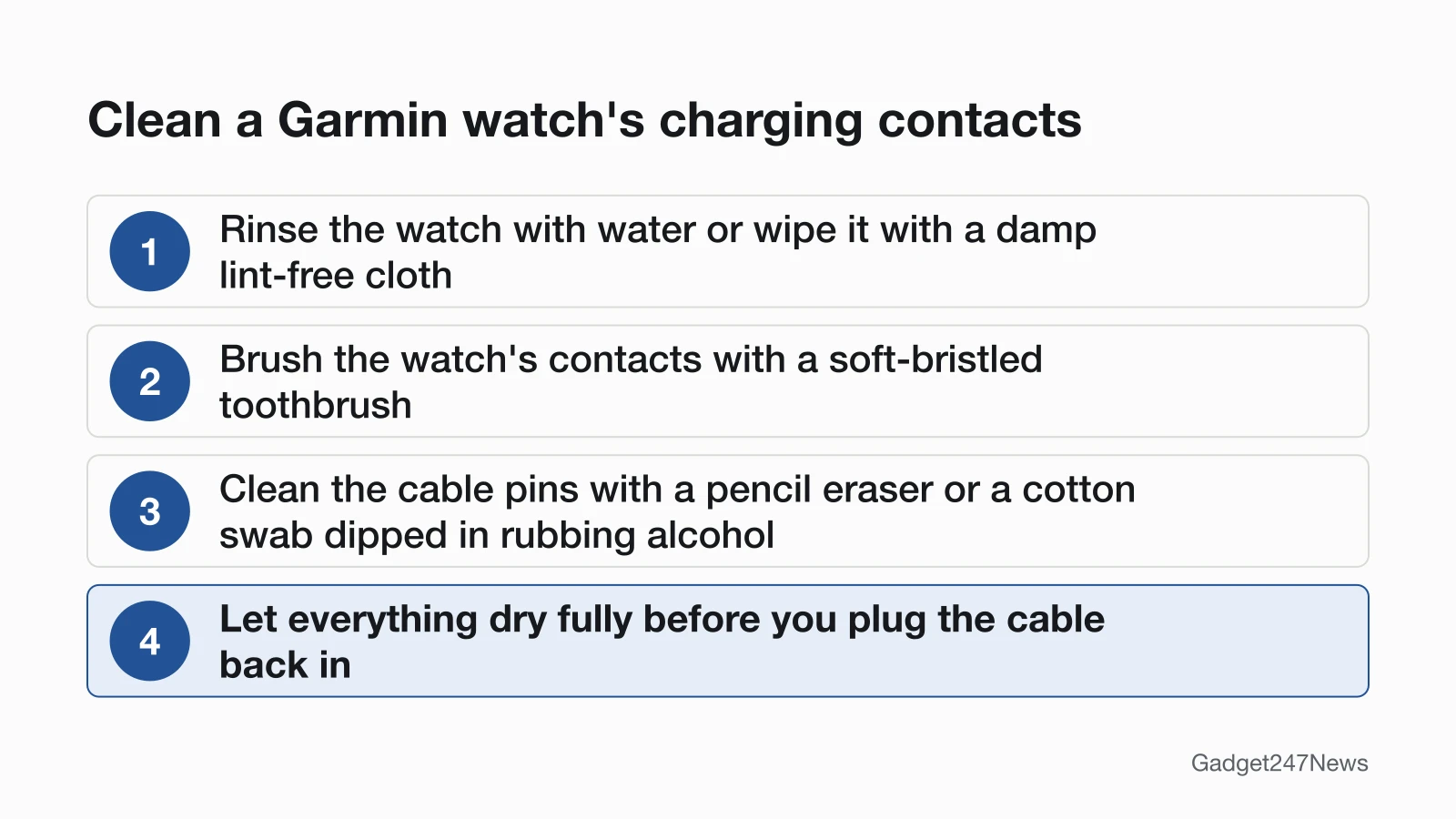
Garmin's cleaning FAQ uses water on the watch itself and rubbing alcohol on the cable pins; its won't-turn-on FAQ uses rubbing alcohol on the contacts of both.
- Rinse the watch with water, or wipe it with a dampened lint-free cloth.
- Brush debris off the watch's charging contacts with a soft-bristled toothbrush. Keep the brush out of cavities and holes, especially on watches with speakers and microphones.
- Clean the cable's pins with a pencil eraser or a cotton swab dipped in rubbing alcohol.
- Let everything air dry. Garmin says the watch must be "fully dry before plugging back into the charging cable."
Don't use sharp objects, and never poke or prod any openings. Garmin doesn't recommend ultrasonic cleaners either, since one "may result in damaging the device." The Forerunner 265 and Lily 2 manuals ask you to clean and dry the contacts before charging "to prevent corrosion."
Fix 4: Try Another Outlet, Adapter or Port
Move the cable to a different outlet to rule out a faulty wall adapter or USB port. Garmin calls a wall outlet or a computer a "proven power source." If your Forerunner 265 charges from an adapter, check that the adapter meets the 5 W minimum from Fix 2.
Fix 5: Check the Charge Level on the Screen
Look at the screen once the cable is on. The Forerunner 265 manual says the watch "displays the current battery charge level" while it charges. Two readouts tell you where the battery stands:
| Indicator | What it means | Source |
|---|---|---|
| Battery charge level on the screen | The watch is connected to power; disconnect it once the level reaches 100% | Forerunner 265 owner's manual |
| Battery Saver prompt | The battery has dropped to 10% | Garmin's Power Manager FAQ |
If the level hasn't moved after Fixes 1 to 4, go to the forced restart.
Fix 6 (Last): Force Restart It While It's on the Charger
Force restart the watch while it's connected to power:
- Connect the watch to a wall outlet or a computer.
- Press and hold the power button for a full 60 seconds.
- If the screen stays blank, release the button, wait 10 seconds and hold it for another 60 seconds.
Garmin says: "You may lose minor data like recent steps, but your saved activities should not be impacted." The power button differs by model. A forced restart is not a factory reset; only reset a Garmin watch once all six fixes have failed.
Charging Problems by Model
The fixes above come from Garmin's general charging FAQs and two owner's manuals, and two cases work differently: the charger style, and four older Forerunner watches.
Plug-Style and Clip-Style Chargers
Garmin's won't-turn-on FAQ pictures two contact styles: plug-style contacts on a Forerunner and clip-style contacts on a Lily. A plug-style cable goes into a charging port on the watch. A clip-style charger is pinched and lined up with the contacts on the back of the watch. Garmin's example of a healthy clip charger shows its 4 pins at the same height, and both styles need clean contacts. The FAQ doesn't list which models use which charger; the Charging the Watch page in your owner's manual shows yours.
Older Forerunner Models (205, 305, 310XT, 910XT)
For the Forerunner 205, 305, 310XT and 910XT only, Garmin's fix is a hard reset on power:
- Connect the watch to a power source with the charging cable.
- Press and hold MODE and LAP/RESET for 10 seconds.
- Release both buttons, then power the watch on.
Garmin says "No user information will be lost by doing this reset." For these four models it also lists eye glass cleaner and electronic screen wipes as safe for the contacts. Don't use this button pair on newer watches. Approach golf watches have a separate Garmin page, My Approach Watch Will Not Power On or Charge, which says a charging Approach shows a lightning bolt in the battery icon.
Still not working?
If the battery level still won't rise after the six fixes, take these steps in order:
- Try the next fix: Garmin watch won't turn on (if the screen stays dark on the charger).
- Reset your Garmin watch: reset a Garmin watch (you'll need to pair it again afterwards).
- Contact Garmin Support: Garmin Support.
- Check repair or warranty options: Understanding Garmin Service Options. If the problem can't be solved remotely, Garmin says Product Support may ask for the watch back for service.
Started after an update? Check the Update Tracker for known issues.
Related Problems
Two faults look like a charging failure at first but need different fixes.
Charges but Won't Hold a Charge
A watch that reaches 100% on the cable and then runs flat quickly is charging fine; the battery is draining. Display brightness, GPS use and Battery Saver are the settings to check first, with the steps on Garmin watch battery draining fast.
Won't Turn On at All
A screen that stays completely dark, even on the charger, follows Garmin's own order: the 60-second forced restart on power first, then the outlet, cable and contacts. The full steps are on Garmin watch won't turn on.
Garmin Charging: Quick Answers
Why is my Garmin watch not charging?
Dirty contacts, a damaged cable pin or a faulty adapter or USB port stop a Garmin watch charging, and a watch stuck in a low-power state can look dead on the cable. Clean the contacts and the pins, try a different outlet, then force restart it on power by holding the power button for 60 seconds.
Why won't my Garmin Instinct charge?
An Instinct follows the same Garmin steps as other Garmin watches: clean the contacts, check the cable pins, then change the outlet. Garmin's cleaning FAQ covers the contacts on "your Garmin device or charging accessory" without naming models, so there are no Instinct-only steps.
How do I know my Garmin watch is charging?
The watch shows its current battery charge level while it's connected, according to the Forerunner 265 manual. If that level doesn't rise after a clean and a new outlet, force restart the watch on the charger.
Sources
We checked this page against the pages below, most recently on . How we verify fixes
- Cleaning the Charging Contacts on a Garmin Wearable (Garmin, support.garmin.com)Official
- My Garmin Wearable or Edge Device Will Not Turn On (Garmin, support.garmin.com)Official
- Forerunner 265 Series Watch Owner's Manual: Charging the Watch (Garmin, www8.garmin.com)Official
- Lily 2 Owner's Manual: Charging the Watch (Garmin, www8.garmin.com)Official
- How to Use Power Manager on Garmin Watches (Garmin, support.garmin.com)Official
- My Forerunner or Edge Is Not Powering on or Charging (Garmin, support.garmin.com)Official
- My Approach Watch Will Not Power On or Charge (Garmin, support.garmin.com)Official
- Understanding Garmin Service Options (Garmin, support.garmin.com)Official