How to Update Fitbit

By Suraj Giri, Founder & Publisher. Reviewed by Suraj Giri on .
Published · 4 min read
How this page was made
- Sources. Checked against 6 official pages from Google, most recently on . See the sources.
- No device testing. We don't test fixes on physical devices, so nothing on this page is a hands-on result. A fact counts as verified only when it matches an official source page.
- AI use. As with every page on Gadget247News, AI tools helped research, outline, draft and edit this page, and re-read the official pages to flag facts that didn't match. The illustration at the top was generated with Runway and is labelled under the image.
- Human sign-off. Suraj Giri, Founder & Publisher, read this page and signed it off on . The site won't publish a page without that sign-off.
- Changes. The published and updated dates move only when the content changes, and every change gets a dated note. Spot an error or a fix that didn't work? Email info@gadget247news.com.
Read our AI use policy, editorial policy and corrections policy.
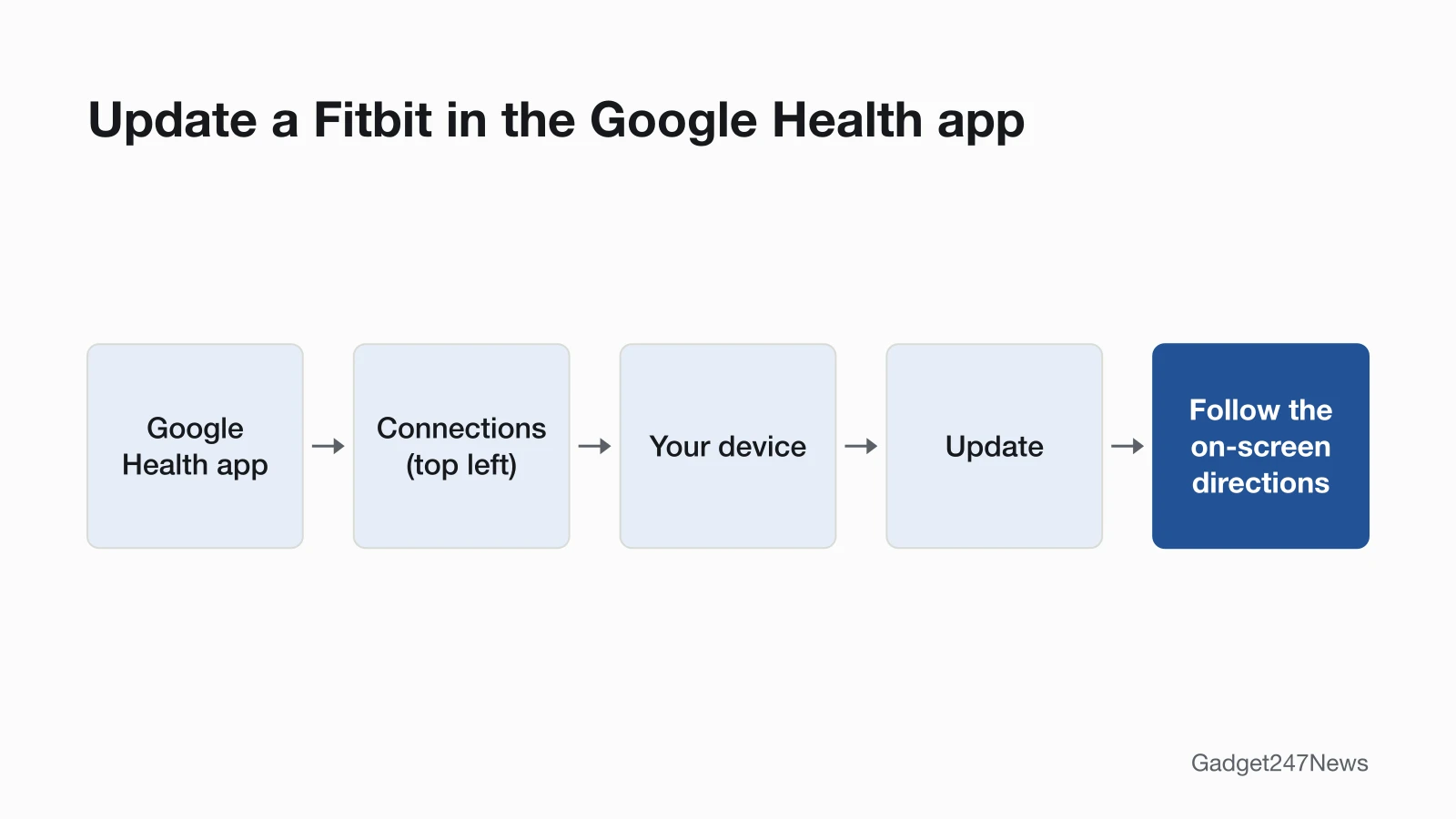
Open the Google Health app with your Fitbit charged and nearby, tap Connections, then your device, then Update. The Update button only appears when an update is ready for you, because Google releases Fitbit updates gradually. Google's update steps start in the Google Health app (formerly the Fitbit app) on your phone or tablet. See every device's current version in Fitbit updates on the Update Tracker, and other faults on Fitbit not working.
How to Update Your Fitbit From the Google Health App
To update a Fitbit, start the update in the Google Health app and keep the Fitbit beside your phone until the progress bar finishes:
- Charge the Fitbit to at least 50%; Google recommends 75% or more, and its release notes suggest plugging the Fitbit into the charger before you start.
- Update the Google Health app to the latest version in your app store.
- Open the Google Health app with your Fitbit nearby.
- At the top left, tap Connections, then your device.
- Tap Update. The button is only there when an update is available.
- Follow the directions on the screen and keep your Fitbit close to your phone, tablet or computer. A progress bar appears on the Fitbit and in the app until the update is complete.
Google says keeping the app running is what keeps the update loading, so leave it open in the background.
Can You Update a Fitbit Without Your Phone?
Google gives no phone-free way to update a Fitbit: its update steps start in the Google Health app on a phone or tablet. Sense, Versa 3, Versa 2, the original Versa and Ionic can also join Wi-Fi "for faster firmware updates": tap Connections › your watch › Wi-Fi Settings › Add Network. They won't join 5GHz networks or public networks that need a login. One exception needs a computer: a Versa Lite Edition on version 38.6.1.1 must be on its charging cable, plugged into a computer's USB port, before the update starts.
Why There's No Update Button
The Update button is missing when no update has reached your Fitbit yet. Google sends Fitbit updates "to everyone gradually over time" and releases them in phases, so check the app again later. Google's release notes list what changed in each version, model by model.
How to Check Your Fitbit Software Version
Your Fitbit's software version is under its name in the Google Health app:
- In the app: open the Google Health app, then at the top left tap Connections › your device. The version number sits under your Fitbit's name.
- On the Fitbit: on some models, open Settings › About or Device Info.
- Google Fitbit Air: tap Connections › your device › System › About and look under "Firmware version".
Compare the number with the newest release on Fitbit and Pixel Watch updates.
Does Fitbit Update Automatically?
Not on Fitbit trackers and watches: Google describes no automatic-install setting for them, so you start each update with Update in the app. Fitbit scales are the exception, because Google says a scale "checks for updates by itself" and installs them. Google Fitbit Air on firmware 20001.229.37, 20001.229.51 or 20001.229.84 gets the latest firmware another way: put it on its charger, tap Connections › your device › Sync, and follow the on-screen instructions.
If Your Fitbit Won't Update
Google's first steps for a stuck update are to force quit the Google Health app, turn Bluetooth off for at least 10 seconds, restart the Fitbit and then the phone, and keep the Fitbit within 2 to 3 feet. It also suggests turning off Bluetooth on other nearby devices, because several paired devices can cause connection problems. The full order is in Fitbit won't update. If your Fitbit won't connect to your phone at all, fix the connection first.
What Changed in the Latest Fitbit Update?
Google says Fitbit updates add new features and help fix issues, and this page leaves current version numbers to the release notes because they change. Security updates carry one of four ratings: Critical, Important, Moderate or Low. Google recommends that you apply a critical or important update immediately. Versions and known issues for each model are tracked on the Fitbit and Pixel Watch updates page. Get an email when a Fitbit update breaks something, and when it's fixed.
Update Questions
How long does a Fitbit update take?
A Fitbit update can take up to an hour or more: Google's update page says it "may take more than one hour", and its troubleshooting page says "up to an hour". A small part of the firmware downloads to the Fitbit each time it syncs, so keep the Google Health app running in the background until it's done.
Do I need Wi-Fi to update my Fitbit?
Your phone needs "a stable Wi-Fi or cellular connection", so Wi-Fi isn't required. The update then reaches the Fitbit a little at a time, each time it syncs with the phone. Only Sense, Versa 3, Versa 2, the original Versa and Ionic can join Wi-Fi themselves for faster firmware downloads.
Sources
We checked this page against the pages below, most recently on . How we verify fixes
- Update your Fitbit device (Google, support.google.com)Official
- Troubleshoot updating your Fitbit device (Google, support.google.com)Official
- How to fix a blank, unresponsive, rebooting, or flickering Fitbit device screen (Google, support.google.com)Official
- How do I connect my Fitbit watch to Wi-Fi? (Google, support.google.com)Official
- What's changed in the latest Fitbit device update? (Google, support.google.com)Official
- What is new with the redesigned Google Health app (Google, support.google.com)Official