One Skullcandy Earbud Not Working? Left or Right Side Fixes

By Suraj Giri, Founder & Publisher. Reviewed by Suraj Giri on .
Published · 6 min read
How this page was made
- Sources. Checked against 11 official pages from Skullcandy, Apple and Google, most recently on . See the sources.
- No device testing. We don't test fixes on physical devices, so nothing on this page is a hands-on result. A fact counts as verified only when it matches an official source page.
- AI use. As with every page on Gadget247News, AI tools helped research, outline, draft and edit this page, and re-read the official pages to flag facts that didn't match. The illustration at the top was generated with Runway and is labelled under the image.
- Human sign-off. Suraj Giri, Founder & Publisher, read this page and signed it off on . The site won't publish a page without that sign-off.
- Changes. The published and updated dates move only when the content changes, and every change gets a dated note. Spot an error or a fix that didn't work? Email info@gadget247news.com.
Read our AI use policy, editorial policy and corrections policy.
This guide is for one Skullcandy earbud that stays silent, or won't join the other. Skullcandy calls this "No Audio in one ear" and fixes it by re-syncing the two earbuds with each other, so that comes first. If neither earbud will pair with your phone, the connection guide linked in Fix 2 covers it. The rest of the brand's Skullcandy earbuds pairing and charging fixes sit on one page.
For other makers, the cross-brand guide to a left or right earbud not working lists each brand's first step.
Why Is Only One Skullcandy Earbud Working?
Only one Skullcandy earbud plays when the two earbuds have lost sync, or for one of five other reasons:
- Lost sync: Skullcandy's "No Audio in one ear?" fix is a re-sync (Dime 3, Rail ANC, Push Active).
- One earbud not charging: debris on its pins or a twisted ear gel can keep it from sitting correctly in the case.
- The other earbud still in the case: the one you're wearing plays alone in Solo Mode (Dime 3, Rail ANC).
- Phone balance off center: a balance slider moved to one side makes one ear quieter.
- A poor seal: a loose or wrong-size ear gel sits badly in your ear canal.
- Side switching on Indy Evo or Sesh Evo: trouble moving between the left and right earbud alone needs a reset of both, then pairing again.
How to Fix Skullcandy Earbuds That Only Work on One Side
These fixes follow Skullcandy's own "No Audio in one ear?" order; the reset comes last.
Fix 1: Charge Both Earbuds in the Case
Charge both earbuds so neither side is flat:
- Seat both earbuds in the case and check that each shows a red charging light (Dime 3, Rail ANC, Push Active, Indy Evo, Sesh Evo).
- If one stays dark, clear debris from its charging pins and check that its ear gel isn't twisted or falling off. On Sesh Evo, wait a moment first: Skullcandy notes that "occasionally it takes a few seconds to begin charging".
Skullcandy gives no charging time for this step. If the case itself won't charge, use the Skullcandy earbuds charging fixes.
Fix 2: Re-Sync the Earbuds With Each Other
Re-sync the two earbuds with your model's button or touch pattern:
- On your phone, turn Bluetooth off.
- Take both earbuds out of the case and make sure both are powered on.
- Run the re-sync for your model from the table below.
- Turn Bluetooth back on and select your earbuds from the paired list. Dime 3 then says "Connected"; Rail ANC and Push Active blink blue 3 times with a voice prompt.
| Model | Re-sync action | Sign it worked |
|---|---|---|
| Dime 3 | Press the button on both earbuds 4 times at the same time | Slow red/blue flashing, then 4 quick blue flashes |
| Rail ANC | Tap the touch sensor on both earbuds 4 times | Purple pulses, then 5 quick blue flashes |
| Push Active | Press the button on both earbuds 3 times at the same time | 5 quick blue flashes |
| Indy Evo, Sesh Evo | Forget them in Bluetooth, hold both to power off (Indy Evo 6 seconds, Sesh Evo 4 seconds), hold each earbud 10 seconds, then put both in the case until red and pull them out | A tone, then only the left earbud flashes red/blue |
Method 360 ANC's page lists no earbud-to-earbud re-sync, only a reset. If the earbuds won't pair at all after this, go to Skullcandy earbuds won't connect.
Fix 3: Centre the Audio Balance
Move your phone's balance slider back to the middle. This is a phone setting, not a Skullcandy one, and the Skullcandy App help page lists no balance control.
- iPhone: in Settings, go to Accessibility > Audio & Visual > Balance, and set the slider in the middle (Apple's check for one side sounding quieter).
- Android: in Settings > Accessibility, the Audio adjustment features change the balance or combine audio channels. Google says names vary by market and device.
Fix 4: Check the Fit and the Ear Gel
Refit the silent earbud before you change anything else:
- Place the earbud in your ear at an angle, then rotate it slightly forward or back. Skullcandy says the ear gel should form a seal inside your ear canal, and Dime 3, Rail ANC and Push Active come with 3 sizes of ear gels to try.
- If the fit is right but that side stays quiet, clean it. Skullcandy's pages give no cleaning method, so follow a guide to clean earbuds to fix muffled sound.
Fix 5: Update the Firmware (App-Compatible Models)
Update the earbuds in the Skullcandy App if an update is waiting:
- Look for an App Banner Notification or the "Update" button on the Product Card.
- Meet Skullcandy's four requirements: earbuds with at least 25% battery, a phone with at least 30% battery and internet access, and both earbuds connected to the phone and the app.
Dime 3 and Sesh Evo don't work with the Skullcandy App, so skip this fix on those models.
Fix 6 (Last): Reset Your Skullcandy Earbuds
Reset only when re-syncing fails; Skullcandy's Step Two resets the earbuds "by clearing the device paired list". On Dime 3, forget the earbuds, turn Bluetooth off, take both out, then hold both buttons for 6 seconds until you hear 2 tones. You pair them again afterwards. Other models use other controls, listed where you reset Skullcandy earbuds.
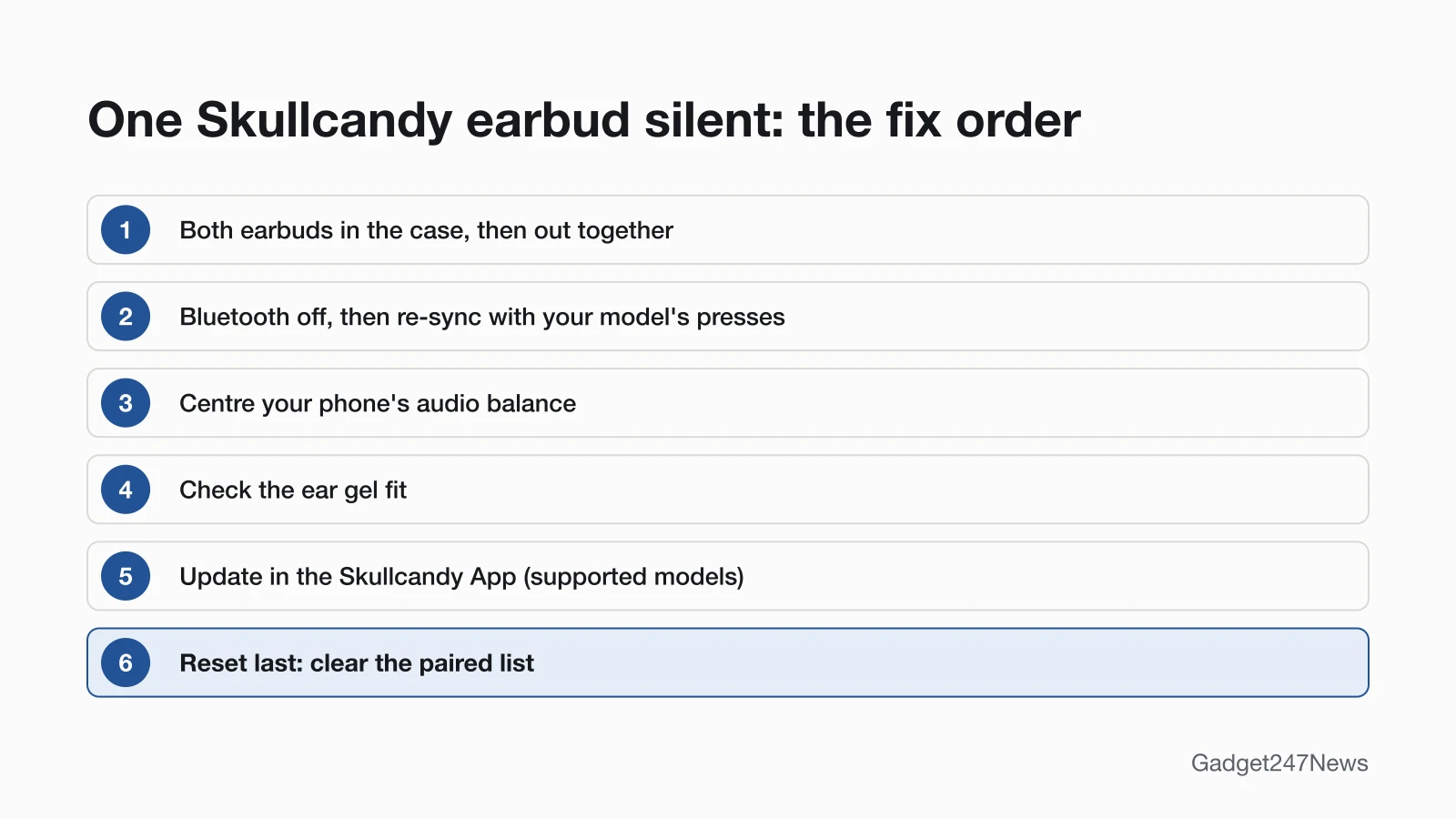
Left, Right and Solo Mode
These four cases look like a fault but are normal:
| Situation | What's different | Source |
|---|---|---|
| One earbud still in the case | The other plays alone in Solo Mode; take the second one out and audio streams back in Stereo Mode | Dime 3, Rail ANC, Push Active |
| One earbud used alone on Indy Evo or Sesh Evo | Either side works, but "the RIGHT bud will always control Volume Up and Track forward, and the LEFT bud will always control Track Back" | Indy Evo, Sesh Evo (Sesh Evo calls it Mono Mode) |
| Only the left earbud flashes after a sync | Expected on Indy Evo and Sesh Evo: after the sync tone, only the left earbud flashes red/blue | Indy Evo, Sesh Evo |
| Stay-Aware won't turn on with one earbud | Dime 3 needs Stereo Mode for Stay-Aware Mode, and Push Active's Stay Aware Mode doesn't work in Solo Mode | Dime 3, Push Active |
Still not working?
If one earbud is still silent after Fix 6, work down this list:
- Try the next fix: Headphones muffled or quiet? How to get full sound back (if both sides sound low).
- Reset your Skullcandy earbuds: reset Skullcandy earbuds (you'll need to pair them again afterwards).
- Contact Skullcandy Support: Skullcandy Product Help (external).
- Check repair or warranty options: Skullcandy's warranty claim page, warranty.skullcandy.com (external). For a single broken or missing earbud, Rail ANC's page points to Skullcandy's Fearless Use™ Promise.
Started after an update? Check the Update Tracker for known issues.
Stopped Working After an Update?
If one side went silent suddenly, right after a firmware update, re-sync the earbuds first (Fix 2), then look for known issues in headphone updates on the Update Tracker. If the update itself failed, Skullcandy says to put the earbuds in the case, close the lid, wait about 5 seconds, then take them out and try the update again once they reconnect to the app.
Skullcandy One Side: Quick Answers
Why is my left Skullcandy earbud not working?
Skullcandy's "No Audio in one ear?" steps don't change with the side: put both earbuds in the case, take them out together, then re-sync with your model's presses (Dime 3: both buttons 4 times at once). Check that the left earbud shows its red charging light in the case, too.
Why is only one of my Skullcandy earbuds working?
The other earbud is out of sync, still in the case in Solo Mode, or not charging. Charge both, take both out together, and run your model's re-sync from Fix 2 if the second earbud stays silent.
Can I use one Skullcandy earbud on its own?
Yes. On Dime 3, Rail ANC, Push Active, Indy Evo and Sesh Evo, leave the other earbud in the case and the one you wear handles calls and music. Sesh Evo calls this Mono Mode. On Indy Evo and Sesh Evo, volume up and track forward stay on the right earbud.
Sources
We checked this page against the pages below, most recently on . How we verify fixes
- DIME® 3 (Skullcandy Product Help) (Skullcandy, skullcandy.com)Official
- RAIL® ANC (Skullcandy Product Help) (Skullcandy, skullcandy.com)Official
- PUSH® ACTIVE (Skullcandy Product Help) (Skullcandy, skullcandy.com)Official
- INDY™ EVO (Skullcandy Product Help) (Skullcandy, skullcandy.com)Official
- SESH® EVO (Skullcandy Product Help) (Skullcandy, skullcandy.com)Official
- METHOD 360 ANC (Skullcandy Product Help) (Skullcandy, skullcandy.com)Official
- SKULLCANDY APP (Skullcandy Product Help) (Skullcandy, skullcandy.com)Official
- If your left or right AirPod isn't working (Apple Support) (Apple, support.apple.com)Official
- Use accessibility features on Android (Android Accessibility Help) (Google, support.google.com)Official
- Skullcandy Product Help (Skullcandy, skullcandy.com)Official
- Submit A Warranty Claim (Skullcandy) (Skullcandy, warranty.skullcandy.com)Official