Skullcandy Earbuds Not Charging? Causes and Fixes

By Suraj Giri, Founder & Publisher. Reviewed by Suraj Giri on .
Published · 6 min read
How this page was made
- Sources. Checked against 10 official pages from Skullcandy, most recently on . See the sources.
- No device testing. We don't test fixes on physical devices, so nothing on this page is a hands-on result. A fact counts as verified only when it matches an official source page.
- AI use. As with every page on Gadget247News, AI tools helped research, outline, draft and edit this page, and re-read the official pages to flag facts that didn't match. The illustration at the top was generated with Runway and is labelled under the image.
- Human sign-off. Suraj Giri, Founder & Publisher, read this page and signed it off on . The site won't publish a page without that sign-off.
- Changes. The published and updated dates move only when the content changes, and every change gets a dated note. Spot an error or a fix that didn't work? Email info@gadget247news.com.
Read our AI use policy, editorial policy and corrections policy.
This guide covers Skullcandy earbuds that show no charging light in the case, a charging case that won't charge, and Skullcandy headphones that won't charge. The fixes follow the "not charging" checklists on Skullcandy's Product Help pages, model by model. Battery that runs down fast is a separate problem (see Related Battery Problems). For other symptoms, go back to Skullcandy earbuds not working.
For another brand's earbuds, see earbuds not charging: case and battery fixes.
Why Won't My Skullcandy Earbuds Charge?
Skullcandy earbuds won't charge when something stops them touching the charging pins, or the case has no charge to give. Skullcandy's Product Help pages name six causes, listed here in the order to check them:
- Debris on the charging pins in the case or on the earbud (Dime 3, Rail ANC, Push Active, Indy Evo, Sesh Evo), or in the USB-C plug or port (Dime 3, Rail ANC).
- Twisted or loose ear gels that keep the earbuds from sitting correctly, so the lid won't close fully (Dime 3, Rail ANC, Push Active, Indy Evo).
- A completely drained case: the earbuds "will not recognize they are in the case" (Dime 3, Rail ANC).
- A cable not properly inserted into a suitable power source (Dime 3, Rail ANC).
- A charger above 18 W, the limit Skullcandy recommends for Indy Evo, Sesh Evo, Crusher Evo and Hesh Evo.
- A problem only Skullcandy can fix, when the light "remains dark and does not come on at all" after every check; Skullcandy then points to its warranty page (Indy Evo, Sesh Evo, Crusher Evo, Hesh Evo).
How to Fix Skullcandy Earbuds That Won't Charge
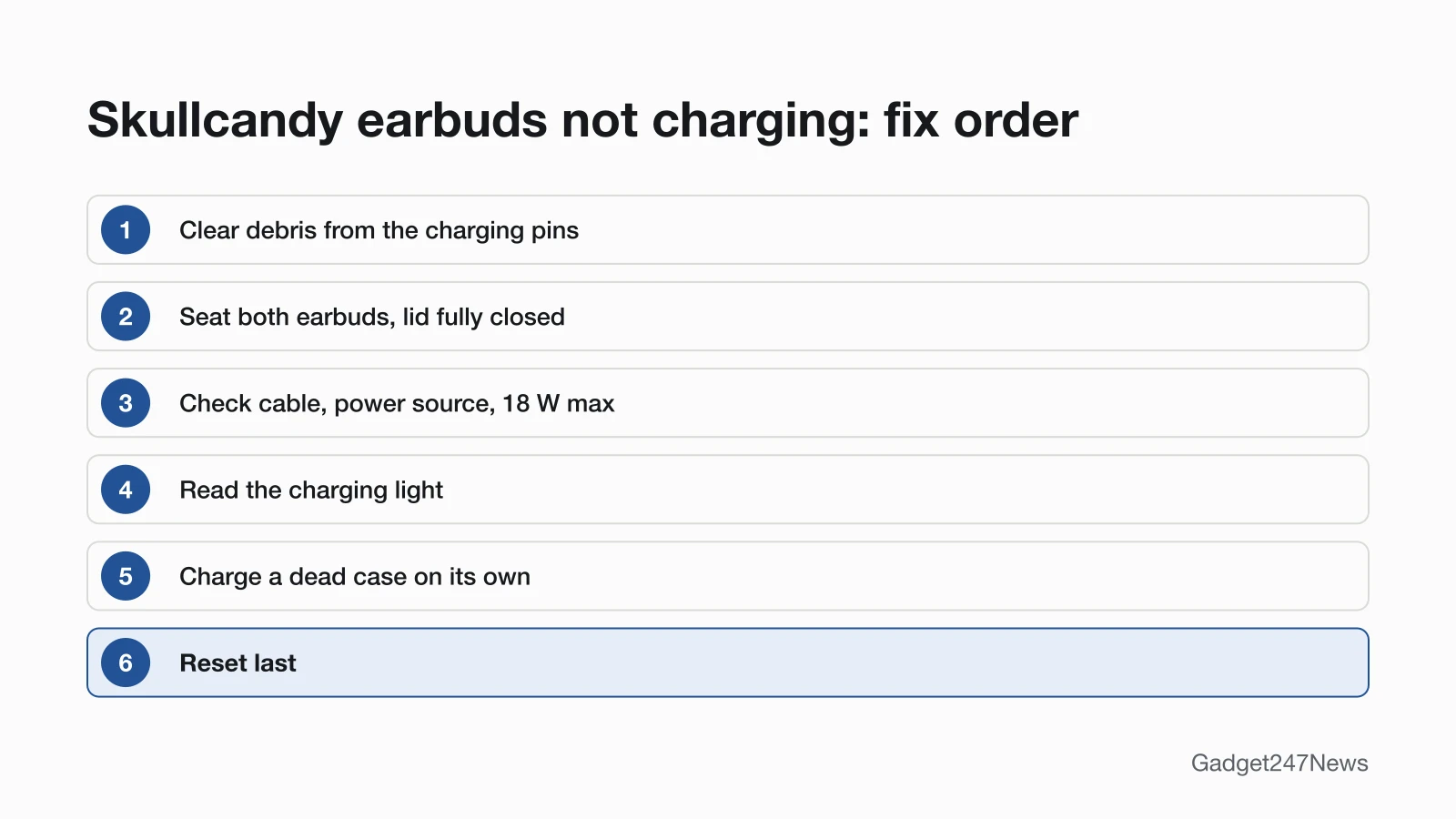
These fixes follow Skullcandy's own checklist order; the reset comes last.
Fix 1: Clear Debris From the Charging Pins
Clear any debris from the charging pins, the first item on the Dime 3, Rail ANC, Push Active and Indy Evo checklists:
- Look at the pins at the bottom of the case, the contacts on each earbud and, on Dime 3 and Rail ANC, the USB-C plug and port.
- Remove any debris you find, then put the earbuds back in the case.
Skullcandy names the check but not a cleaning tool. For safe methods, see how to clean earwax out of earbuds.
Fix 2: Seat Both Earbuds Properly
Seat both earbuds so the lid closes completely. Skullcandy says trouble closing the lid means the earbuds "are not set correctly or the gels are interfering":
- Check each ear gel sits straight and isn't twisted or falling off. On Indy Evo, line up the notch on the stability gel with the notch on the earbud; on Sesh Evo, the gels go on the acoustic port.
- Put both earbuds in the case and close the lid. If it won't close fully, take them out and seat them again.
- Look for each earbud's charging light (Fix 4). Push Active begins charging when you close the lid.
Fix 3: Check the Cable, Charger and Power Source
Check the cable, the power source and the charger's output in this order:
- Power source: plug the USB-C cable firmly into a working source. For Dime 3 and Push Active, Skullcandy lists a computer, wall charger, power bank or 12-volt adapter in a car.
- Charger output: use a cable, charger or outlet that doesn't exceed 18 W (5 volts, 3.6 amps), Skullcandy's recommendation for Indy Evo, Sesh Evo, Crusher Evo and Hesh Evo. Skullcandy says "pretty much all USB-A to USB-C charging cables" charge Dime 3, Rail ANC, Push Active and Indy Evo.
- A few seconds: wait after you seat or plug in. On Sesh Evo, Skullcandy says "occasionally it takes a few seconds to begin charging".
Fix 4: Read the Charging Light
The charging light shows whether the earbuds and the case are taking charge, and the colors differ by model. Skullcandy's pages give these meanings:
| Model | Earbuds in the case | Case light |
|---|---|---|
| Dime 3 | Solid red for 5 seconds: charging. Blue for 5 seconds: still full | Light next to the USB-C port, cable plugged in: red 0 to 25%, yellow 26 to 75%, green 76 to 100% |
| Rail ANC | Red: charging. Blue: fully charged | Light next to the USB-C port (open the lid or plug in): red, yellow, green, same bands as Dime 3 |
| Method 360 ANC | Pulsing amber 0 to 40%, pulsing white 41 to 90%, solid white 91 to 100% | Same colors, shown when plugged in |
| Push Active | Red: charging. Solid blue: fully charged | White light above the USB-C port pulses while charging and stays on when full; four case lights, 25% each |
| Indy Evo, Sesh Evo | Red: charging | Indy Evo: a battery fuel gauge on the case |
Method 360 ANC uses amber and white instead of red, so pulsing amber on that model means it's charging (0 to 40%).
Fix 5: Revive a Completely Drained Case
Charge the case on its own first when it's completely drained:
- Take the earbuds out and plug the case in. Skullcandy says the Dime 3 and Rail ANC cases charge "whether the earbuds are in it or not".
- Once the case light shows a charge level, put both earbuds back and check for their charging light.
Skullcandy explains why this matters: with a dead case, the earbuds won't power off and charge when you put them in, and won't power on when you take them out.
Fix 6 (Last): Reset Your Skullcandy Earbuds
Reset the earbuds only if they now charge but won't turn on or pair properly, because Skullcandy's charging checklists don't include a reset. A reset clears the device paired list, so you pair the earbuds again afterwards. The steps for every model are in How to Reset Skullcandy Earbuds.
One Earbud, the Case or Headphones Not Charging
A single earbud, and Skullcandy headphones, each need their own check.
Left or Right Earbud Not Charging
When only one earbud charges, check that earbud's contact with its charging pins:
- Clean that earbud's contacts and the pins under it, and straighten its ear gel (Fix 1 and Fix 2).
- Seat it again and watch for its own light. Dime 3, Rail ANC and Push Active show a charging light on each earbud.
- If it charges but stays silent, re-sync the two earbuds with the steps for one Skullcandy earbud not working.
Skullcandy Headphones Not Charging
Crusher Evo and Hesh Evo show a red light while charging and blue when finished. When neither appears, Skullcandy's checklist is to wait a few seconds after plugging in, clear any debris from the charging port on the side of the headphones, and charge on a flat surface so the USB connector sits flush in the port. Keep to a charger of 18 W or less. On Crusher ANC 2, the light shows red from 0 to 94% and blue from 95 to 100%.
Still not working?
- Try the next fix: Earbuds not charging: case and battery fixes (including battery that drains fast).
- Reset your Skullcandy earbuds: How to reset Skullcandy earbuds (you'll need to pair them again afterwards).
- Contact Skullcandy Support: Skullcandy Product Help (external).
- Check repair or warranty options: Skullcandy's warranty claim page, warranty.skullcandy.com (external). Skullcandy points there "if the indicator light remains dark and does not come on at all".
Started after an update? Check the Update Tracker for known issues.
Related Battery Problems
- Battery that runs down fast: the cross-brand earbuds charging and battery guide linked above covers drain.
- Earbuds that charge but won't turn on: see How to turn Skullcandy earbuds on and off.
Skullcandy Charging: Quick Answers
Why is my Skullcandy case not charging?
A Skullcandy case that won't charge needs three checks: the USB-C port, the power source and the charger. Clear any debris from the USB-C plug and port, plug into a computer, wall charger or power bank, use a charger of 18 W or less and wait a few seconds. On Dime 3, Rail ANC and Method 360 ANC, the light next to the USB-C port shows the case's level.
Why is only one of my Skullcandy earbuds charging?
Only one earbud charging points to the other earbud not sitting on its charging pins. Clean the pins and that earbud's contacts, straighten its ear gel and seat it until the lid closes fully, then look for its charging light.
How do I know my Skullcandy earbuds are charging?
Skullcandy earbuds are charging when their lights turn red in the case on Dime 3, Rail ANC, Push Active, Indy Evo and Sesh Evo. Method 360 ANC pulses amber or white instead. Rail ANC and Push Active show blue when full; Dime 3's lights turn off once charged.
Sources
We checked this page against the pages below, most recently on . How we verify fixes
- DIME® 3 (Skullcandy Product Help) (Skullcandy, skullcandy.com)Official
- RAIL® ANC (Skullcandy Product Help) (Skullcandy, skullcandy.com)Official
- METHOD 360 ANC (Skullcandy Product Help) (Skullcandy, skullcandy.com)Official
- PUSH® ACTIVE (Skullcandy Product Help) (Skullcandy, skullcandy.com)Official
- INDY™ EVO (Skullcandy Product Help) (Skullcandy, skullcandy.com)Official
- SESH® EVO (Skullcandy Product Help) (Skullcandy, skullcandy.com)Official
- CRUSHER® EVO (Skullcandy Product Help) (Skullcandy, skullcandy.com)Official
- HESH® EVO (Skullcandy Product Help) (Skullcandy, skullcandy.com)Official
- CRUSHER® ANC 2 (Skullcandy Product Help) (Skullcandy, skullcandy.com)Official
- Skullcandy Product Help (Skullcandy, skullcandy.com)Official