Skullcandy Earbuds Not Connecting? Causes and Fixes

By Suraj Giri, Founder & Publisher. Reviewed by Suraj Giri on .
Published · 7 min read
How this page was made
- Sources. Checked against 13 official pages from Skullcandy, most recently on . See the sources.
- No device testing. We don't test fixes on physical devices, so nothing on this page is a hands-on result. A fact counts as verified only when it matches an official source page.
- AI use. As with every page on Gadget247News, AI tools helped research, outline, draft and edit this page, and re-read the official pages to flag facts that didn't match. The illustration at the top was generated with Runway and is labelled under the image.
- Human sign-off. Suraj Giri, Founder & Publisher, read this page and signed it off on . The site won't publish a page without that sign-off.
- Changes. The published and updated dates move only when the content changes, and every change gets a dated note. Spot an error or a fix that didn't work? Email info@gadget247news.com.
Read our AI use policy, editorial policy and corrections policy.
This guide covers Skullcandy earbuds and headphones that won't connect at all: they're missing from the Bluetooth list, never say "Ready to pair", connect with one earbud only, or aren't pairing together. Skullcandy calls keeping the buds "properly connected to each other and your device" the biggest challenge with true wireless earbuds. Earbuds that connect and then cut out have a separate guide, linked at the end. Other Skullcandy faults start at Skullcandy Earbuds Problems and Fixes.
For earbuds from other brands, use the cross-brand checklist for earbuds not connecting to your phone.
Why Won't My Skullcandy Earbuds Connect?
Skullcandy earbuds won't connect when the two earbuds lose their link to each other, they aren't in pairing mode, or the phone holds the wrong entry. Skullcandy's pages point to six causes, listed in the order to check them:
- The earbuds are out of sync with each other, so only one connects or they won't pair together.
- They aren't in pairing mode. Skullcandy says earbuds that skip pairing mode "are likely trying to connect to a previously paired device".
- You picked the "-LE" entry, a Tile connection that "will not allow for audio and calls".
- Your phone holds a stale Bluetooth connection from an earlier pairing.
- The case is flat, so the earbuds can't register that they've left it.
- The firmware is old on app-compatible models; Skullcandy says the latest Push Active firmware "will alleviate the majority of troubleshooting issues".
How to Fix Skullcandy Earbuds That Won't Connect
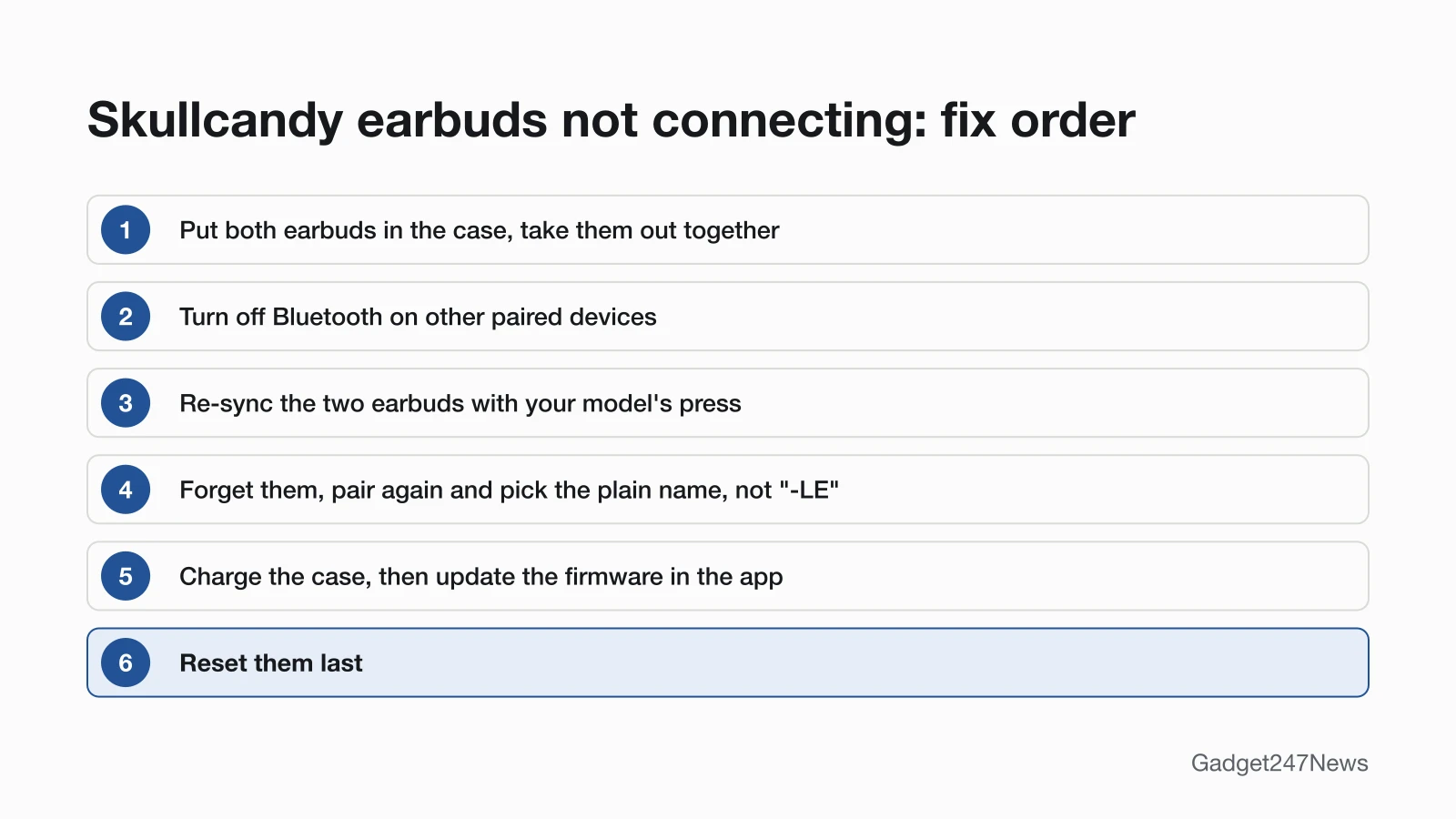
These fixes follow the order of Skullcandy's own Product Help pages; the reset comes last.
Fix 1: Put Both Earbuds in the Case and Take Them Out Together
Re-seat both earbuds first; this step opens the troubleshooting section on Skullcandy's Dime 3, Rail ANC and Push Active pages:
- Put both earbuds in the charging case. On Dime 3, wait until both lights turn red; on Rail ANC and Push Active, close the lid for 2 seconds so they fully power off.
- Take both earbuds out together.
- Check whether both earbuds play. If one stays silent or neither joins your phone, go on to Fix 2.
Fix 2: Check Your Phone's Bluetooth
Make sure Bluetooth is on and no other device is holding the earbuds:
- Turn on Bluetooth on your phone.
- If the earbuds are also paired with a laptop or tablet nearby, turn Bluetooth off on that device. Dime 3, Rail ANC and Method 360 ANC use Multipoint Pairing and reconnect to the two most recently paired devices each time they power on.
Fix 3: Re-Sync the Two Earbuds With Each Other
Re-sync the earbuds when only one connects or they aren't pairing together. Turn Bluetooth off on your phone first, then take both earbuds out of the case and make sure both are on:
| Model | Re-sync press (both earbuds) | What you see |
|---|---|---|
| Dime 3 | Press the button on both earbuds 4 times at the same time | Slow red/blue flashing, then 4 quick blue flashes |
| Rail ANC | Tap the touch sensor on both earbuds 4 times | A purple pulse, then 5 quick blue flashes |
| Push Active | Press the button on both earbuds 3 times at the same time | A series of pulses, then 5 quick blue flashes |
| Indy Evo, Sesh Evo | No press re-sync; use their sync steps below | Only the left earbud flashes red/blue |
| Method 360 ANC | Not listed on its page; its pairing fix is the reset (Fix 8) | Not listed |
Then turn Bluetooth back on and select the earbuds you paired before. Dime 3 blinks blue once and says "Connected"; Rail ANC and Push Active blink blue 3 times.
Fix 4: Forget Them and Pair Again (Pick the Right Name)
A fresh pairing replaces a stale one on your phone:
- In your phone's Bluetooth settings, select Forget or Unpair for the Skullcandy earbuds.
- Put both earbuds back in the case, close the lid for a few seconds, then take them out. No pairing prompt after 10 seconds means you need your model's pairing press (Fix 5).
- Select the plain product name, such as "Sesh Evo" and not "Sesh Evo-LE", and accept any "Pair" or "OK" prompt.
On Android, Skullcandy's Indy Evo page says to tap "+ Pair New Device" and then select the earbuds. Full steps for each model are in How to connect and pair Skullcandy earbuds with any device.
Fix 5: Put Them in Pairing Mode Again
Put the earbuds into pairing mode by hand: hold either earbud's button (Dime 3) or touch sensor (Rail ANC) for 3 seconds, or hold either earbud for 3 seconds (Method 360 ANC). On Push Active, press either earbud button once, then press and hold it for 1 second. Other models are in the model table of the connect guide.
Fix 6: Charge the Case
Charge the case, because a dead case stops the earbuds from powering on when you take them out:
- Plug the case into a power source with its USB-C cable.
- Check the case light next to the USB-C port. On Dime 3 and Rail ANC, red means 0% to 25%, yellow 26% to 75% and green 76% to 100%.
If the case won't take a charge either, see Skullcandy earbuds not charging.
Fix 7: Update the Firmware (App-Compatible Models Only)
Update the firmware through the Skullcandy App on models that support it:
- Open the Skullcandy App and tap the Update button on the Product Card, or the update banner.
- Meet the conditions Skullcandy lists first: at least 25% battery on the earbuds, at least 30% on the phone, internet access on the phone, and both earbuds connected to the phone and the app.
Dime 3, Sesh Evo and Hesh Evo can't take this fix, because the Skullcandy App doesn't support them.
Fix 8 (Last): Reset Your Skullcandy Earbuds
Reset only after Fixes 1 to 7. Skullcandy's reset clears the earbuds' paired device list and ends with "Ready to pair" on Dime 3, Rail ANC and Method 360 ANC, so you pair them with your phone again afterwards. The model-by-model steps are in How to Reset Skullcandy Earbuds.
Skullcandy Earbuds Not Connecting by Model and Device
Some models and devices need one extra step.
Only the Left Earbud Flashes (Indy Evo and Sesh Evo)
On Indy Evo and Sesh Evo, one flashing earbud means the sync worked: after a successful sync, Skullcandy says "ONLY the LEFT bud will begin to flash RED/BLUE", and the name should appear once in your Bluetooth list. If they won't sync, forget them on your phone, then:
- Power them off: touch and hold both earbuds for 6 seconds (Indy Evo) or 4 seconds (Sesh Evo).
- Touch and hold each earbud for 10 seconds to reset it.
- Put both back in the case until the lights show red, then pull them out; they flash blue while they sync.
After pairing, Indy Evo appears twice in your paired devices list, which Skullcandy's steps expect.
Not Connecting to a Laptop or Android Phone
Laptops and Android phones use the same pairing mode. Skullcandy lists computers and laptops as supported devices, but the Skullcandy App has no PC, iPad or MacBook support, so pair from the computer's own Bluetooth settings. The device guides are How to connect Skullcandy earbuds to a Windows PC and How to connect Skullcandy earbuds to Android.
Skullcandy Headphones Not Pairing
Skullcandy headphones pair again through their own buttons. For Crusher Evo, forget them on your phone, then hold the top and bottom buttons for 2 seconds: the lights flash purple, you hear "disconnected", then "pairing". Hesh Evo uses the main button and volume down for 3 seconds. Crusher ANC 2, when off, goes straight into pairing mode after a 6-second hold of the power button.
Still not working?
If your Skullcandy earbuds still won't connect after the eight fixes, work through these:
- Try the next fix: Why Skullcandy earbuds keep disconnecting (if they connect and then drop out).
- Reset your Skullcandy earbuds: How to reset Skullcandy earbuds (you'll need to pair them again afterwards).
- Contact Skullcandy Support: Skullcandy Product Help (external).
- Check repair or warranty options: Skullcandy's warranty claim page, warranty.skullcandy.com (external; Skullcandy asks you to contact customer service before filing a claim).
Started after an update? Check the Update Tracker for known issues.
Stopped Connecting After an Update?
Earbuds that stopped connecting suddenly after a firmware update may have a failed update. Skullcandy names three likely reasons: "a phone call interrupted the update, the earbuds lost connection during the update, or the app was closed during the update". Put the earbuds in the case, close the lid, wait about 5 seconds, then take them out and retry once they reconnect to the app. For update reports, check Skullcandy earbud updates on the Update Tracker.
Skullcandy Earbuds Not Connecting: Quick Answers
Why are my Skullcandy earbuds not pairing together?
The two earbuds have lost their paired state with each other. Put both in the case and take them out together. If one is still silent, re-sync them with your model's press while Bluetooth is off on your phone (Dime 3: both buttons 4 times at once).
Why won't my Skullcandy earbuds connect to my phone?
Skullcandy's most common causes are earbuds not in pairing mode, a stale pairing saved on your phone, or low battery. Picking the "-LE" entry blocks audio too. Forget the earbuds, take them out of the case for "Ready to pair", and choose the plain product name.
Why is only one of my Skullcandy earbuds connecting?
The second earbud didn't sync with the first. Seat both in the case, take them out together, then re-sync them (Fix 3). Using one earbud on purpose is Solo Mode, which Dime 3, Rail ANC, Indy Evo and Sesh Evo support.
Sources
We checked this page against the pages below, most recently on . How we verify fixes
- DIME® 3 (Skullcandy Product Help) (Skullcandy, skullcandy.com)Official
- RAIL® ANC (Skullcandy Product Help) (Skullcandy, skullcandy.com)Official
- PUSH® ACTIVE (Skullcandy Product Help) (Skullcandy, skullcandy.com)Official
- METHOD 360 ANC (Skullcandy Product Help) (Skullcandy, skullcandy.com)Official
- INDY™ EVO (Skullcandy Product Help) (Skullcandy, skullcandy.com)Official
- SESH® EVO (Skullcandy Product Help) (Skullcandy, skullcandy.com)Official
- CRUSHER® EVO (Skullcandy Product Help) (Skullcandy, skullcandy.com)Official
- HESH® EVO (Skullcandy Product Help) (Skullcandy, skullcandy.com)Official
- CRUSHER® ANC 2 (Skullcandy Product Help) (Skullcandy, skullcandy.com)Official
- SKULLCANDY APP (Skullcandy Product Help) (Skullcandy, skullcandy.com)Official
- Why Won't My Skullcandy Earbuds Pair? (Skullcandy) (Skullcandy, skullcandy.com)Official
- Skullcandy Product Help (Skullcandy, skullcandy.com)Official
- Submit A Warranty Claim (Skullcandy) (Skullcandy, warranty.skullcandy.com)Official