One JBL Earbud Not Working? Left or Right Side Fixes

By Suraj Giri, Founder & Publisher. Reviewed by Suraj Giri on .
Published · 6 min read
How this page was made
- Sources. Checked against 11 official pages from JBL, Apple and Google, most recently on . See the sources.
- No device testing. We don't test fixes on physical devices, so nothing on this page is a hands-on result. A fact counts as verified only when it matches an official source page.
- AI use. As with every page on Gadget247News, AI tools helped research, outline, draft and edit this page, and re-read the official pages to flag facts that didn't match. The illustration at the top was generated with Runway and is labelled under the image.
- Human sign-off. Suraj Giri, Founder & Publisher, read this page and signed it off on . The site won't publish a page without that sign-off.
- Changes. The published and updated dates move only when the content changes, and every change gets a dated note. Spot an error or a fix that didn't work? Email info@gadget247news.com.
Read our AI use policy, editorial policy and corrections policy.
This guide is for one JBL true wireless earbud, left or right, that stays silent, won't join the other earbud or won't charge. JBL's own order for that problem starts with re-pairing the two earbuds to each other and saves a reset for later. When both earbuds are silent, go back to JBL earbuds not working and pick the fix for the connection.
Own a different brand? The cross-brand guide covers headphones only working on one side.
Why Is Only One of My JBL Earbuds Working?
Only one JBL earbud works when the two earbuds lose their link to each other or one of them stops charging. These are the five common causes, most likely first:
- The left and right earbuds are no longer paired to each other. JBL's left-and-right support page starts from exactly this case.
- Dirt on one earbud's charging contacts. JBL says dirty contacts can stop charging, or leave you with a case where "one of the ear buds suddenly switches on and begins the pairing process."
- A Balance slider moved off center on the phone, which makes one side quieter than the other.
- Debris on the eartip or speaker mesh, the first thing Apple checks when one of its own earbuds goes silent.
- One earbud still in the case. JBL's Tune Beam 2 and Tune Buds guides show either earbud playing alone in mono mode.
A reset sits at the end of this list on purpose: JBL puts it after re-pairing the two earbuds.
How to Fix One JBL Earbud Not Working
These follow JBL's own left-and-right steps first; reset comes last.
Fix 1: Re-sync the Left and Right Earbuds
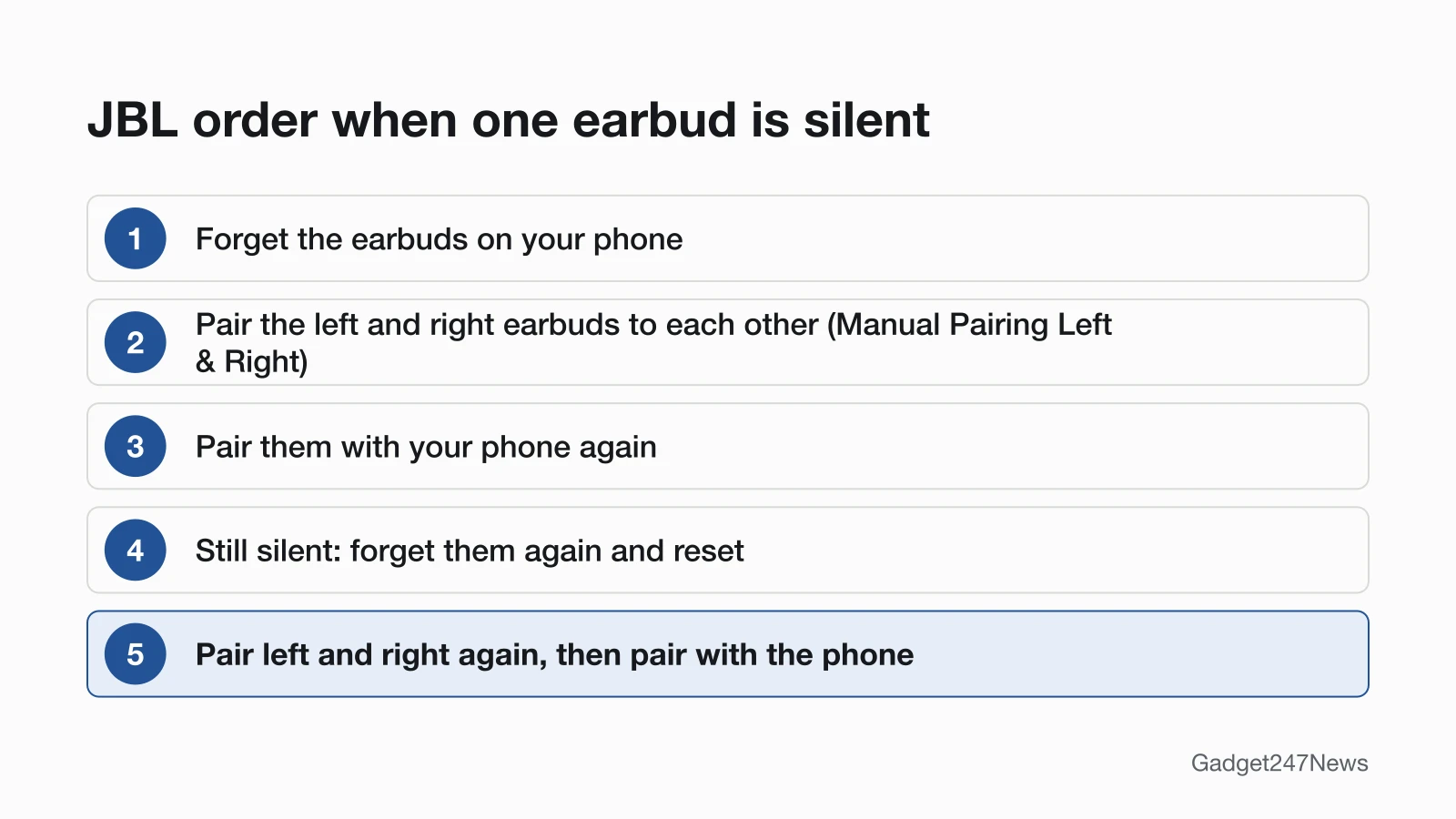
Re-sync the two earbuds first. These are steps 1 to 3 of the order JBL gives when the earbuds "are no longer paired to each other":
- Forget the earbuds on your phone. On an iPhone, go to Settings > Bluetooth, tap the More Info button next to the JBL name, then tap Forget this Device. On Android, tap Forget in the earbuds' Bluetooth settings.
- Pair the two earbuds to each other with the "Manual Pairing Left & Right" instructions in your Owner's Manual or Quick Start Guide.
- Pair the earbuds with your phone again and play a song to check both sides.
The English pages of the Tune Beam 2 and Tune Buds Quick Start Guides don't print a step under that name, so check the guide for your exact model or ask JBL support for it. For step 3, follow our steps to connect and pair JBL earbuds.
Fix 2: Charge Both Earbuds and Clean the Contacts
Clean the charging contacts when one earbud stays dark in the case. JBL says the problem is "almost always caused by dirt on the metal charging contacts", because sweat, skin grease and ear wax build up on them:
- Put a little rubbing alcohol on a cotton swab, then rotate it and scrub lightly on each contact of both earbuds. Wipe off leftover cotton with a cloth.
- Wipe the contact pins inside the charging case with a clean swab, and let the inside dry completely before you close the lid.
- Repeat until the contacts look clean, then seat both earbuds and charge them.
JBL adds that a pencil tip and its eraser "can help to re-establish charging" on stubborn contacts. More causes are on the page of JBL earbuds charging fixes.
Fix 3: Center the Balance Setting
Center the balance next. It's a phone setting, not a JBL one, so it lives in your phone's accessibility menu:
- iPhone: open Settings > Accessibility > Audio & Visual, scroll down to Balance and set the slider in the middle.
- Android: open your Accessibility settings and use the Audio adjustment features, where Google puts the balance control. Google notes that navigation and feature names vary by market and device.
Fix 4: Check the Eartip
Look at the eartip on the silent side next. Apple's own first step for a silent earbud is to remove the ear tips and check the speaker mesh for debris. The JBL support pages we read give no eartip cleaning method, so use our general steps to clean earbud mesh.
Fix 5 (Last): Reset, Then Re-sync Again
Reset the earbuds only if Fix 1 didn't bring the silent side back, and pair the two earbuds to each other again afterwards:
- Forget the earbuds on your phone again.
- Reset them. On Tune earbuds such as the Tune Beam 2, Tune Buds and Tune Flex 2, triple tap either earbud and hold it on the third tap for more than 5 seconds; they power off and reset. For other series, see how to factory reset JBL earbuds.
- Pair the two earbuds to each other again with the manual steps from Fix 1. JBL explains that "the reset procedure does not automatically pair the two ear pieces together".
- Pair them with your phone.
A reset wipes all previous settings and pairings, JBL notes, so every phone or tablet needs pairing again.
JBL Models and One-Earbud Use
JBL documents single-earbud playback for two Tune models, and the reset gesture changes by series.
Using One JBL Earbud on Its Own
Yes, on the Tune Beam 2 and Tune Buds. Both Quick Start Guides show two modes under "DUAL CONNECT + SYNC": Stereo mode with the left and right earbuds together, and Mono mode with either earbud alone. Either earbud can play by itself; to hear stereo again, take both earbuds out of the case.
Right or Left Earbud Silent on Tune, Live or Vibe Models
JBL's left-and-right page is written for all its TWS earbuds, so the order above is the same on every series. Two things change by model: the "Manual Pairing Left & Right" step (in each model's guide) and the reset gesture:
| JBL series | Models JBL names | Reset gesture JBL gives |
|---|---|---|
| Tune | Tune Beam 2, Tune Buds, Tune Buds 2, Tune Flex 2 | Triple tap either earbud, hold on the third tap for more than 5 seconds |
| Vibe and Wave | Vibe Beam 2, Vibe Buds 2, Wave Beam 2, Wave Buds 2 | The same triple tap and hold, with both earbuds on and out of the charging case |
| Live | Earbuds on JBL's Live series reset page | The page lists the triple tap and hold too; check it for your model |
Still not working?
Work through these next steps in order:
- Try the next fix: Why JBL earbuds keep disconnecting (if one side keeps cutting out).
- Reset your JBL earbuds: factory reset JBL earbuds (you'll need to pair them again afterwards).
- Contact JBL Support: JBL Customer Experience Center (phone (800) 336-4525).
- Check repair or warranty options: JBL returns and warranty.
Started after an update? Check the Update Tracker for known issues.
Related Problems
- One earbud won't charge at all: the full charging checks are on the JBL earbuds charging fixes page linked in Fix 2.
- Neither earbud connects: see JBL earbuds not connecting to your phone.
One JBL Earbud Not Working: Quick Answers
Why is my right JBL earbud not working?
JBL's pages point to two causes for a silent right earbud: it has lost its link to the left one, or dirty contacts stopped it charging. Forget the earbuds on your phone, pair the two earbuds to each other with your model's manual steps, then pair them with the phone again. If the right earbud stays dark, clean its charging contacts.
How do I get my JBL earbuds to connect to each other?
Forget them on your phone first. Then follow the "Manual Pairing Left & Right" instructions in your model's Owner's Manual or Quick Start Guide, and pair the earbuds with the phone again. After a factory reset, repeat the left and right pairing, because JBL says a reset doesn't do it.
Can I use one JBL earbud by itself?
Yes, on models whose Quick Start Guide shows mono mode, such as the Tune Beam 2 and Tune Buds: either earbud can play alone. Take both out of the case when you want stereo sound again.
Sources
We checked this page against the pages below, most recently on . How we verify fixes
- TWS Left & Right Not Pairing Together (JBL) (JBL, support.jbl.com)Official
- Cleaning Instructions for Re-establishing Charging (JBL) (JBL, support.jbl.com)Official
- Factory Reset Procedure: Tune Series (JBL) (JBL, support.jbl.com)Official
- Factory Reset Procedure: Wave/Vibe Series (JBL) (JBL, support.jbl.com)Official
- Factory Reset Procedure: Live Series (JBL) (JBL, support.jbl.com)Official
- JBL Tune Beam 2 Quick Start Guide (JBL, support.jbl.com)Official
- JBL Tune Buds Quick Start Guide (JBL, jbl.com)Official
- If your left or right AirPod isn't working (Apple) (Apple, support.apple.com)Official
- Use accessibility features on Android (Google) (Google, support.google.com)Official
- Connect a third-party Bluetooth accessory to your iPhone or iPad (Apple) (Apple, support.apple.com)Official
- Find & set up Bluetooth devices near your Android device (Google) (Google, support.google.com)Official