Why JBL Earbuds Keep Disconnecting

By Suraj Giri, Founder & Publisher. Reviewed by Suraj Giri on .
Published · 6 min read
How this page was made
- Sources. Checked against 13 official pages from JBL, Apple and Google, most recently on . See the sources.
- No device testing. We don't test fixes on physical devices, so nothing on this page is a hands-on result. A fact counts as verified only when it matches an official source page.
- AI use. As with every page on Gadget247News, AI tools helped research, outline, draft and edit this page, and re-read the official pages to flag facts that didn't match. The illustration at the top was generated with Runway and is labelled under the image.
- Human sign-off. Suraj Giri, Founder & Publisher, read this page and signed it off on . The site won't publish a page without that sign-off.
- Changes. The published and updated dates move only when the content changes, and every change gets a dated note. Spot an error or a fix that didn't work? Email info@gadget247news.com.
Read our AI use policy, editorial policy and corrections policy.
JBL earbuds and headphones that pair fine, then lose the audio, cut out mid-track or shut themselves off are covered here, with fixes built on JBL's own support pages. A JBL that won't pair at all is a different fault, and the Still not working? list sends you to it. For charging, resets and other faults, start from the hub of JBL earbuds fixes.
Apps, buttons and standby rules differ from brand to brand. For earbuds that disconnect and reconnect from other makers, the cross-brand guide gives each brand's first fix.
Why Do My JBL Earbuds Keep Disconnecting?
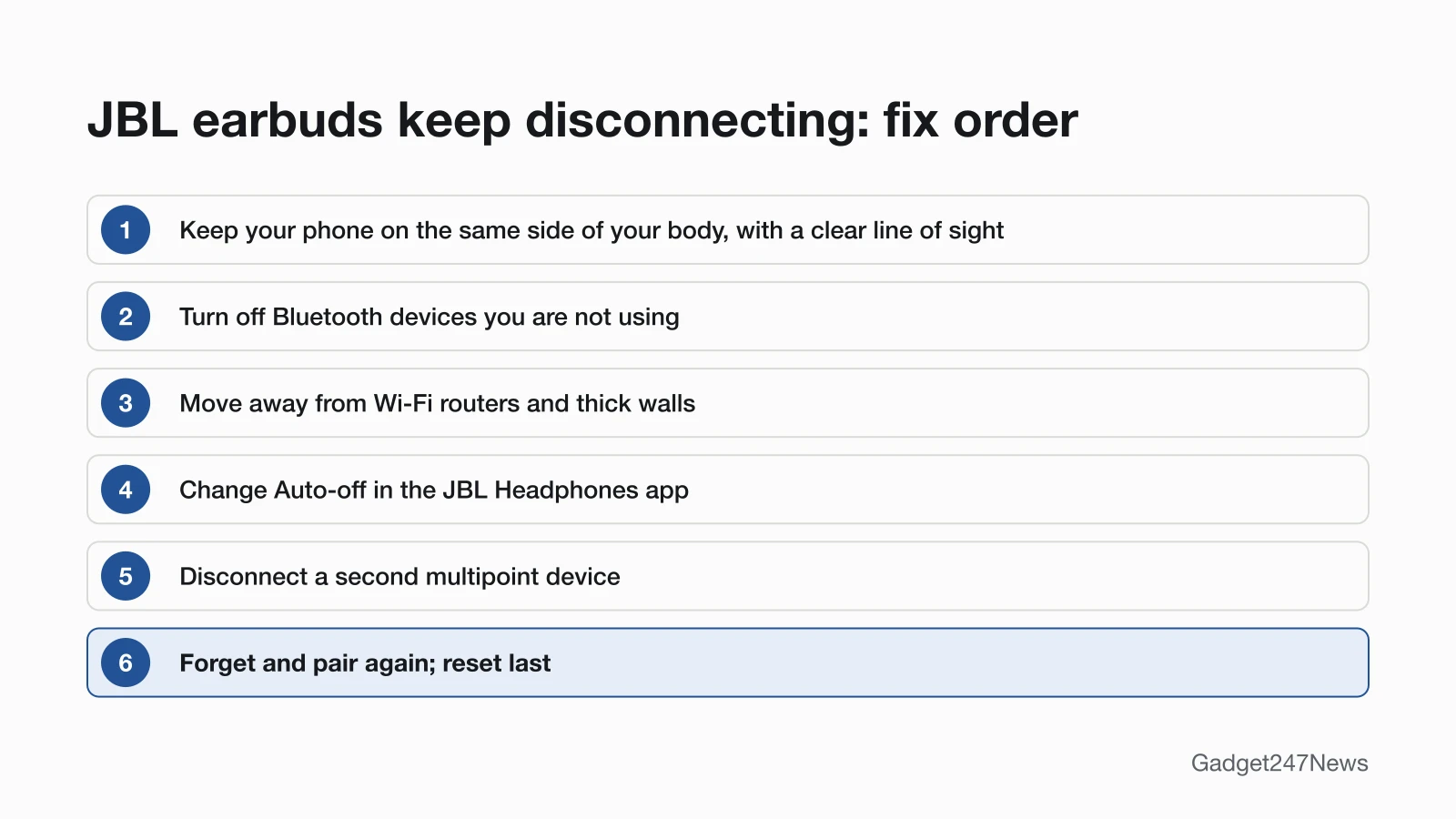
JBL earbuds keep disconnecting when something blocks or crowds the Bluetooth signal, or when the earbuds drop into standby and power off. JBL's support pages point to six causes, listed here in the order this page fixes them:
- Your body between the phone and the earbuds. JBL says "Bluetooth signals cannot travel through water, which includes the human body."
- Other Bluetooth products nearby, including ones nobody is using.
- A Wi-Fi router close to you, whose stronger signal can "overlap" the Bluetooth link.
- Concrete or brick walls between you and your phone.
- Open spaces such as parks, where the signal has no objects around you to reflect from.
- Standby auto-off on true wireless earbuds, which switch off after spending 30 minutes in standby without Bluetooth.
If none of these fit, the last three fixes test multipoint, a fresh pairing and a factory reset.
How to Stop JBL Earbuds Disconnecting
These fixes follow JBL's interference advice first, then its standby and pairing pages; a reset comes last because it wipes your settings.
Fix 1: Keep Your Phone in Line of Sight
Phone placement is the first thing to change, because JBL's rule for wireless headphones is to keep the source device and the receiver on the same side of the body.
- Keep a clear line of sight between your JBL earbuds or headphones and your phone, and watch for obstacles in front of either one.
- Carry the phone on the same side of your body as the earbuds, such as a pocket on that side, not one on the opposite hip.
Fix 2: Turn Off Bluetooth Devices You Aren't Using
Idle Bluetooth products can still interfere: JBL says they "are often the reason for interference even though they are not being used."
- Switch off Bluetooth products near you that you aren't using, such as a speaker, a tablet or a PC.
- Play audio on your JBL again and note whether the cut-outs stop.
Fix 3: Move Away From Wi-Fi Routers and Thick Walls
Step away from your Wi-Fi router while you listen, since JBL says a Wi-Fi signal "is stronger and in many cases will 'overlap' the connection." Walls are the next check: JBL notes that "Concrete and brick walls will often interrupt the signal," because the signal can't pass through walls that thick. Outdoors has its own problem. In parks and other open spaces, JBL says the signal struggles when it "cannot reflect from objects around you," which leaves line of sight and the same side of your body (Fix 1) as the parts you control.
Fix 4: Change the Auto-Off Time
JBL true wireless earbuds that disconnect from Bluetooth power off after 30 minutes in standby mode, and the Auto-off setting changes that time.
- Wake earbuds in standby by pressing or touching the outside of an earbud. If they have already powered off, put them back in the charging case and take them out again.
- Open the JBL Headphones app (JBL's Standby page calls it "My JBL Headphones") and choose Auto-off, the Standby Time setting.
- Pick a time (JBL lists 15min, 1hr and others), or choose Never to keep the earbuds on at all times.
The setting then applies whether the earbuds are connected to Bluetooth or not.
Fix 5: Check Multipoint
On JBL models with Multi-Point Connection, your earbuds or headphones stay connected to two devices at the same time, and the Tune Beam 2 and Tune 520BT Quick Start Guides both mark it "(Maximum 2 devices)". If audio keeps jumping to a laptop or tablet, disconnect the device you aren't listening on and check whether the drops stop. Treat this as a test: JBL's Multi-Point Connection Support page doesn't mention drop-outs. How the feature works across brands is covered in the guide to earbuds that connect to two devices at once.
Fix 6: Forget the Earbuds and Pair Again
For a JBL that stops connecting, JBL's support page says to remove it in your phone's Bluetooth settings and pair it again (it also suggests a reset, which this page keeps for Fix 7).
- Delete the old pairing. iPhone: open Settings, tap Bluetooth, tap the More Info button beside your JBL and choose Forget this Device. Android: swipe down from the top of the screen, touch and hold Bluetooth, open Settings beside the JBL name and choose Forget.
- Put the JBL in pairing mode with the control its Quick Start Guide shows. For the Tune 520BT, the guide says to power off, then hold the pictured button for 5 seconds.
- Choose the JBL name in your phone's Bluetooth list, for example "JBL Tune Beam 2" or "JBL TUNE520BT".
Fix 7 (Last): Reset Your JBL Earbuds
A factory reset comes after Fixes 1 to 6, because JBL says it "will erase all settings and Bluetooth data from the device." You then pair with your phone again, and the button hold for each JBL series is in the steps to reset JBL earbuds.
JBL Earbuds vs Headphones Cutting Out
JBL's interference advice is the same for earbuds and headphones, while its standby and left-right pairing pages are written for true wireless earbuds.
JBL Headphones Keep Cutting Out
JBL headphones cut out for the same reasons as earbuds, because JBL's interference page counts "speaker, headphones etc." among the Bluetooth devices it applies to. Keep the phone and the headphones on the same side of your body with a clear line of sight, and turn off Bluetooth products you aren't using. JBL's Standby page is written for true wireless earbuds, and the Tune 520BT Quick Start Guide we read doesn't give an auto-off time for headphones. The Tune 520BT does support multipoint, so run Fix 5 if the sound moves to another device.
Only One JBL Earbud Drops Out
When only one JBL earbud keeps dropping out, check whether the two earbuds are still linked. For earbuds that "are no longer paired to each other," JBL's order is to forget them on your phone, manually pair the two earpieces together, then pair them with the phone. The full order, with JBL's reset step, is in the guide for JBL earbuds working on one side only.
Still not working?
- Try the next fix: JBL earbuds won't connect (if they won't reconnect at all).
- Reset your JBL earbuds: reset JBL earbuds (you'll need to pair them again afterwards).
- Contact JBL Support: JBL Customer Experience Center (phone (800) 336-4525).
- Check repair or warranty options: JBL returns and warranty.
Started after an update? Check the Update Tracker for known issues.
Started Dropping Out After an Update?
If your JBL earbuds suddenly started dropping out after an update, check which firmware JBL released for your model. For Tune Buds, JBL lists software version V6.1.0 with a release date of November 22, 2024, delivered "OTA (over the air) via JBL Headphone App" with the note "Stability and performance improvement". The JBL pages we read don't give the update route for other models. Check your model against the Sony, Bose and JBL firmware updates list.
JBL Earbuds Disconnecting: Quick Answers
Why do my JBL headphones keep cutting out?
JBL headphones cut out when something blocks or crowds the Bluetooth signal. JBL's list names the human body, concrete and brick walls, idle Bluetooth products and a Wi-Fi router close by. Keep the phone on the same side of your body as the headphones, with a clear line of sight.
Why do my JBL earbuds disconnect when I'm outside?
JBL earbuds can drop out outdoors because open spaces give the Bluetooth signal nothing to reflect from. JBL names parks as the example and calls open air "bad" for any Bluetooth signal that cannot reflect from objects around you. Keep the phone on the same side of your body as the earbuds.
Why do my JBL earbuds turn off by themselves?
JBL true wireless earbuds that lose their Bluetooth link go into standby and power off after 30 minutes. Put them back in the charging case and take them out to reconnect, or open Auto-off in the JBL Headphones app and change the time or choose Never.
Sources
We checked this page against the pages below, most recently on . How we verify fixes
- How to avoid Bluetooth Interference or Interruptions (JBL, support.jbl.com)Official
- Standby Mode Information (JBL, support.jbl.com)Official
- Multi-Point Connection Support (JBL, support.jbl.com)Official
- I cannot connect to my device anymore via Bluetooth, what can i do? (JBL, support.jbl.com)Official
- TWS Left & Right Not Pairing Together (JBL, support.jbl.com)Official
- Factory Reset Procedure: Tune Series (JBL, support.jbl.com)Official
- TUNE BUDS: Software Update Release Notes (JBL, support.jbl.com)Official
- JBL Tune Beam 2 Quick Start Guide (JBL, support.jbl.com)Official
- JBL Tune 520BT Quick Start Guide (JBL, jbl.com)Official
- Connect a third-party Bluetooth accessory to your iPhone or iPad (Apple, support.apple.com)Official
- Find & set up Bluetooth devices near your Android device (Google, support.google.com)Official
- JBL Customer Experience Center (JBL, support.jbl.com)Official
- Return Products (JBL) (JBL, support.jbl.com)Official