JBL Earbuds Not Connecting? Causes and Fixes

By Suraj Giri, Founder & Publisher. Reviewed by Suraj Giri on .
Published · 6 min read
How this page was made
- Sources. Checked against 16 official pages from JBL, Apple, Google and Microsoft, most recently on . See the sources.
- No device testing. We don't test fixes on physical devices, so nothing on this page is a hands-on result. A fact counts as verified only when it matches an official source page.
- AI use. As with every page on Gadget247News, AI tools helped research, outline, draft and edit this page, and re-read the official pages to flag facts that didn't match. The illustration at the top was generated with Runway and is labelled under the image.
- Human sign-off. Suraj Giri, Founder & Publisher, read this page and signed it off on . The site won't publish a page without that sign-off.
- Changes. The published and updated dates move only when the content changes, and every change gets a dated note. Spot an error or a fix that didn't work? Email info@gadget247news.com.
Read our AI use policy, editorial policy and corrections policy.
This page covers JBL earbuds and headphones that won't connect: they don't show up in the Bluetooth list, they join another phone instead of yours, pairing fails, or only one earbud connects. If they connect and then cut out, that's a separate problem, covered in JBL earbuds keep disconnecting. For charging, sound and reset trouble, start from JBL earbuds pairing, battery and sound fixes.
The fixes below come from JBL's own support pages and run from the gentlest step to a reset. For earbuds from other brands, see Bluetooth headphones not connecting.
Why Won't My JBL Earbuds Connect?
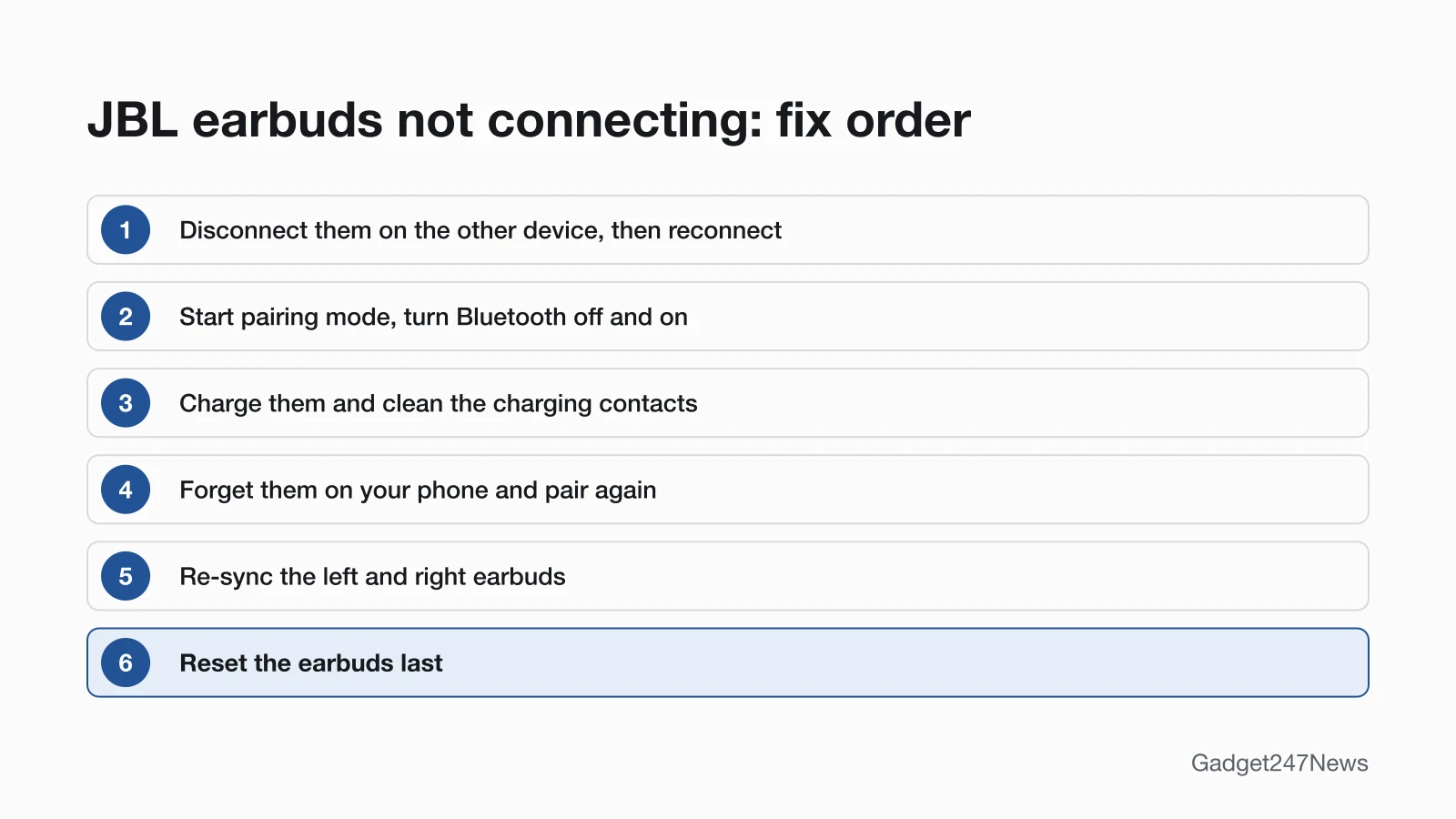
JBL earbuds won't connect when another device holds them, pairing mode is off, or your phone's scan is stuck. JBL's pages point to six causes, listed here in the order you should check them:
- Another device holds the connection. JBL says the product "will automatically reconnect to the last device it was connected to", and a second phone can keep it.
- Pairing mode is off, so the earbuds never appear in your phone's list of discoverable devices.
- Your phone's Bluetooth scan is stuck. JBL's fix is to turn Bluetooth off and back on.
- The battery is flat or the charging contacts are dirty. On brand-new earbuds, a plastic film can stop them powering on.
- An old pairing on your phone no longer matches the earbuds.
- The left and right earbuds lost their link to each other, so only one side connects.
How to Fix JBL Earbuds That Won't Connect
Start with the soft fixes and keep the reset for last. JBL's Bluetooth Pairing & Connecting page calls resetting "a drastic step" that "should only be done if the unit is not operating correctly." JBL's shorter answer for a device that won't connect puts a reset first; we put it last because it wipes your settings.
Fix 1: Disconnect the Other Device, Then Reconnect
Free the earbuds from the other device first, then reconnect them from your phone:
- On any other phone, tablet or laptop the earbuds used, open Bluetooth settings and disconnect them, or turn Bluetooth off.
- On your phone, open Bluetooth settings and make sure Bluetooth is on.
- Tap the JBL name to reconnect, then play some music.
Don't forget (unpair) the earbuds at this stage. JBL warns that forgetting the product in your phone's Bluetooth settings "will require you to repeat the Pairing steps".
Fix 2: Put Them in Pairing Mode and Refresh Bluetooth
When the JBL name is missing from the list, start pairing mode and refresh your phone's scan:
- Put the earbuds in pairing mode. The first time, turning them on does it, and JBL says a flashing LED shows they're searching. After that, use your model's step from the table below.
- Open Bluetooth settings on your phone. JBL says the name "should pop up within a few seconds"; if it doesn't, "quickly turn off your BT settings and turn it back on."
- Tap the JBL name when it appears.
JBL's guides give a different pairing step, and a different list name, for each model:
| JBL model | Pairing step | Name in the Bluetooth list |
|---|---|---|
| Tune Beam 2 (adding a second device) | Tap an earbud once, then hold for 5 seconds | "JBL Tune Beam 2" |
| Tune Buds (adding a second device) | Tap an earbud once, then hold for 5 seconds | "JBL TUNE BUDS" |
| Tune 520BT headphones (pairing again) | Power them off, then hold the power button for 5 seconds | "JBL TUNE520BT" |
| JBL LIVE headphones (a second time or a new device) | Press and hold the power button until the blue light flashes | JBL LIVE headphones |
Those holds belong to the models in each row. Any other JBL model has its own step in its Quick Start Guide, and how to connect and pair JBL earbuds with any device covers pairing on phones, computers and consoles.
Fix 3: Charge Them and Clean the Contacts
Charge the case and the earbuds, then clean the charging contacts if charging misbehaves:
- Put the earbuds in the case and charge it. If nothing charges, try another cable; JBL says "It could be as simple as a bad USB charging cable."
- Clean every contact point on each earbud and inside the case with a cotton swab and some rubbing alcohol, and let the case dry completely before you close it.
JBL says charging trouble, including an earbud that switches on and starts pairing by itself, "is almost always caused by dirt on the metal charging contacts." Brand-new earbuds that won't power on may still carry their plastic film: JBL says to remove it so the pins in the case can touch the contact plates on the earbuds. If they still won't charge, see JBL earbuds not charging.
Fix 4: Forget the Earbuds and Pair Again
Remove the old pairing from your phone, then pair the earbuds as new:
- Forget them. On an iPhone, go to Settings > Bluetooth, tap the More Info button next to the JBL name, then tap Forget this Device. On Android, touch and hold Bluetooth, tap Settings next to the JBL name, then tap Forget.
- Put the earbuds in pairing mode (Fix 2).
- Pair them again from your phone's Bluetooth list.
Fix 5: Re-sync the Left and Right Earbuds
When only one earbud connects, the two earbuds may no longer be paired to each other. JBL's order is to forget them on your device, pair the two earpieces together with the "Manual Pairing Left & Right" steps in your Owner's Manual or Quick Start Guide, then pair them with your device again. If one side stays silent after that, see the checks for a left or right JBL earbud not working.
Fix 6 (Last): Reset Your JBL Earbuds
Reset the earbuds only after every fix above has failed. JBL's answer for a device that can't connect anymore is to reset it, remove it from your phone's Bluetooth settings and pair it again, and its Tune Series reset page says a factory reset "will erase all settings and Bluetooth data from the device." The buttons differ by model; find yours in how to reset JBL earbuds.
JBL Earbuds Not Connecting by Device
When the earbuds fail with one device only, start with that device's Bluetooth menu.
Not Connecting to a Laptop
A Windows laptop may leave JBL earbuds out of its device list. Microsoft says that when a Bluetooth device isn't displayed, the Bluetooth devices discovery setting "might need to be set to Advanced". Disconnect the earbuds from your phone first, because they return to the last device they used, then start pairing mode near the laptop. The full steps are in how to connect JBL earbuds to a Windows PC.
Not Connecting to an Android Phone
On Android, tap Connect on the Fast Pair pop-up if one appears, or touch and hold Bluetooth and tap Pair new device. JBL's Tune Beam 2 guide says its Fast Pair pop-up is "Compatible with Android phones running 6+". If Pair new device is missing, Google says to look under Available devices or tap More, then Refresh. Step-by-step help: how to connect JBL earbuds to Android.
Still not working?
If your JBL earbuds still won't connect after the six fixes, work through these:
- Try the next fix: Why JBL earbuds keep disconnecting (if they connect and then drop out).
- Reset your JBL earbuds: How to reset JBL earbuds (you'll need to pair them again afterwards).
- Contact JBL Support: JBL Customer Experience Center (external; phone (800) 336-4525).
- Check repair or warranty options: JBL returns and warranty (external).
Started after an update? Check the Update Tracker for known issues.
Stopped Connecting After an Update?
If the connection trouble began after a firmware update, check the Update Tracker above for known issues first. JBL's Tune Buds release notes give the update route as "OTA (over the air) via JBL Headphone App"; the JBL pages we read don't give the route for other models. Release details for JBL and other brands are on the latest JBL earbuds firmware page.
JBL Earbuds Not Connecting: Quick Answers
Why won't my JBL earbuds connect to my phone?
Another device may be holding the connection, because JBL earbuds reconnect to the last device they used. Turn off Bluetooth on that phone, tablet or laptop, then tap the JBL name in your phone's Bluetooth settings. If the name isn't listed, start pairing mode.
Why won't my JBL earbuds pair?
They aren't in pairing mode, or your phone's Bluetooth scan is stuck. Start pairing mode (on first use, turning them on does it), then turn your phone's Bluetooth off and back on. If they still won't pair, forget them on the phone and pair them again.
How do I find my JBL earbuds when they're not connected?
The JBL support pages we read don't explain how to locate lost earbuds for a given model. One JBL software release note mentions a Find My Buds feature, updated so that "the volume gradually increases within 10 seconds", but it doesn't say which models have it. JBL Support can confirm whether yours does.
Sources
We checked this page against the pages below, most recently on . How we verify fixes
- JBL: Bluetooth Pairing & Connecting (JBL, support.jbl.com)Official
- JBL: Multi-Point Connection Support (JBL, support.jbl.com)Official
- JBL: I cannot connect to my device anymore via Bluetooth, what can I do? (JBL, support.jbl.com)Official
- JBL: Cleaning Instructions for Re-establishing Charging (JBL, support.jbl.com)Official
- JBL: My new TWS earbud won't power on or charge? (JBL, support.jbl.com)Official
- JBL: Battery and charging issues (JBL, support.jbl.com)Official
- JBL: TWS Left & Right Not Pairing Together (JBL, support.jbl.com)Official
- JBL: Factory Reset Procedure: Tune Series (JBL, support.jbl.com)Official
- JBL: TUNE BUDS Software Update Release Notes (JBL, support.jbl.com)Official
- How do I connect my JBL LIVE headphones to my device via Bluetooth? (JBL, support.jbl.com)Official
- JBL Tune Beam 2 Quick Start Guide (JBL, support.jbl.com)Official
- JBL Tune Buds Quick Start Guide (JBL, jbl.com)Official
- JBL Tune 520BT Quick Start Guide (JBL, jbl.com)Official
- Connect a third-party Bluetooth accessory to your iPhone or iPad (Apple, support.apple.com)Official
- Find & set up Bluetooth devices near your Android device (Google, support.google.com)Official
- Pair a Bluetooth device in Windows (Microsoft, support.microsoft.com)Official